pi-agent-budget
Pi extension: AI coding cost tracker with widget, budget limits, and CNY pricing for Chinese models.
Package details
Install pi-agent-budget from npm and Pi will load the resources declared by the package manifest.
$ pi install npm:pi-agent-budget- Package
pi-agent-budget- Version
0.1.10- Published
- Nov 6, 2026
- Downloads
- 602/mo · 462/wk
- Author
- rex_young
- License
- MIT
- Types
- extension
- Size
- 221.4 KB
- Dependencies
- 0 dependencies · 2 peers
Pi manifest JSON
{
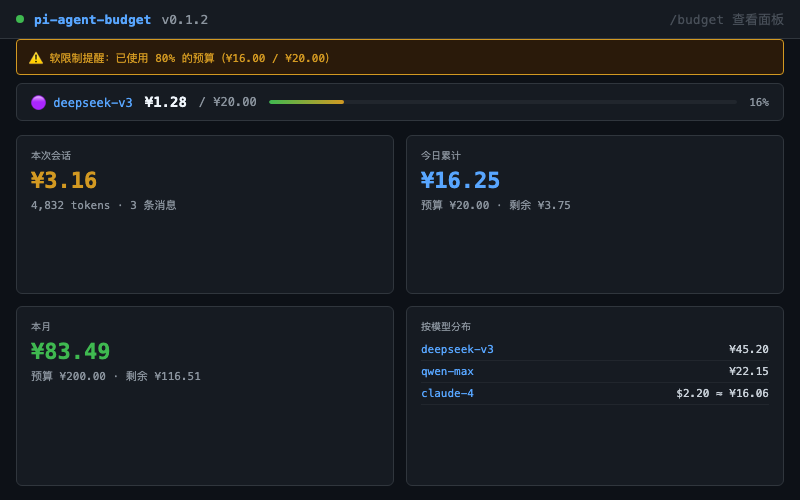
  "image": "https://raw.githubusercontent.com/RexYoung000/pi-agent-budget/main/preview.png",
  "extensions": [
    "./src/index.ts"
  ]
}
Security note
Pi packages can execute code and influence agent behavior. Review the source before installing third-party packages.
README
pi-agent-budget
Pi extension: real-time AI coding cost tracking with budget limits and native CNY pricing for Chinese models.
Track token usage and costs as you chat with AI. A live widget sits below the input box showing your spending, with soft/hard budget limits to prevent surprise bills.
Features
- 👁️ Real-time cost tracking — every assistant message is recorded: tokens × pricing = cost
- 📊 Status bar widget — live display below the editor:
¥0.16 / ¥10.00 ██░░░░(model + cost + budget + progress bar) - 🇨🇳 CNY pricing for Chinese models — deepseek / qwen / glm / kimi / doubao priced in RMB with auto FX conversion (1 USD ≈ 7.2 CNY)
- 🛡️ Soft/hard budget limits — 80% triggers a warning card, 100% blocks further input
- 📈
/budgetdashboard — overview + budget settings + pricing table + config, all in a TUI panel - 📋
/budget report— cost breakdowns by model / tool / session
Install
pi install npm:pi-agent-budgetRequires Node.js 22.13+ (or any Node build with
node:sqlite). No native addons, no compile step, no network-downloaded binaries.
Commands
/budget                     # Dashboard (overview / budget / pricing / settings)
/budget set <amount>        # Set session budget in USD      e.g. /budget set 2
/budget set project <amount> # Set project daily budget in USD
/budget report [range]      # Cost report             e.g. /budget report week
/budget by <dim> [range]    # Slice by model / tool / session
/budget widget              # Widget appearance settings
/budget export              # Export cost data
/budget fx                  # Show active USD/CNY rate
/budget fx auto             # Enable automatic daily updates
/budget fx fixed 7.1        # Fix 1 USD = 7.1 CNY
/budget fx refresh          # Refresh now (automatic mode)
Configuration
Edit via /budget config or ~/.pi/budget.json:
{
  "session": { "usd": 2.00 },
  "pricingAnchor": "followModel",
  "exchangeRate": { "mode": "auto" },
  "widget": {
    "placement": "belowEditor",
    "compact": false,
    "showModel": true,
    "showProgressBar": true,
    "showContextWindow": true
  }
}| Setting | Description | Default |
|---|---|---|
session.usd |
Session budget in USD | Unlimited |
exchangeRate.mode |
auto (daily reference rate) or fixed |
auto |
exchangeRate.fixedRate |
CNY per USD, positive number used in fixed mode | Current effective rate when selected in UI |
pricingAnchor |
Currency anchor: followModel / cny / usd |
followModel |
widget.placement |
Widget position: belowEditor / aboveEditor |
belowEditor |
widget.compact |
Minimal mode (cost only) | false |
softLimitRatio |
Soft limit threshold | 0.8 |
hardLimitRatio |
Hard limit threshold | 1.0 |
Currency handling
followModel(default): Chinese models (deepseek/qwen/glm etc.) display in ¥, Western models display in $cny: Everything in RMB, budget presets use RMB amountsusd: Everything in USD
Language changes only UI text, not currency. The dashboard budget page, overview, widget, limit dialogs and reports use the selected display currency. Budget selections and limit-dialog inputs are converted back to USD before saving; changing currency preserves the value of an existing budget. For example, a stored $1 budget displays as ¥7.20 in CNY mode.
/budget set <amount> always accepts USD, regardless of language or display currency. Configuration and exports also remain in USD. Chinese model price tables are converted to USD internally for cross-model aggregation. All conversions use the active USD/CNY rate:
- Automatic (default): fetch the daily reference rate from Frankfurter at session start when the cache is over 24 hours old. Long sessions check hourly; failed automatic requests retry no sooner than one hour later.
- Fixed:
/budget fx fixed 7.1uses exactly 7.1 CNY per USD and disables online updates./budget fx autorestores automatic mode. - The dashboard Pricing tab shows the rate, mode, source/status and actual data date. It can switch modes and Refresh exchange rate immediately. Arbitrary fixed values can be entered with the command above.
- Requests time out after five seconds. Offline/failure preserves the last saved valid rate; without one, the UI labels the built-in 7.2 reference. Failed requests do not update the data date.
PI_OFFLINE=1disables FX requests too. - New token-based cost estimates, budget input, widget, overview and reports use the same rate. Existing USD records and budgets are never recalculated. Rates are daily references, not real-time payment settlement rates. Model prices remain the built-in table; refreshing FX does not change them.
Data storage
| File | Purpose |
|---|---|
~/.pi/budget.db |
SQLite (costs / budgets / alerts) |
~/.pi/budget.json |
User configuration |
Development
npm run check          # TypeScript type check
npm test               # Currency and dashboard regression tests
pi -e ./src/index.ts   # Local dev testing
License
MIT