pi-anchor
Cross-session Task & Todo Dock for Pi — persistent belowEditor tree overlay (✓ strikethrough, ◐ live file activity, ⛓ DAG dependencies, Alt+A fold), auto-saves unfinished todos across restarts, 0ms pin: notes, and /back session teleport.
Package details
Install pi-anchor from npm and Pi will load the resources declared by the package manifest.
$ pi install npm:pi-anchor- Package
pi-anchor- Version
1.0.1- Published
- Oct 11, 2026
- Downloads
- 2,396/mo · 1,833/wk
- Author
- jason-zeros
- License
- MIT
- Types
- extension
- Size
- 425.4 KB
- Dependencies
- 0 dependencies · 1 peer
Pi manifest JSON
{
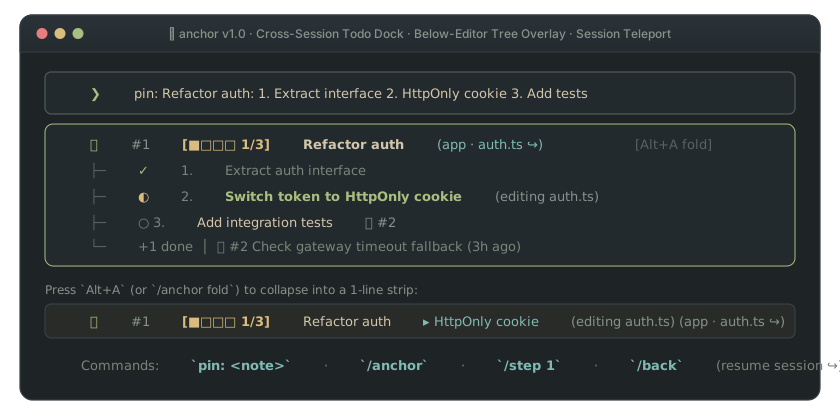
  "image": "https://raw.githubusercontent.com/3ZEROS12/anchor/main/assets/hero-en.svg",
  "extensions": [
    "dist/extension.js"
  ]
}
Security note
Pi packages can execute code and influence agent behavior. Review the source before installing third-party packages.
README
⌖ Anchor
A digital sticky note & cross-session
todocheckpoint docked below your Pi editor — automatically catches unfinishedtodolists when you close the terminal, sticks quick notes in 0ms (pin: ...), and teleports back to the original session (/back).






pi install npm:pi-anchor ┌─ [aboveEditor stays 100% free for pi-lingual and other HUD widgets] ────────────┐
╭─┴─ Pi Editor ────────────────────────────────────────────────────────────────────╮
│ ❯ pin: Refactor auth: 1. Extract interface 2. HttpOnly cookie 3. Unit tests │
╰─┬────────────────────────────────────────────────────────────────────────────────╯
├─► ⌖ #1 [■□□□ 1/3] Refactor auth (app · auth.ts ↪) [Alt+A fold]
│ ├─ ✓ 1. Extract auth interface (strikethrough)
│ ├─ ◐ 2. HttpOnly cookie (editing auth.ts)
│ ├─ ○ 3. Unit tests ⛓ #2
│ └─ 📌 #2 Double-check gateway timeout fallback (3h ago)
└─► (Folded via Alt+A): ⌖ #1 [■□□□ 1/3] Refactor auth ▸ HttpOnly cookie (auth.ts ↪)Core Value
Late at night, mid-way through fixing a bug, you spot a second issue in src/auth.ts or need to pause a multi-step refactor until tomorrow. Standard ways of recording that note create immediate friction:
- Terminal Exit Wipes Working Memory: Closing the terminal or running
/newclears the agent's context. Yesterday's unfinished steps and the conversation history behind them vanish. TODO.mdPollutes Git & Burns Context Tokens: Tracking personal reminders inside repository markdown files dirtiesgit statusand re-injects stale checklists into the system prompt on every turn.- Splash Banners Vanish When You Start Typing: Traditional startup widgets disappear on the first message. For the rest of a two-hour session, your notes are hidden unless you manually run a slash command.
Anchor acts like a physical sticky note and auto-save checkpoint stuck to the bottom bezel of your Pi editor:
- Auto-Todo Bridge (
todo➔ Cross-Session Checkpoint): Standardtodotools (@juicesharp/rpiv-todoand built-intodo) live only inside a single conversation with zero disk writes — closing the terminal or running/newwipes unfinished tasks. Anchor automatically mirrors unfinishedtodosnapshots to disk ([■■□□ 2/5]) and auto-clears them the moment all steps reachcompleted. - Persistent Below-Editor Strip (
belowEditor): Docks a single-line note strip directly beneath your input box. It stays in view while you code, leavesaboveEditoruntouched for extensions likepi-lingualandrpiv-todo, and collapses to 0 lines when empty. - 0ms Human-First Capture (
pin: ...): Typepin: Check token expiry(or/pin ...) straight into the editor. An input hook intercepts the text in0.00mswithout calling the language model or spending tokens. - Session Teleport (
/back&↪ Jump to session): Every note and auto-checkpoint bookmarks the exact.jsonlsession file where work happened. Run/back(or select↪ Jump to sessionin/anchor) to switch Pi straight back to that conversation.
How It Works
| Mode / Action | What You Input | What the Engine Does | What You See | Best For |
|---|---|---|---|---|
| Auto-Todo Checkpoint | Agent calls todo (2/5 done, then you quit or /new) |
Mirrors unfinished todo snapshot + modified files + sessionFile; auto-clears at 5/5 |
Next session shows: ⌖ #1 [■■□□ 2/5] Switch token ▸ Add tests (↪) |
Never losing unfinished todo lists across terminal restarts |
| Stick a Note (0ms) | Type pin: Fix auth in src/auth.ts or /pin ... |
Intercepts via input hook in 0ms, extracts file paths, and links current sessionFile |
1-line strip appears below editor: ⌖ #1 Fix auth (app · auth.ts ↪) |
Capturing a tangent without derailing the current prompt |
| Track Multi-Step Work | Type /pin Refactor: 1. API 2. Cookie 3. Tests then /step 1 |
Parses step list and increments done / total counter in ~/.anchor/state.json |
Strip updates in place: ⌖ #1 [■■□□ 2/3] Refactor ▸ Tests |
Multi-session features and long-running study goals |
Resume Context (/back) |
Run /back (or /anchor ➔ ↪ Jump to session) |
Invokes Pi's native ctx.switchSession(note.sessionFile) |
Terminal switches directly back to the original conversation transcript | Picking up a complex task days later with full history |
| Auto-Tear on Commit | Commit code (git commit -m "feat: fix auth") or run /done 1 |
Matches commit message against active notes (filtering generic stop-words) | Note archives to archive.jsonl; strip clears (⌖ Auto-torn off #1) |
Keeping the sticky strip clean without manual bookkeeping |
Features & Engineering Answers
1. Will the sticky strip collide with pi-lingual or overflow narrow split panes?
Anchor mounts its widget with { placement: "belowEditor" }. Extensions that render translation cards or diagnostics above the input box (aboveEditor) never overlap with Anchor.
On narrow terminal splits (such as 50-column tmux panes), the strip measures visual column widths using Unicode East Asian Width rules (CJK/emoji = 2 cells, ASCII = 1 cell) and dynamically folds multiple notes into ⌖ 3: #1 [■■□□ 2/4] Refactor… +2 while stripping unclosed brackets before ellipses.
2. Does keeping sticky notes cost tokens on every turn?
Turn 2+ consumes 0 system prompt tokens.
Anchor injects a compact summary of active notes only on Turn 1 of a cold session. From Turn 2 onwards, the system prompt hook returns nothing. When the agent reads or edits a file that matches a note's path or glob (src/auth/*.ts), Anchor appends a single syntax-safe comment line (// ⌖ Note #1: ...) to that tool result, while returning null for .json, .env, lockfiles, and binaries.
3. What happens to old notes or accidental git commit matches?
- 7-Day Quiet Mode (Zero Silent Deletion): Notes untouched for more than 7 days transition to
sleeping(quiet). They stop appearing in Turn-1 prompts for unrelated workspaces, remain 100% visible in/anchor, and wake up automatically when you open their target project. - Stop-Word Filtered Commit Matching & 1-Tap Undo: Commit matching strips generic words (
fix,feat,chore,bug,update) so a commit likefix: typo in bug templatenever tears off a note titledfix bug in login. If you ever tear off a note by mistake,/anchor undopops the last entry fromarchive.jsonlright back onto your strip. - Bracketed Ratio Parsing: Progress ratios require explicit brackets (
[2/4]or(5/30)), ensuring calendar dates in note titles (likeBefore 10/12 release) are never mistaken for progress bars.
4. Storage Topology & Cross-Process Lock Safety
All state lives in ~/.anchor/ outside your git repository:
~/.anchor/
├── state.json      # Active and quiet sticky notes (< 2KB, atomic temp-file + rename)
├── state.lock      # Cross-process exclusive lock (fs.openSync 'wx' + dead-PID reclamation)
└── archive.jsonl   # Append-only history of torn-off notes (powers /anchor undo)
Commands
| Where | Input / Command | Description |
|---|---|---|
| Pi Editor | pin: <note> or 便签: <note> |
Stick a note in 0ms without calling the LLM |
| Pi Slash | /pin <note> |
Stick a note (supports [1/4] or 1. A 2. B 3. C steps) |
| Pi Slash | /anchor |
Open interactive sticky note board (tear off, +1 step, ↪ jump to session, or read details) |
| Pi Slash | /step 1 |
Advance progress bar on note #1 by +1 |
| Pi Slash | /back (or /anchor jump 1) |
Teleport Pi back to the conversation session of the latest unfinished note/todo checkpoint |
| Pi Slash | /done 1 / /anchor 1 |
Tear off note #1 and archive it |
| Pi Slash | /anchor undo |
Put back the most recently torn-off note |
| Terminal CLI | anchor / anchor "<note>" |
View or stick notes from any shell outside Pi |
| Terminal CLI | anchor step 1 / anchor done 1 / anchor undo |
Advance progress, tear off, or restore notes from the command line |
Author's Note
Anchor started because I hated watching TODO.md files rot inside my git repositories, yet closing my terminal at night always meant losing track of what I still needed to fix the next morning.
In its early versions, I over-engineered the solution. By v0.3, Anchor had grown into a 10-file miniature project manager with four cognitive quadrants (Today, Upcoming, Habits, Backlog), [P0] priority tags, daily recurring habit trackers, pre-flight shell test runners on startup, and a graveyard eviction state machine. Ironically, the more features it gained, the less I wanted to use it. Worse, its startup banner disappeared the moment I typed my first message, hiding my notes for the rest of the coding session.
In v0.4 and v0.5, I threw away 60% of the codebase and rebuilt Anchor around four files (types.ts, store.ts, tui.ts, extension.ts) as a simple digital sticky note:
- Dock the 1-line note strip below the editor (
belowEditor) so it stays in sight while coding and never fights withpi-lingualabove the editor. - Let human hands stick a note in
0msby typingpin: ...without waiting on a model call. - Add a 4-cell progress bar (
[■■□□ 2/4]) for multi-step refactors and bookmark the session file (↪) so clicking a note teleports you back to the exact conversation where the work started.
npm run typecheck  # Strict tsc --noEmit check (0 errors)
npm test           # Native Node test runner (15/15 passing)
npm run build      # Dual ESM/CJS compilation via tsup + declaration emit
Ecosystem: Pi Terminal Suite
Each extension occupies a distinct terminal slot (aboveEditor, belowEditor, status-only footer, and runtime tool hooks) so all four run together with zero widget overlap:
| Package | Terminal Slot & Mechanism | Install |
|---|---|---|
pi-lingual |
二 ⇄ two aboveEditor HUD (≤9 lines, UAX #11 tree layout) & prompt-to-English transformer (0 chat history tokens) |
pi install npm:pi-lingual |
toolflow |
⌬ Runtime tool hooks — stage-gated MCP mounting & >40-line log dehydration to disk (-95% log tokens) |
pi install npm:toolflow |
pi-tui-status-beautifier |
status-only footer hook — 6 badge presets, <80-col idle folding (+N idle), 0 render-loop disk reads |
pi install npm:pi-tui-status-beautifier |
pi-anchor (Current) |
⌖ belowEditor Task & Todo Tree Dock (Alt+A fold), Auto-Todo Bridge, 0ms pin: notes & /back session teleport |
pi install npm:pi-anchor |
License
MIT © Jason Song