pi-anycopy
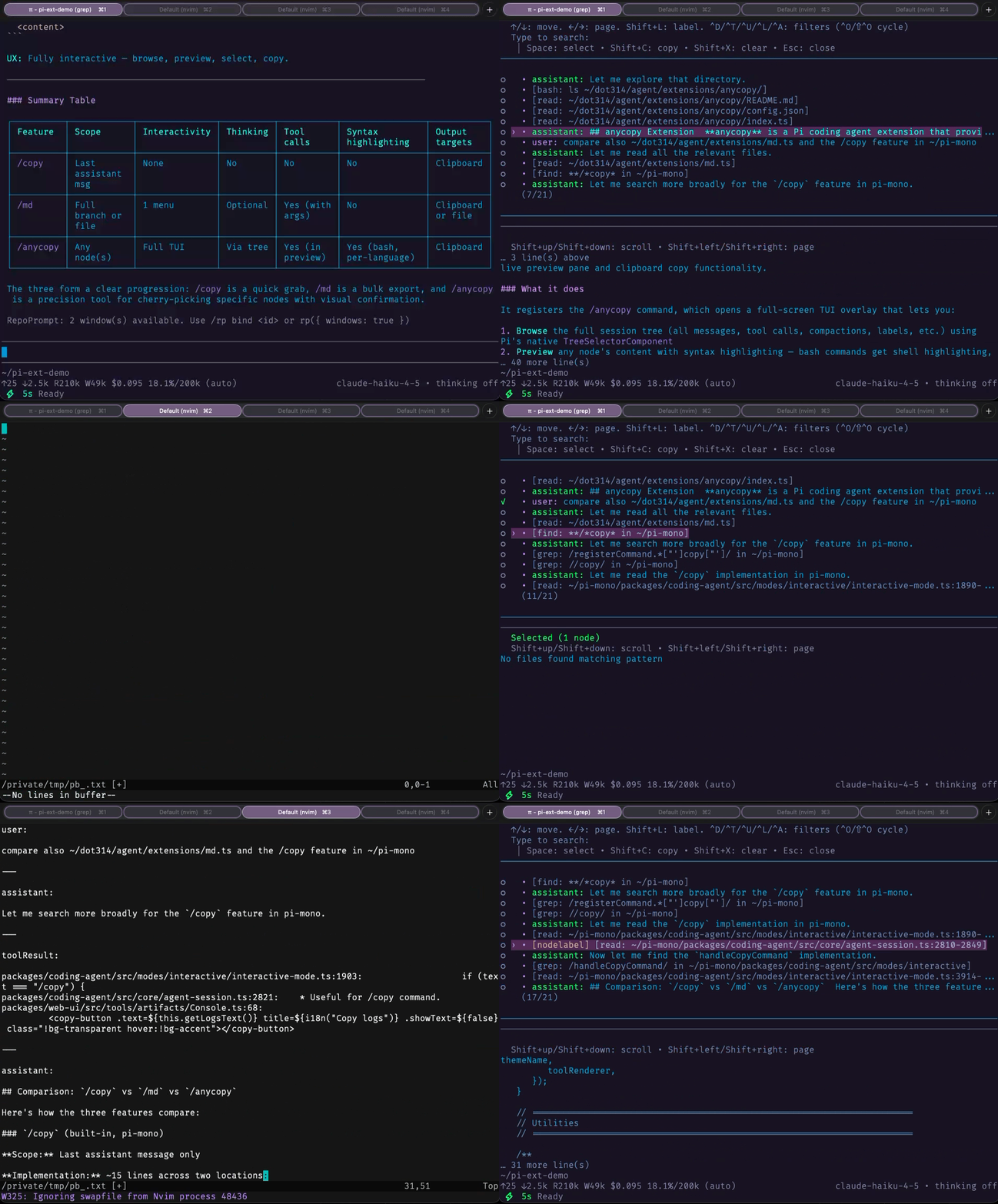
Pi's /tree with a live syntax-highlighted preview, ability to copy any node(s) to the clipboard, and persistence of folded branches
Package details
Install pi-anycopy from npm and Pi will load the resources declared by the package manifest.
$ pi install npm:pi-anycopy- Package
pi-anycopy- Version
0.2.6- Published
- Apr 13, 2026
- Downloads
- 555/mo · 24/wk
- Author
- w-winter
- License
- MIT
- Types
- extension
- Size
- 43.3 KB
- Dependencies
- 0 dependencies · 2 peers
Pi manifest JSON
{
  "extensions": [
    "extensions/anycopy/index.ts"
  ],
  "image": "https://raw.githubusercontent.com/w-winter/dot314/main/assets/anycopy-demo.gif"
}
Security note
Pi packages can execute code and influence agent behavior. Review the source before installing third-party packages.
README
anycopy for Pi (pi-anycopy)
This extension mirrors all the behaviors of Pi's native /tree while adding a live, syntax-highlighting preview of each node's content, the ability to copy any node(s) to the clipboard, and optional display of the timestamps of labeled nodes' last labelings.
Install
From npm:
pi install npm:pi-anycopy
From the dot314 git bundle (filtered install):
Add to ~/.pi/agent/settings.json (or replace an existing unfiltered git:github.com/w-winter/dot314 entry):
{
  "packages": [
    {
      "source": "git:github.com/w-winter/dot314",
      "extensions": ["extensions/anycopy/index.ts"],
      "skills": [],
      "themes": [],
      "prompts": []
    }
  ]
}
Restart Pi after installation.
Usage
/anycopy
Keys
Defaults (customizable in config.json):
| Key | Action |
|---|---|
Enter |
Navigate to the focused node (same semantics as /tree) |
Shift+A |
Select/unselect focused node for copy |
Shift+C |
Copy selected nodes, or the focused node if nothing is selected |
Shift+X |
Clear selection |
Shift+L |
Label node (native tree behavior) |
Shift+T |
Toggle label timestamps for labeled nodes |
Shift+Up / Shift+Down |
Scroll node preview by line |
Shift+PageUp / Shift+PageDown |
Page through node preview |
Esc |
Close |
Notes:
Enteralways navigates the focused node, not the marked set- After
Enter,/anycopyoffers the same summary choices as/tree:No summary,Summarize, andSummarize with custom prompt - If
branchSummary.skipPromptistruein Pi settings,/anycopymatches native/treeand skips the summary chooser, defaulting to no summary - Escaping the summary chooser reopens
/anycopywith focus restored to the node you tried to select - Cancelling the custom summarization editor returns to the summary chooser
- If no nodes are selected,
Shift+Ccopies the focused node - Single-node copies use just that node's content; role prefixes like
user:orassistant:are only added when copying 2 or more nodes - When copying multiple selected nodes, they are auto-sorted chronologically by position in the session tree, not by selection order
Shift+A/Shift+Cmulti-select copy behavior is unchanged by navigation support, while plain space remains available for search queriesShift+Tis configurable viakeys.toggleLabelTimestampsinconfig.jsonShift+Tshows timestamps for labeled nodes only, using the latest label-change time for each label- Same-day labels show
HH:MM; older labels showM/D HH:MM; cross-year labels showYY/M/D HH:MM - Label edits are persisted via
pi.setLabel(...) - Folded branches are persisted by default in hidden
/anycopysession entries, so closing/reopening/anycopy, switching to a sibling branch, or revisiting the session later restores the same folded view until you explicitly unfold it again - Search and filter changes still reset the live overlay's fold state temporarily; reopening
/anycopyrestores the persisted folded branches
Configuration
Edit ~/.pi/agent/extensions/anycopy/config.json:
treeFilterMode: initial tree filter mode when opening/anycopy; defaults todefaultto match/tree- one of:
default|no-tools|user-only|labeled-only|all
- one of:
persistFoldState: whether/anycopypersists folded branches across reopenings and later sessions; defaults totrue; when disabled,/anycopydoes not read or write hidden fold-state session entrieskeys: keybindings used inside the/anycopyoverlay for copy/preview actions, including the label timestamp toggle
{
  "treeFilterMode": "default",
  "persistFoldState": true,
  "keys": {
    "toggleSelect": "shift+a",
    "copy": "shift+c",
    "clear": "shift+x",
    "toggleLabelTimestamps": "shift+t",
    "scrollUp": "shift+up",
    "scrollDown": "shift+down",
    "pageUp": "shift+pageup",
    "pageDown": "shift+pagedown"
  }
}