pi-arcade-games
Retro terminal arcade for Pi - play games while you wait for builds and tests
Package details
Install pi-arcade-games from npm and Pi will load the resources declared by the package manifest.
$ pi install npm:pi-arcade-games- Package
pi-arcade-games- Version
1.0.3- Published
- May 21, 2026
- Downloads
- not available
- Author
- imkingjh999
- License
- MIT
- Types
- extension, skill
- Size
- 326.1 KB
- Dependencies
- 4 dependencies · 0 peers
Pi manifest JSON
{
  "extensions": [
    "./dist/extensions"
  ],
  "skills": [
    "./skills"
  ]
}Security note
Pi packages can execute code and influence agent behavior. Review the source before installing third-party packages.
README
Pi Arcade Games 🎮
Retro terminal arcade for Pi coding agent. Play classic games while you wait for builds, tests, and long-running tasks.
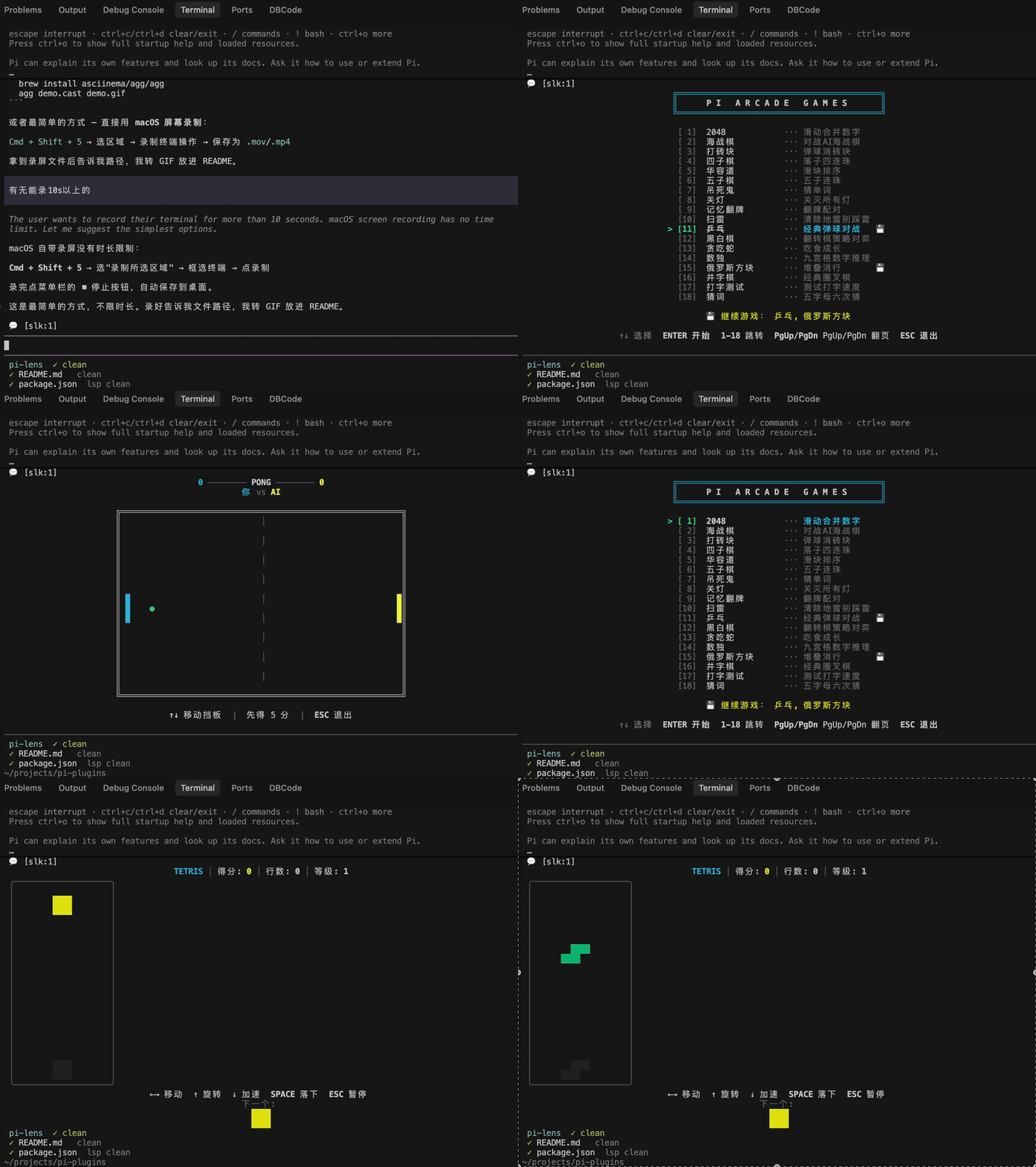
18 games built in — with bilingual (English / 中文) menu support and auto-save.
💾 Auto-Save
Every game automatically saves your progress when you exit. Come back anytime and pick up right where you left off.
    ╔════════════════════════════════════════╗
    ║      P I   A R C A D E   G A M E S     ║
    ╚════════════════════════════════════════╝

  ▸ [1]  2048            ···  Slide & merge tiles
    [2]  Battleship      ···  Naval combat vs AI
    [3]  Snake           ···  Eat food, grow, don't crash  💾

    💾 Continue: Snake
- 💾 badge — appears next to games with saved progress
- Continue prompt — shows at the bottom so you can jump right back in
- Per-game state — each game stores its own save independently (score, board, position…)
Just select the game with 💾 and you're back in action. No manual saving needed.
Games
| Game | Description |
|---|---|
| 2048 | Slide & merge tiles to reach 2048 |
| Battleship | Naval combat vs AI |
| Breakout | Break bricks with ball and paddle |
| Connect Four | Drop discs, get 4 in a row vs AI |
| Gomoku | Five in a row strategy game |
| Hangman | Guess the hidden word one letter at a time |
| Lights Out | Toggle all lights off |
| Memory | Flip & match card pairs |
| Minesweeper | Reveal cells, flag mines, clear the board |
| Pong | Classic paddle game, first to 5 wins |
| Reversi | Othello strategy game vs AI |
| Snake | Eat food, grow, don't crash |
| Sliding Puzzle | Arrange numbered tiles in order (3×3–5×5) |
| Sudoku | 9×9 number puzzle |
| Tetris | Stack & clear lines |
| Tic-Tac-Toe | Classic 3×3 grid, X vs O against the agent |
| Typing Test | Test your typing speed and accuracy |
| Wordle | 5-letter word, 6 guesses, position feedback |
Install
pi install npm:pi-arcade-games
Or add to your Pi settings:
{
  "packages": ["pi-arcade-games"]
}
pi install /path/to/pi-arcade-games
# or test without installing:
pi -e /path/to/pi-arcade-games
Quick Start
- Type
/gamein Pi to open the game menu - First launch picks your language (English / 中文) — remembered for next time
- Pick a game with arrow keys +
ENTERand start playing - Press
QorESCto quit — your progress is auto-saved - Open
/gameagain to continue from where you left off
Commands
| Command | Description |
|---|---|
/game |
Open game selection menu |
/game-list |
List all games (shows 💾 for saves) |
/game-install <url> |
Install a game from a URL |
Environment Variables
| Variable | Description |
|---|---|
PI_ARCADE_REGISTRY |
URL to a game registry JSON manifest |
PI_ARCADE_LOCAL_GAMES |
Colon-separated list of local game module paths |
Controls
| Game | Controls |
|---|---|
| All | Q / ESC quit, R restart (after game over) |
| 2048 | Arrow keys to slide & merge |
| Battleship | Arrow keys + ENTER to place ships and fire |
| Breakout | ←→ to move paddle |
| Connect Four | ←→ to select column, ENTER to drop disc |
| Gomoku | Arrow keys to move, ENTER to place stone |
| Hangman | Type any letter to guess |
| Lights Out | Arrow keys + ENTER to toggle lights |
| Memory | Arrow keys + SPACE to flip cards |
| Minesweeper | Arrow keys to move, ENTER reveal, F flag |
| Pong | ↑↓ to move paddle |
| Reversi | Arrow keys to move, ENTER to place piece |
| Snake | Arrow keys or WASD |
| Sliding Puzzle | Arrow keys to slide tiles |
| Sudoku | Arrow keys, 1-9 to fill, DEL to clear |
| Tetris | Arrow keys, SPACE for hard drop |
| Tic-Tac-Toe | Arrow keys to move, ENTER to play |
| Typing Test | Just start typing! |
| Wordle | Type 5 letters + ENTER to submit |
Tips
- Background long-running tasks with Ctrl+B before starting a game
- All games auto-save on exit — just re-open
/gameto continue - After quitting a game, you return to the menu to pick another
Writing Your Own Game 🛠️
Pi Arcade Games is designed to be extensible. Anyone can write a game and submit a PR!
Quick overview:
- Create a
.tsfile inextensions/games/builtin/ - Export a
GameModuleobject withmeta+register() - Implement a TUI
Componentwithrender(),handleInput(),invalidate() - Register a menu entry via
registerMenuEntry()
👉 See CONTRIBUTING.md for the full guide with a working template game.
Build from Source
npm install
npm run build
Architecture
pi-arcade-games/
├── extensions/
│   ├── arcade.ts               # Main extension: menu, commands, /game
│   └── games/
│       ├── types.ts            # GameModule interface
│       ├── ansi.ts             # Shared ANSI styling helpers
│       ├── i18n.ts             # Internationalization (en/zh)
│       ├── loader.ts           # Game loader (builtin/remote/local)
│       └── builtin/            # 18 bundled games
│           ├── 2048.ts
│           ├── battleship.ts
│           ├── breakout.ts
│           ├── connect4.ts
│           ├── fifteen.ts      # Sliding Puzzle
│           ├── gomoku.ts
│           ├── hangman.ts
│           ├── lightsout.ts
│           ├── memory.ts
│           ├── minesweeper.ts
│           ├── pong.ts
│           ├── reversi.ts
│           ├── snake.ts
│           ├── sudoku.ts
│           ├── tetris.ts
│           ├── tictactoe.ts
│           ├── typing.ts
│           └── wordle.ts
├── skills/
│   └── games/SKILL.md          # Pi skill documentation
├── tests/                      # Test suite for each game
└── package.json
License
MIT