pi-ask-permission
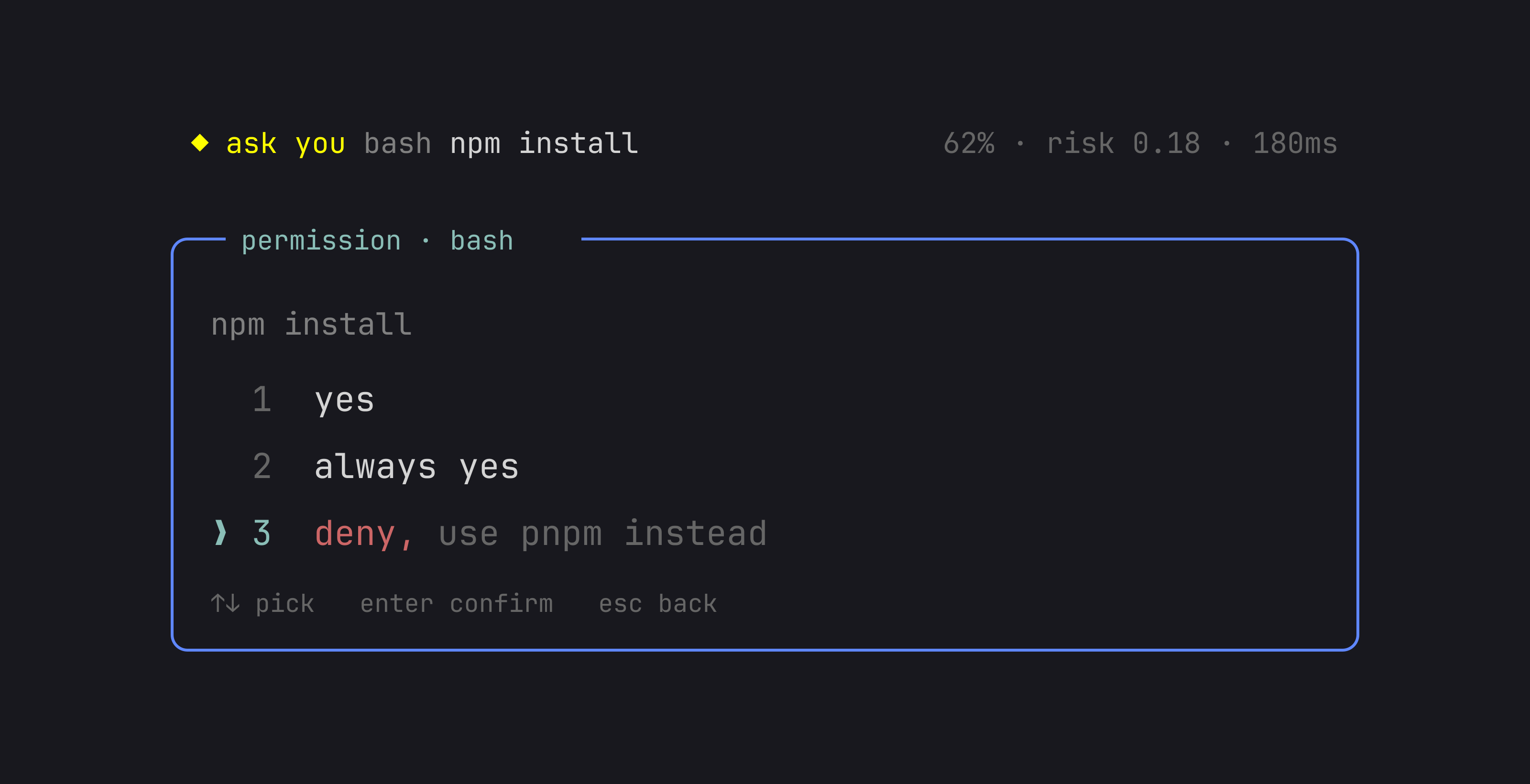
A permission dialog for the Pi coding agent. Approve, always approve, or deny a tool call, and attach a note the model reads with the result.
Package details
Install pi-ask-permission from npm and Pi will load the resources declared by the package manifest.
$ pi install npm:pi-ask-permission- Package
pi-ask-permission- Version
2.0.1- Published
- Sep 21, 2026
- Downloads
- 743/mo · 743/wk
- Author
- adeildo
- License
- MIT
- Types
- extension
- Size
- 256.8 KB
- Dependencies
- 1 dependency · 3 peers
Pi manifest JSON
{
  "image": "https://raw.githubusercontent.com/felipeadeildo/pi-ask-permission/main/assets/preview.png",
  "extensions": [
    "./src/index.ts"
  ]
}
Security note
Pi packages can execute code and influence agent behavior. Review the source before installing third-party packages.
README
Pi has no permission popups. This extension adds one.
The dialog asks before a tool runs. Its three answers are yes, always yes, and deny, and any of them can carry a note that goes to the model with the tool result. Deny npm install with use pnpm instead, and the agent reads the correction while it keeps working.
Install
pi install npm:pi-ask-permission
Or pi install git:github.com/felipeadeildo/pi-ask-permission, or clone the repo and point ~/.pi/agent/settings.json at src/index.ts.
The dialog
Press tab to attach a note to the highlighted row. Each row keeps its own draft, and approvals take a note too.
If you are typing in the editor when a call arrives, the dialog waits for a pause. The footer reads waiting for you to finish typing, and by default it waits as long as you keep typing. typing.maxWait caps the wait.
Paste works like the main editor. ctrl+v inserts a clipboard image as its temp file path, and a long or multi-line paste collapses to a [paste #1 +48 lines] marker that expands on confirm.
| Key | Does |
|---|---|
↑ ↓ or 1 2 3 |
move the highlight, and the open note input with it |
enter |
confirm the highlighted row |
tab |
open or close the note input, and in the depth picker, change the scope |
esc |
deny, or close the note input if one is open |
Digits only move the highlight, so any row can take a note or a plain confirm. The highlight starts on yes, so a plain approval is one enter.
Always yes
always yes opens a second step: which grant to remember, then how long it lasts.
permission · bash
  pnpm test

always yes for...
  pnpm
❯ pnpm test

scope: this session   (tab to change)
The narrowest level is preselected, so enter grants exactly what was on screen. File tools nest by directory, so a write can be approved for one file or the folder around it.
| Scope | Stored in | Survives |
|---|---|---|
| this session | memory | nothing |
| this project | <project>/.pi/extensions/pi-ask-permission/grants.json |
reloads and new sessions |
| everywhere | ~/.pi/agent/extensions/pi-ask-permission/grants.json |
everything |
The files are plain JSON, { "bash": ["pnpm test"] }, matched by tool and level, so a bash grant never widens write. Project grants load only in a trusted project.
Session modes
Alt+M cycles the session, and /perm mode does the same. /perm mode yolo sets one directly.
| Mode | Approves |
|---|---|
manual |
nothing on its own; the normal gate decides |
accept edits |
edit and write |
yolo |
every call |
Neither accept edits nor yolo consults the judge.
The mode is session state. Alt+M and /perm mode never write to config.json, so turning on yolo in one session does not affect another. The mode field in config.json only sets where the next session starts.
Read-only bash
Commands that only read run without a prompt: cat, grep, wc, git log, git branch (listing), git remote (listing), and chains of them. Anything that writes, substitutes a command, opens a subshell, assigns a variable, or continues on a second line asks. A redirect that discards output (2>/dev/null, 2>&1, >/dev/null) does not. Turn the check off with readOnlyBash.
AI approvals
Off by default. With it on, a judge model answers first: a confident approval runs the call, a confident denial blocks it, and anything uncertain comes to you. So do timeouts, errors, and missing keys.
Two backends:
- Jev, TypeSafe's System One model, answers typed questions with a verdict, a probability distribution, and a confidence.
- A pi model is asked for strict JSON. A reply that is not valid JSON counts as no judgement.
Set up Jev
/login typesafe
The extension registers an auth-only typesafe provider, so the key is stored through pi and Jev never appears in the model picker. TYPESAFE_API_KEY works too.
Write a policy
The policy is the rulebook the judge reads. Turn on AI approvals (judge) in /perm and a Policy row appears.
| Preset | Allows | Still asks |
|---|---|---|
| Locked down | reads, existing tests | any write, install, or network call |
| Standard development | project edits, tests, builds, local git | installs, network, destructive commands |
| Autonomous | the above plus project installs and network reads | sudo, credentials, destructive commands |
| Custom | whatever you write | everything else |
Standard development is the default. A picker shows each preset's description, and the preset is plain text, so you can pick one and keep editing.
# May run without asking
- Running tests, linters, type checks, and builds
- git status, diff, log

# Must always ask first
- sudo, or anything that changes system-wide state
- Anything that reaches the network
- Deleting files outside the project

# When in doubt
Ask me.
Turn on Dry run to watch it decide without acting. Each decision shows up in the transcript as a card, and /perm judge log keeps the session history. If calls come back as the judge could not decide: no response from ..., run /perm judge test: one real request with a generous timeout, reporting the model, the latency, and the exact error.
How the judge decides
The judge answers a fixed set of atomic questions: a verdict, how reversible the call is, whether it touches secrets, and whether it leaves the project. Code combines the answers. There is no broad is this safe? prompt.
risk = 0.45 × reversibility + 0.30 × sensitive + 0.25 × outside
A call is approved only when the verdict is allow, its confidence clears thresholds.allow, and risk is at or below riskCeiling. It is denied only when the verdict is deny and confidence clears thresholds.deny. Everything else comes to you, unless onUncertain says otherwise. The never list is checked in code first, so a call on it is never auto-approved.
The policy is authoritative and the tool call is treated as untrusted data, so a command cannot talk its way past never.
Settings
These rows appear indented under AI approvals (judge) in /perm.
| Setting | Does |
|---|---|
| AI approvals | Turn the judge on or off |
| Judge | Jev, or any model from pi |
| Model | The model, such as jev-latest |
| When confident | Approve or deny, or approve only |
| When unsure | Ask you, allow, or deny |
| When it can't answer | Ask you, allow, or deny (asking is safest) |
| Tools it may judge | Bash only, bash and file writes, or every tool; hand-edited patterns in config.json read as Custom |
| Policy | Presets, or a full editor |
| Dry run | Show the verdict, still ask |
| Judge with no UI | Also judge in print, JSON, and subagent runs |
| Remember approvals | Treat a judge approval as a session grant |
Configuration
One file, created with these defaults on first load. PI_CODING_AGENT_DIR moves it with the rest of the agent directory.
~/.pi/agent/extensions/pi-ask-permission/config.json
{
	"allow": ["read", "grep", "find", "ls"],
	"headless": "deny",
	"followup": "result",
	"mode": "manual",
	"readOnlyBash": true,
	"typing": { "pause": 1000, "maxWait": null }
}
The file also carries the full judge block, disabled by default.
allow lists the tools that never prompt. Wildcards work, so mcp_* covers a family. Everything else asks, including tools registered later.
headless decides when there is nobody to ask: print mode, JSON mode, or a subagent. It takes one mode or a per-tool map. Specificity wins over file order, so an exact name beats a wildcard and a wildcard beats *.
{
	"headless": { "*": "allow", "bash": "deny" }
}
followup chooses where an approval note goes. "result" appends it to the tool result the model is already reading. "message" sends it as its own steering message.
mode is the mode a new session starts in. "manual" asks as usual, "accept-edits" runs file edits and writes without asking or judging, and "yolo" approves everything for a throwaway run. Change it from /perm or Alt+M and only the current session moves. Change it here and only the next session.
typing tunes the wait before the dialog opens. pause is the quiet time in milliseconds. maxWait caps the total wait, or null for no cap.
A missing or malformed file falls back to the defaults and reports what it dropped. A typo never widens the gate.
Commands
| Command | Does |
|---|---|
/perm |
settings dialog for the mode, followup wire, judge, and headless |
/perm mode |
cycle the session mode (also Alt+M) |
/perm mode yolo |
set the session mode (also manual and accept-edits) |
/perm status |
resolved config, grant counts per scope, and file paths |
/perm judge |
open the AI-approval settings |
/perm judge on |
turn AI approvals on (also off) |
/perm judge log |
the most recent judge decisions this session |
/perm judge test |
make one real judge request and report the model, latency, and any error |
/perm reset |
forget this session's grants |
/perm reset project |
delete the project grants file |
/perm reset global |
delete the global grants file |
/perm reset all |
clear all three scopes |
How a call is decided
- The mode approves it:
yoloapproves everything,accept-editsapproveseditandwriteoutright. - The tool is in
allow, allow. - A grant matches this tool and level, allow.
readOnlyBashis on and the bash command only reads, allow.- AI approvals are on and the tool is judged, ask the judge. A confident allow runs, a confident deny blocks, and anything uncertain continues.
- There is a UI, ask.[^edit]
- There is no UI,
headlessdecides. WithJudge with no UIon, the judge gets the same first refusal first, thenheadlessdecides anything it could not.
[^edit]: An edit whose oldText cannot match the file is blocked with the matcher's own error, no dialog. Asking about an edit that is already going to fail only costs a keystroke.
Limits
Grants are exact. There are no wildcard grants, no path canonicalization, and no symlink resolution. A command arrives as the agent wrote it and is judged by the person reading it.
A chained command is one string. cd /repo && pnpm test offers cd, cd /repo, and the whole chain, because the depth picker reads text instead of parsing the shell. Grants on chains are coarse at the head and exact at the tail.
allow matches a tool name, not an argument, so allowing bash permits every bash command.
accept edits covers the built-in edit and write tools. A custom tool that writes files is not in that set, so it asks.
The judge is a model. It narrows what reaches the dialog; it does not guarantee anything. A never pattern, a deterministic block, or an uncertain verdict still reaches you, and in manual the judge can only narrow. yolo and accept edits skip the judge for the tools they approve. The judge reads the tool call you give it, so do not point it at calls that carry secrets you would not send to that provider.
If you want deterministic rules with no human in the loop, this is the wrong tool.
The read-only check is a classifier, not a sandbox. It matches the command name as written and does not resolve PATH, so a cat that is a different binary earlier on PATH passes the check and then runs. It refuses a name shadowed by an exported shell function, and BASH_ENV disables the check because that file can define functions. It also refuses anything it cannot prove harmless, so a few safe commands still ask.
Contributing
See CONTRIBUTING.md. Commits follow Conventional Commits; release-please handles the changelog and the publish.
License
MIT © Felipe Adeildo