pi-ask-user
Interactive ask_user tool for pi-coding-agent with searchable split-pane selection UI, multi-select, and freeform input
Package details
Install pi-ask-user from npm and Pi will load the resources declared by the package manifest.
$ pi install npm:pi-ask-user- Package
pi-ask-user- Version
0.16.0- Published
- Oct 2, 2026
- Downloads
- 13.7K/mo · 2,556/wk
- Author
- edlsh
- License
- MIT
- Types
- extension, skill
- Size
- 153.8 KB
- Dependencies
- 0 dependencies · 3 peers
Pi manifest JSON
{
  "skills": [
    "./skills"
  ],
  "extensions": [
    "./index.ts"
  ]
}
Security note
Pi packages can execute code and influence agent behavior. Review the source before installing third-party packages.
README
pi-ask-user
A Pi package that adds an interactive ask_user tool for collecting user decisions during an agent run.
Demo
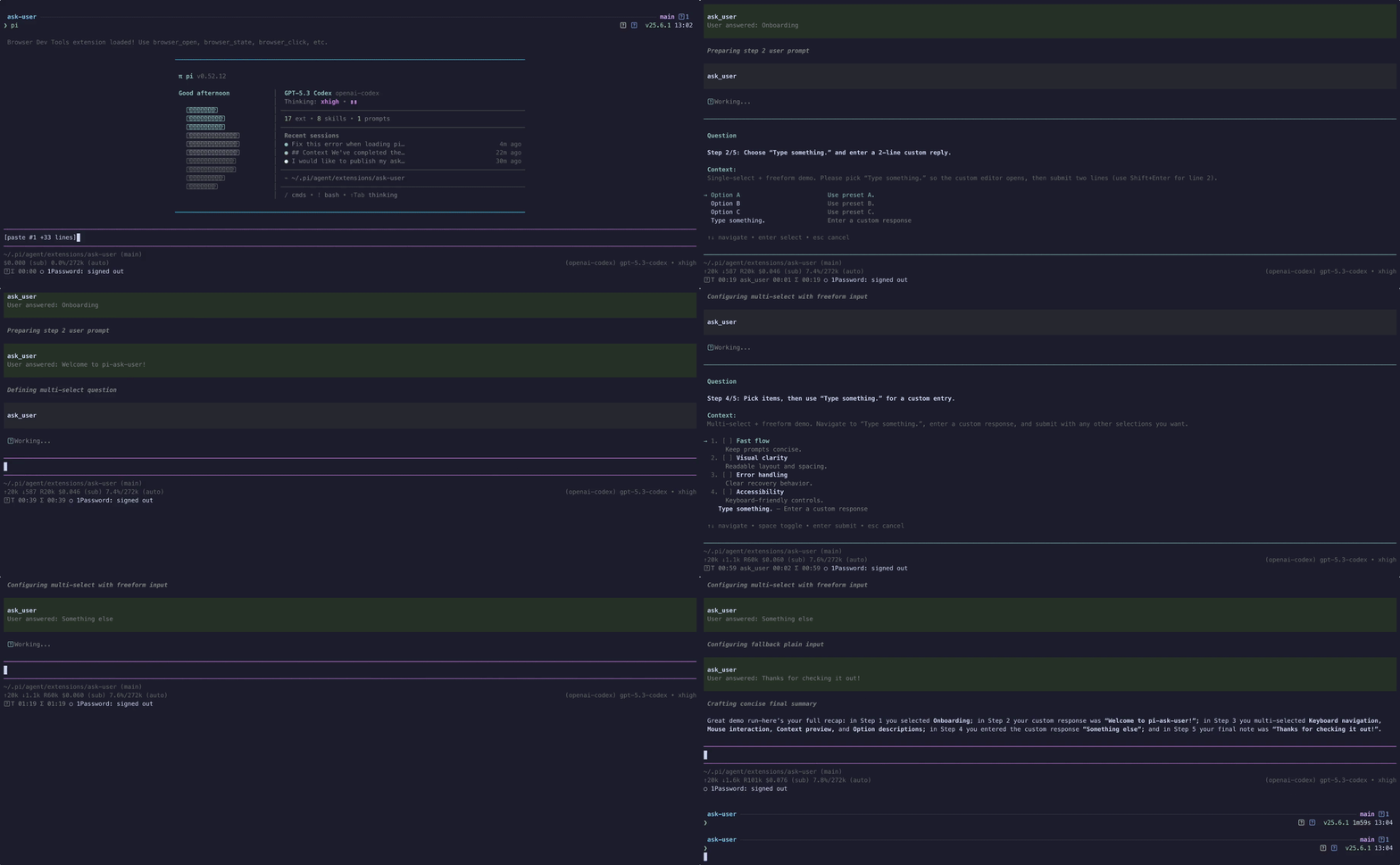
High-quality video: ask-user-demo.mp4
Features
- Searchable single-select option lists with wrapped titles and descriptions
- Responsive split-pane details preview on wide terminals, with a persistent single-column preference
- Multi-select option lists
- Batches of 2-4 independent questions in one prompt, with a review page before submitting
- Optional freeform responses
- User-toggleable extra context on structured selections
- Context display support
- Responsive context collapse that keeps the question and choices visible on small terminals without discarding full context
- Configurable display mode:
overlay(modal, default) orinline(rendered directly in the flow) - Runtime overlay toggle: press the configured overlay-toggle key (
alt+oby default, configurable per call or via env var) while the prompt is open to temporarily hide/show the popup so you can read prior agent output, then press it again to bring it back - Pi-TUI-aligned keybinding and editor behavior
- Custom TUI rendering for tool calls and results
- System prompt integration via
promptSnippetandpromptGuidelines - Optional timeout for auto-dismiss in both overlay and fallback input modes
herdr:blockedlifecycle events while waiting for interactive input- Structured response and cancellation
detailsfor session state reconstruction - Graceful fallback when interactive UI is unavailable
- Bundled
ask-userskill for mandatory decision-gating in high-stakes or ambiguous tasks
Bundled skill: ask-user
This package now ships a skill at skills/ask-user/SKILL.md that nudges/mandates the agent to use ask_user when:
- architectural trade-offs are high impact
- requirements are ambiguous or conflicting
- assumptions would materially change implementation
The skill follows a "decision handshake" flow:
- Gather evidence and summarize context
- Ask one focused question via
ask_user - Wait for explicit user choice
- Confirm the decision, then proceed
See: skills/ask-user/references/ask-user-skill-extension-spec.md.
Install
pi install npm:pi-ask-userTool name
The registered tool name is:
ask_user
Parameters
| Parameter | Type | Default | Description |
|---|---|---|---|
question |
string? |
— | The question to ask the user. Each call needs exactly one of question or questions |
questions |
{question, context?, options?, allowMultiple?, allowFreeform?}[]? |
— | 2-4 independent questions shown together, used instead of question. Set context, options, allowMultiple, and allowFreeform on each entry; passing them at the top level as well is an error. The remaining parameters apply to the whole batch. See Asking several questions at once |
context |
string? |
— | Relevant context summary shown before the question |
options |
{title, description?}[]? |
[] |
Multiple-choice options. The schema is a flat object shape (no anyOf, which some provider proxies strip or reject); plain strings and common alias keys (label, text, value, name, option) are still accepted at runtime |
allowMultiple |
boolean? |
false |
Enable multi-select mode |
allowFreeform |
boolean? |
true |
Add a "Type something" freeform option |
allowComment |
boolean? |
env var or false |
Expose a user-toggleable extra-context option in the custom UI (ctrl+g or the toggle row) and collect an optional comment in fallback dialogs |
displayMode |
"overlay" | "inline"? |
env var or "overlay" |
Controls custom UI rendering: overlay shows the centered modal (current behavior), inline renders without overlay framing |
singleSelectLayout |
"auto" | "list"? |
env var or "auto" |
Use the responsive details pane automatically or always render descriptions below their options |
contextExpanded |
boolean? |
env var or false |
Start with oversized context expanded. Per-call value overrides PI_ASK_USER_CONTEXT_EXPANDED |
overlayToggleKey |
string? |
env var or "alt+o" |
Shortcut for hiding/showing the overlay popup (overlay mode only). Pi-TUI key spec, e.g. "alt+o", "ctrl+shift+h". Pass "off" to disable. |
commentToggleKey |
string? |
env var or "ctrl+g" |
Shortcut for toggling the optional comment/extra-context row when allowComment: true. Pass "off" to disable. |
timeout |
number? |
— | Auto-dismiss after N ms and return null if the prompt times out |
Example usage shape
{
  "question": "Which option should we use?",
  "context": "We are choosing a deploy target.",
  "options": [
    { "title": "staging" },
    { "title": "production", "description": "Customer-facing" }
  ],
  "allowMultiple": false,
  "allowFreeform": true,
  "allowComment": true,
  "displayMode": "inline"
}
displayMode: "inline" uses the same interaction logic but skips overlay mode when calling ctx.ui.custom(...). RPC/headless fallback behavior is unchanged.
Asking several questions at once
Use questions for 2-4 decisions that are independent of each other and whose prerequisites are already settled. Anything that depends on another answer belongs in a later ask_user call.
{
  "questions": [
    {
      "question": "Which database should the service use?",
      "context": "Both are supported by the ORM; the service is single-region.",
      "options": [
        { "title": "Postgres", "description": "Managed, JSONB support" },
        { "title": "SQLite", "description": "No extra infrastructure" }
      ]
    },
    {
      "question": "Which deploy target?",
      "options": [{ "title": "Fly.io" }, { "title": "Cloudflare" }],
      "allowFreeform": false
    },
    { "question": "Anything else we should know before starting?" }
  ],
  "timeout": 300000
}
The prompt shows one page per question plus a review page. Confirming a page records its answer and moves to the next unanswered question, then to the review page. tab / shift+tab switch pages without losing filters, drafts, or checked options, and number keys on the review page jump back to a question. Only the review page submits. If questions are still unanswered, the first press warns and a second press submits them as skipped. Questions without options open straight in a text editor.
In RPC/headless mode the questions are asked one after another with the fallback dialogs. There is no review page there, so cancelling any question cancels the whole batch.
Personal preferences via environment variables
Configure your defaults globally by setting these in your shell profile (~/.zshrc, ~/.bash_profile, etc.):
export PI_ASK_USER_DISPLAY_MODE=inline
export PI_ASK_USER_SINGLE_SELECT_LAYOUT=list
export PI_ASK_USER_ALLOW_COMMENT=true
export PI_ASK_USER_OVERLAY_TOGGLE_KEY=alt+h
export PI_ASK_USER_COMMENT_TOGGLE_KEY=alt+c
export PI_ASK_USER_CONTEXT_EXPANDED=true
Environment variables must be present in the process that launches Pi. If Pi is launched from a desktop app or a different shell, changes in ~/.zshrc may not be inherited; launch Pi from a terminal where echo $PI_ASK_USER_DISPLAY_MODE shows the expected value.
Display mode
Effective order:
- Per-call
displayModeparameter (if provided) PI_ASK_USER_DISPLAY_MODE(if set to"overlay"or"inline")- Fallback default:
"overlay"
Unrecognised values are silently ignored and fall back to "overlay".
Single-select layout
Effective order:
- Per-call
singleSelectLayoutparameter (if provided) PI_ASK_USER_SINGLE_SELECT_LAYOUT(when set tolist)- Fallback default:
auto
auto shows the details pane on wide terminals. list keeps descriptions below their options at every width.
Optional comments
Effective order:
- Per-call
allowCommentparameter (if provided) PI_ASK_USER_ALLOW_COMMENT(true,1,yes, oron; corresponding false values are also accepted)- Fallback default:
false
Context expansion
Oversized context collapses behind a one-line summary so the question and choices stay visible. To start expanded instead:
- Per-call
contextExpandedparameter (if provided) PI_ASK_USER_CONTEXT_EXPANDED(true,1,yes, oron; corresponding false values are also accepted)- Fallback default:
false
ctrl+e still toggles from whichever state the prompt opened in.
Shortcuts
Effective order for both overlayToggleKey and commentToggleKey:
- Per-call parameter (if provided)
- Matching env var (
PI_ASK_USER_OVERLAY_TOGGLE_KEY/PI_ASK_USER_COMMENT_TOGGLE_KEY) - Built-in defaults:
alt+oandctrl+g
Pass "off", "none", or "disabled" (at any level) to disable the shortcut entirely. Invalid specs are silently dropped and the next source is used. Specs follow the Pi-TUI KeyId format: [mod+]...key where modifiers are ctrl, shift, alt, super, in any order, joined by + (e.g. ctrl+g, alt+shift+x, escape, tab).
Controls
While an ask_user prompt is open:
| Key | Action |
|---|---|
alt+o (configurable via overlayToggleKey) |
Hide/show the overlay popup so you can read the agent's prior output. Available in overlay mode only. The first time you hide it, a notification reminds you which key brings it back. |
ctrl+g (configurable via commentToggleKey) |
Toggle the optional comment/extra-context row (when allowComment: true). |
ctrl+e |
Expand or collapse oversized context while choosing an option. If another configured ask shortcut owns it, the prompt shows ctrl+x or ctrl+y instead. |
enter |
Confirm the focused option, submit a freeform response, or submit/skip an optional comment. In a batch, confirming records the answer; on the review page it submits. |
esc |
Clear the search filter, exit freeform/comment mode, or cancel the prompt. In a batch, cancelling cancels every question. |
↑ / ↓, ctrl+k / ctrl+j |
Navigate options. ctrl+k / ctrl+j (vim-style) work while typing in searchable prompts without disturbing the filter. On a batch's review page they scroll the answers. |
tab / shift+tab |
Single question: move down/up through the options. Batch: switch to the next/previous question or the review page. |
1-4 |
Batch review page: jump back to that question. |
If you prefer never to see the overlay, set displayMode: "inline" per call or PI_ASK_USER_DISPLAY_MODE=inline globally.
Cancellation
Aborting a tool call dismisses its active prompt, including freeform and RPC dialogs. Cancelling or timing out an optional RPC comment cancels the whole answer; press Enter with an empty comment to submit the selection without a comment.
The custom UI uses one timeout for the prompt. In the dialog fallback, the configured timeout applies separately to each dialog stage of a single question. A batch has one deadline for all of its questions, in the custom UI and in the dialog fallback.
Mobile-sized terminals
If context wraps beyond the available decision area, ask_user collapses it into a one-line summary so the question and at least one choice remain visible. Press the context key shown in the prompt (ctrl+e by default) to expand or collapse the complete context; expanded context remains bounded and scrollable with the existing prompt-scroll keys in both display modes.
Events
While an interactive prompt is open, the extension emits herdr:blocked with { active: true, label: "Waiting for user response" }. It emits { active: false } in finally, including cancellation and error paths. Hosts without a listener are unaffected.
When a displayed prompt resolves with an answer or cancellation, it emits ask:answered or ask:cancelled. Calls aborted before a prompt opens emit neither outcome event. Every installed extension receives these, so by default they carry only what is needed to correlate the prompt with its outcome:
// ask:answered
{ question: string; response: { kind: "selection" | "freeform" } }
// ask:cancelled
{ question: string }
A batch publishes nothing until the user submits it. Then each answered question emits ask:answered and skipped questions emit nothing; a cancelled batch emits ask:cancelled for every question. Batch events carry the same payload plus the question's position:
{ ...payload, batch: { index: number; total: number } }Set PI_ASK_USER_EMIT_FULL_EVENTS=true (or 1, yes, on) to restore the full payloads — context, the offered options on cancel, and the complete response including selections, comment, and freeform text. Leave it unset unless another extension you trust needs the answer itself; the full response is always available to the agent through the tool result's details.
Known limitations
- Overlays cannot draw over inline images (#8). Pi-TUI's overlay compositor skips rows occupied by terminal images (Kitty/iTerm2 graphics), so an
ask_useroverlay that intersects an image is partially or fully invisible. This must be fixed upstream in pi-tui (compositeLineAtreturns image rows unchanged). Until then,displayMode: "inline"(orPI_ASK_USER_DISPLAY_MODE=inline) sidesteps the overlay compositor entirely and should keep the prompt visible.
Result details
Answers and cancellations include structured prompt details for rendering and session state reconstruction:
type AskResponse =
  | { kind: "selection"; selections: string[]; comment?: string }
  | { kind: "freeform"; text: string };

interface AskToolDetails {
  question: string;
  context?: string;
  options: QuestionOption[];
  response: AskResponse | null;
  cancelled: boolean;
}
A questions batch returns separate details; the single-question shape above is unchanged:
interface AskBatchDetails {
  kind: "batch";
  questions: Array<{ question: string; context?: string; options: QuestionOption[] }>;
  // Index-aligned with questions; empty when the batch was cancelled.
  answers: Array<{ status: "answered"; response: AskResponse } | { status: "skipped" }>;
  cancelled: boolean;
}
Malformed options, invalid questions batches, unavailable interactive UI, and UI failures throw so Pi records a failed tool call rather than a successful answer. These host-created error results do not guarantee either details shape. Error rendering also accepts older stored results with details: { error: string }.
Contributing
See CONTRIBUTING.md for development setup and checks.
Changelog
See CHANGELOG.md.