pi-asterisk-tui
Polished Pi coding agent TUI: transcript collapse modes (native / per-tool / grouped / run lines), claude-hud style dashboard, telemetry, and bilingual settings.
Package details
Install pi-asterisk-tui from npm and Pi will load the resources declared by the package manifest.
$ pi install npm:pi-asterisk-tui- Package
pi-asterisk-tui- Version
0.9.0- Published
- Sep 30, 2026
- Downloads
- 1,157/mo · 741/wk
- Author
- no_world
- License
- MIT
- Types
- extension
- Size
- 571.1 KB
- Dependencies
- 0 dependencies · 3 peers
Pi manifest JSON
{
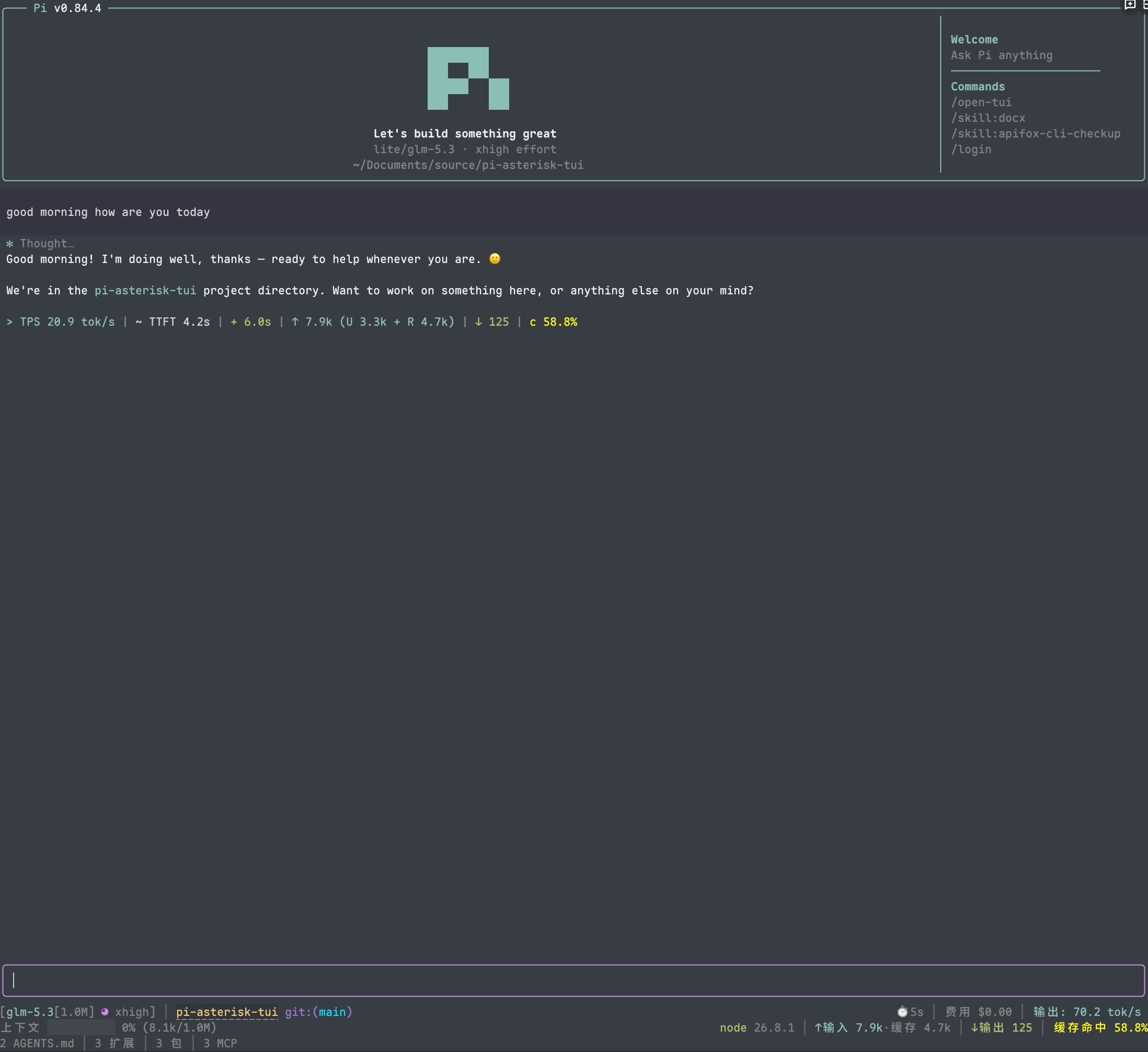
  "image": "https://raw.githubusercontent.com/No-World/pi-asterisk-tui/main/assets/preview_dashboard_1.png",
  "extensions": [
    "./extensions/asterisk-tui/index.ts"
  ]
}
Security note
Pi packages can execute code and influence agent behavior. Review the source before installing third-party packages.
README
pi-asterisk-tui
English | 简体中文
A Pi terminal experience where everything the model does folds into tidy
✻ lines — Claude Code style — plus a claude-hud style status dashboard.
pi install npm:pi-asterisk-tuiOr from git (tracks main):
pi install git:github.com/No-World/pi-asterisk-tui✻ Transcript
The transcript renders as answer text plus compressed activity lines. How much
compresses is the compression mode (/*tui → Collapse):
| Mode | Rendering |
|---|---|
native |
untouched pi rendering — no compression |
single |
one line per tool (▸ bash · $ npm test), nothing merged |
group-same |
consecutive same-type tools merge (✻ read 3 files); thinking merges its own ✻ Thought for 11s line — kinds never mix |
group-all |
Claude-Code style: consecutive thinking + tools merge into one line (default) |
✻ Thought for 19s, searched for 9 patterns, listed 1 directory, ran 1 shell command- Run lines (group-all): verbs read like a sentence —
ran 3 shell commands,edited 2 files,read 5 files,listed 2 directories,searched for 9 patterns,called playwright ×2(leading verb capitalized when no thinking precedes). Thinking durations come from live telemetry; history turns read✻ Thought, ran 1 shell command. - Per-tool overrides: every tool can be set to
default(follow the mode),single(one line),group-same(same-type group line, never absorbed into run lines) orexpand(native box);*matches unnamed tools. Per-item states are absolute — group-same groups even in native mode. - Thinking blocks share the same lattice (
turnCollapse.thought):default(follow the mode) /single(one ✻ label per message) /group-same(grouped Thought line, never merged with tools) /expand(inline, pi native). Whole-run absorption exists only via group-all mode + default. pi's nativehideThinkingBlockis kept as a mirror (ctrl+t flips are adopted as explicit states). - Line spacing:
compact(flush) orclassic(blank line around compressed lines, adjacent compressed lines separated by a single blank; ✻ label lines count as compressed lines, keeping them apart from their text tails). - One-click expand/collapse: click a compressed line to open the full reasoning and every tool's bordered output at once — including the thinking of text-bearing messages, no second tap on labels. Click any member line to fold it all back. A click is an unmodified press that releases on the same cell — drag-selecting text never toggles a run (pi's fullscreen selection keeps working untouched).
- Per-message thinking labels:
✻ Thought…(history) /✻ Thinking…(streaming), individually clickable to expand just that message's reasoning, styled identically to run lines (same accent ✻, same muted upright text). - Running tools render as an animated one-liner (
⠋ bash · $ npm test) with live output streaming beneath — and never drag completed neighbors out of their folded lines (turnCollapse.liveTools: falsedrops the streaming box, spinner line only; native- override tools always keep their box) - Live thinking (
turnCollapse.liveThinking, default on): while a message streams thinking-only content it renders inline in real time; once text starts (or the message stops streaming) it folds back to the ✻ label / run line immediately — no need to wait for the run to settle (native mode keeps pure pi boxes). - Retry UX: the countdown carries the failure reason
(
Retrying (2/10) in 5s… · 429 rate_limit_error); intermediate errors are held back, a successful retry prints nothing, and only the last error shows if the run fails (togglable independently of the mode). - Regular-mode support: compressed lines work in the regular (non-fullscreen)
TUI too — every line ends with the effective expand-all shortcut hint (e.g.
(ctrl+\ to expand)); pressing it expands every run (reasoning + all tool output), pressing again collapses all. Fullscreen keeps per-run click-to-expand. - Compact spacing: pi's internal spacer padding and OSC shell-integration markers around ✻ lines are folded away.
Telemetry
- Working indicator: every segment carries its own glyph — elapsed (clock), speed, input,
output, cache hit, tool count (wrench):
Working… ( 34s · 61.8 tok/s · ↑ 1.2k · ↓ 3.4k · 96.0% · 3)— elapsed always leads; every other segment is a per-surface toggle on the Working tab (workingLine.*). Output tokens are run-cumulative (stream-estimated while streaming, exact on message completion, kept across tool calls); the speed shown here is the run average from submission to now — the HUD footer's speed segment is the session average. - Turn telemetry after each run: TPS, TTFT, duration, tool-call count, input/output token breakdown with cache-read and cache-write, cache hit rate, stall count/time, actual run cost and the blended $/M rate (cache-read dominated).
- Persistence: each run's telemetry is stored as a session custom entry (extension-owned,
never sent to the model) and rendered as a transcript line in place — the same line at the
same position whether the run just finished or the session was resumed, re-formatted with
the current icon/language settings; rewinding past a run prunes its entry.
telemetry.persisttoggles it (on by default); when off, the old transient one-shot status line is shown for the live session only. - Tools/summaries side spend: token usage attached to tool results (the tool's own
LLM calls, e.g. subagents) and to compaction/branch summaries is real session cost, but
not main-context accounting — mirroring pi's own
Tools/summariesbucket it is tracked separately and shown as a dimmed suffix on the cost segment ($0.012+$9.500 tools/费用 $0.01+$9.50 工具) in both footers; today's cost sums the same scope. Zero side spend renders exactly as before. - Classic footer summary:
✓ done 12s · ✻ 8s · 2 shell commandsafter each run.
HUD footer
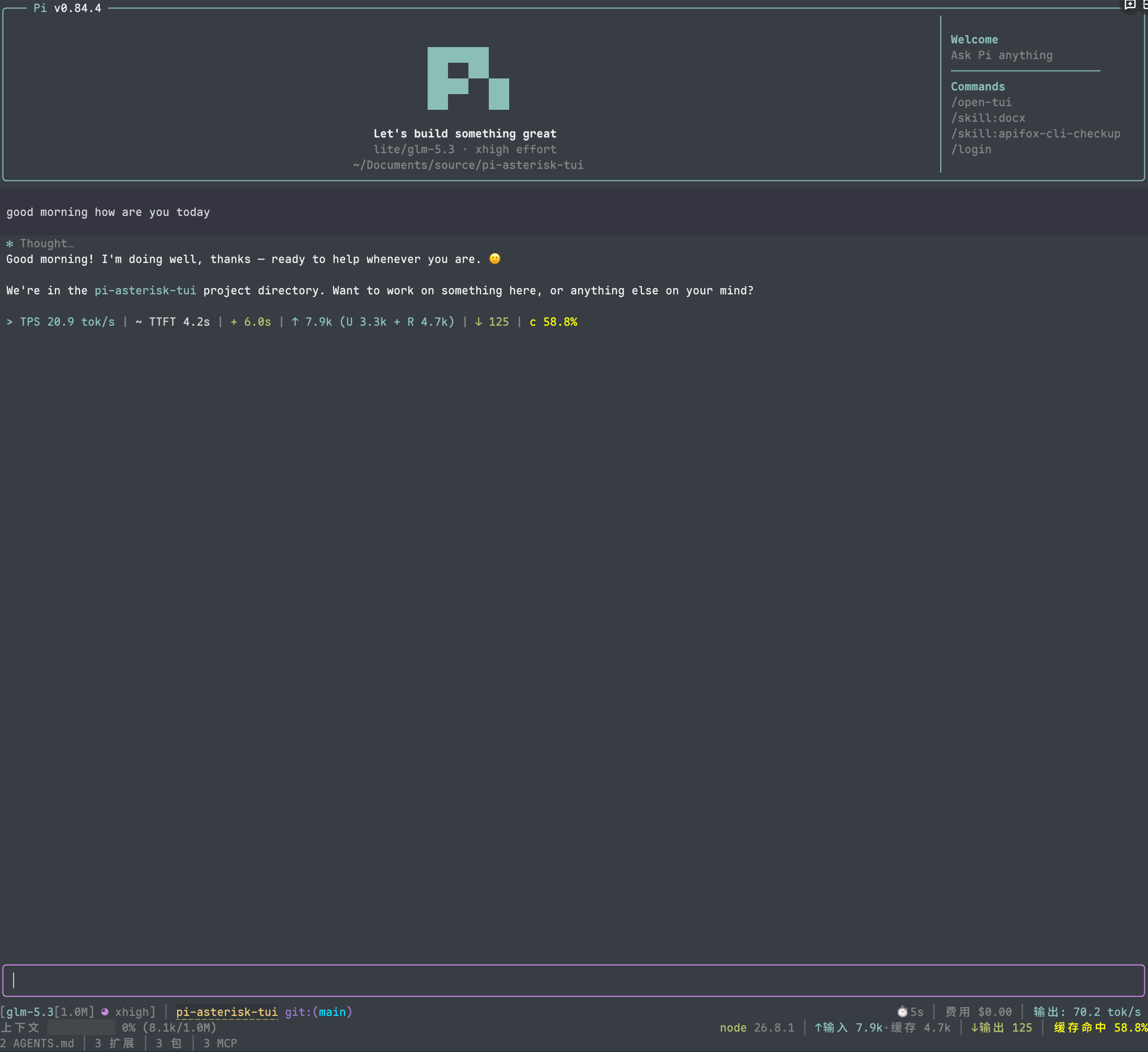
A claude-hud style four-line dashboard (a starship-style classic preset is also built in):
- Status line — model with context window, thinking level (moon-phase icons; the
model name, icon, and level text share the thinking-level color, matching the
editor border — all levels including
max), git branch with dirty marker, ahead/behind, per-file diff totals[+71 -5], session name, cumulative working time, cost, today's cost, live output speed (tok/s; only updated when the message streamed for at least 1s — burst-flushed responses are not measurable and keep the last credible speed). - Context line — usage bar with percent and token counts, cache hit rate, and a compaction-count suffix (
hud.compactions, on by default, hidden until the session has compacted):· compact 2. Token stats have three presentations (hud.tokens): localizedverboselabels, language-independentcompactshorthand (icon + value, e.g.77M (U 855k + R 77M) │ 266k │ 98.9%), oroff. The stat segments (time, cost, today's cost, output speed, tokens, cache hit) render perhud.statStyle:icon(glyphs only),icon+text(default), ortext; glyphs come from the same set as the telemetry line and classic footer, with ASCII fallback undericons.mode: "ascii". - Tools line — per-tool usage counts with ✓, running tool labels.
- Environment line — MCP server count (pi ≥0.99 counts native
mcp.jsonservers — global, trusted project, and extension-registered — while pi-mcp-adapter's config chain keeps counting during transitions; same-name native entries win), memory usage, compaction count, pi version.
Plus: OSC 8 hyperlinks on the working directory and changed files (click to open), powerline-styled git segment, ahead/behind indicators, and full subdirectory git detection (pi normally fails to show branch state when started inside a repository subdirectory).
Editor & settings
- Framed editor with block / bar / underline cursor styles.
- Working status (
/*tui→ Working tab,workingStatus): where the live run status renders —line(pi's working line only),border(editor top border only), orboth(default). The two surfaces are information peers, each with its own content options in the same order (elapsed, speed, input, output, cache hit, run cost, tools), shown only while the mode includes that surface. The cost segment is run-scoped — the spend of the current submission so far, not the session total (the footer keeps that) — and is a tri-state like the footers (off/cost/cost+rate, with the blended $/M rate appended). Input tokens are a tri-state — off, run total, or total with its cache-read part (↑ 348k (R 298k), updated at message boundaries). Either surface falls back to the elapsed time when everything else is off; the border degrades by width (segments → elapsed → glyph). Speed semantics: the working surfaces show the run average over response time — run tokens over wall-clock elapsed since submission minus tool-execution time (TTFT counts as response time, tool waits do not), reconciling by eye with the elapsed and token segments beside it; both surfaces draw from one 500ms snapshot (the border renders on every streaming repaint but only shows the cached text, so it can never run a beat ahead of the line). The HUD footer's speed segment is the session average — every message this session over its summed streaming windows, never reset across runs, and re-seeded on resume from the persisted run telemetry so it survives restarts. The border status is painted with the frame color, recoloring with thinking-level and bash-mode borders; narrow frames degrade to a glyph-only rung and the scroll hint (↑ 3 more) keeps its centered slot. LegacyborderWorkingStatusconfigs migrate (true→both,false→line). Inbordermode pi's own retry countdown and compaction statuses ride the border too (native embed routing);line/bothkeep them as standalone lines. - Inline footer (
inlineFooter, default off, classic style only): moves the classic footer's two main rows into the editor frame borders — top carries the location segments (cwd · host · session · git) left and the model block right; bottom carries the done summary left and the stats row (compact context · tokens · cost) right. Extension status rows stay below the editor. The right block survives shrinking widths first, mirroring the plain footer's alignRight priorities. While working, the bottom-left stays empty only when the workingStatus mode includes the border — inlinemode the working timer falls back to the bottom cell, so the state is never invisible. Saves two rows of vertical space on small terminals. Inert underfooterStyle: "hud". - Selection copy (fullscreen) in three modes (
/*tuipanel orselection.copy, defaultunwrapped):plaincopies visual content (pi stock, row by row);unwrappedcopies logical content — soft-wrapped rows join back into their logical line (paragraphs, list items, quotes, table rows with wrapped cells);rawcopies source content — markdown-covered runs yield the pre-render source (**bold**,$x^2$, table pipes; selecting a whole message yields its original text; non-markdown rows degrade to logical content for those rows only). Note: this depends on pi-tui rendering internals and may silently stop working after a pi upgrade (it falls back to stock copy without errors); updating this extension restores it. A separate switch,selection.trimPadding(default on), keeps the selection highlight off padded margins and drops the leading/trailing margin spaces from visual-content copies. - Bilingual
/*tuisettings panel (English / 简体中文) — the language choice also localizes HUD labels — covering footer segments, HUD toggles, telemetry fields, icon mode (nerd / ascii / auto), cursor style, fullscreen wheel-scroll speed, and a Collapse tab (compression mode, line spacing, retry-error folding, thinking visibility, per-tool overrides — extension/MCP tools appear there once seen) — with named style presets (hud / classic / custom). - Version-guarded compatibility shims: fullscreen wheel speed falls back to pi defaults if
the runtime shape changes. On pi ≥0.99 the wheel speed setting stands down entirely —
pi ships it natively (with an accelerating
"auto"mode) and re-applies its own value, so the settings entry points at/settings → fullscreenWheelScrollLinesinstead (ADR-0009).
Fresh installs default pi's hideThinkingBlock to true (existing choices are never
overridden) so the ✻ experience works out of the box.
Requirements
- Pi 0.85+ (framed-editor mouse click alignment needs pi-tui's component mouse events)
- UTF-8 terminal; a Nerd Font for the full icon set (ASCII icons are built in)
- Both TUI modes work: in regular mode compressed lines expand/collapse via the
expand-all shortcut (default
ctrl+\, annotated at the end of each compressed line); **per-run click-to-expand** needs pi's fullscreen mouse capture (/settings→ TUI mode, or"tuiMode": "fullscreen"in~/.pi/agent/settings.json).
Font and icons
The default auto mode checks the terminal environment, not the installed font file —
the emulator owns font selection and no environment variable can prove a Nerd Font is
active (ADR-0006). Auto uses Nerd Font icons in interactive UTF-8 TTYs (including over
SSH, where terminal-name sniffing never propagates), and falls back to ASCII for
non-interactive output, TERM=dumb, or an explicitly non-UTF-8 locale. The first time
auto resolves to nerd, a one-time hint notes the remediation path in case icons render
as boxes. Modes under /*tui → Appearance:
nerd: force Nerd Font icons after configuring a Nerd Font in the terminal profileascii: plain-text icons, no patched font requiredauto: nerd in interactive UTF-8 TTYs; ASCII for dumb/non-TTY/non-UTF-8
If icons appear as boxes, either set ascii or install a
Nerd Font and select it in the terminal
profile — in VS Code, Windows Terminal, and similar apps the font must be set in the
terminal profile, not only installed on the OS.
Configuration
Run /*tui, or edit ~/.pi/agent/asterisk-tui.json. Settings from a legacy
open-tui.json are adopted automatically on first run; the old file is kept.
Notable keys:
| Key | Default | Effect |
|---|---|---|
footerStyle |
"hud" |
hud / classic footer presets |
turnCollapse.mode |
"group-all" |
native / single / group-same / group-all compression |
turnCollapse.style |
"compact" |
compact / classic spacing around compressed lines |
turnCollapse.retryErrors |
true |
hold retry errors during a run; collapse repeated request errors into one ⚠ … ×N line (click to expand) |
turnCollapse.thought |
"default" |
thinking: default / single / group-same / expand |
turnCollapse.liveThinking |
true |
stream thinking inline while it arrives; fold back after |
turnCollapse.liveTools |
true |
render running tool output boxes below the spinner line |
turnCollapse.expandAllKey |
"ctrl+\\" |
expand-all shortcut in regular mode (pi KeyId; empty disables; applies after restart/reload) |
turnCollapse.tools |
{} |
per-tool default / single / group-same / expand; * wildcard |
icons.mode |
"auto" |
nerd / ascii / auto icon set; auto = nerd in interactive UTF-8 TTYs (ADR-0006), one-time hint on first nerd resolution |
cursorStyle |
"block" |
editor cursor style |
telemetry.* |
on | working-indicator and post-turn telemetry fields; telemetry.cost is a tri-state (off / cost / cost+rate); telemetry.persist (on) stores each run as a session entry rendered as a transcript line (survives resume) |
footerSegments.* |
mixed | classic footer segment toggles |
footerSegments.hostname |
false |
opt-in short host name segment (first label of the machine's host name) — for telling SSH targets apart at a glance; same toggle exists as hud.hostname |
footerSegments.capitalizeProviderName |
true |
uppercase the provider name's first letter; false keeps the raw provider id casing (proxy-style ids like cc-switch-zhipu-glm) |
footerSegments.capitalizeProviderName |
true |
uppercase the provider name's first letter; false keeps the raw provider id casing (proxy-style ids like cc-switch-zhipu-glm) |
workingStatus |
"both" |
live run status on pi's working line, the editor top border, or both; legacy borderWorkingStatus migrates (true→both, false→line) |
workingLine.* / workingBorder.* |
mixed | per-surface content options (elapsed, speed, input/output tokens, cache hit, tools); *.input is a tri-state (off / total / total+cache) and *.cost a tri-state (off / cost / cost+rate); shown per the active mode |
workingBorder.elapsed |
true |
border always degrades to elapsed → glyph when narrow |
inlineFooter |
false |
classic footer rows render inside the editor frame borders instead of dedicated rows; inert under footerStyle: "hud" |
hud.* |
on | every HUD segment individually toggleable (hud.tokens: verbose / compact / off; hud.statStyle: icon / icon+text / text; hud.cost: off / cost / cost+rate) |
fullscreen.wheelScrollLines |
4 |
mouse wheel lines per tick; inert on pi ≥0.99 — use pi's native /settings wheel entry instead |
selection.copy |
"unwrapped" |
selection copy: plain (visual content) / unwrapped (logical content, default) / raw (source content); depends on pi-tui internals, may silently fall back to stock after a pi upgrade |
selection.trimPadding |
true |
trim selection margins: highlight skips padded blanks; visual-content copies carry no margin spaces |
selection.tabWidth |
3 |
tab width for source-content copies: any integer 2–8 (3 as rendered) or tab for literal tabs (recovered deterministically from the original text for per-block copies) |
How it works
Everything is a runtime patch over pi's extension surface, version-guarded and inert on mismatch: the chat container's render is wrapped to re-chunk the transcript (containers, messages, and tools are classified by content, not appearance), the fullscreen viewport's mouse input is observed (never consumed) to route same-cell press→release clicks through per-render line segments, and pi-tui's loader messages carry retry reasons. No pi files are modified on disk.
Local development
npm install
npm test && npm run typecheck
pi -e .
Acknowledgements
- OldSuns/pi-open-tui — this project began as a fork of it; the original integration work and its credits carry over.
- claude-hud — the HUD footer layout.
- pi-haiku — footer structure and working timer.
License
MIT