pi-atelier
A responsive status rail and live activity sidebar for Pi
Package details
Install pi-atelier from npm and Pi will load the resources declared by the package manifest.
$ pi install npm:pi-atelier- Package
pi-atelier- Version
0.1.6- Published
- Jul 22, 2026
- Downloads
- 711/mo · 711/wk
- Author
- michaelmjhhh
- License
- MIT
- Types
- extension
- Size
- 329.4 KB
- Dependencies
- 0 dependencies · 2 peers
Pi manifest JSON
{
  "extensions": [
    "./extensions/index.ts"
  ],
  "image": "https://raw.githubusercontent.com/michaelmjhhhh/pi-atelier/main/assets/preview.png"
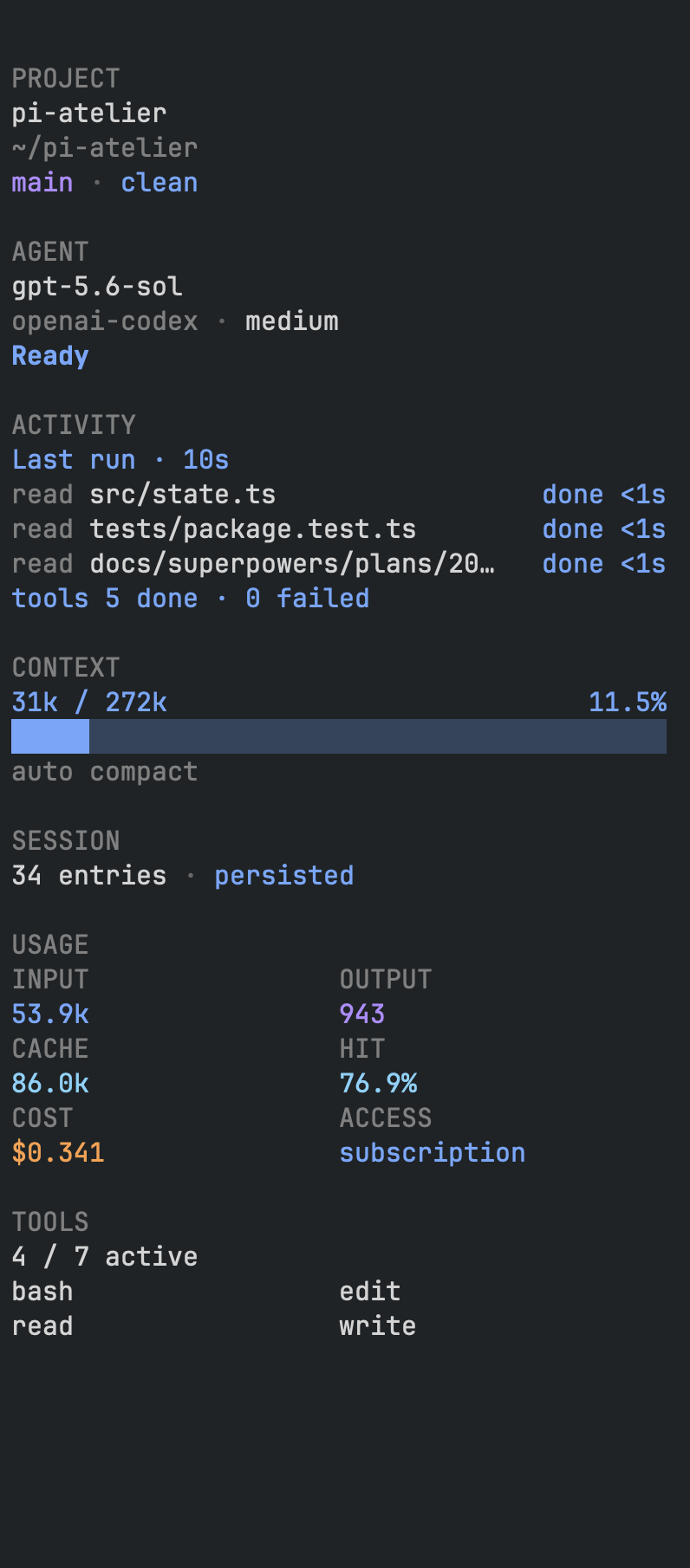
}
Security note
Pi packages can execute code and influence agent behavior. Review the source before installing third-party packages.
README
Pi Atelier
A responsive status rail and live activity sidebar for Pi.
Pi Atelier replaces Pi's default footer with a calm Status Rail and adds an optional docked sidebar for live agent, turn, tool, context, session, and project information.
Wide terminals use two stable zones: agent state and workspace identity stay left, while readable telemetry is right-aligned. The extension always uses its fixed dark Midnight Spectrum—blue input/context, purple output/menu, cyan cache, amber cost/working, and red danger—regardless of the selected Pi theme.
Demo
Fixed Dark Midnight Spectrum
Pi Atelier has one visual palette. Selecting a light, dark, or custom Pi theme does not change the footer's colors: labels, workspace text, metric values, state anchors, warnings, and errors all retain the same dark-style treatment. With NO_COLOR, the footer emits no custom RGB and uses theme-native neutral and semantic roles.
Features
- Preserves cumulative input, output, cache-read, cache-write, cache-hit, cost, subscription, context, and compaction information
- Responsive one-line layout that never wraps
- Model and thinking-level controls
- Searchable tool controls
- Editorial, minimal, and classic display presets
- Session details, renaming, and safe compaction controls
- Session-scoped, non-capturing docked information rail with live run, turn, and tool activity
- Fixed dark Midnight Spectrum across every selected theme, with a
NO_COLORfallback - User and trusted-project configuration
- No telemetry or external network requests
Requirements
- Pi
0.80.7or newer - Node.js
22.19.0or newer - Interactive TUI mode
Install
pi install npm:pi-atelier
Try a checkout without installing it permanently:
pi -e ./pi-atelier
Pi packages execute with your full system permissions. Review third-party source before installation.
Local development
git clone https://github.com/michaelmjhhhh/pi-atelier.git
cd pi-atelier
npm install
npm run check
pi -e .
Footer anatomy
incumulative input tokensoutcumulative output tokenscachelatest cache-hit percentage in the editorial presetread,write, andhitdetailed cache telemetry in the classic preset$cumulative estimated cost(sub)OAuth subscription-backed accessctxcontext utilization(auto)automatic context compaction*tracked working-tree changes
READY remains fixed when idle. During each work cycle, the working label is selected once from a playful built-in phrase set—such as KNEADING, MOONWALKING, or PONDERING—and remains stable until the cycle ends. When the full activity label fits, its ellipsis shrinks from ... to .. to . every 400 ms. Narrower terminals use the compact, static WORKING label.
Menu
Open Pi Atelier with:
/atelier
The default shortcut is alt+a. The menu contains:
- Model — choose an authenticated model or thinking level
- Tools — search and toggle active Pi tools
- Display — switch presets and save user defaults
- Session — inspect, rename, or compact the current session
- Sidebar — dynamically show or hide the docked information rail
Additional commands:
/atelier disable
/atelier enable
Sidebar
The sidebar starts hidden in every session. Use these commands to control it explicitly:
/atelier sidebar       # toggle between shown and hidden
/atelier sidebar on    # show it; safe to repeat
/atelier sidebar off   # hide it; safe to repeat
You can also press alt+a, choose Sidebar, and select the dynamic On/Off action. When enabled, the session-scoped rail attaches to the top-right, fills the terminal height, and stays visible without taking editor focus. Its quiet, information-first layout uses restrained semantic color, compact section labels, and aligned context and token/cache/cost metrics. It also shows project and Git state, model and thinking level, the active-tool count with exact activated names in two columns, and extension statuses.
During an agent run, the sidebar adds information the compact footer intentionally omits: current one-based turn, elapsed run time, active parallel tool calls, the three most recent tool results, per-tool durations, and total done/failed tool counts. The footer remains a stable one-line status rail and never repeats tool names or tool history.
The sidebar uses a non-overlapping split presentation: Pi's workspace reflows into the columns to the left of the rail instead of rendering underneath it. It starts at 44 columns, can be resized between 28 and 72 columns, always preserves at least 64 columns for Pi, and auto-hides below 92 terminal columns.
Press Ctrl+Shift+R to enter temporary Resize mode. Drag the divider and release to accept, use Left/Right for one-column adjustments, Shift+Left/Shift+Right for four-column adjustments, Enter to accept, or Escape to restore the previous width. Mouse reporting is active only during Resize mode, so ordinary terminal text selection is unchanged at all other times.
The split is implemented entirely inside Pi Atelier by wrapping the active TUI renderer at runtime; no Pi files are modified. This is a version-sensitive integration with Pi's current TUI structure and may require compatibility updates when Pi changes its renderer internals. A terminal character divider cannot display Ghostty's native hover resize cursor.
Configuration
User configuration:
~/.pi/agent/pi-atelier.json
Trusted project configuration:
<project>/.pi/pi-atelier.json
Project settings override user settings only after Pi trusts the project. Menu changes apply to the current session; Save as user default writes user configuration atomically. Pi Atelier never modifies project configuration from the menu.
Complete example:
{
  "preset": "editorial",
  "shortcut": "alt+a",
  "segments": [
    "brand",
    "activity",
    "metrics",
    "context",
    "model",
    "git",
    "statuses",
    "menu"
  ],
  "density": "comfortable",
  "ornament": "none",
  "contextWarning": 70,
  "contextDanger": 90,
  "currencyDecimals": 3,
  "showExtensionStatuses": true,
  "showSessionActions": true
}
Unknown or invalid values are ignored with one warning. The required metrics and context segments are restored if omitted. The editorial preset always suppresses the brand ornament; restrained displays ATELIER only for non-editorial configurations that include the brand segment.
Presets
- editorial — default Status Rail with activity, workspace identity, cache-hit summary, and telemetry
- minimal — compact activity, metrics, context, model, and menu
- classic — detailed cache telemetry, context, model, Git, and extension statuses
Responsive behavior
The Status Rail removes optional information by priority as the terminal narrows instead of switching to fixed layouts. Brand and extension statuses are removed first, followed by Git and thinking level, cost, model, input and output totals, cache, and finally the menu shortcut. Activity and context are retained longest, and the result is truncated safely rather than wrapping when space is exceptionally tight.
Privacy and security
Pi Atelier:
- Performs no telemetry, analytics, or network calls
- Does not store prompts, responses, credentials, or session content
- Reads structured usage metadata already available inside Pi
- Executes local
git status --short --branch --untracked-files=noafter relevant events to show tracked dirty state - Reads project configuration only when Pi reports the project as trusted
Footer conflicts
Pi supports one custom footer at a time. If multiple extensions call setFooter, extension load order determines which footer is visible. Pi Atelier does not wrap undocumented footer internals. Disable it with /atelier disable to restore Pi's built-in footer.
Troubleshooting
The menu shortcut does not open
Some terminals or personal keymaps intercept alt+a. Use /atelier, then choose another shortcut in pi-atelier.json and run /reload.
Metrics differ from the current context percentage
Token and cost metrics are cumulative across the entire session. Context percentage describes only the current model context after compaction.
The footer is missing
Pi Atelier intentionally does not install terminal UI in print, JSON, or RPC modes. In TUI mode, check whether another extension replaced the footer later in load order.
Publishing
Release verification must include:
npm run check
npm pack --dry-run
npm pack
Inspect the tarball before running npm publish.
License
MIT