pi-auto-save-to-markdown
Pi extension that automatically saves each completed conversation turn as a markdown file with YAML frontmatter, one file per session-tree branch.
Package details
Install pi-auto-save-to-markdown from npm and Pi will load the resources declared by the package manifest.
$ pi install npm:pi-auto-save-to-markdown- Package
pi-auto-save-to-markdown- Version
0.10.2- Published
- Sep 15, 2026
- Downloads
- 2,074/mo · 252/wk
- Author
- licongy
- License
- MIT
- Types
- extension
- Size
- 140 KB
- Dependencies
- 0 dependencies · 1 peer
Pi manifest JSON
{
  "extensions": [
    "./index.ts"
  ]
}
Security note
Pi packages can execute code and influence agent behavior. Review the source before installing third-party packages.
README
pi-auto-save-to-markdown


A Pi extension that automatically saves every completed conversation turn as a markdown file with YAML frontmatter — one file per session-tree branch.
Why
Pi records sessions internally as JSONL trees, which are great for resuming but terrible for reading, searching, or archiving. This extension mirrors the conversation into plain markdown files as you work, so every exchange is preserved in a format any editor, note app, or grep can consume — with the model, cost, tokens, and session metadata right in the frontmatter.
Installation
pi install npm:pi-auto-save-to-markdown
Usage
Automatic: after every settled agent turn (agent_settled), the current conversation branch is written to <cwd>/<folder>/<title>-<key>-<time>.md.
Sessions Pi does not persist (in-memory, --no-session — including the ephemeral auxiliary agents host clients spawn next to the real conversation, such as Claudian's title generation) are skipped by every automatic save; only the explicit /save-conversation command archives such a session on demand.
Manual: run /save-conversation to save the current branch immediately and report the file path.
Batch: run /save-conversation-all to save every session of the current project — every session jsonl in the project's ~/.pi/agent/sessions/<encoded-cwd>/ folder. Each session goes through the exact same pipeline as the live one (candidate chain, never-overwrite guard, rename-on-title, recovery warnings), and its archive is written under that session's own working directory, exactly as if /save-conversation had been run inside it. The current session saves first through the normal live path. Details:
- Idempotent. Re-running continues or reports "up to date" per session; it never re-creates files.
- Skips sessions without an assistant reply (nothing conversational to archive) and pre-
id/parentId-era legacy files. - Defers a session whose jsonl changed while it was being processed (its runtime is still writing it): the save only proceeds when the file is verified unchanged since it was read. Deferred sessions are continued by their own runtime or by the next batch run.
- Reports a summary —
N saved, M up to date, K skipped, …— with per-session warnings for anything anomalous (each tagged with the first 8 chars of its session id).
Configuration
The target folder is controlled by the PI_SAVE_CONVERSATION_DIR environment variable (Pi has no per-extension settings API):
| Value | Location |
|---|---|
| unset | <cwd>/ai-conversations/ (default) |
. or "" |
<cwd>/ directly |
notes/ai |
<cwd>/notes/ai/ |
/abs/path |
that absolute path |
PI_SAVE_CONVERSATION_DIR=notes/ai pi
File naming and frontmatter
Filename: <title>-<key>-<time>.md
<title>— the session name (/name), or a slug of the first user message when the session is unnamed<key>— the first 8 hex of the SHA-256 of the session id: every file of one session shares it, so a session's files cluster in the directory across recoveries and resumes (when no session id exists yet — the degenerate fallback — the deepest message entry's id is hashed the same way, so the key is always an opaque 8-hex cluster key)<time>— local file-creation time,YYYYMMDD-HHmmss
When the session's real name arrives after the file was created (e.g. Claudian generates its title only after the first reply), the next save renames the file once to <name>-<key>-<original-time>.md — keeping the original creation timestamp — and rewrites the frontmatter title and the document heading to match. The rename happens at most once: later /name changes never touch the filename, and manually renamed files are left alone.
---
title: "Fix login redirect loop"
agent: "pi"
format_version: "1.6"
session_id: "d0a4f541-976d-4d1b-8e1c-30a1f2b3c4d5"
session_key: "c2088d77"
branch_last_entry_id: "019be3a2-1f4d-7c8a-9b01-d23e45f6a7b8"
model: "z-ai/glm-5.3"
provider: "openrouter"
cost: 0.023401
tokens: 18745
tokens_input: 15230
tokens_output: 3515
tokens_cache_read: 0
tokens_cache_write: 0
messages: 8
created: "2026-08-29T13:05:12+08:00"
updated: "2026-08-29T13:42:10+08:00"
project_root: "/Users/me/project"
session_file: "~/.pi/agent/sessions/--Users-me-project-20260829-050500_ab12.jsonl"
---

# Fix login redirect loop

User <span style="font-size: 0.5em; color: var(--text-faint);">2026-08-29 13:05:12</span>
===

The login page redirects in a loop after the auth refactor...

> [!quote]- Editor Selection
> [[src/auth/middleware.ts|middleware.ts]] · **lines**: `14-22`
>
> export function middleware(request) { … }

---

Assistant <span style="font-size: 0.5em; color: var(--text-faint);">2026-08-29 13:05:40 · claude-sonnet-4-5</span>
===

> [!tldr]- Thinking
>
> Let me check the redirect chain...

I'll trace the middleware order first.

> [!quote]- Tool Calls · 1 (read)
> **`read`** `{"filePath":"/Users/me/project/src/auth/middleware.ts"}`
>
> ```
> import { NextResponse } from "next/server";
> export function middleware(…) …
> ```

---
The body renders user and assistant messages in full (assistant thinking and per-turn tool calls are each folded into a collapsed callout — > [!tldr]- Thinking and > [!quote]- Tool Calls · …), recording every tool call with its full raw result: the file is a documentary record that may be @-referenced back into a conversation, and a truncated half-result would be wasted when the tool is called again and misleading when it is not, while local reading (grep, ranged reads) makes size a non-issue. Callouts are used instead of HTML <details> because a callout is plain markdown — meaningful in every renderer, a panel where supported and a blockquote everywhere else — whereas raw HTML blocks have no such portability: Obsidian does not parse markdown inside HTML blocks, and neither does Quartz's remark/CommonMark pipeline (invalid HTML there can even break a page outright), so <details> cannot be relied on to carry content across the tools these files are read in. Arguments render as full JSON in inline code spans and results verbatim — whitespace intact, nothing capped — in fenced code blocks (with a delimiter sized to survive backticks inside the content), so raw tool output renders literally instead of being parsed as markdown.
Callouts beyond Obsidian
A callout is a blockquote whose first line carries a type marker (> [!note] Title): renderers that understand the marker draw a titled, colored, optionally collapsible panel, and every other renderer still sees a perfectly valid blockquote. Obsidian popularized the syntax and extends it with fold markers (- collapsed, + expanded) and arbitrary types; GitHub standardized a five-type subset of the same marker ([!note] …[!caution], no folding) as its "alerts". These files render best in Obsidian — custom types and preset-collapsed folds included — but Obsidian is far from the only viewer that draws the panels:
- Quartz — the static-site generator for publishing Obsidian vaults, renders the same callout syntax, folding included.
- VS Code — extensions add the panels to the built-in markdown preview, e.g. Markdown Obsidian Callout, vscode-markdown-obsidian-alert, or Markdown GitHub Alerts & Obsidian Callouts.
- Static-site pipelines — remark plugins render callouts on the web: remark-obsidian-callout (Astro and friends) parses the full Obsidian syntax, remark-github-blockquote-alert the GitHub subset.
- The standardized subset — GitHub itself, Typora (opt-in), and Markdown Preview Enhanced render GitHub's alert types; this plugin's
tldr/quotetypes and fold markers live outside that subset, so on those surfaces the callouts fall back to plain — still perfectly readable — blockquotes, exactly the graceful degradation the syntax was designed for.
Prompt blocks the client or the agent injects into a user message — the editor's active selection, attached or referenced notes, loaded skills — are re-rendered from their raw XML (which markdown viewers cannot present usefully — Obsidian shows it as literal angle-bracket text) into generic callouts. No block is parsed individually: the title is the tag name in words (editor_selection → Editor Selection), and the body opens with vault-shaped path/location values as bare wikilinks ([[…|alias]] is a clickable link in Obsidian, Quartz, and Markdown Preview Enhanced alike; the aliased filename speaks for itself — no path: label), followed by the remaining attributes as **name**: value items, then the content. Every callout is preset-collapsed — user-provided blocks (selections, note attachments) as > [!quote]-, even when they carry only attributes (the client emits note references as self-closing tags carrying just a path), agent-side skill traces as a > [!note]- Skill · <name> marker (the loaded skill's name rides the title, so the collapsed marker still says which skill; the location follows in the body, the content is dropped) — and consecutive blocks of the same tag (nothing but whitespace between them) merge into one callout, so a run of note references collapses into a single list. Unknown markup is left verbatim, so XML pasted as content is never mangled — and the fallback filename slug derives from the typed message with every known block stripped.
The recognized injected-block vocabulary:
| XML tag | Renders as | What it carries |
|---|---|---|
editor_selection |
[!quote]- Editor Selection |
Selection in the code editor |
editor_cursor |
[!quote]- Editor Cursor |
Cursor position in the editor |
current_note |
[!quote]- Current Note |
The currently open note |
context_files |
[!quote]- Context Files |
Files attached as context |
canvas_selection |
[!quote]- Canvas Selection |
Selection on the canvas |
browser_selection |
[!quote]- Browser Selection |
Selection in the browser view |
linked_note |
[!quote]- Linked Note |
A note reference (the @-mention's machine copy) |
linked_content |
[!quote]- Linked Content |
An attached note's content |
skill |
[!note]- Skill · <name> |
Loaded-skill marker; content dropped |
| any other tag | verbatim | Pasted XML is never mangled |
Each message block opens with a setext level-1 info header (User, Assistant) underlined with === — one level above the ## headings AI content typically starts with, and distinguishable from content # headings when parsing. The header's metadata (local date-time, and the model for assistant messages) sits in a small faint <span> (0.5em, Obsidian's --text-faint color — renderers without the variable fall back to the inherited text color), so the role stays visually dominant while the details remain a glance away. Each block ends with a --- separator wrapped in single blank lines (extra blank lines are trimmed), so blocks are easy to tell apart both when reading and when splitting the file programmatically. The document heading sits directly after the frontmatter with no blank line between them; appends heal the blank line that older versions wrote there.
Two views of the same saved file rendered in Obsidian — the <title>-<key>-<time>.md filename on top, message blocks with role headers and timestamps, and the Thinking and Tool Calls callouts collapsed. First with the Properties panel expanded, showing all frontmatter fields:
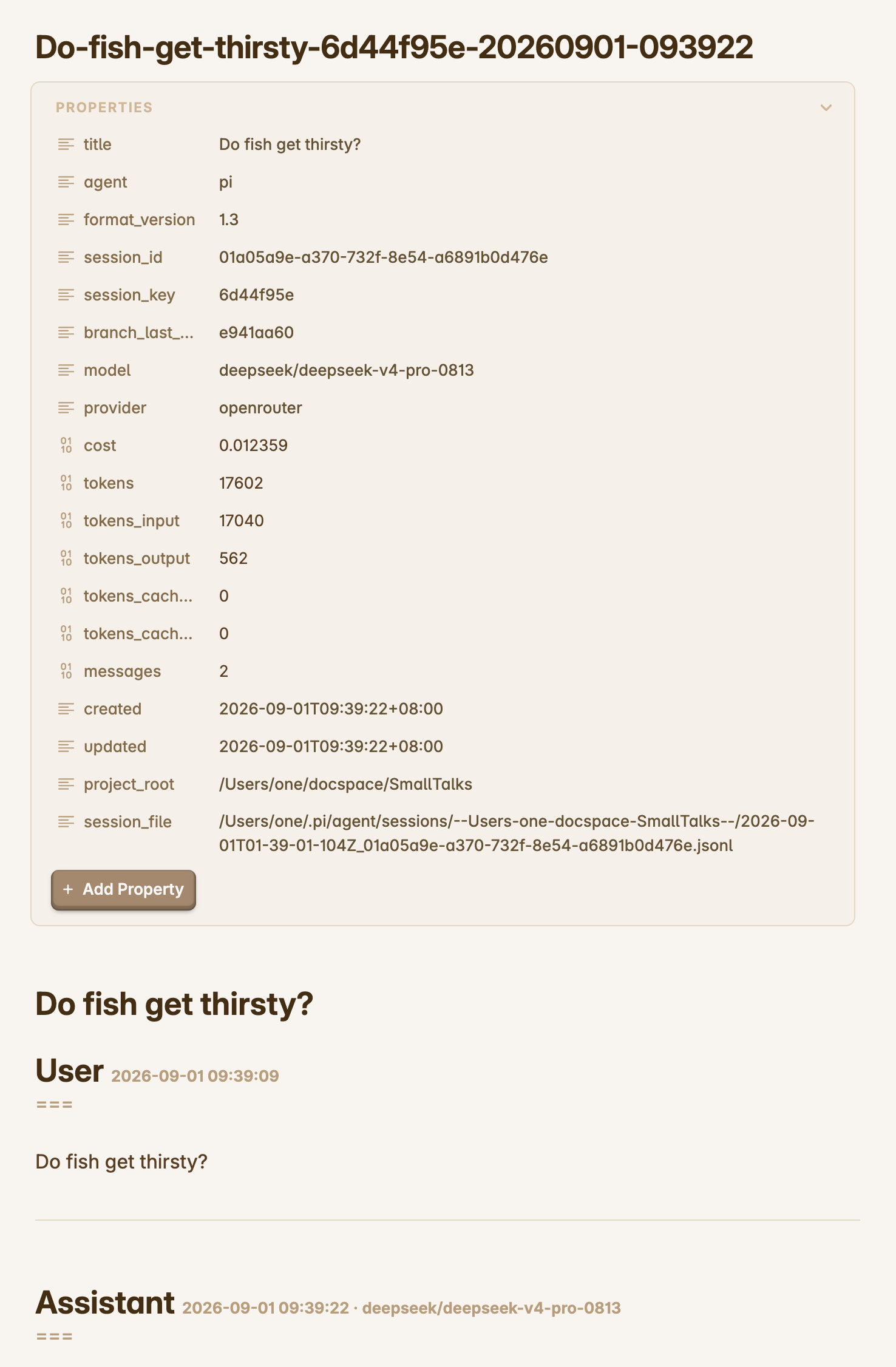
Then with the Properties panel folded away and the full conversation body in view:
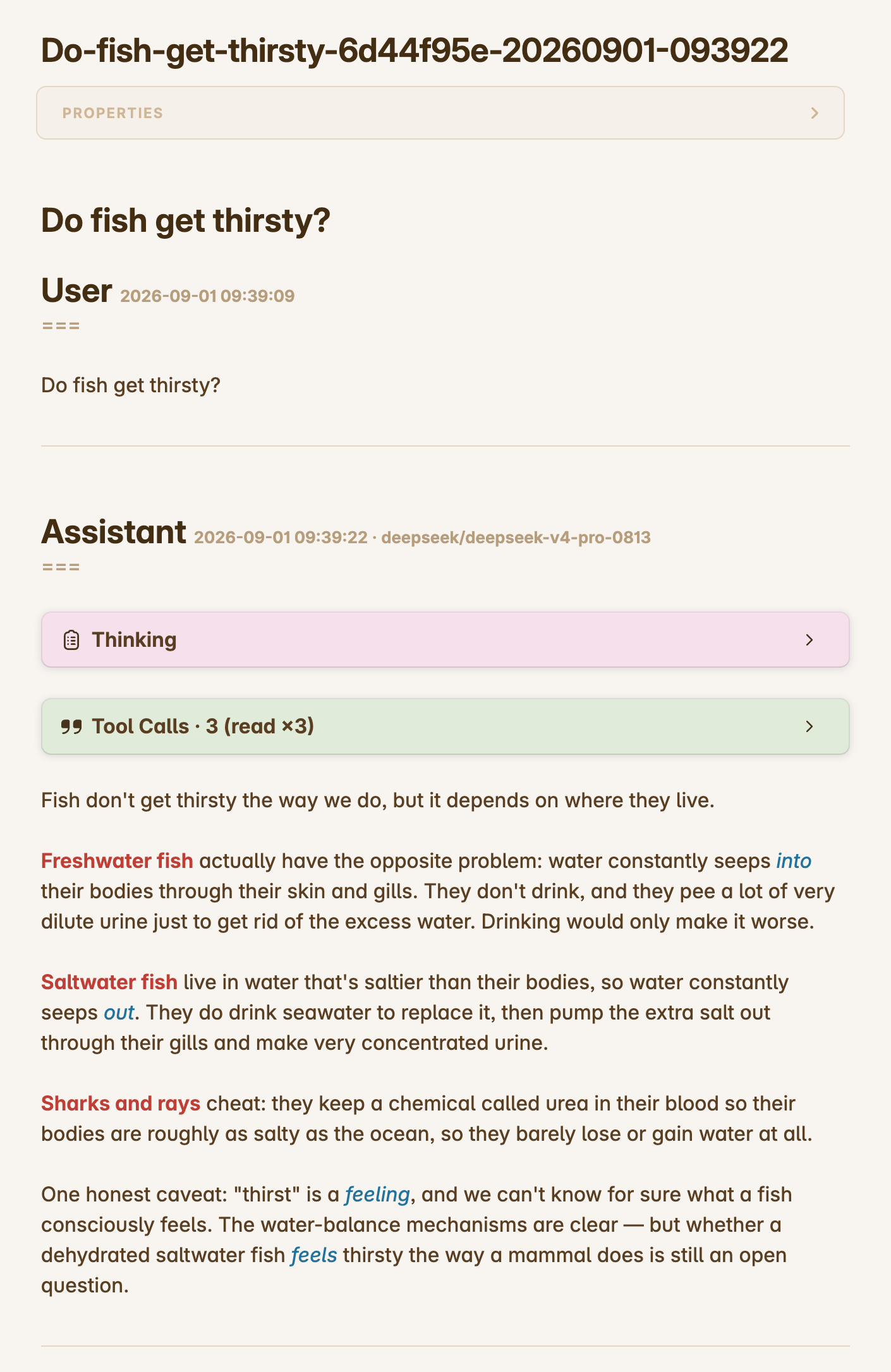
Fragmented thinking repair
Some upstream reasoning streams (observed with z-ai/GLM via OpenRouter) store thinking with every word — or every CJK character — on its own line: the original spaces collapse into leading spaces of one-word fragments joined by runs of newlines. The extension detects this corruption (lines starting with a single leading space, or a majority of 1–2-character fragment lines) and re-joins the fragments into flowing text, so saved thinking reads normally instead of one word per line. Paragraph breaks survive the repair: a separator run of 3+ newlines that follows a sentence-final character is a real paragraph break about three times out of four in corrupted blocks, so exactly those separators are restored to blank-line paragraphs while every other separator joins — a break is never inserted mid-sentence; worst case, one lands between two complete sentences, which still reads fine. Clean thinking blocks are written untouched.
cost and the token fields cover the whole saved branch and include cached tokens (priced at the provider's cache rates), so the totals are comparable with provider-side accounting (e.g. OpenRouter activity). Requests that never landed in the session tree (failed retries, other sessions sharing the same API key) are necessarily excluded.
Branch behavior
Pi sessions are trees: /tree navigates to an earlier point and a new prompt forks a new branch. Each markdown file records exactly one branch — the root-to-leaf path that branch sees.
- Same branch, next turn → new messages are appended to the existing file, and the frontmatter (
cost,tokens,messages,updated, title, model) is refreshed. /tree+ new prompt (a different branch) → a new file is created containing the full new branch (the shared prefix plus the new exchange). The save also notifies (info) that the branch changed, naming the new file and the earlier branch's kept file, so multiple files of one session stay navigable.- Forking at the current tip → the existing file continues (its content is already an exact prefix of the new branch), so no duplicate file is created.
- Resuming later (restart,
/resume,/fork,/clone) → the branch is recognized and its file continues where it left off.
Branch identity is persisted inside the session tree itself via extension custom entries (never sent to the LLM, not rendered in the TUI), so state survives restarts and navigation without any sidecar files. State discovery reads those entries straight from the session's jsonl on disk — the append log shared by every runtime — so even a long-lived warm process whose in-memory tree lags behind still finds saves recorded by other runtimes.
Continuation targets are validated newest-first: the target file must exist and its frontmatter messages count must cover the branch position (a higher count is fine — a descendant branch extended the same file). The first target that validates is continued; when the newest one fails but an older candidate validates, the save downgrades to the older file and warns about it. If every target fails — the file was deleted, or was rewritten from a different tree position (e.g. a save on an older branch after /tree navigation), where continuing could silently strand the newer branch's messages — a fresh file with the full current branch is written instead, with a warning naming the failed target. A fresh file never overwrites an existing filename either (an existing name falls back to -1, -2 … suffixes), so two runtimes recovering the same lost file in the same second cannot silently overwrite each other. Every branch therefore always ends up with a complete, consistent file.
Compacted sessions still export their full original history — the archive always contains the complete conversation, not the compacted context.
Debug
PI_CLAUDIAN_DEBUG=1 pi
Any value other than an explicit false token (empty, 0, false, no, off — case-insensitive) enables it; unset the variable (or set one of those tokens) to turn it off.
License
MIT