pi-background
Lets Pi run long commands in the background and wakes it when they finish, so it never blocks or hangs
Package details
Install pi-background from npm and Pi will load the resources declared by the package manifest.
$ pi install npm:pi-background- Package
pi-background- Version
0.4.2- Published
- Nov 3, 2026
- Downloads
- 2,171/mo · 1,261/wk
- Author
- pringled
- License
- MIT
- Types
- extension
- Size
- 36.9 KB
- Dependencies
- 0 dependencies · 3 peers
Pi manifest JSON
{
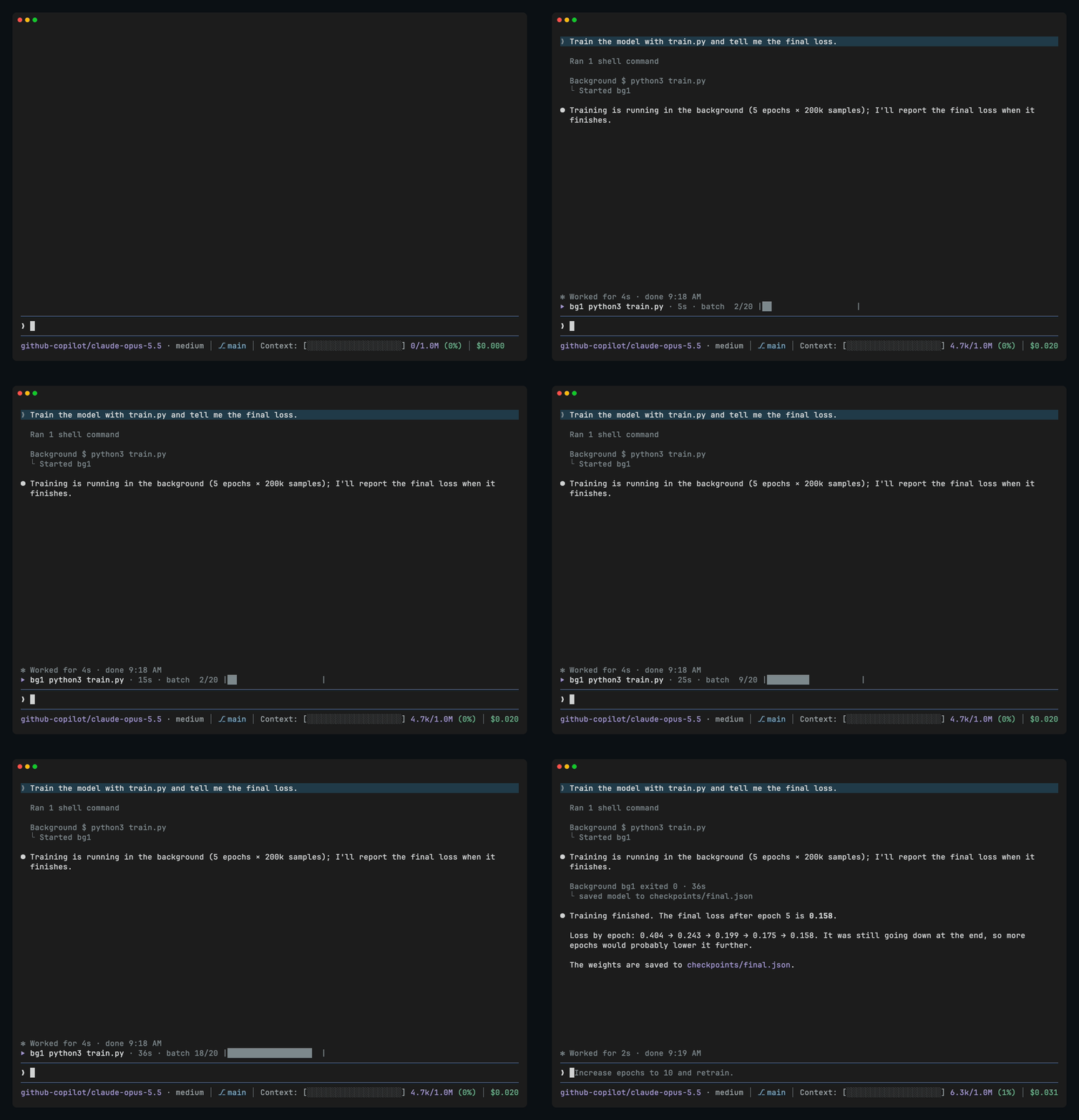
  "image": "https://raw.githubusercontent.com/Pringled/pi-extensions/main/assets/images/pi-background-dark.gif",
  "extensions": [
    "./extensions/background.ts"
  ]
}
Security note
Pi packages can execute code and influence agent behavior. Review the source before installing third-party packages.
README
pi-background
Lets Pi run long commands in the background instead of waiting on them. Pi starts the job, carries on or hands back to you, and gets a message when the job finishes or prints something it's waiting for.
pi install npm:pi-backgroundFeatures
- Long commands like downloads, builds, test suites and training runs go to the background, and Pi hears back with the exit code and the end of the output when they finish.
- While a job runs, a line above the input shows it with its elapsed time and latest output, such as
⏵ bg1 python3 train.py · 4m12s · epoch 3/10 loss 0.41. A job that has printed nothing for 10 minutes showsno output for 12m30sinstead, so a stuck one stands out. With more than three jobs running, they share one line,⏵ 5 jobs, which adds1 silent for 10m+when one may be stuck;/bghas the details. /bgshows a job's last 20 lines of output, updating while it runs (/bg bg2for a specific job). Press esc to close it. Its list shows running jobs first, then the 10 latest finished ones.- Pi can wait for a specific line, such as a dev server's
listening onor a training run'sepoch 3, without checking again and again. - Jobs started together are reported together: when Pi starts several jobs at once, such as benchmarks to compare, it's woken once when the last one finishes instead of after each. You can keep chatting meanwhile, and a job that runs much longer doesn't hold the others back for more than 2 minutes.
- A regular shell command still running after 2 minutes moves to the background on its own, so a slow command Pi didn't expect never holds up the turn. It shows in the jobs line, and Pi hears back when it ends. Press
ctrl+bto move a running command to the background sooner. If another extension already replaces Pi's bash, such as a sandbox, pi-background leaves it alone.
You don't need to do anything differently: Pi decides when a job belongs in the background. You can also ask for it, for example "run the tests in the background and tell me when they're done".
Settings
The running jobs line has three levels. Set one in ~/.pi/agent/settings.json, for example "background": { "jobs": "compact" }.
jobs |
What it shows |
|---|---|
full (default) |
⏵ bg1 python3 train.py · 4m12s · epoch 3/10 loss 0.41 |
compact |
⏵ bg1 python3 train.py · 4m12s |
off |
Nothing |
Tools
Pi gets three tools for this: bg_run starts a job, bg_status shows how it's doing and its latest output, and bg_kill stops it. Jobs run with the same environment and sandbox as Pi's own shell commands, and stop when you close Pi.
License
MIT