pi-better-background-tasks
Pi extension for durable background shell tasks, watchers, logs, and status inspection.
Package details
Install pi-better-background-tasks from npm and Pi will load the resources declared by the package manifest.
$ pi install npm:pi-better-background-tasks- Package
pi-better-background-tasks- Version
0.12.1- Published
- Oct 29, 2026
- Downloads
- 4,107/mo · 874/wk
- Author
- exoulster
- License
- MIT
- Types
- extension
- Size
- 647.8 KB
- Dependencies
- 1 dependency · 2 peers
Pi manifest JSON
{
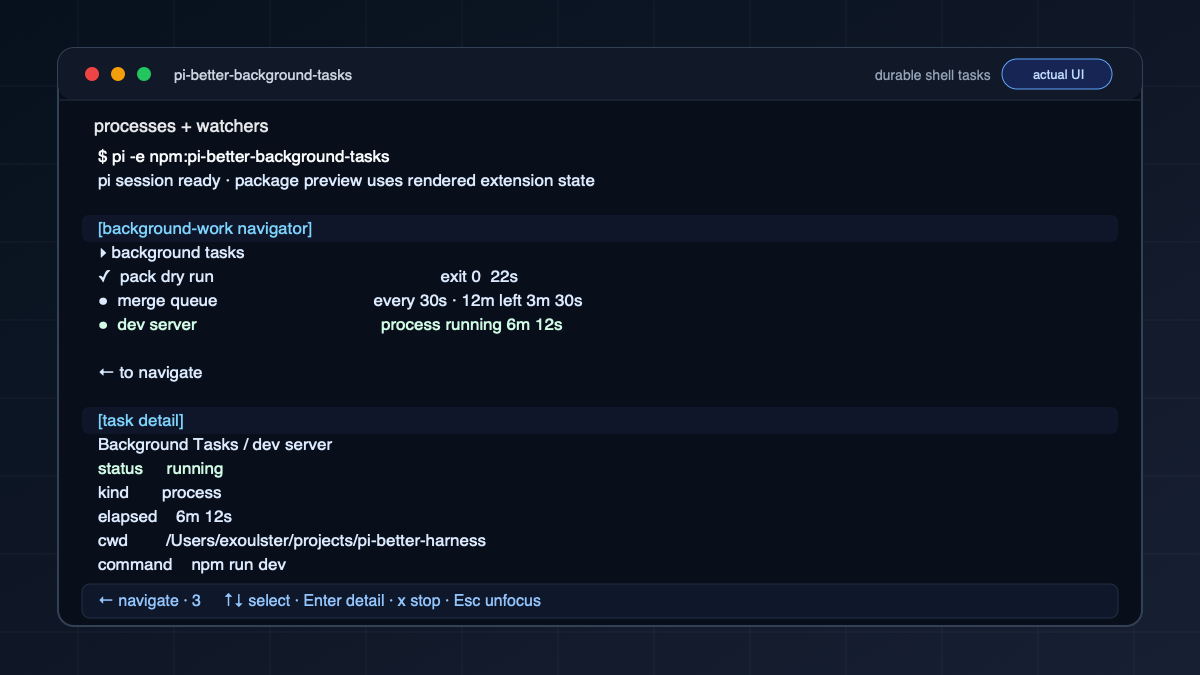
  "image": "https://raw.githubusercontent.com/1aboveio/pi-better-harness/main/docs/images/package-gallery/pi-better-background-tasks.png",
  "extensions": [
    "./src/index.ts"
  ]
}
Security note
Pi packages can execute code and influence agent behavior. Review the source before installing third-party packages.
README
pi-better-background-tasks
pi-better-background-tasks is a Pi extension for durable background shell tasks, watchers, logs, and status inspection.
Quick Answer
Use pi-better-background-tasks when a command should keep running while the foreground Pi session stays free. It is best for dev servers, long scripts, queue watchers, deploy checks, log tails, and other command-driven work.
Screenshots
Core Features
- Start long-running commands without blocking the current turn.
- Watch commands until success, failure, or timeout.
- Keep task metadata and logs available across reloads.
- Retain completed task artifacts for seven days, then remove them during rate-limited maintenance.
- Show active work in Pi's background-work navigator.
- Report quiet work and suspected stalls separately from task lifecycle.
- Confine local task writes to the project directory when
pi-better-sandboxis enabled.
Write Sandbox
When pi-better-sandbox
is installed, local tasks follow the independent Background tasks column in
/sandbox. Its Sandbox switch starts Off for fresh settings. When enabled,
commands run under macOS Seatbelt or Linux Bubblewrap with that column's project,
outside-project, credential-file, command and network permissions. Protected
paths remain denied. Run applications is the master execution switch. With it
On and Shell scripts Off, direct launches using shell:false and argv are
allowed; shell commands and explicit shell-interpreter launches, including
aliases, are refused. Applications may still invoke scripts or shells internally.
Command time limit caps each actual process or watch check, not the whole watch duration. A smaller requested timeout wins; omitting or increasing it cannot bypass the policy cap. Cleanup covers ordinary process-group descendants, not deliberately daemonized processes. Shell scripts defaults On and the limit defaults to No limit, including for legacy settings.
The policy is captured once at launch. Later settings changes affect only new
tasks. An existing process, including a watcher resumed in a later Pi session,
keeps its launch policy. /sandbox on|off and /sandbox default on|off now
change Main only; use the Background tasks column to change new task launches.
Older settings migrate by copying Main's values into Background tasks once.
If the Background policy is unavailable or failed, launch is refused rather
than retried unconfined. Turning its Sandbox switch Off deliberately permits
unconfined local launches.
With Background tasks' Outside project = Write, the task can write across home
and temp but can remove files outside the project only in temp, hidden home
directories, and worktree folders (see
pi-better-sandbox).
On macOS, Outside project = Write or Write & delete starts an APFS local snapshot
(tmutil localsnapshot) as a recovery aid. A failed snapshot is noted in the log
and never blocks execution.
Structured SSH cannot apply local file and credential permissions remotely, so an enabled permission-aware Background profile refuses those launches. When unconfined, SSH retains its documented remote behavior; local policy never establishes remote confinement. Without the sandbox extension, local tasks retain their historical unconfined behavior.
Pi's own process, provider transport, pi.exec calls, and unrelated runtime
extensions remain outside the task boundary. Installing the harness does not
activate Main or Background confinement by default.
Remote SSH
For short synchronous remote commands that should return output in the current
turn, install pi-better-ssh and use remote_bash. Use background tasks for
long-running or durable remote jobs and asynchronous health watches.
Prefer structured ssh fields over hand-written ssh command lines. A remote
spawn uses a durable tmux session by default, while a remote watch opens one
direct SSH poll per interval and does not require tmux. The package keeps the
same local metadata, logs, terminal statuses, callbacks, and /reload recovery
for both.
{
  "name": "remote build",
  "command": "npm run build",
  "ssh": { "host": "build.example", "user": "deploy" },
  "remote": { "workdir": "/srv/app" },
  "timeout_seconds": 1800
}
Tmux-backed spawn can install tmux non-interactively when the remote host allows
it and fails closed with copy-pasteable setup guidance when it cannot. Set
remote.session=direct only as an explicit escape hatch for short jobs: stop or
timeout can terminate the local SSH client but the remote process may still be
running. See the detailed usage notes for bootstrap policy, watch conditions,
timeouts, and v1 non-goals.
Reloads and session switches
Tasks belong to the Pi session that started them. After /reload, the same
session picks every task back up: watches keep polling, remote tmux output keeps
being collected, and a task that finished during the reload (or exits later) gets
its completion callback exactly once.
After /new, /resume, fork, or switching to another session, the previous
session's tasks keep running but are paused from Pi's side: watches do not poll,
remote tmux output is not collected, and timeout_seconds deadlines are not
enforced until that session is active again. An overdue deadline is enforced as
soon as the session resumes, so a timeout can land late but is never skipped.
While the same Pi process stays open, a local process that exits in the meantime
is recorded as finished, and its callback is delivered when its session resumes.
If you quit Pi first, nothing records that exit: when the session is resumed in a
new Pi process, a task whose process is gone is marked lost.
Progress And Suspected Stalls
A task can remain running without recent progress evidence. Compact status and
navigator use the same observation. Process tasks use recorded progress and the
log's modification time. Watches use recorded progress and completed polls. Before
any progress, the task's launch time anchors the silence duration. This does not
measure CPU activity, network waits, or useful application work.
At 60 seconds without observed progress, work is quiet. At 5 minutes, it has a
suspected stall. Both thresholds are inclusive. Set PI_BETTER_STALL_QUIET_MS
and PI_BETTER_STALL_MS to positive millisecond durations to override them.
Compact status shows the last observed time, silence duration, and a warning:
silence alone does not prove the task is hung. Terminal tasks are not reported as
suspected stalls. New output or a completed watch poll refreshes the observation.
A status cursor changes when the observation crosses either threshold, even if
metadata and log bytes have not changed. Within the same observation state,
unchanged status still shows the current silence duration. A suspected stall
records an observation, not a process failure. After the existing 60-second
attention grace, callback-enabled tasks wake the parent once per silent spell.
New progress closes the observation and a later spell can notify again. Quiet
work does not alert, callback:false suppresses notification, and no silence
threshold stops a task or changes its lifecycle. The active session's runtime
checks observations once per second, including an in-flight watch poll. Reload
restores monitoring and the persisted attention receipts. Log-retention writes
are excluded from task progress.
Launch Policy And Diagnostics
/sandbox has an independent Background tasks column. New tasks capture
that column at launch; subsequent changes do not alter an existing process or
its future watch polls. Older saved settings copy Main into Background tasks
once so the migration preserves behavior. Older sandbox publishers without the
Background field retain their Main-policy behavior. A restrictive application
policy rejects an incompatible older background consumer instead of silently
dropping the restriction.
Launch and status show confined, unconfined, or unknown, plus the backend
when known and the policy source. verbose:true includes the persisted policy
summary. Restored tasks without recorded launch evidence report unknown;
missing profile files or current process-tool denials are not confinement proof.
Remote execution also reports unknown remote confinement.
Use bg_task_status with diagnostics:true (or either wrapper's status
action) for a bounded, current process snapshot. Both Main and Background tasks
must currently permit Process access: Read, even when sandbox switches are
Off. The result checks the recorded PID and start identity, then reports process
state, accumulated CPU time, and available wait evidence. It never reads command
arguments or environment values and never probes a remote host or descendants.
A snapshot cannot establish useful work or a hang. Watch poll PIDs are not
retained, so their activity evidence is explicitly unavailable.
The process-activity adapter is unavailable under Main confinement; it never
retries ps unconfined. Unsupported systems, absent launch identities, reused
PIDs, and blocked diagnostics each receive a separate explanation. Diagnostics
permissions do not change or describe the task's launch-time confinement.
Watch conditions
JSON conditions require a root-prefixed path, such as $.status or
$.terminalFailure; bare keys such as status are rejected before the command
starts. For a command that emits {"status":"FAILURE","terminalFailure":true},
use:
{
  "success_when": { "type": "json_path_equals", "path": "$.status", "value": "SUCCESS" },
  "failure_when": { "type": "json_path_equals", "path": "$.terminalFailure", "value": true }
}
Persisted watchers with unsupported paths fail explicitly on their next poll. Missing JSON fields or invalid JSON output remain retryable; task status shows the condition evaluation error until a subsequent poll recovers. Keep a finite timeout to bound watches whose output never becomes evaluable.
Writing a watch check
A check that swallows its own errors reports "still pending" forever. Keep failures visible:
- Do not end the check with
exit 0or|| true. A check that exits non-zero is recorded as a failure and escalates to the parent session. - Map an unknown or unparseable state to failure (a non-zero exit), not to pending.
- Prefer structured output parsed with
jq -eover hand-written format strings.jq -eexits non-zero when the field is missing, so a broken query shows up at once.
For example, a Cloud Run job execution:
status=$(gcloud run jobs executions describe "$EXECUTION" --region="$REGION" --format=json \
  | jq -er '.status.conditions[] | select(.type == "Completed") | .status') || exit 2
case "$status" in
  True) echo TERMINAL_SUCCESS ;;
  False) echo TERMINAL_FAILURE ;;
  Unknown) echo STILL_RUNNING ;;
  *) echo "unexpected Completed status: $status" >&2; exit 2 ;;
esac
with success_when: {type: "stdout_contains", value: "TERMINAL_SUCCESS"} and
failure_when: {type: "stdout_contains", value: "TERMINAL_FAILURE"}.
bg_task_watch (and bg_task with action: "watch") waits up to 15 seconds
for the first check and puts its exit code, the newest few lines of stderr and
of stdout in the tool result, so a broken check is visible at launch. When the
result is short on room, stdout is cut first. If the first check is still
running after 15 seconds, or you press Esc during the wait, the result says so
at once and the watch continues.
A running watch also guards against a blind check. When 3 checks in a row exit
0, write to stderr, and match neither success_when nor failure_when, the
watch records one incident that needs action, with the latest stderr line, and
wakes the parent session once. The watch keeps running. A later check with
empty stderr recovers the incident whatever its exit code (a non-zero or
failed check is then recorded as its own incident), and so does a check that
matches a condition. A non-zero check that writes stderr restarts the count but
leaves the incident open. A clean pending check (exit 0, no stderr) never
counts.
Some tools write to stderr on success (gcloud … list prints "Listed 0
items.", and kubectl and npm print warnings), which can raise a false alarm.
If the stderr is expected, redirect it (2>/dev/null) or set
blind_checks: 0. Set blind_checks to another number to change the count.
Install
pi install npm:pi-better-background-tasksTry it for one run:
pi -e npm:pi-better-background-tasksFailure observations
Task lifecycle and failure evidence are reported separately. A watch can remain
running while a poll or condition evaluator has failed. Status, list, log, and
navigator views show unresolved observations before ordinary progress. A success
match cannot finish a watch while evaluation of its failure condition is broken;
a definite failure match still terminates it.
Observations live in failures.jsonl beside task metadata. Recovery requires a
successful evaluation of the same operation. Repeated failures are grouped, and
an explicitly configured nonzero success exit is treated as expected. Verbose
status includes observation details and the journal path. Corrupt or unreadable
evidence is reported as observation incomplete.
Pass operation_id and expected_exit_codes on bg_task_spawn, bg_task_watch,
or bg_task to declare intent before launch; a malformed declaration starts
nothing. An exit code in expected_exit_codes (distinct integers 1-255, such as
[1] for a no-match probe; a 0 is ignored) is recorded as an Expected failure that needs no
action; signals and timeouts never are. When a task with an operation_id
succeeds, earlier failed tasks with the same operation_id, kind, cwd, SSH
target, and owner (the same session id, or for sessionless tasks the same Pi
process) recover, so a retry with a changed command or timeout
closes the original incident. Observation gaps are never recovered this way, and
no command text is compared.
Task failures are labeled Action required; the shared labels also include
Expected failure and Observation incomplete. Unresolved running failures
become eligible for attention after 60 seconds; observation gaps are eligible
immediately. Each notification lists only the incidents it is delivering;
earlier ones are counted, not repeated. Terminal failures use the normal
completion notification. A delivery receipt is stored only after handoff;
notification delivery does not clear the failure. callback:false stays quiet
while all inspection surfaces retain the evidence. Journals follow the task's
existing retention and explicit-clear behavior.
Status, log, and list count and list only failures that need action (Action
required and Observation incomplete). Expected and closed failures are one
history count line with no incident cursor; pass history: true to
bg_task_status (or action:status) to page them. Incident rows are compact
(120-byte excerpt, evidence such as output.log#poll=3); the raw log keeps the
full evidence path.
When To Use
Use this package for shell commands that need logs, status, cancellation, or completion notifications across a Pi turn.
Do not use it for short commands where the foreground session should wait for the result directly; use remote_bash from pi-better-ssh instead.
Compatibility
| Requirement | Support |
|---|---|
| Pi | Required |
| Install method | pi install npm:pi-better-background-tasks |
| Development runtime | Node.js 22+ |
Update Or Remove
pi update npm:pi-better-background-tasks
pi remove npm:pi-better-background-tasks