pi-better-harness
Pi extension bundle for a write sandbox, subagents, background tasks, SSH, goals, and Outcome & Todo.
Package details
Install pi-better-harness from npm and Pi will load the resources declared by the package manifest.
$ pi install npm:pi-better-harness- Package
pi-better-harness- Version
0.37.1- Published
- Nov 1, 2026
- Downloads
- 8,141/mo · 1,926/wk
- Author
- exoulster
- License
- MIT
- Types
- extension
- Size
- 3.1 MB
- Dependencies
- 10 dependencies · 0 peers
Pi manifest JSON
{
  "image": "https://raw.githubusercontent.com/1aboveio/pi-better-harness/main/docs/images/package-gallery/pi-better-harness.png",
  "extensions": [
    "extensions/sandbox/index.ts",
    "extensions/subagents/index.ts",
    "extensions/background-tasks/index.ts",
    "extensions/ssh/index.ts",
    "extensions/goal/index.ts",
    "extensions/task-context/index.ts",
    "extensions/minimal-output/index.ts",
    "extensions/settings/index.ts"
  ]
}
Security note
Pi packages can execute code and influence agent behavior. Review the source before installing third-party packages.
README
pi-better-harness
pi-better-harness is a Pi meta package that installs the core Pi Better Harness extensions: an opt-in foreground write sandbox, delegated subagents, durable background tasks, synchronous SSH commands, goal tracking, and Outcome & Todo.
Quick Answer
Use pi-better-harness when you want the full working set for Pi. It manages:
pi-better-sandboxfor an opt-in write sandbox around Pi's foreground tools.pi-better-subagentsfor detached, sandboxed subagent runs.pi-better-background-tasksfor durable shell tasks and watchers.pi-better-sshfor short remote commands over reusable SSH connections.pi-better-goalfor explicit triggers, pause/resume, and background-aware continuation.- Harness-owned Outcome & Todo for session context and checklist progress. Saved state displays by default; its hooks start off.
pi-better-read-aloud is intentionally not included yet.
Outcome & Todo
In /harness-settings, Outcome & Todo display (outcome-todo-display)
defaults to On, and Outcome & Todo hooks (outcome-todo) defaults to
Off. Saved outcomes and checklists display even when hooks are off; missing
state creates no placeholder, state, or settings. Turning display off does not
disable hooks. Saved v1 enabled remains the hooks authority; the new optional
display preference defaults to true.
The compact widget has one Todo heading, with a caret after Todo and the completion
count on the left. A matching Goal's status and existing active-time clock appear
on the right. The outcome is one muted, truncated subtitle. The collapsed view
shows up to five relevant rows; the expanded view shows all rows. Click to toggle.
/todo shows the full objective, acceptance criteria, boundaries, and plan;
/todo expand and /todo collapse also control the compact checklist. Todo
commands remain available with hooks off for explicit user control.
An accepted outcome can be saved without a checklist. Completing or clearing its Todo does not complete or remove the outcome. Write labels as short, plain actions, usually 3-7 words: "Add Todo toggle", "Keep session state", or "Test keyboard controls". Keep methods, file paths, and acceptance criteria in the outcome or supporting records. This is writing guidance, not a hard limit or automatic truncation; existing saved labels remain unchanged until deliberately updated.
Use newTask: true with a new
outcome for unrelated work; a correction to the current task keeps its binding.
Hooks enable update_todo, get_todo, capture, matching Goal lifecycle bridge
writes, reminders, and automated cleanup. While hooks are enabled and the outcome is active, Harness
includes a short reminder before each model call. Turning hooks off stops those
hooks without deleting saved state or starting a turn. /goal and skills never
enable them.
Existing Plan session histories restore as Todo. Workflow task-plan files and revision checks stay unchanged; skills continue using their own records when the optional interface is off. See the usage guide.
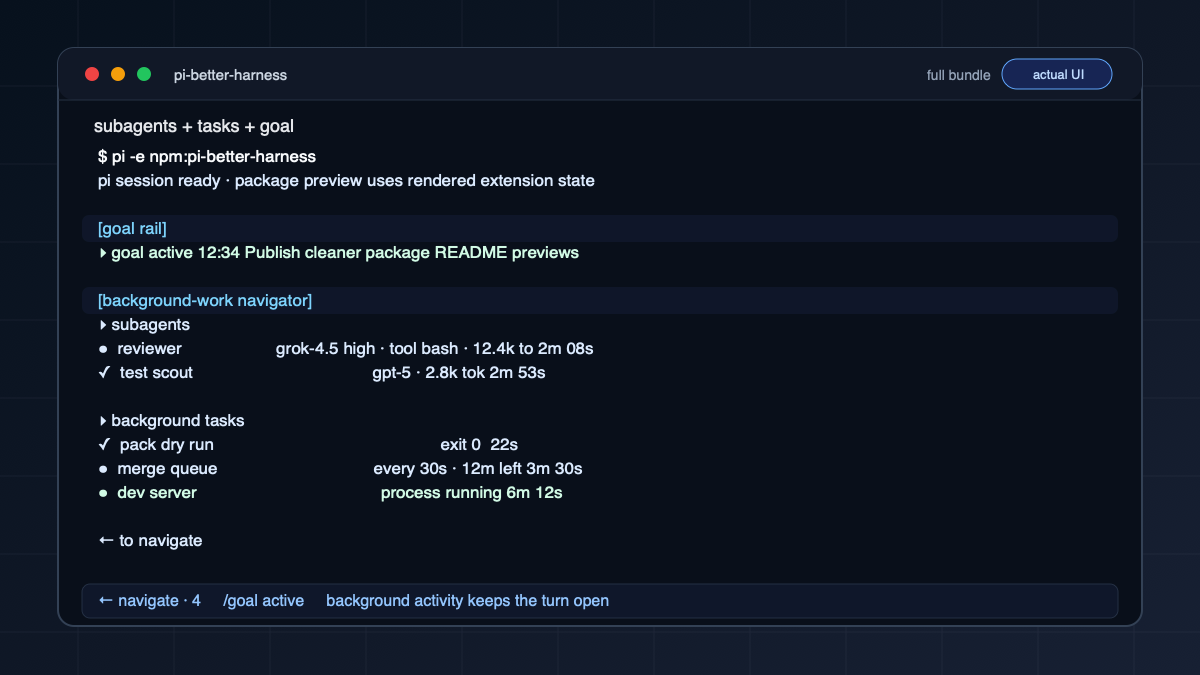
Subagent and background-task rows can be clicked to open their existing navigator
details. Enter and keyboard controls remain available, and editor input stays
passive. Harness packages do not write to Pi's status bar. Goal holds and resume
instructions remain available through /goal; permission checks are unchanged.
Screenshots
Install
Install the extensions as standalone Pi packages, so Pi displays and manages each by its own package name:
npx pi-better-harness installFor project-local Pi settings:
npx pi-better-harness install --localThe installer also registers Harness with filters for its own settings, minimal output, and Outcome & Todo extensions. It removes an old pi-better-plan registration in the selected scope. The component packages keep their separate identities. Pi's normal installation prompts and errors still apply.
The single-bundle installation remains available:
pi install npm:pi-better-harnessAfter a normal bundle install or pi update, Harness masks any separately loaded
pi-better-plan package before Pi registers its tools, /plan command, widgets,
or prompt hooks. This applies in either load order, including when Outcome & Todo
hooks are off. The old registration and cached files may remain, but are inactive while
Harness is loaded. Settings and session history are not rewritten. The explicit
installer above removes the old registration in its selected scope instead.
Ordinary Startup
You keep launching Pi the way you always have:
piThe foreground write sandbox starts inactive. Use /sandbox on for the current
session or /sandbox default on to persist opt-in across startup, new session,
resume, fork, and reload. There is no launcher.
While it is on, Pi's built-in bash, write, and edit tools, your own ! / !! commands, local background tasks, and subagents can write only under the directory you launched Pi from, minus the packaged deny paths (.git/hooks, .env, .env.local).
Reads and network access are unrestricted — this sandbox limits writes only. Writes are confined for those integrated first-party execution paths; Pi's own process, arbitrary pi.exec calls, and unrelated third-party extension code are not confined. Confinement is also per surface: each integrated surface denies its own control plane, not every other surface's, so with several first-party surfaces installed a confined process on one can still write another's control plane.
Sandbox state is human-only: /sandbox, /sandbox on, /sandbox off,
/sandbox default on|off, /sandbox deny ..., and /sandbox rules are slash
commands with no tool equivalent. /sandbox off and /sandbox default off
need interactive confirmation. Full policy: pi-better-sandbox.
Minimal Tool Output
The bundled harness provides Tool output: Normal / Minimal in
/harness-settings. /tool-output minimal, /tool-output normal, and
/tool-output (toggle) remain compatibility shortcuts to the same preference.
Minimal mode folds each tool call into a single-line header, including running
calls. The tool-specific icon and tool name share a state color: accent while
running, muted when completed, and error-colored when failed. In fullscreen Pi, a soft highlight travels through the entire visible running tool name and its
inline command/path details; details stay dim between highlight passes. Scrollback terminals keep static state colors.
Choose Tool animation: Off in /harness-settings for static running headers.
Running and failed calls retain text labels so state never depends on color or
motion alone. Tool rows are indented two columns past
the assistant text padding. Long
headers are truncated to the terminal width; result bodies,
images, boxes, and tool spacers are hidden. Built-in, extension, and MCP calls
are included. Tools without a custom call renderer use a generic icon and a
compact argument hint. Compaction summaries also collapse to one quiet row with
the pre-compaction token count; Ctrl+O reveals their original summary.
Custom transcript messages from any extension also fold to a quiet disclosure
row with the message type and first content line. This includes background
completion batches and subagent health/timing alerts. Ctrl+O or a fullscreen
click reveals the original content and any custom renderer. Direct UI notices
are unchanged.
Execution, sandboxing, and agent-facing payloads are unchanged.
When a foreground run ends, each consecutive block of tool calls folds further
into one disclosure row showing the call count and any failures. Only the failure
count uses the error color; the disclosure and total stay muted. Assistant text
stays visible, and restored history uses the same folded view. In newer Pi
fullscreen mode, click a block disclosure to reveal its call rows, then click a
call to expand its original details. Hover highlights compact call and disclosure
rows using the selection background (reverse video for themes without one), and
tool icons sit centered in a three-column gutter. Click the disclosure again to refold the
block; native expanded call/result clicks collapse individual details. Regular
terminals keep mouse input for terminal selection and scrollback; Ctrl+O expands
all original tool details in both modes and folds them again on the next toggle.
/tool-output normal restores ordinary rendering. Error result bodies are also
hidden in minimal mode and remain available when expanded.
Minimal mode also covers Harness tools: Subagents, Background Tasks, Goal, Todo, catalog inspection, and SSH. Compact calls retain the run or task ID, launch name and task, background command, goal action, or plan summary without showing result bodies. Finished calls fold into the same disclosure blocks as built-in tools; expanding them restores their original package renderers. Goal and Todo widgets and the background-work navigator are independent UI surfaces and remain visible.
Normal mode is the initial default. Changing tool output saves the choice in
global settings.json under piBetterHarness.toolOutput, as well as the current
session. New sessions inherit it; resumed branches retain their own saved choice.
This is a version-sensitive internal TUI adapter,
tested with Pi 0.82.1, 0.99.1, and the bundled Pi 1.0.4 CLI; incompatible APIs
produce a warning and leave ordinary output enabled. Print/RPC output and
exported transcripts are unchanged.
The installer includes this Harness-owned extension. To run it directly from a checkout:
pi -e ./packages/pi-better-harness/extensions/minimal-output/index.tsHarness Settings
The bundled harness provides /harness-settings, using Pi's native settings
list. It opens the settings screens of loaded Sandbox, Subagents, and Goal
packages without duplicating their configuration, plus the Agents shortcut
to the /agents catalog. /sandbox, /subagents settings, /agents, and
/goal settings remain available in standalone installations.
Packages without a settings screen are not listed. Pi's /settings is unchanged.
Sticky navigator controls the shared navigator used by Goal, Outcome & Todo,
Subagents, and Background Tasks. On (the default) keeps it above the input;
Off places it in the conversation so it scrolls with chat. Changes apply
immediately and save under piBetterHarness.navigator for future sessions.
Package controls and detail views remain available in either mode. Standalone
packages use the same shared navigator and saved preference.
The hub includes Tool output and Tool animation when the bundled renderer
extension is loaded. Changes apply immediately and save the default for future
sessions. The animation preference is stored in piBetterHarness.toolAnimation;
normal output and expanded tool details are never animated.
The hub also owns Completions while busy, shared by Subagents and Background
Tasks. Choose Wait until idle (the default) or Steer active run. Changes
apply immediately and autosave to the current session branch, including across
reloads. Press Ctrl+S to save the current choice as your default for future
Pi sessions; changing a session afterward does not change that saved default.
Saving a default leaves already-open sessions unchanged, including when
navigating to a branch without a session override.
The user default is stored in
<agent-dir>/settings.json under piBetterHarness.callbacks and also applies
when either callback package is loaded standalone. The former
PI_BETTER_CALLBACK_WHILE_BUSY environment variable is no longer supported.
All Harness-owned defaults use the piBetterHarness section of global
~/.pi/agent/settings.json (or PI_CODING_AGENT_DIR/settings.json): tool output,
Subagents configuration, callback delivery, Goal controls, and Sandbox activation,
permissions, and deny-rule templates. Existing preference files migrate on first
use after validation; global choices take precedence, and old files remain intact.
Updates preserve Pi's own settings and other packages' choices. SSH profiles,
plans, run records, and role/agent definitions remain in their existing stores:
they are session data or reusable definitions, not global UI defaults.
In /agents, model and effort edits are session-local until Ctrl+S saves them
to the user or trusted project's agents/settings.json. Markdown definitions
remain unchanged, so bundled prompt updates keep applying. The Settings,
Instructions, and Files tabs keep configuration separate from prompts.
Reset to bundled in Settings restores model/effort without changing the
prompt; in Instructions, it restores the prompt while preserving model/effort.
A user Markdown override is archived when its prompt is reset. Saved defaults
survive sessions and upgrades.
Next-prompt inference is deferred pending safe public auth/header resolution in Pi's SDK. It is not loaded by the bundle, has no toggle or preference store in this version, and makes no auxiliary model requests. The integration blocker is issue #426.
The hub is TUI-only and is included by the installer. To load the settings extension directly from the checkout:
pi -e ./packages/pi-better-harness/extensions/settings/index.tsWhen To Use
Use the installer when you want every core extension with standalone package identities. Install an individual package instead when you only need the sandbox, subagents, shell task supervision, synchronous SSH, or goal tracking. Outcome & Todo is available through Harness.
Compatibility
| Requirement | Support |
|---|---|
| Pi | Required |
| Recommended install | npx pi-better-harness install |
| Write sandbox on macOS | Seatbelt (sandbox-exec), ships with the OS |
| Write sandbox on Linux | Bubblewrap — install bubblewrap |
| Development runtime | Node.js 22+ |
Update Or Remove
Remove every standalone package:
npx pi-better-harness uninstallAdd --local to remove them from project-local settings. This also removes the filtered Harness registration in that scope.