pi-better-model-select
Searchable, usage-ranked model picker for Pi with model management, default model and thinking effort selection, and per-role subagent defaults.
Package details
Install pi-better-model-select from npm and Pi will load the resources declared by the package manifest.
$ pi install npm:pi-better-model-select- Package
pi-better-model-select- Version
0.3.6- Published
- Oct 30, 2026
- Downloads
- 1,278/mo · 924/wk
- Author
- msenebald
- License
- MIT
- Types
- extension
- Size
- 462.7 KB
- Dependencies
- 0 dependencies · 2 peers
Pi manifest JSON
{
  "image": "https://cdn.jsdelivr.net/npm/pi-better-model-select@latest/docs/demo/gallery.png",
  "extensions": [
    "./extensions/bms.ts"
  ]
}
Security note
Pi packages can execute code and influence agent behavior. Review the source before installing third-party packages.
README
pi-better-model-select
A searchable model picker for Pi. Switch models, edit model definitions, and save default models and thinking effort. Models you pick most often appear first.
Install
pi install npm:pi-better-model-selectRun /bms, type to filter by name, model ID, or provider, then press Enter to switch models for the current session.
Compact TUI
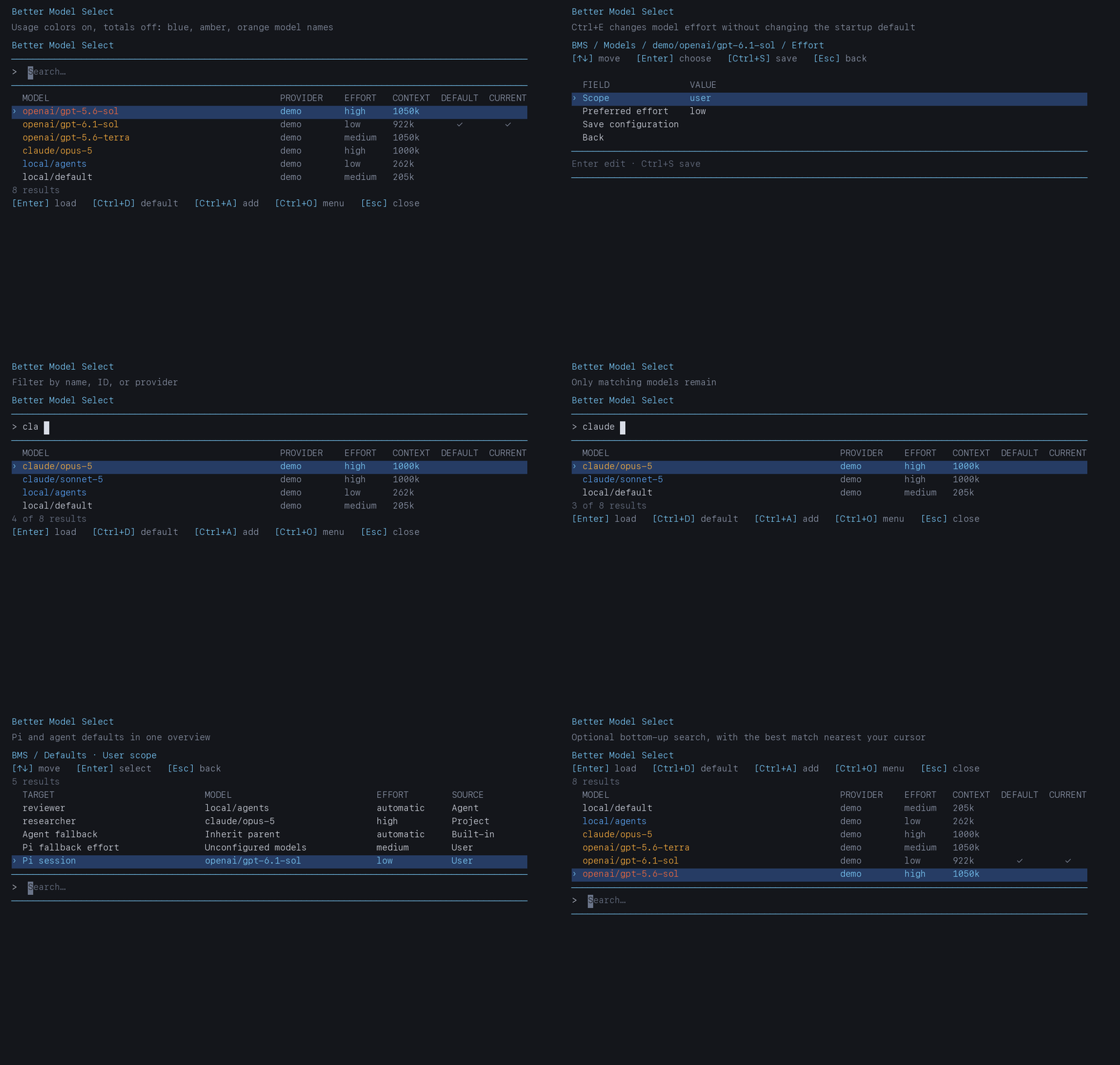
The picker uses aligned model, provider, effort, context, default, and current columns. Model names are color-coded by relative selection frequency using the icon's blue, amber, and orange palette. Unused models stay neutral. Selection totals are hidden by default. Type in the search field in Pi's editor area. Results appear below search by default, matching Pi command completion. Choose Options → Result placement → Above prompt for bottom-up results with the best match nearest the search line.
Add and edit use one form. Review the fields, press Enter to change a value, then choose Save configuration or press Ctrl+S to save. Text and numeric fields currently open a Pi input dialog; choices use the compact table. Esc goes back; unsaved changes require a discard confirmation. Options also stay in a draft until saved. Color-code usage, Show total selections, and Usage palette are independent options. Choose the Icon palette, the default, or Theme to use Pi's active thinking-level colors. Turning display options off does not stop counting or change sorting.
Commands and shortcuts
| Command | Action |
|---|---|
/bms |
Open the model picker |
/bms-add |
Add a model |
/bms-options |
Open result placement, write mode, and provider options |
/bms-defaults |
Configure Pi and subagent defaults |
Inside /bms:
| Key | Action |
|---|---|
| ↑ / ↓ | Move through models |
| Enter | Use the selected model for this session |
| Ctrl+D | Open startup-default form for the highlighted model |
| Ctrl+E | Edit the highlighted model's effort preference |
| Ctrl+G | Open the defaults menu |
| Ctrl+A / Ctrl+U / Ctrl+X | Add / update / delete a model |
| Ctrl+O | Open BMS menu: Models, Add model, Defaults, Options |
| Ctrl+R | Reset usage ranking |
| Esc | Close |
The DEFAULT and CURRENT columns use checkmarks to identify the saved startup default and active session model. The row highlight shows the model you are browsing. The EFFORT column shows the effort each model will use when loaded, using its saved preference or the current session level as a fallback. Non-reasoning models show off. Pi may clamp unsupported effort levels. Only Enter selections count toward usage ranking. Returning from a submenu preserves your search and selection. Plain menus always browse top-to-bottom; only searchable result lists reverse in above-prompt mode. Esc goes back one level, including back to the BMS menu when that is where you entered a submenu.
Default models and effort
Save a model and thinking effort for Pi, a subagent fallback, or an individual agent role.
- Use Ctrl+D in
/bmsto set the main Pi default and save effort for that model only. Other models' preferences and the global fallback stay unchanged. - Configure the user-wide fallback effort in
/bms-defaults→ Pi fallback effort. Per-model preferences take priority. - Use
/bms-defaultsfor all defaults. The menu starts in user scope; select the scope row to switch to a trusted project's settings. - Agent model and effort overrides are independent. You can inherit the parent model while choosing a different effort.
Removing an override restores the agent's own definition and fallback rules. Effort off is explicit, not inheritance. The menu shows saved settings and their sources, not running-child state.
BMS applies saved per-model effort preferences when you load a model, without /reload. Run /reload after changing agent defaults or before using updated per-model preferences through Pi's own model picker. Existing children stay unchanged. Test Pi startup defaults in a fresh session, since resumed sessions restore their recorded model and effort.
Optional pi-subagents integration
pi-subagents is a separate extension. Install it only if you want subagents:
pi install npm:pi-subagentsBMS discovers its agent roles and edits their saved model and effort defaults. It does not install pi-subagents automatically. External runner roles are read-only because their model settings belong to the runner.
If discovery fails, Agent discovery details shows the error. Pi defaults work without this integration. See the configuration reference for compatibility details.
Supported effort levels
BMS uses provider-reported effort lists when available and Pi's capability restrictions where supplied. Otherwise it offers Pi's standard levels, marked as provider support unverified:
off · minimal · low · medium · high · xhigh · maxAdd/update edits supported effort levels. Ctrl+E edits a per-model preferred effort separately. These hints do not change Pi's provider adapters. If Pi clamps an effort, BMS asks before saving the applied level. No paid model probes are made.
Where changes are saved
Open Ctrl+O → Options to select the model write mode:
| Mode | Behavior |
|---|---|
| Overlay, the default | Save model edits in models.bms.json; leave models.json unchanged |
| Direct | Write model edits to Pi's models.json |
Defaults always go into native Pi settings.json, regardless of write mode. User files normally live in ~/.pi/agent; project defaults use .pi/settings.json. BMS respects PI_CODING_AGENT_DIR and shows the selected settings paths.
Provider filters hide entries only in /bms, not Pi's /model picker. Default-assignment menus also include authenticated Pi registry models.
Further documentation
- Changelog: changes by version.
- Configuration reference: file paths, precedence, overlays, metadata, and integration limits.
Development and navigation design documents live in
docs/internal/in the source checkout and are not included in the npm package.
Support and contact
By Martin Senebald. For questions, feedback, or bug reports, contact me on:
License
MIT