pi-better-sandbox
Pi extension with independent Main and Subagents permission profiles, file guards, and OS sandbox enforcement.
Package details
Install pi-better-sandbox from npm and Pi will load the resources declared by the package manifest.
$ pi install npm:pi-better-sandbox- Package
pi-better-sandbox- Version
0.12.0- Published
- Oct 7, 2026
- Downloads
- 3,028/mo · 1,948/wk
- Author
- exoulster
- License
- MIT
- Types
- extension
- Size
- 351.3 KB
- Dependencies
- 1 dependency · 3 peers
Pi manifest JSON
{
  "image": "https://raw.githubusercontent.com/1aboveio/pi-better-harness/main/docs/images/package-gallery/pi-better-sandbox.png",
  "extensions": [
    "./index.ts"
  ]
}Security note
Pi packages can execute code and influence agent behavior. Review the source before installing third-party packages.
README
pi-better-sandbox
Sandbox permissions for Pi's foreground tools and detached subagents.
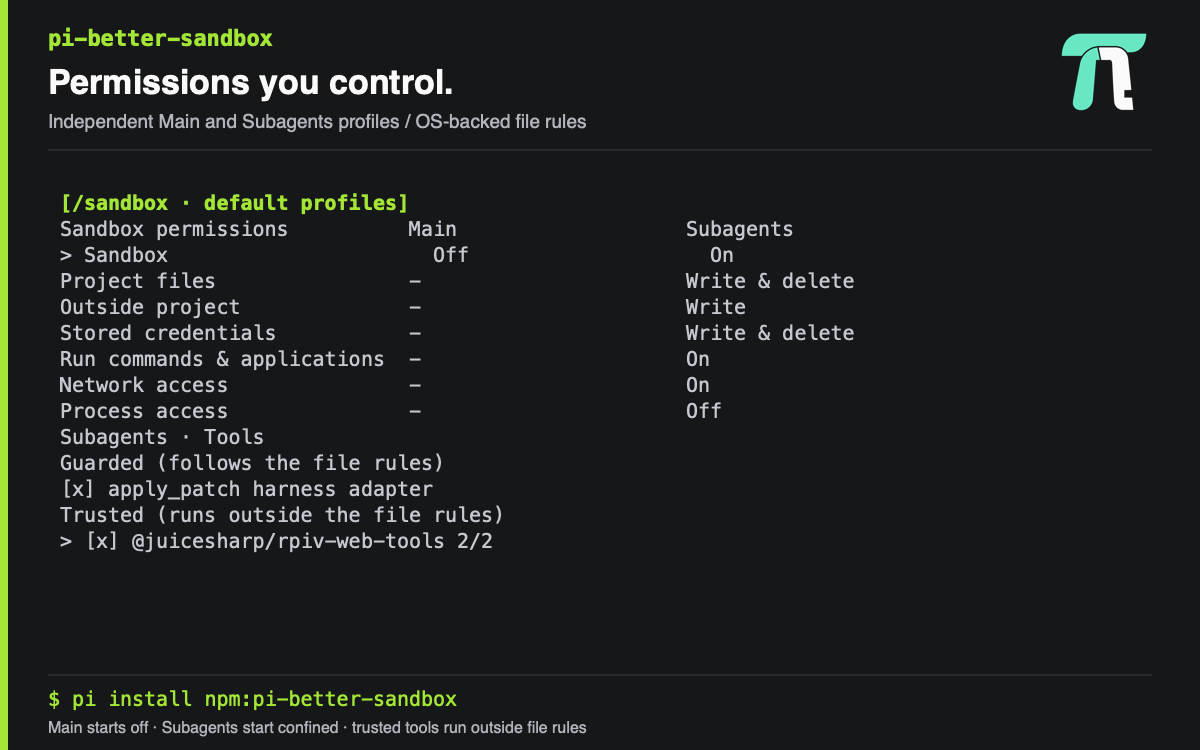
It is installed by default with pi-better-harness, and can be installed on its own:
pi install npm:pi-better-sandboxEither way you keep starting Pi the way you always have — pi. There is
no launcher or wrapper command. Main starts inactive; Subagents start confined.
Open /sandbox to change either column, or use /sandbox on for the current
Main session. Edits apply immediately and are saved to the current session branch.
Ctrl+S saves both profiles as defaults for new sessions.
Sandbox permissions               Main             Subagents

Sandbox                           Off              On

Project files                     -                Write & delete
Outside project                   -                Write
Stored credentials                -                Write & delete
Run commands & applications       -                On
Network access                    -                On
Process access                    -                Read

  Subagents · Tools
    Guarded (follows the file rules)
    [x] apply_patch  harness adapter
    Trusted (runs outside the file rules)
    > [x] @juicesharp/rpiv-web-tools  2/2
    > [ ] <other installed package>  0/1

↑↓ Select · ←→ Column/fold · Space Toggle · ctrl+s Save default · Enter Fold · Esc Back
Subagents · Tools picks the extension tools a confined subagent may use:
- Guarded tools go through the same guarded file operations as
writeandedit, so the rows above govern them.apply_patchapplies Codex-style patches; deletes and moves follow the removal rules, and a patch is checked in full before any file changes. - Trusted tools are the other tools your Pi has loaded, listed with their
package. A ticked one is loaded into the subagent and runs in its Pi process,
outside the file rules. One Space toggles it immediately. It is admitted
only from the package you ticked. Known network tool names are refused while
Network access is Off:
web_fetch,web_search,firecrawl_scrape,firecrawl_extract,mcp,mcpScript,remote_bash,ssh_profile,ssh_mux, and anymcp__*name. That is a name list, not a network sandbox.
Trusted tools use two levels: a package/provider group, then its individual tools.
Non-MCP tools are grouped by exact owning package; mcp__<provider>__... tools
are grouped by provider and owning package together. Groups start collapsed.
File-backed extensions explicitly marked builtin by Pi display as built-in,
not their package path (which can be .). This is a display label only: saved
choices and admission still use the original owning package. An unmarked .
package is not built-in, and an unavailable saved tool keeps its package label
until Pi reports its provenance again. Core tools with synthetic source paths
remain excluded from trusted candidates.
> means collapsed and v means expanded. Their checkbox shows [x] when
all children are selected, [-] when some are selected, and [ ] when none
are; the count is selected/total. Right expands a group. Left collapses a group,
or moves from a child to its parent and collapses it. Enter folds the selected
group. Space on a group selects all children when none or only some are selected,
or deselects them all when all are selected. Every toggle applies on one Space;
Ctrl+S saves defaults and reports anything loosened. Only individual tool
entries are saved, never a package/provider wildcard or the open/closed state.
Defaults: apply_patch, web_fetch, and web_search on; everything else off.
The pi-better-ssh trusted group offers ssh_profile, remote_bash, and
ssh_mux, all off by default. Expand it with Right and toggle individual tools
with Space, or toggle the group to select all three. Keep Subagents Network
access On. A ticked tool automatically loads its owning extension into new
subagents; no separate extension mapping is needed. Default launches include
ticked tools; an explicit spawn tools list must include the SSH tools needed,
and clean:true does not load extensions. Ctrl+S saves these choices for new
sessions. Running subagents keep their launch policy.
Trusted SSH tools run outside local file, credential-file, and command rules; remote effects are not confined either. Only enable them when you trust the extension and the subagent's access to your SSH configuration and credentials. Other harness packages remain excluded from trusted candidates. See ADR 0009.
Project files and Outside project cycle through four levels:
| Level | Meaning |
|---|---|
| Off | No access. |
| Read | Read only. |
| Write | Read, create, and overwrite in place; removal is restricted, with the exceptions below. |
| Write & delete | Full access, including removal. This was called "Read / write"; saved settings keep it. |
Stored credentials uses the same labels but offers only Off, Read, and Write & delete. Subagents default to Write & delete; Main retains Read. Explicit saved defaults and session profiles are preserved, including Read and Off. Changing the built-in default does not upgrade existing profiles.
Whatever these rows say, removal is always allowed in temp, hidden
directories and files directly under your home (~/.cache, ~/.gradle,
~/.npm, …), and git worktree folders (.worktrees/, *-worktrees/). The
deny list below still wins there.
Write blocks rename-based saves. The kernel treats "rename a temp file over
an existing file" as removing that file. Under Write, git commits and editors or
package managers that save atomically fail outside those disposable places. Pi's
own write and edit tools write in place and keep working. Choose Write &
delete for a place where that matters. The table shows this hint when you
select the row.
Outside project = Write (the Subagents default) lets tasks write across your home directory and temp, so tool caches just work with no per-tool setup. It retains fixed protections that are not configurable per tool:
- Credentials follow the independent Stored credentials row. The Subagents
Write & deletedefault permits reading, modifying, and removing the files listed below plus~/Library/Keychains,~/.claude/.credentials.json,~/.claude.json,~/.gnupg,~/.codex/auth.json,~/.cargo/credentials(.toml),~/.pgpass, and~/.config/rclone, subject to stricter protected-path rules. Set the row to Read to deny credential writes or Off to hide them. Writable credentials let CLIs such asgcloudupdate database permissions and refresh token state even for read-only cloud queries. This also lets tasks alter or delete credentials; it is not a read-only authentication capability. - Code that runs later cannot be written, removed, or renamed: shell startup
files (
.bashrc,.zshrc,.profile, and the rest),~/.config/fish,~/.gitconfig,~/.config/git,~/.config/systemd/user,~/.config/autostart,~/.pi(or$PI_CODING_AGENT_DIR),~/.claude,~/.agents,~/Library/LaunchAgents,~/.local/bin,~/bin,~/.git-templates,~/.oh-my-zsh/custom,~/.gradle/init.d, and~/.cargo/config(.toml). These stay readable, because subagents read skills from them. Their parent folders can't be removed or renamed either, so you can clean inside~/.gradlebut not delete~/.gradleitself. - Harness state (the subagent and background-task registries, run and control directories, and task-runtime provenance) cannot be written, removed, or renamed.
Every protected entry is guarded under the literal path under home, every symlink hop on the way to its target, and the target itself. So a dotfiles manager's links (stow, chezmoi), including chains of links, can't be swapped or retargeted. A link whose target is missing protects that target too: it can't be created.
Git config and hooks under home are not protected, so git keeps working:
git init, git clone and git worktree add copy hook samples into .git/hooks.
A task can therefore plant code that a later git command runs, through any
repository's .git/hooks or .git/config (core.hooksPath, core.fsmonitor,
diff.external, filters, aliases), submodule hooks in .git/modules/*/hooks,
gitdir: redirects, or files that ~/.gitconfig pulls in with [include].
~/.gitconfig, ~/.config/git, and ~/.git-templates themselves stay protected. Add your own paths to the deny list with /sandbox deny add <path>. Under
Write, those paths are also protected from removal and renaming.
Space applies every change immediately, including higher permission levels,
capabilities switched on, and a sandbox switched off. ctrl+s saves the
defaults from any row on the first press, and the note names anything that
loosened. Enter only folds tool groups; it never saves defaults. The focused
row has a full-width background and bold text; the selected Main/Subagents cell
also uses inverse styling. No model
tool can change these settings. Other rows toggle Off/On. Detail cells under an
Off sandbox display a dimmed - and cannot be changed; their values return when
the sandbox is enabled again.
Platforms
| macOS (Seatbelt) | Linux (Bubblewrap) | Windows | |
|---|---|---|---|
| Outside project = Write | Writes across home and temp. Removal and renaming refused outside the disposable places. | Fallback: ordinary top-level home folders (~/projects, ~/Documents, …) and home itself are read-only. Dot entries, temp, worktree folders (found within three levels of home), and the workspace are writable, removal included. A directory holding a protected symlink (typically ~/.config with a stow link such as ~/.config/git) keeps its existing entries writable but refuses new top-level entries. A protected symlink pointing at nothing can get an empty read-only placeholder that stays on disk; the launch says so, and you remove the placeholder before creating the real target. |
No backend: confined launches fail closed. |
| Project files = Write | Enforced. | Refused at launch (bind mounts cannot separate removal from writing). Use Write & delete or Read. | No backend. |
| Deny list | Path rules, matched ignoring case on every volume (as Seatbelt does). | Credentials masked by empty mode-000 mounts. Code that runs later is bound read-only. | No backend. |
Linux could separate removal from writing with Landlock (5.19+), but nothing
here can apply it: Node has no binding and bwrap does not expose it. Windows
could use NTFS DELETE rights with a restricted token or AppContainer, which
would need a native launcher. Both are tracked as follow-ups; see
ADR 0008.
Recovery snapshot (macOS)
When a confined subagent or background task starts with Outside project =
Write or Write & delete, the harness starts tmutil localsnapshot in the
background. That is an APFS local snapshot and needs no administrator rights.
Write can still empty or re-permission files in place, and Write & delete can
remove them. It takes at most one per 15 minutes per Pi process. The run never
waits for it. A failure shows as a warning (subagents) or a task-log line
(background tasks). Set PI_SANDBOX_RECOVERY_SNAPSHOT=off to turn it off.
Local snapshots are purgeable, so treat them as a recovery aid, not a backup.
The Seatbelt profile leaves Mach IPC to system daemons open, which is why
security and tmutil work inside the sandbox. It also means a hostile task
could likely delete these snapshots. Restore from one with Time Machine or
tmutil restore.
Stored credentials currently means known credential files. It covers SSH, AWS, GitHub CLI, Google Cloud CLI, Azure, Kubernetes, Docker, npm, netrc, Git credentials, and Pi's file-based auth. These rules override ordinary file access. OS vault services such as Keychain and Secret Service, and tokens inherited in environment variables, are excluded. Write & delete may be needed by a CLI that refreshes a token or updates its credential database. This row applies independently of Project files and Outside project.
Process access controls the fixed process_list tool: Off or
Read (default for fresh Main and Subagents profiles). Read returns current-user process IDs and names only, with optional
literal name filtering and a bounded result limit. It does not expose command
arguments, environment variables, debugger attachment, signals, termination,
or emulator/ADB operations. Explicit saved values are preserved, and legacy
saved profiles without this setting stay Off until a human enables Read;
subagents snapshot the setting at launch.
The inventory helper uses a fixed system pgrep command under the existing
kernel policy, without a shell or model-controlled arguments. It can work with
Run commands & applications Off because it is a fixed read-only adapter, not
general command execution. No sandbox restrictions are relaxed. The control
governs this adapter only: it does not make arbitrary shell process inspection
impossible when commands are enabled. Windows has no supported inventory backend.
Linux still requires a supported permission profile with visible process metadata;
hidden-root profiles without /proc fail rather than gaining a new host mount.
On macOS, /bin/ps is setuid and can be refused at execution by Seatbelt even
when process information reads are allowed. Enabling Process access provides
process_list; it does not authorize raw /bin/ps or an unconfined workaround.
File and shell operations use the kernel: macOS uses Seatbelt (sandbox-exec)
and Linux uses Bubblewrap (bwrap). read, write, and edit keep Pi's normal
tool behavior and mutation queues, while a fixed worker performs filesystem
syscalls under the selected policy. Canonical checks explain denials; kernel
enforcement also protects against a symlink changing between checking and use.
The confined file worker rejects files over 8 MiB instead of silently truncating
them; larger-file processing can use a confined command when commands are On.
What is confined, and what is not
Pi is the trusted runtime. It can lock configuration/authentication files, connect to its provider, and persist sessions. Main and Subagents permissions apply to task operations. Subagents can start with task Network access or Run commands & applications Off. The fixed file worker remains available according to the file permissions even when task commands are Off.
The task executor provides private scratch through TMPDIR, TMP, and TEMP.
Outside Read and Write & delete also retain explicit runtime write exceptions for
/tmp (canonical /private/tmp on macOS), the current user's macOS temporary
directory, and that user's Security.framework MDS cache. MDS access lets CLI
Keychain retrieval initialize and refresh its cache; it does not restrict the
Keychain API to reads. Other users' caches and arbitrary outside *.lock files
are not writable. Credential-file and Pi control-path protections still win.
Outside Off does not expose these host runtime directories.
The currently admitted model-tool implementations are read, write, edit,
and bash, plus, for Subagents, the guarded apply_patch and the trusted tools
ticked under Subagents · Tools. User-entered ! and !! commands use the same
shell policy. Other model-callable tools require a verified execution adapter
and are refused while that actor's sandbox is enabled; enabling network alone
does not admit them. Subagent launch output identifies requested tools that are
unavailable, with the reason. Main
remains Off by default, so its ordinary orchestration tools remain available
unless the user enables Main confinement.
Pi and installed runtime extensions remain trusted code, including their
initialization, provider hooks, and internal pi.exec calls. The tool gate is
not a sandbox around malicious runtime extensions. Loaded runtime code,
configuration, and policy/control files are protected from task writes, even
under broader file grants. Task access to ~/.pi does not receive a blanket
write allowance or lock-file exception.
Local confinement cannot govern a remote host's filesystem. SSH tools are
available to confined Subagents only when explicitly ticked as trusted under
Subagents · Tools, with Network access On. They run outside local task rules.
Main SSH tools, and unadmitted MCP, scripting, background, and nested-agent
tools, still lack admission adapters and fail closed under an enabled actor
profile. SSH through confined bash receives local file, credential, and network
restrictions; remote effects remain outside the local filesystem policy.
Overriding write and edit changes nothing you can see: the parameter
schemas, prompt guidance, call rendering, write previews, edit diffs, result
details, mutation queueing, and cancellation are Pi's own. Only the filesystem
operations underneath them are replaced.
Local Permission Diagnostics
Opt in with /sandbox diagnostics on. Saved in global settings.json, this
collects redacted local observations from foreground guards, guarded file
operations, and background launch preflight, plus redacted worker reports.
Collection is off by default and never changes permissions or uploads data.
/sandbox diagnostics status: show collection state and retained evidence./sandbox diagnostics summary: group denials and observed recoveries./sandbox diagnostics export: write a redacted local JSON export for sharing./sandbox diagnostics off: stop collection without deleting retained evidence.
The bounded journal lives under <agent-dir>/diagnostics/sandbox: at most 2,000
observations, 1 MiB, and 30 days. Records contain resource categories, package
version, platform/backend, and installation-keyed fingerprints, not raw commands,
paths, file contents, or output. Export excludes the fingerprint key.
Confirmed policy refusals are separate from EACCES/EPERM observations, which
do not prove the sandbox caused the failure. Confined workers relay fixed,
redacted reports to their parent, which records them as agent-reported; workers
never receive write access to the global journal. Worker retry correlations stay
within the reporting worker. Arbitrary shell output and nonzero exits are not
classified. Recovery is an observed success, not authorization for broader
permissions or remote access. Summaries disclose journal gaps and retention
losses; collection failures that prevent a write may not persist.
Storage contention is bounded and never overrides a writer's lock by age. If an
abruptly terminated collector leaves events.jsonl.lock, collection warns and
stops writing. Stop every collector before manually removing that empty lock
directory. Existing evidence is retained; enforcement is unaffected.
Commands
/sandbox                     open the permission table (text status outside TUI)
/sandbox on                  enable protection for operations started from now on
/sandbox off                 turn protection off for this session (interactive confirmation)
/sandbox default on          persist opt-in and enable it now
/sandbox default off         persist opt-out (interactive confirmation)
/sandbox deny list           show the write-denied paths
/sandbox deny add <path>     stop allowing writes to a path
/sandbox deny remove <path>  allow writes to a path again
/sandbox deny reset          drop your changes and restore the packaged defaults
/sandbox rules               open the write-denied paths editor
The footer shows sandbox · available when a backend is available but inactive,
sandbox · inactive when inactive without a backend, and
sandbox · on · <project> while protection is active. Explicitly enabled
sessions report UNAVAILABLE or FAILED when protection cannot be applied.
Both surfaces report what the runtime actually resolved — which backend, which
executable — never what was merely configured.
/sandbox off and /sandbox default off need interactive confirmation and are
refused outright when there is no interactive UI. There is no tool for changing
sandbox state or its rules, so the model cannot change confinement or edit the
paths it is confined away from.
Write-denied paths
Three paths are denied out of the box — .git/hooks, .env, and .env.local,
relative to whichever project you are in. They live in the package's source, so
installing writes no settings file anywhere.
Rules are paths, not patterns. Write one of three ways:
| You type | It means |
|---|---|
build/artifacts |
that path inside every project you open |
~/.aws |
that path under your home directory |
/etc/hosts |
exactly that path |
A relative rule is stored as a template and resolved against each project, which is why one global rule set is enough — there is no per-project database. Lists and the editor always show the canonical absolute path a rule currently resolves to. A directory denies its whole subtree; a file denies that exact file, whether or not it exists yet.
/sandbox rules opens a compact keyboard-driven editor over the same rules:
arrow keys to move, enter to remove the highlighted rule, or pick Add to type
a new one and Restore the packaged defaults to start over. The slash commands
and the editor are two front ends over one validation and persistence module, so
they cannot disagree.
Changes take effect for shell commands and file mutations started after them. A command already running keeps the rules it launched with.
Where your rules live
Your changes are written to ~/.pi/agent/settings.json (under
$PI_CODING_AGENT_DIR when you set one), in the piBetterHarness namespace:
{
  "piBetterHarness": {
    "sandboxDenyRules": {
      "version": 1,
      "denyWrite": [".env", ".env.local", ".git/hooks", "build/artifacts"]
    }
  }
}
The override key appears the first time you add or remove a rule, or when an
existing legacy override is migrated; installation alone writes nothing.
/sandbox deny reset sets sandboxDenyRules to null and puts the defaults
shipped by the installed package version back in force. The sentinel prevents a
retained legacy file from being imported again and does not store a stale copy
of the packaged defaults. Other Pi and harness settings remain unchanged.
If the file cannot be read, the packaged defaults stay in force, the problem is
reported, and rule changes are refused until you fix the override or reset it —
a typo is never quietly turned into a lost rule set. If the whole settings.json
file is invalid JSON, repair it by hand first; a deny reset cannot discard other
settings to repair the file.
What is refused, and why
- Empty entries and patterns (
*.pem,src/**/x) — rules are concrete paths; a pattern would silently match nothing. - Duplicates, however they are spelled:
.env,./.env, the absolute path, or a symlink pointing at the same file all resolve to one canonical path. - Overlaps, in both directions. A path already inside a denied directory would change nothing; a directory that would swallow a narrower rule names that rule so you can remove it deliberately instead of losing it silently.
- A rule that contains the project root —
.,..,/, or~when your project lives under home. Denying it would make every write in the project fail./sandbox offis the thing you actually want there.
A global rule that turns out to contain the root of a different project stays in your rule set but is held out in that project, with a message saying so.
Upgrading
Sandbox defaults now share global settings.json under piBetterHarness:
sandbox stores version 1 activation preferences, sandboxPermissions stores
version 1 permission profiles, and sandboxDenyRules stores the rule override.
On first read of a missing key, the corresponding validated legacy file in
extensions/ is imported: pi-better-sandbox-preferences.json,
pi-better-sandbox-permissions.json, or pi-better-sandbox.json. Legacy files
are left untouched. An existing global key always wins, including the deny-rule
null sentinel; invalid global values are reported, not replaced by legacy data.
Updates use locked atomic replacement and preserve unrelated Pi settings and
other harness keys.
A saved permission profile keeps its values: a saved read-write is now shown as Write & delete, and a saved
Subagents Outside project = Read stays Read. Only a fresh configuration, or
Ctrl+S after you choose Write, uses the new Subagents default. To
adopt it, open /sandbox, set Subagents → Outside project to Write, and save.
~/.pi/agent/sandbox.json (filesystem.allowWrite, allowRead,
network.allowedDomains) is the format of Pi's example sandbox extension. This
package never reads it, and it has no effect on the harness.
Lifecycle
The foreground sandbox is inactive by default. Permission edits, including
Sandbox switches and /sandbox on|off, auto-persist as Pi custom entries on the
current session branch, not as global defaults. Resume, fork, reload and session
tree navigation restore the latest policy on the active branch. A branch with
no permission entry and a new session inherit saved global settings. Invalid
persisted session policy fails closed rather than falling back to defaults.
Ctrl+S writes both profiles to piBetterHarness.sandboxPermissions in global
settings.json. When no saved profile exists, the Main switch inherits the
activation preference from piBetterHarness.sandbox, including migrated legacy
activation preferences.
/sandbox default on|off remains available and updates Main's saved switch.
Failed default saves leave the current session's edits intact. Write-deny rules
retain their global persistence in piBetterHarness.sandboxDenyRules through
/sandbox deny and /sandbox rules. Session entries and runtime control-plane
protections are unchanged.
Toggles apply to operations launched after the change. A command already running keeps the policy it launched with.
Fail-closed behaviour
While the sandbox is explicitly or persistently enabled and a backend cannot be applied, protected commands and file mutations are blocked rather than run unprotected:
- No backend on this platform (
unavailable). - A launch directory too broad to confine —
/or your home directory (failed). Relaunch Pi from the directory you are actually working in, or turn the sandbox off on purpose. - A backend that was selected but failed to start. It is never retried directly.
Paths, symlinks and denied files
The launch directory is canonicalized at session start, so reaching a project through a symlink does not widen what is writable. Denied entries are canonicalized the same way: a directory denies its whole subtree, a file denies that exact file, and an alias pointing at a denied file is denied too.
Platform support
| Platform | Backend | Requirement |
|---|---|---|
| macOS | Seatbelt (sandbox-exec) |
ships with the OS |
| Linux | Bubblewrap (bwrap) |
install bubblewrap |
| Other | none | protected commands are blocked |
A detached subagent gets a private session/temp directory for Pi's runtime
state. This directory stays writable even with Outside project set to Read or
Off; other runs' state and the parent's launch metadata are not included.
Read access to system executable and library directories, device I/O, and root
directory metadata/listing remains available so a process can start. On macOS,
the allowance excludes the broad /System/Volumes tree.
Linux currently refuses combinations it cannot safely mount: hiding the project or credential files inside a visible whole-filesystem bind, writing credential stores under a read-only outside root, a writable outside root (Write & delete) with protected paths, and Project files = Write. These launch errors preserve the selected restrictions. The macOS permission combinations are covered by real-kernel tests; Linux mount behavior requires a Linux runner with Bubblewrap and user namespaces.
macOS setuid executable limitation
Seatbelt-sandboxed processes cannot execute setuid/setgid binaries, even with
an (allow default) profile. On the verified host, /bin/ps and /usr/bin/top
are setuid-root binaries. A shell attempting to run /bin/ps reports
Operation not permitted and exits 126. This is an OS-level execution
restriction, not a harness command deny rule, a filesystem permission failure,
or evidence that Run commands & applications is Off.
Read-only reproduction (verified on 2026-10-04):
ls -l /bin/ps /usr/bin/top
/usr/bin/sandbox-exec -p '(version 1) (allow default)' \
  /bin/bash -c '/bin/ps -p $$ -o pid,ppid,comm'
The second command fails with /bin/bash: /bin/ps: Operation not permitted
and exit 126; the same ps query outside Seatbelt succeeds. Launching ps
directly through sandbox-exec instead reports execvp() failure and exit 71.
Changing the requested output fields or adding a profile allowance for ps
does not remove this limitation.
When process inspection is a prerequisite for safe work, do not interpret the
denial as an empty process list. Hold the dependent operation until an
authorized coordinator or environment custodian supplies a fresh snapshot
and explicit ownership handoff from outside the task sandbox. Prefer
pid,ppid,pgid,lstart,comm over full command arguments, which may expose
secrets. Do not disable the sandbox or modify/copy privileged executables to
work around the denial. A trusted process-inspection adapter would require
separate implementation; this package does not currently provide one.
See the session evidence and documented setuid/setgid limitation.
For other extensions
The effective policy is published as a frozen snapshot on Pi's extension event bus. It carries policy and status only — never a way to run anything.
import {
  FOREGROUND_SANDBOX_POLICY_CHANNEL,
  FOREGROUND_SANDBOX_POLICY_REQUEST_CHANNEL,
  type ForegroundSandboxPolicyEvent,
} from "pi-better-sandbox";

pi.events.on(FOREGROUND_SANDBOX_POLICY_CHANNEL, (policy) => {
  // Snapshot it at launch time; a running operation keeps its launch policy.
});

// Loaded late and missed the last publication? Ask for the current one.
pi.events.emit(FOREGROUND_SANDBOX_POLICY_REQUEST_CHANNEL, undefined);