pi-board
AI-first local task/sprint manager
Package details
Install pi-board from npm and Pi will load the resources declared by the package manifest.
$ pi install npm:pi-board- Package
pi-board- Version
1.0.5- Published
- Apr 30, 2026
- Downloads
- not available
- Author
- jpballares
- License
- unknown
- Types
- extension
- Size
- 443.6 KB
- Dependencies
- 3 dependencies · 0 peers
Pi manifest JSON
{
  "extensions": [
    "./index.js"
  ],
  "image": "img/board.png"
}
Security note
Pi packages can execute code and influence agent behavior. Review the source before installing third-party packages.
README
pi-board
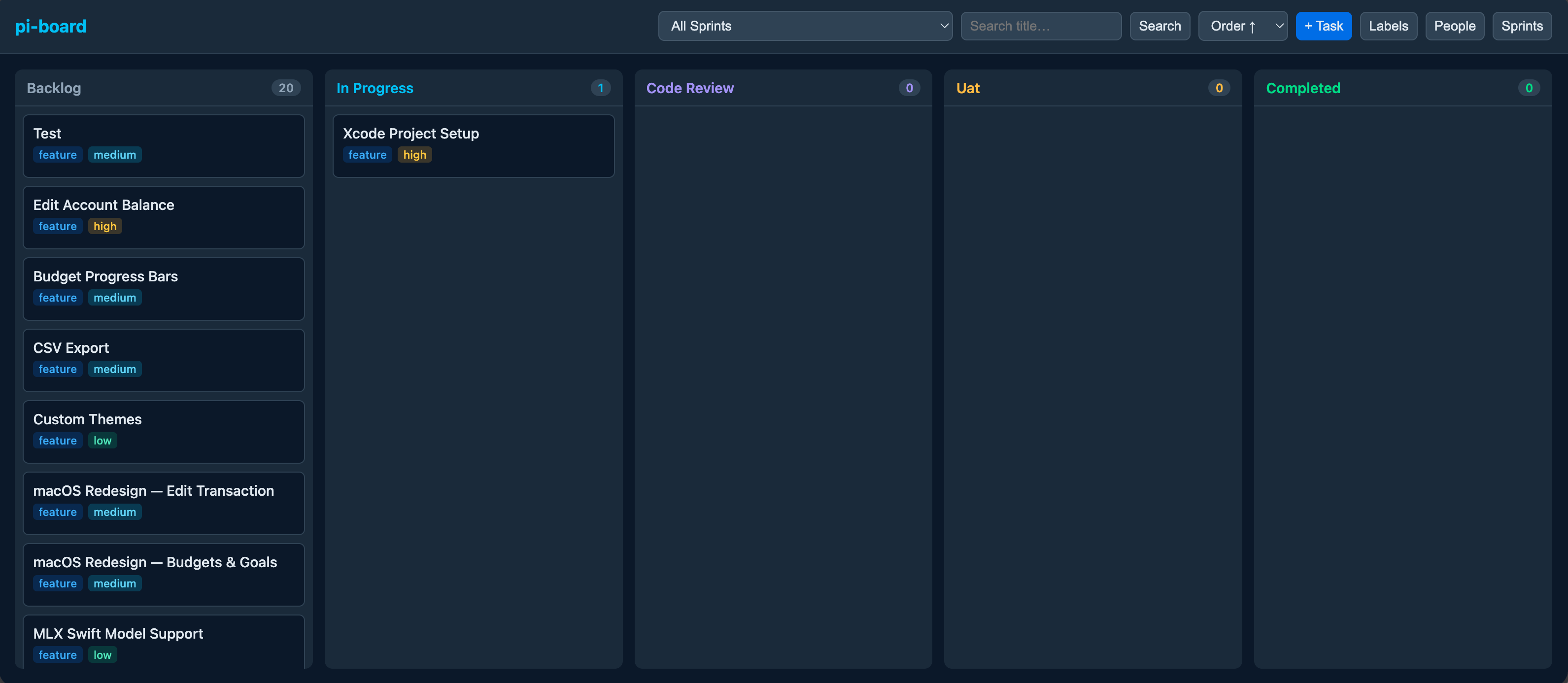
AI-first local task and sprint manager with a Kanban web UI. Manage tasks through conversational AI tools or a drag-and-drop board in your browser.
Installation
From npm
pi install npm:pi-board
From GitHub
pi install git:github.com/JPBallares/pi-board
From local path (development)
pi install /path/to/pi-board
Quick Start
Install the package (see above).
Start the board server:
/boardThis opens
http://localhost:3333in your default browser.Create your first sprint and tasks via AI or the web UI.
Web UI
Open the Kanban board with /board or visit http://localhost:3333.
Features
- Kanban columns: Backlog → In Progress → Code Review → UAT → Completed
- Drag & drop: Move tasks between columns; changes persist immediately
- Mobile fallback: Tap the ⋯ menu on any card to move it without drag-and-drop
- Task detail modal: Click any card to view and edit all fields inline
- Search: Filter tasks by title or description (submit-based)
- Filters: Filter by sprint, assignee, or label
- Active sprint quick button: One-click filter to the currently active sprint
- Sort: By priority, order, or creation date — preference saved to
localStorage - Labels: Create colored labels and attach them to tasks
- People: Create assignees with colors; assign during task creation or editing
- Sprints: Only one active sprint at a time; completing a sprint moves all its tasks to Completed
- Auto-refresh: Board updates every 5 seconds when no modal is open
- Keyboard shortcuts:
N— New taskE— Edit open taskD— Delete open taskEsc— Close modal?— Show shortcuts help
- Collapsible columns: Click ▾/▸ to collapse/expand columns; state persists in
localStorage - WIP limits: Set max tasks per column; visual warning when exceeded
- Markdown descriptions: Task descriptions render as Markdown in the detail view
- Overdue notifications: Toast warning when tasks are past their due date
- Stats modal: Burndown chart for the active sprint and assignee workload table
- Export / Import: Download full board as JSON, export filtered tasks as CSV, or restore from JSON
AI Tools
Task Management
| Tool | Description |
|---|---|
board_create_task |
Create a new task. Supports title, description, type, priority, status, sprint, assignee, labels, due date, estimate, and dependencies. Auto-assigns to the active sprint if none specified. |
board_update_task |
Update any task field by ID. Can reassign, change status, update labels, dependencies, etc. |
board_list_tasks |
List tasks with optional filters (sprint, status, assignee, labels, search, archived) and sorting. |
board_get_task |
Get full details of a single task including labels, assignee, dependencies, subtasks, activity, and comments. |
board_delete_task |
Delete a task by ID. |
board_duplicate_task |
Duplicate a task by ID (creates a copy in Backlog). |
board_move_task |
Move a task to a different status column and/or order. |
Sprint Management
| Tool | Description |
|---|---|
board_create_sprint |
Create a new sprint with start and end dates. Automatically activates it and completes the previous active sprint. |
board_complete_sprint |
Complete a sprint by ID. All tasks in that sprint are moved to the Completed column. |
board_incomplete_sprint |
Reactivate a completed sprint. |
board_get_sprint |
Get a single sprint by ID. |
board_update_sprint |
Update sprint name, start date, or end date. |
board_delete_sprint |
Delete a sprint by ID (fails if tasks are assigned). |
board_archive_sprint_tasks |
Archive all completed tasks in a sprint. |
board_get_sprint_stats |
Get sprint statistics: total/completed tasks, completion %, story points breakdown. |
board_get_sprint_burndown |
Get daily completion data for burndown analysis. |
Labels
| Tool | Description |
|---|---|
board_create_label |
Create a colored label (e.g., "urgent", "frontend"). |
board_list_labels |
List all available labels. |
board_update_label |
Update a label's name or color by ID. |
board_delete_label |
Delete a label by ID. |
People
| Tool | Description |
|---|---|
board_create_person |
Create a person (assignee) with a color. |
board_list_people |
List all people. |
board_update_person |
Update a person's name or color by ID. |
board_delete_person |
Delete a person by ID (unassigns their tasks). |
Subtasks
| Tool | Description |
|---|---|
board_add_subtask |
Add a subtask to a task. |
board_toggle_subtask |
Toggle a subtask's completion status. |
board_update_subtask |
Update a subtask title or order. |
board_delete_subtask |
Delete a subtask by ID. |
Comments
| Tool | Description |
|---|---|
board_add_comment |
Add a comment to a task. |
board_list_comments |
List all comments on a task. |
board_delete_comment |
Delete a comment by ID. |
Column Settings
| Tool | Description |
|---|---|
board_list_column_settings |
List WIP limits for all columns. |
board_set_column_wip_limit |
Set the WIP limit for a column/status. |
Reporting
| Tool | Description |
|---|---|
board_get_sprint_stats |
Get sprint statistics (tasks, completion %, estimates). |
board_get_sprint_burndown |
Get burndown data for a sprint. |
board_get_workload |
Get assignee workload overview (task count, total points). |
Export / Import
| Tool | Description |
|---|---|
board_export_json |
Export all board data to JSON. |
board_import_json |
Import board data from JSON (replaces all existing data). |
Commands
| Command | Description |
|---|---|
/board |
Start the web UI server and open it in your browser. |
Data Model
Task
title,description(supports Markdown rendering)type:bug|feature|chorestatus:backlog|in-progress|code-review|uat|completedpriority:urgent|high|medium|loworder: display order within a columnsprint_id,assignee_iddue_date: optional deadline (YYYY-MM-DD)estimate: optional story points (integer)archived: boolean, hidden from board by defaultlabels: many-to-many colored labelsdepends_on: task dependencies (many-to-many, with cycle detection)subtasks: checklist items with completion trackingactivity: audit log of create/update/move/delete operationscomments: threaded comments on tasks
Sprint
name,start_date,end_datestatus:active|completed- Only one sprint may be active at a time
Label
name,color(hex)
Person
name,color(hex)
Column Settings
status,wip_limit: optional max tasks per column
Storage
All data is stored locally in an SQLite database at .pi/board.db. No remote services are used.
Database migrations run automatically on startup to add new columns and tables without breaking existing data.
Environment Variables
| Variable | Description | Default |
|---|---|---|
PI_BOARD_PORT |
Port for the web UI server | 3333 |