pi-boxed-tools
User-box-inspired boxed rendering for pi's built-in text tools.
Package details
Install pi-boxed-tools from npm and Pi will load the resources declared by the package manifest.
$ pi install npm:pi-boxed-tools- Package
pi-boxed-tools- Version
0.1.0- Published
- Sep 20, 2026
- Downloads
- 189/mo · 7/wk
- Author
- bubbathevtog
- License
- MIT
- Types
- extension
- Size
- 685 KB
- Dependencies
- 0 dependencies · 3 peers
Pi manifest JSON
{
  "extensions": [
    "./src/index.ts"
  ]
}
Security note
Pi packages can execute code and influence agent behavior. Review the source before installing third-party packages.
README
pi-boxed-tools
User-box-inspired rendering for pi's built-in text tools.
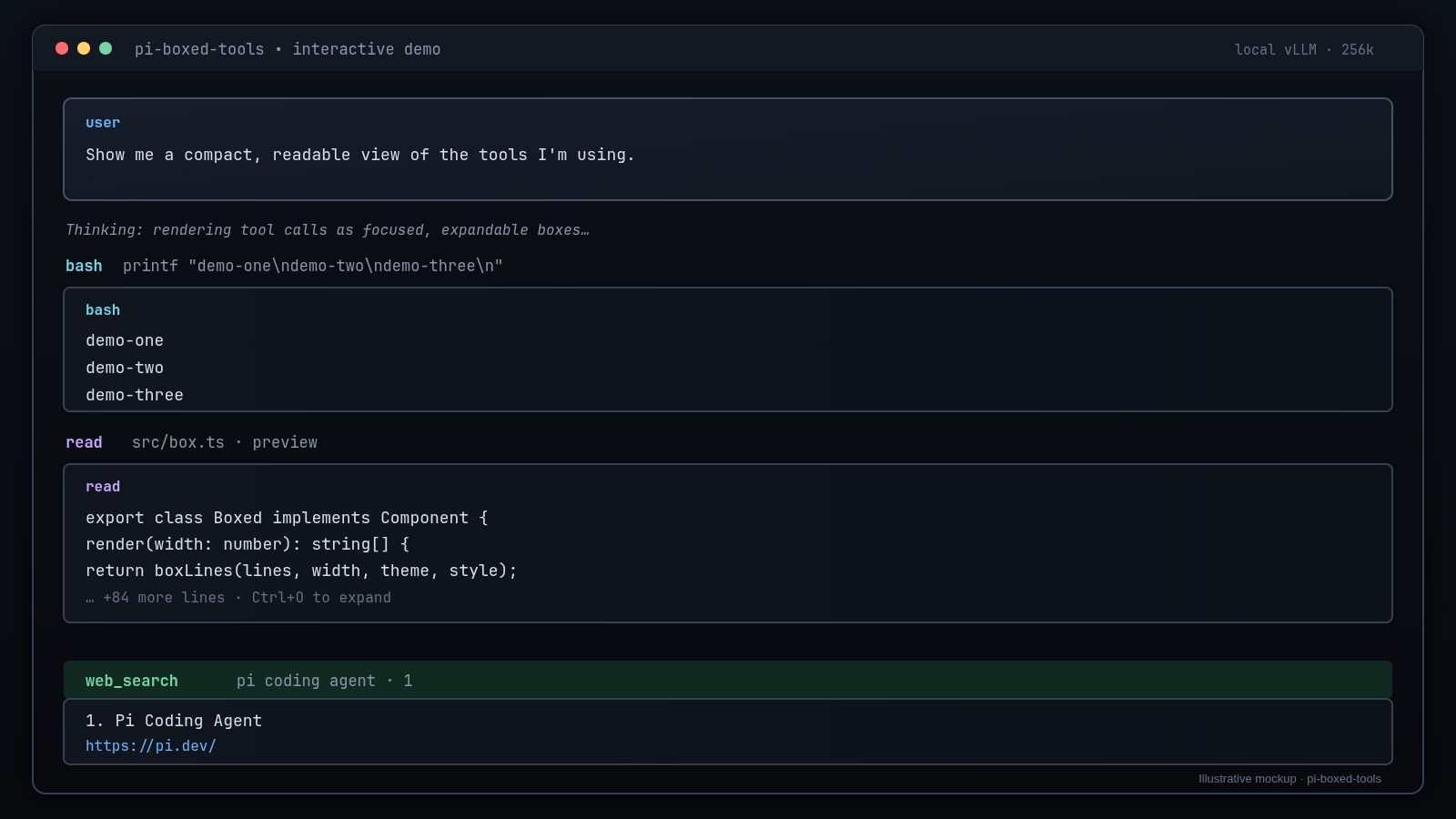
Illustrative mockup: the first image is a designed example of the intended UI, not a direct terminal screenshot.
Live-style editor demo

This second image is a real pi editor pane captured from a Herdr split with
grim. It runs deliberately small, non-mutating demo operations through
bash, read, and web_search, so it shows the plugin in its actual editor
context without unrelated desktop or browser chrome.
pi-boxed-tools gives read, grep, find, ls, and bash a consistent,
focused frame inspired by pi's user-message box while leaving
pi-tool-display in charge of
its excellent edit/write diff rendering and native user-message box.
What it does
- Rounded, width-safe tool-result frames with
╭─ title ─╮/╰────╯edges - Theme-aware
border,accent, anduserMessageBgcolors - Slim one-line call headers
- Collapsed previews with configured expand hints
- Full output through pi's normal tool expansion behavior
- Error, empty-result, and streaming states
- Real execution delegated to pi's built-in tool implementations
- No changes to pi core and no runtime dependencies beyond pi's peer packages
The package uses pi's documented same-name built-in override API and
renderShell: "self". It copies the built-in tool schemas and prompt metadata,
then delegates execution unchanged; only the display slots are replaced.
Ownership split with pi-tool-display
This package is deliberately not a fork of pi-tool-display. The packages work together:
| Tool | Owner |
|---|---|
read, grep, find, ls, bash |
pi-boxed-tools |
edit, write |
pi-tool-display |
| User message box and thinking labels | pi-tool-display |
web_search, fetch_content, get_search_content |
Companion local web-search extension |
Disable pi-tool-display's ownership for the five tools claimed here:
{
  "registerToolOverrides": {
    "read": false,
    "grep": false,
    "find": false,
    "ls": false,
    "bash": false,
    "edit": true,
    "write": true
  }
}
The setting lives in:
~/.pi/agent/extensions/pi-tool-display/config.jsonThen run /reload.
Installation
From this repository:
pi install git:github.com/BubbatheVTOG/pi-boxed-tools.gitOr install the local checkout while developing:
pi install ~/git/pi-boxed-toolsAfter installation, apply the ownership configuration above and run /reload.
Inspiration and related projects
pi-tool-display— visual inspiration for compact tool rows, the native user-message box, diff presentation, and ANSI/background handling. Portions of the frame/background code are adapted from its MIT-licensed user-message renderer.- Pi custom rendering
— the public
renderCall,renderResult, andrenderShellAPIs used here. pi-transcript-window— inspiration for display-only extension behavior and pi 0.84+ support.pi-hide-messages— the upstream display-layer project behind the transcript-window approach.
Development
The package has no npm runtime dependencies. Pi supplies its core peer packages when loading the extension.
Run the deterministic harnesses from pi's installed package root so the same core-package aliases used by pi's loader are available:
cd /home/bubba/.npm-global/lib/node_modules/@earendil-works/pi-coding-agent
node ~/git/pi-boxed-tools/tests/renderers.test.mjs
The harness verifies:
- all five tools register with valid schemas and prompt metadata
- collapsed, expanded, partial, error, and empty rendering states
- frame integrity and width-safe output
- real
read,bash,grep,find, andlsexecution delegation
Recreating the illustrative mockup
The source artwork is docs/assets/pi-boxed-tools-mockup.svg.
The committed PNG was captured with grim from a clean Chromium app window
rendering that SVG. To regenerate the raster artwork without the compositor:
rsvg-convert -w 1600 -h 900 \
  docs/assets/pi-boxed-tools-mockup.svg \
  docs/assets/pi-boxed-tools-demo.png
The mockup intentionally says “Illustrative mockup” so it is not confused with a live terminal recording.
Rollback
Remove the package, restore pi-tool-display's five ownership flags to true,
and run /reload:
pi remove ~/git/pi-boxed-toolsLicense
MIT. See LICENSE. Portions adapted from
pi-tool-display, also MIT.