pi-bro
An Earendil Pi extension that explains pasted text, assistant responses, local documents, public webpages, and recent session turns (as shapes) in a context-isolated window, opens a sandboxed side conversation with /bro btw, and provides a second-opinion
Package details
Install pi-bro from npm and Pi will load the resources declared by the package manifest.
$ pi install npm:pi-bro- Package
pi-bro- Version
0.19.1- Published
- Sep 30, 2026
- Downloads
- 2,479/mo · 970/wk
- Author
- tranhoangnguyen0310
- License
- MIT
- Types
- extension
- Size
- 316.5 KB
- Dependencies
- 4 dependencies · 3 peers
Pi manifest JSON
{
  "extensions": [
    "./bro.ts"
  ]
}
Security note
Pi packages can execute code and influence agent behavior. Review the source before installing third-party packages.
README
pi-bro
Turn a dense AI reply, pasted text, local document, or public webpage into a
plain-language explanation — or open a separate side conversation with
/bro btw — without adding anything to your main agent's context.
pi-bro is an extension for Earendil Pi.
Experimental PiG 0.3.0 compatibility uses the same npm package and requires Node.js. See the compatibility notes for verified coverage and the PiG RPC tool-exclusion limitation.
It opens explanations in a separate modal and runs them through a CLI backend
you already have installed and signed in to. Explain, show, BTW, and the
advisor all work across five backends:
- Google Antigravity CLI (
agy) — the default for new settings - Claude Code (
claude) - Grok Build (
grok) - Codex CLI (
codex) - Meta Muse Code (
muse)
You only need the backend(s) you select; Agy is the default, not a requirement.
Quick start
You need Earendil Pi >=0.84.2 <1, Node.js >=22.19.0, and at least one
backend CLI on your PATH, signed in once from your terminal (agy >=1.1.15
for the default). Then install Bro:
pi install npm:pi-broRestart Pi or run /reload. If you use Claude Code, Grok, Codex, or Muse instead of Agy,
choose it in /bro config (for everything, or per feature). Then try:
/bro
/bro text Paste text here
/bro file docs/report.pdf
/bro url https://example.com/article
/bro btw "what file defines this route?"
Run /bro doctor after installation or whenever Bro is not working.
To install from GitHub instead, use
pi install git:github.com/tranhoangnguyen03/pi-bro. To try Bro without
installing it, use pi -e npm:pi-bro.
What Bro can explain
| Source | Command | What Bro does |
|---|---|---|
| Latest assistant reply | /bro |
Explains the latest completed reply without adding the result to the conversation. |
| Pasted text | /bro text <text> |
Explains text supplied directly in the command. |
| Local document | /bro file <path> |
Extracts text from a workspace-local Markdown, text, PDF, or DOCX file. |
| Public webpage | /bro url <url> |
Fetches one public HTML page and extracts its main readable content. |
| Recent session turns | /bro show |
Draws the last turns' conversation text as shapes instead of prose (tool calls, tool results, reasoning, and images are omitted). |
| Any of the above, auto-detected | /bro <input> |
Routes a lone URL to the webpage reader, an existing workspace file with a supported extension to the document reader, and anything else to pasted text. |
Pressing R simplifies the captured source again. These commands capture a
new source: /bro text, /bro file, /bro url, and /bro show. Giving /bro a URL, path, or
text directly captures a new source the same way.
Commands
| Command | Description |
|---|---|
/bro or /bro text |
Explain the latest completed assistant response. |
/bro text <text> |
Explain pasted text. |
/bro <input> |
Explain it directly: a lone URL runs the webpage reader, an existing workspace file with a supported extension runs the document reader, and anything else is pasted text. A quoted path with spaces is routed too when the file exists. |
/bro file <path> |
Explain a workspace-local .md, .markdown, .txt, .pdf, or .docx file. |
/bro url <url> |
Explain one public, text-based webpage. |
/bro open |
Reopen the latest explanation without calling the simplifier again. |
/bro show [n-turns] [query] |
Draw recent session turns (default last 1) as shapes instead of prose, from user and assistant conversation text only — tool calls, tool results, reasoning, and images are omitted. An optional query steers what the shapes focus on, with or without a leading turn count. |
/bro doctor |
Check Bro's settings, prompt, and each selected backend, with the effective backend/model/effort per feature. |
/bro mode [brief|balanced|faithful] |
View or choose the explanation mode. |
/bro config |
Open an interactive settings screen for the shared default backend/model/effort, explain mode, show turns, and per-capability (explain/show/btw/advisor) overrides. |
/bro btw [question] |
Open a side conversation in a modal, seeded with recent main-session context. Starts conversation-only; type /mode inside to toggle full permission (read and edit the workspace) without losing the thread. |
/bro advisor |
Quick notice of whether the executor's bro_advisor tool is available right now, pointing at /bro config, /bro advisor-steer, and /bro doctor. |
/bro advisor-steer |
View, edit, save, or clear the one persistent steering brief the advisor always sees. |
/bro help |
Open the built-in quick reference. |
Giving /bro the input directly works the same way:
/bro https://example.com/article
/bro docs/report.pdf
/bro any other text is explained as pasted text
Explanation modes
Bro treats the source as data, rejects embedded instructions, preserves its
language, and avoids adding facts, advice, or conclusions in every mode. Choose
a persistent mode with /bro mode:
brief: Uses the original audience-led ELI-simpleton prompt with no fixed word target.balanced: The default. Keeps important details, conditions, warnings, context, code, and formatting while trimming fluff and repetition.faithful: Simplifies the language while preserving every claim, qualification, warning, number, command, code block, and formatting choice.
Modal controls
- Mouse wheel / trackpad: Scroll in regular or fullscreen mode
- ↑ / ↓: Scroll in any mode
- C: Copy the complete explanation
- R: Simplify the captured source or run the current Doctor check again
- O: Open the HTML diagram when a show reply contains one
- Esc: Close the modal, or cancel while Bro is working
The modal header shows the model and reasoning effort the explanation or
drawing used (default when the model's own effort applies); /bro open
keeps the original label.
Bro temporarily captures mouse input while its modal is open. Native mouse selection may be unavailable or visually extend outside the modal depending on your terminal mode; press C to copy the complete explanation reliably.
Bro btw (side conversation)
/bro btw opens a separate multi-turn conversation in a modal, so you can ask
a quick side question while the main agent keeps working. It runs through the
selected backend and never adds anything to Pi's conversation unless you
explicitly insert it into the editor.
/bro btw <question>asks immediately;/bro btwopens an empty thread. Reopening keeps the thread and its mode.Two modes, toggled with
/mode: a new thread starts conversation-only; type/modein the modal to switch to full permission (read and edit the workspace, run commands) and again to switch back. The conversation is kept across switches. How conversation-only is enforced depends on the backend — see Backends: access and retention.Every new or cleared thread is seeded with up to the last 8 turns of main-session user/assistant conversation text (40,000 characters max, with a truncation notice). Later turns continue the backend's native session; in full permission mode the side agent can also read the repo itself.
In the modal: type a question and press Enter (empty Enter re-asks the last question). Composer actions trigger only on these exact commands:
/mode: toggles conversation-only / full permission, keeping the thread/copy: copies the latest answer to the system clipboard/copy-all: copies the full thread to the system clipboard/insert: inserts the latest answer into the main editor without submitting/insert-all: inserts the full thread into the main editor without submitting/retry: re-asks the last question (empty Enter does the same)/clear: resets the thread
/insertand/insert-allnever replace an existing main-editor draft: edit or clear it first. Any other text, including other slash-prefixed input such as/send, is sent as a question. Esc closes the modal (or cancels a running turn). The header shows the model and reasoning effort the latest turn used (defaultwhen the model's own effort applies) and the current mode.A turn is capped at 2 minutes in conversation-only mode and 10 minutes in full permission mode.
Bro's thread lives in memory only — it clears when you switch Pi sessions, reload extensions, or quit Pi. Changing the BTW backend starts a fresh thread; native session IDs never cross backends.
Bro advisor
bro_advisor is a tool the executor agent — not you — can voluntarily
call mid-task for a second opinion. Unlike /bro btw, which is a side
conversation for you, bro_advisor is a tool for the model you're working
with; it shows up as a normal tool call/result in the transcript, not a
modal. It is registered like any other tool when the extension loads and has
no on/off switch of its own — whether the executor can actually call it
depends entirely on this host's own tool restrictions.
/bro advisor is a quick notice of whether bro_advisor is available right
now, pointing at /bro config, /bro advisor-steer, and /bro doctor.
/bro doctor has the full diagnostic: whether this host exposes and
activates bro_advisor, its resolved backend/model/effort, steering
presence, and backend compatibility (for Agy, a minimum CLI version with an
agy update action when it is too old).
- Automatic context, no prep needed: the executor never assembles a
summary. Bro captures a harness-neutral snapshot — the executor's system
instructions, its active tools, and the conversation so far including tool
calls and results — and sends it, along with an optional
questionthe executor may pass, to a fresh, standalone process of the selected backend for every consultation. Nothing is resumed or reused across calls, including retries. - Instructed to investigate, not implement: the advisor process has real tool access in the workspace with permissions auto-approved — there is no enforced read-only isolation. It is instructed to verify claims itself and return advice, leaving edits to the executor, but that boundary is a behavioral prompt instruction rather than an enforced sandbox constraint, so treat its findings as advice to verify, not a guaranteed hands-off review.
- Steering:
/bro advisor-steeropens an editor for one persistent steering brief — e.g. "quick prototype; keep A and B careful, everything else minimal" — that the advisor always reads. Ctrl+S saves and keeps the editor open; Enter or Shift+Enter inserts a newline; Ctrl+K clears both the saved brief and draft while staying open; Ctrl+C copies the entire current draft, including unsaved edits; and Esc closes without saving unsaved edits. The brief is never added to Pi's conversation or sent to the main model — the advisor is the only thing that reads it. - Persistence: the steering brief persists with the Pi session (not globally, not per project) as custom extension data in the session file and is restored on resume or reload. Forking a session inherits it; edits made after the fork are independent of the original branch.
- Retries: on an invocation failure (not a completed answer — "I need more evidence" is a normal result, not a failure), Bro retries with the identical snapshot, steering, and question: once after 5 seconds, once more after 10 seconds, then returns the backend's own diagnostic — including a context-length error, verbatim — as the failure. Each attempt is capped at 10 minutes. Cancelling the tool call aborts immediately and skips any pending retry wait.
- Progress and provenance: while an attempt is running, Bro shows the last
thing the advisor actually reported — a tool name or a user-facing response
line, never hidden reasoning — and how long ago it arrived, e.g.
last reported: Read src/app.ts (2s ago), or "awaiting first activity" before anything arrives. Expanding a running consultation shows up to the last 4 reported activity lines; each retry starts the trail over. The returned answer starts with backend, model, effort, attempt count, duration, workspace, steering presence, snapshot size, and known omission/compaction notes; the advisor's complete answer follows unchanged. - Model/effort: resolved the same way as explain/show/btw, through
/bro config(shared default or per-capability override).
Bro show
Where the explanation modes rewrite dense prose in simpler words, /bro show
changes the form: it draws what you and the assistant said in the last few
session turns as a shape instead of paragraphs. Capture keeps only user and
assistant conversation text, including every intermediate assistant message in
a turn — tool calls, tool results, reasoning, and images never leave the
session. It runs the same backend-specific model call and shows the result
in the same modal, never touching your conversation. /bro show uses its own
draw prompt; the explanation modes and bro-prompt.md do not affect it.
Because the draw model only ever sees conversation text, its shapes reflect what was reported in the conversation — what the assistant said it did or found — not an independent check against the actual code or system state.
Shapes are terminal-first: pseudocode, call trees, file trees, component trees, diffs, and types and signatures. Bro picks the shape from what happened in the session; there is no flag to request a specific one. When the source has no code structure to draw, Bro falls back to a plain outline instead of forcing a diagram. A reply that ends in one self-contained HTML block — layout, a state comparison, anything where position itself carries meaning — is written to a file and opened with O.
Pressing R redraws the same captured turns; running /bro show again
captures the latest turns afresh. /bro show <n-turns> overrides the default turn
count for a single run.
Add a query to steer what the shapes focus on, either after a turn count or on
its own: /bro show what changed in the auth flow, or /bro show 3 what changed in the auth flow. The query is used as a lens on the captured turns,
not as additional evidence, and its casing is preserved as typed. Pressing
R retries with the same turn count and query.
Any leading whitespace-delimited word that looks like a number is treated as the
requested turn count: for example, /bro show 3 what changed captures 3 turns
and steers on "what changed", while /bro show 404 handler parses "404" as the
turn count and "handler" as the steering query. To steer on a phrase that starts
with digits while choosing a turn count, specify the turn count explicitly
first: /bro show 1 404 handler captures 1 turn and steers on "404 handler".
If the first word is not a number, the whole input is treated as the steering
query using the saved showTurns default.
A slow session-create, traced
The agent followed a two-second delay from the handler down to the worker.
/bro show drew the chain:
handleCreateSession(req)
├── validateRequest(req)
├── SessionStore.insert(req.body)
└── publish('session.created')
    └── AgentWorker.run(sessionId)
        ├── loadContext(sessionId)
        ├── callModel(context)
        └── persistResult(sessionId, result)
The shape of code before it exists
A design discussion agreed on the data model ahead of implementation. /bro show kept just the shape:
interface Item { id: ItemId; parentId: ItemId | null }
interface Cursor { position: ItemId; direction: 'up' | 'down' }
function resolveTarget(items: Item[], cursor: Cursor): ItemId | null
A layout that collapses at narrow widths
Text can't show a before/after layout change at a glance, so Bro ends with one
self-contained HTML block and O opens it (the terminal first shows
[HTML diagram saved — press O to open]):
Diff — what changed in the save handler:
 on(save)
-  write content
+  if content is unchanged
+    return cached result
+  write new content
+  invalidate cache
File layout — where everything lives, for a refactor:
src/
├── commands/           # user intents
│   ├── registry.ts
│   └── show-me.ts
├── sessions/           # state and lifecycle
│   ├── events.ts
│   ├── store.ts
│   └── worker.ts
├── transport/          # API
│   ├── client.ts
│   └── stream.ts
└── config.ts           # root config
Component tree — what the session page renders:
SessionPage (apps/example/src/routes/session.tsx)
├── [hook] useSessionEvents
├── SessionToolbar (packages/ui)
│   └── RunSkillButton
└── SessionTimeline (packages/ui)
    └── SkillResultCard
Pseudocode — how scroll capture and restore work:
capture(blocks, targetRect, scrollRect) -> Snapshot:
  target = focusedBlock ?? firstBlockIntersectingViewportTop(blocks)
  anchor = wholeBlockAnchor(blocks, target)
  offset = targetRect.top - scrollRect.top
  return { anchor, offset, scrollTop, revision + 1 }

restore(snapshot, blocks) -> number:
  placement = resolveAnchor(blocks, snapshot.anchor)
  if placement: return scrollRect.top + targetRect.top - snapshot.offset
  return snapshot.scrollTop
Prose in, outline out: a purely conversational session with no code to draw degrades to a plain outline of the discussion — never a forced diagram.
Bro in action
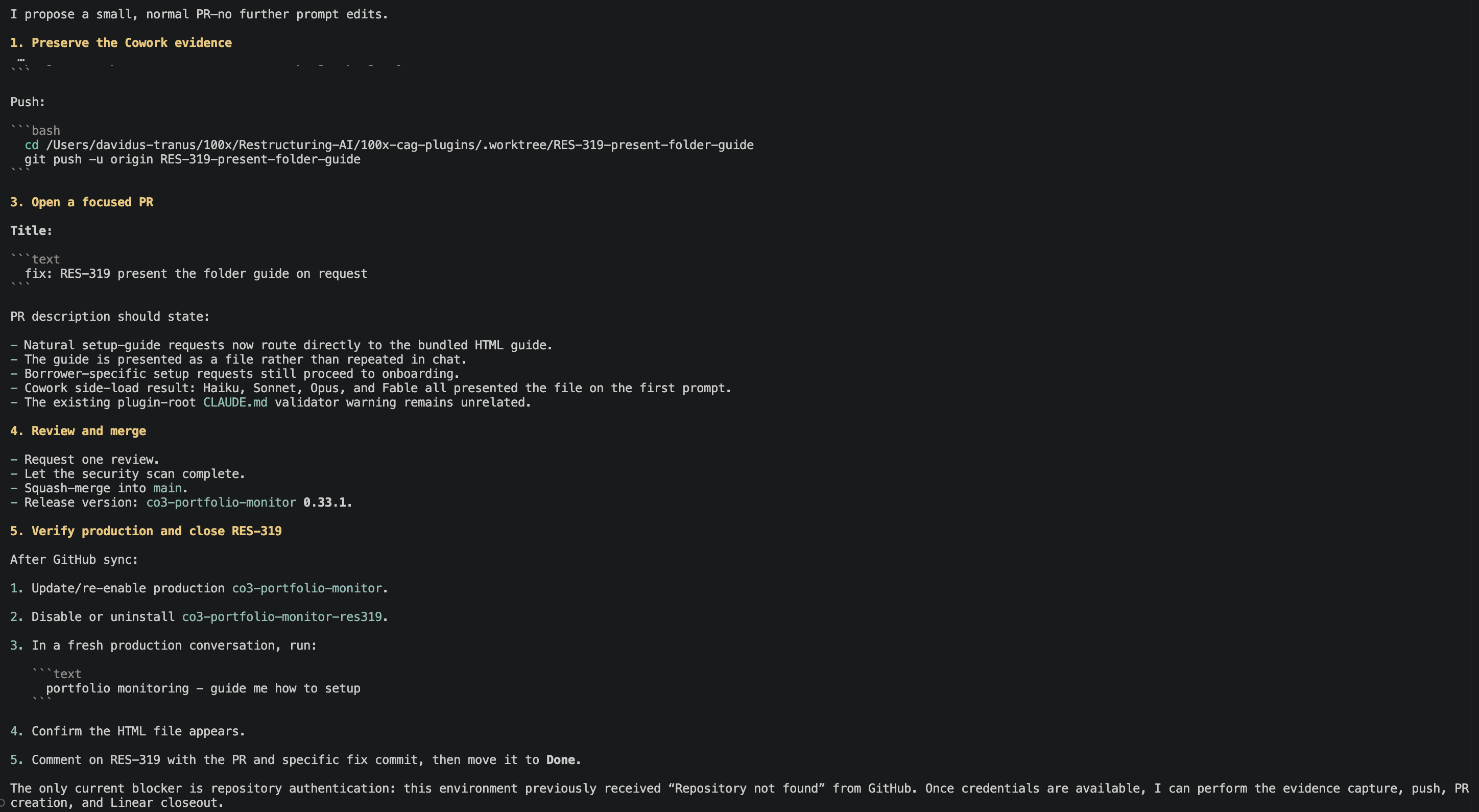
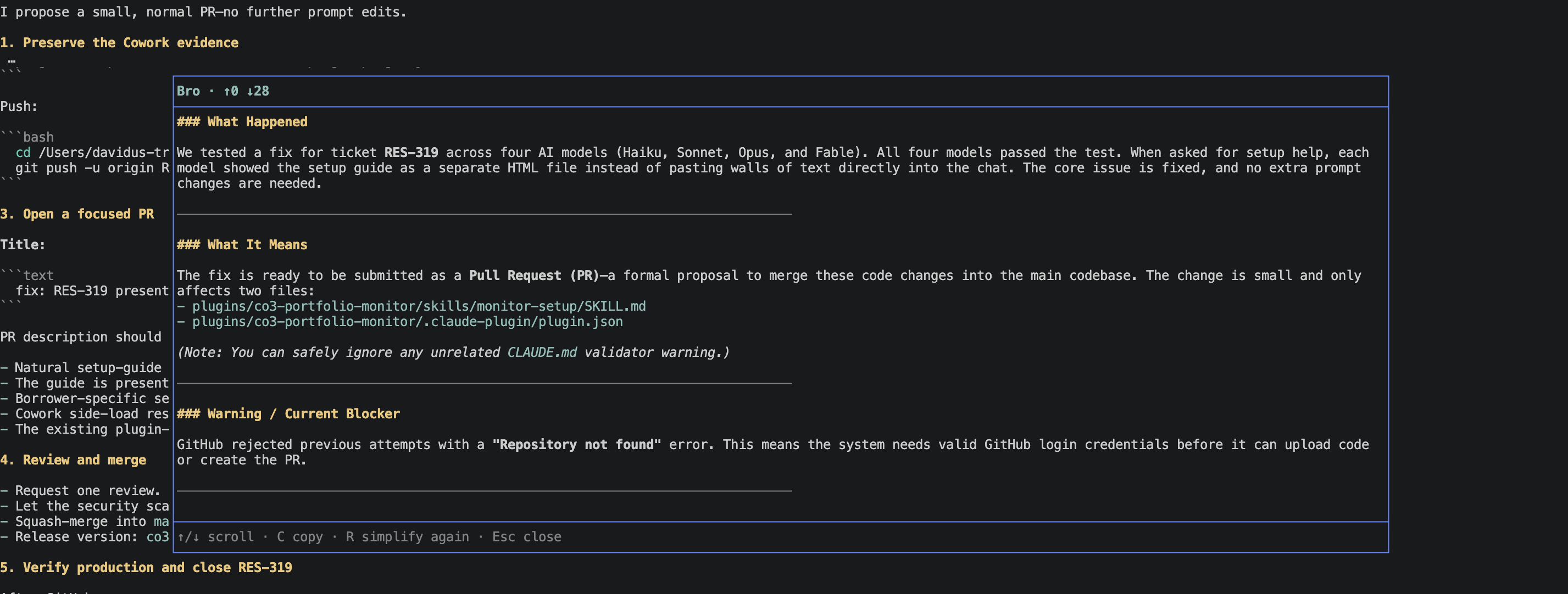
Assistant response
Before /bro: the original agent response
After /bro: the plain-language explanation
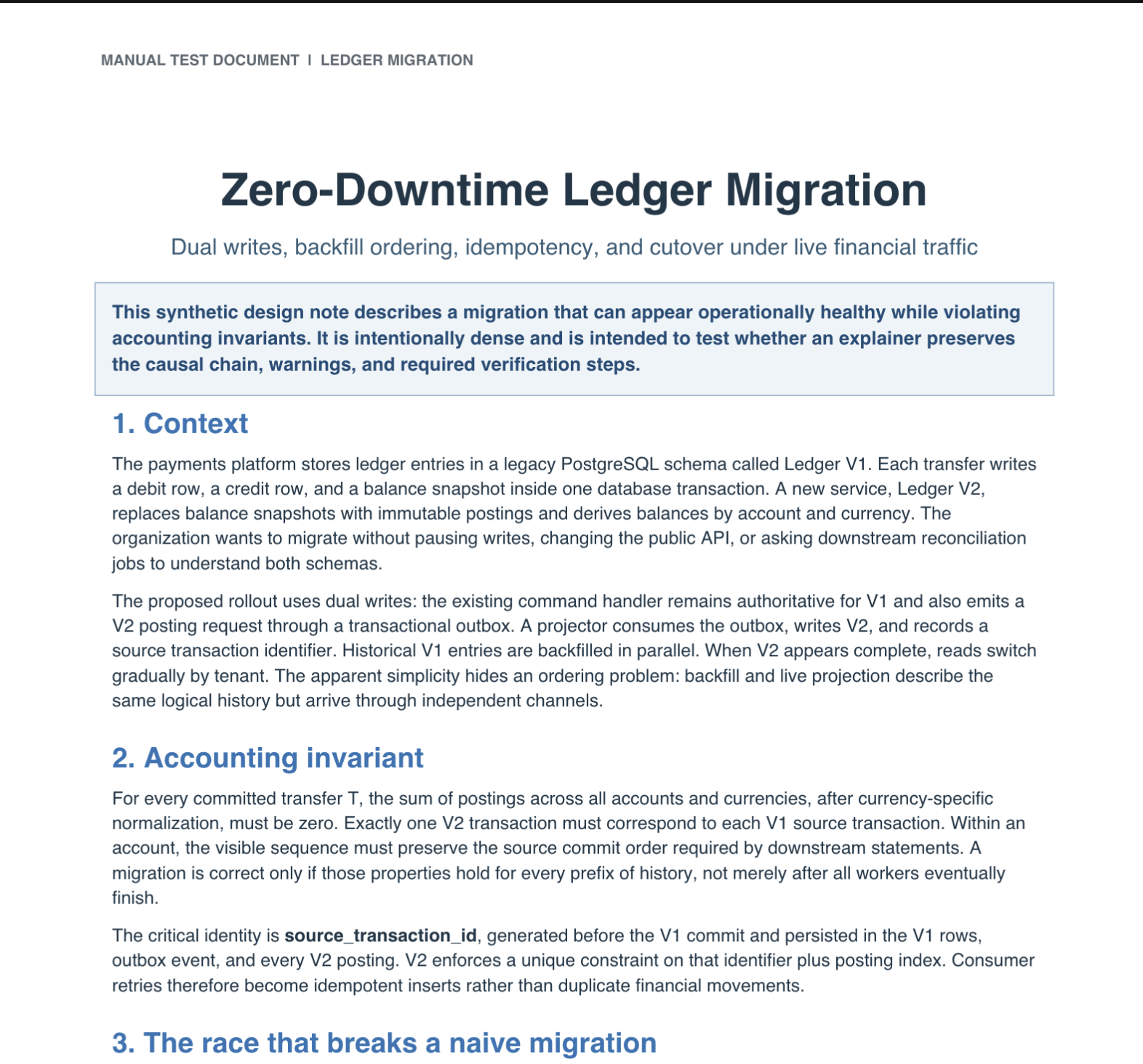
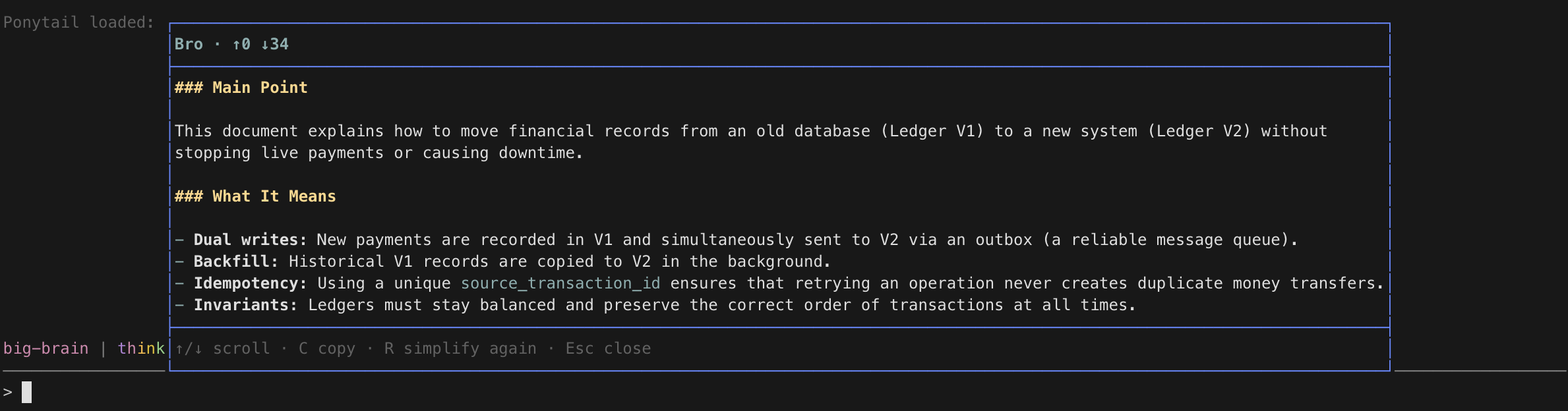
Local document
Before: a complex PDF
After /bro file <path>
Bro optimizes for understanding, not simply for fewer words. The written examples below are synthetic and were run through Bro's default prompt. Click a screenshot to see it at full size.
Before
The diagnostic is not evidence that
resultis intrinsically uninhabitable; it is an artifact of TypeScript's intraprocedural control-flow graph. Becauseresultis initialized tonulland only assigned inside theforEachcallback, the outer scope does not model that callback as definitely executing. Afterif (!result) return, the remaining branch therefore collapses tonever, producing the property-access error. Replace the callback-driven mutation with a control-flow-visible loop:for (const item of items) { if (matches(item)) { result = item; break; } }. Alternatively, derive the value expressionally withconst result = items.find(matches);and guardif (!result) return;before dereferencing it. Avoid anas Resultassertion; it suppresses the symptom while preserving the unsound state transition that caused the narrowing anomaly.
After /bro
What happened
TypeScript showed an error saying your variable result cannot be used or
accessed.
This happened because result was set to null outside a forEach loop and
then modified inside the loop's helper function (callback). TypeScript tracks
code line by line. It cannot guarantee that code inside a forEach callback
will actually run.
What it means
Because TypeScript assumes the loop's callback might not run:
- It believes
resultmight still benull. - When you check
if (!result) return, TypeScript thinksresultcan never hold a valid value after that check. - It sets the type of
resulttonever(a special type meaning "impossible value") and blocks you from reading its properties.
The error is a limitation in how TypeScript analyzes loops with callbacks.
What you should do next
Choose one of these two fixes:
Option 1: Use a standard for...of loop
for (const item of items) {
  if (matches(item)) {
    result = item;
    break;
  }
}
Option 2: Use Array.prototype.find
const result = items.find(matches);
if (!result) return;
Avoid using a type assertion like as Result. It only hides the warning
without fixing the underlying tracking issue.
Before
What you're observing is almost certainly not an authentication failure in the credential-validation layer; it is a post-authentication session persistence failure caused by an environment-dependent mismatch between Express's transport-security inference and the TLS termination topology in production.
Locally, Express sees the request as plain HTTP and your development cookie configuration probably permits a non-secure session cookie. In production, however, the browser connects over HTTPS to Nginx, a load balancer, or an ingress controller, which terminates TLS and forwards the request to Node over HTTP. Unless Express trusts that intermediary,
req.secureremainsfalse, even when the proxy sendsX-Forwarded-Proto: https. Withcookie.secure: true,express-sessioncan consequently decline to emit the cookie because it believes the originating request was insecure. The login route may still return200, making the credentials appear accepted, but the next request has no session identifier and is treated as anonymous.Configure proxy trust before registering session middleware, and make the cookie policy reflect whether the frontend and API are same-site or genuinely cross-site:
app.set("trust proxy", 1);

app.use(session({
  secret: process.env.SESSION_SECRET,
  resave: false,
  saveUninitialized: false,
  proxy: true,
  cookie: {
    httpOnly: true,
    secure: true,
    sameSite: "lax",
    maxAge: 1000 * 60 * 60 * 24
  }
}));
Use
sameSite: "none"instead of"lax"only when the browser must send the cookie in a cross-site context, such as a frontend and API on unrelated registrable domains. Browsers requireSecurewhenSameSite=None, so that combination must remain HTTPS-only. Separate subdomains such asapp.example.comandapi.example.comare usually same-site, though they are still cross-origin.Also verify that the proxy explicitly forwards
X-Forwarded-Proto, that the browser receives aSet-Cookieresponse header, and that frontend requests usecredentials: "include"when crossing origins. If CORS is involved, the server must return the exact allowed origin plusAccess-Control-Allow-Credentials: true; a wildcard origin is incompatible with credentialed requests.Avoid setting a cookie
domainunless sharing across subdomains is intentional. A host-only cookie is safer and eliminates another production-only failure mode.
After /bro
What happened
Your username and password check succeeded, and the login route returned 200 OK. However, the browser did not receive or return a usable session cookie in
production.
What it means
In production, secure web traffic (HTTPS) hits an intermediary, such as a load balancer or Nginx, before reaching your Node/Express app as plain HTTP.
Because your session cookie requires HTTPS (secure: true), Express may withhold
it when it does not trust the proxy forwarding the request. The exact trust
setting must match your deployment's proxy topology.
What you should do next
Configure Express to trust only your actual proxy topology. Put this before the session setup. For example, use
1only when there is exactly one trusted proxy hop:app.set("trust proxy", 1); app.use(session({ secret: process.env.SESSION_SECRET, resave: false, saveUninitialized: false, cookie: { httpOnly: true, secure: true, sameSite: "lax", maxAge: 1000 * 60 * 60 * 24 } }));Check your cookie settings:
- Keep
sameSite: "lax"if your frontend and backend share the same main domain, such asapp.example.comandapi.example.com. - Use
sameSite: "none"only when the cookie must be sent cross-site. Browsers requiresecure: truewith this setting. - Avoid defining a custom cookie
domainunless you deliberately need to share cookies across subdomains.
- Keep
Verify the proxy, browser, and CORS settings:
- Ensure the proxy forwards the
X-Forwarded-Protoheader. - Check that the response contains a
Set-Cookieheader. - Include
credentials: "include"in cross-origin frontend requests. - Return the exact allowed origin with
Access-Control-Allow-Credentials: true. Do not use a wildcard (*) for credentialed requests.
- Ensure the proxy forwards the
Before
The failure is not a nondeterministic pnpm installation problem, despite the misleading first error being emitted from the test runner immediately after dependency hydration. It is a state-contamination problem at the intersection of the repository cache, the package export map, and an incorrectly scoped cache key. The decisive observation is that the same commit succeeds in a clean checkout and in CI when cache restoration is disabled, but fails when the pre-build workspace cache is restored. That isolates the variable to files materialized outside Git rather than source, Node, or runner image drift.
The affected package,
@acme/config, was recently migrated from a dual CommonJS/ESM build to an ESM-oriented TypeScript output. Its rootpackage.jsondeclares"type": "module"and maps theimportcondition to./dist/index.js, while the legacyrequirecondition still maps to./dist/index.cjs. The current compiler emitsindex.jsbut does not remove the previous build directory first. An older cacheddistdirectory therefore contributes two files that no longer belong to the current build graph:dist/index.cjsanddist/package.json, the latter declaring"type": "commonjs". The new compiler overlaysdist/index.jsbut leaves both obsolete files intact. Because nested package boundaries override the root package type, Node interprets the newly emitted ESMindex.jsas CommonJS in that restored workspace and reportsUnexpected token 'export'. Test processes entering throughrequire()instead resolve the obsoleteindex.cjs, which references a removed chunk and can instead produceMODULE_NOT_FOUND. These apparently different errors are two projections of the same dirty-output condition.The cache configuration makes that contaminated state persistent. The workflow computes the key with
hashFiles('packages/**/pnpm-lock.yaml'), but this workspace has only the root-levelpnpm-lock.yaml. GitHub Actions consequently evaluates the hash expression to an empty value, yielding a key equivalent toLinux-node20-workspace-. A broad restore key then permits an archive produced before the module-format migration to satisfy the lookup. That archive combines the pnpm content-addressable store, Turborepo metadata, and every package'sdistdirectory. Those data classes do not share valid invalidation semantics: pnpm store entries are immutable by content, Turborepo artifacts are task-hash addressed, and arbitrary build directories are mutable snapshots whose correctness depends on complete deletion or exact provenance. Treating them as one cache effectively elevates obsolete untracked files into undeclared build inputs.The evidence is visible by comparing the restored and clean workspaces before compilation. In the failing job,
packages/config/dist/package.jsonexists with"type":"commonjs"andpackages/config/dist/index.cjshas a timestamp and checksum predating the current commit. Neither file appears aftergit clean -ffdxfollowed by installation and build. The Actions cache log also shows the truncated key without a lockfile digest, whilegit diffremains empty because the problematic files are ignored. Finally, deleting onlypackages/config/distbefore rerunning the unchanged test command converts the failure to a pass, which excludes dependency resolution and network variability as primary causes.The minimal durable remediation has three parts. First, stop caching package output directories. Cache the pnpm store separately, using a key that includes the actual root lockfile:
key: ${{ runner.os }}-node20-pnpm-${{ hashFiles('pnpm-lock.yaml') }}
restore-keys: |
  ${{ runner.os }}-node20-pnpm-
A broad fallback is acceptable for the pnpm store because pnpm validates content-addressed entries; it is not acceptable for mutable
distsnapshots. If remote or local Turborepo caching is retained, cache only.turboand allow Turbo's task hash to govern artifact reuse rather than wrapping raw workspace outputs in a generic archive.Second, make every package build replace, rather than merge into, its output directory.
@acme/configshould deletedistbefore invokingtsc,tsup, or the existing bundler. The CI workflow should also run the repository's recursive clean target before the first build as a defense against future cache or runner reuse. This is not a substitute for fixing cache scope, but it restores the invariant that generated output is a function of the checked-out sources and declared toolchain.Third, make the export contract agree with emitted files. If
@acme/configis intentionally ESM-only, remove therequirecondition and the obsolete CommonJS metadata. If CommonJS consumers remain supported, restore an explicit CJS build that deterministically emitsdist/index.cjs; do not let a historical artifact impersonate that support. In either case, package publication should reject export targets that do not exist.Verification should exercise both cache states and both module entry paths. Run the full pipeline once with no cache, save only the corrected caches, and rerun the identical commit expecting a cache hit and the same result. Inspect the built package to confirm the nested CommonJS
package.jsonand legacy chunks are absent unless intentionally generated. Add a lightweight smoke check using dynamicimport('@acme/config'); if CommonJS remains supported, add a second check throughcreateRequire. Finally, change the root lockfile and confirm the logged cache key changes. That matrix validates clean-build reproducibility, restored-cache reproducibility, export-map coherence, and dependency-cache invalidation independently rather than relying on a single green run.
After /bro
What happened
Your build failed because old files were left behind by a broken cache (a saved snapshot of previous build files).
The package @acme/config recently switched its module format to modern
JavaScript (ESM). However, the build process did not delete the old output
folder (dist) before creating new files.
Because the GitHub Actions setting searches the wrong path
(hashFiles('packages/**/pnpm-lock.yaml')), GitHub could not find the root
pnpm-lock.yaml. It restored an outdated cache containing dist/index.cjs and
a dist/package.json configured for older JavaScript (CommonJS). The new build
wrote some files but left the old ones behind, confusing Node and causing errors
such as Unexpected token 'export' and MODULE_NOT_FOUND.
A clean checkout without the cache succeeds. This proves the problem is old cached files, not your source code or dependencies.
What it means
- Cache contamination: The CI workflow restores mutable
distfolders alongside package-manager files, mixing obsolete files into new builds. - Mismatched module settings: The package says it supports both modern
(
import) and legacy (require) formats, but it only builds the modern one while relying on leftover cached files for the legacy one.
What you should do next
Fix the GitHub Actions cache: Stop caching
distfolders. Cache only the pnpm store, using the root lockfile:key: ${{ runner.os }}-node20-pnpm-${{ hashFiles('pnpm-lock.yaml') }} restore-keys: | ${{ runner.os }}-node20-pnpm-If you use Turborepo, cache only
.turbo.Clean output folders before building: Make
@acme/configdeletedistbefore runningtsc,tsup, or the bundler. Run the repository's recursive clean command before CI builds.Update the package exports:
- If
@acme/configis ESM-only, remove therequireentry and old CommonJS metadata. - If CommonJS is still needed, add a real build step for
dist/index.cjs.
- If
Verify the fix:
- Delete the generated
packages/config/distfolder, then run a clean build. Do not usegit clean -ffdxin a working copy with files you need. - Run the workflow without a cache, save the new cache, and rerun the same commit to verify that a cache hit also passes.
- Test
import('@acme/config'), and testcreateRequireif CommonJS is supported.
- Delete the generated
Explain pasted text
Paste text directly after the command:
/bro text OAuth refresh tokens are rotated after every successful use.Bro explains the pasted text instead of the latest assistant reply. With no text
after /bro text, it falls back to the latest completed reply. Press R
to simplify the same captured text again.
Explain a document
Use a path relative to Pi's current workspace, or an absolute path inside it:
/bro file "docs/incident review.pdf"Paths may contain spaces; matching single or double quotes are also accepted.
Bro extracts text locally, then sends that text through the same explanation
flow used by /bro. Pressing R retries the extracted snapshot; running a
new /bro file <path> command reads the file again.
Files are limited to 10 MiB and 100,000 extracted characters. Scanned PDFs are not supported because Bro does not perform OCR.
Explain a webpage
Pass one public HTTP or HTTPS page:
/bro url https://example.com/complicated-articleBro fetches the page, extracts its main readable text locally, and sends only
that text through the existing explanation flow. The completed modal shows the
final website and page title. Pressing R retries the captured page without
fetching again; running a new /bro url <url> command fetches a fresh copy.
The first version is intentionally limited to one public, text-based page. It does not use browser cookies, sign in, run page JavaScript, bypass paywalls or bot protection, load complete discussion threads, follow pagination, or understand images and video. Pages that depend on those features may fail.
If Bro cannot read a page, copy its content into a .txt or .md file, or save
it as a PDF, then use /bro file <path>.
Check your setup
Run /bro doctor when Bro is newly installed or something is not working. It
checks Bro's settings and prompt, then probes only the backends some feature
actually selects, and reports the effective backend/model/effort for each
feature. Failed checks explain what to fix.
- Agy: installed version, model catalog, and account access.
- Claude Code: installed version and configured authentication.
- Grok: installed version only; authentication and connectivity are not verified.
- Codex: installed version and configured authentication.
- Muse: installed version only; authentication and connectivity are not verified.
Doctor never sends source text or runs a model completion. A successful check confirms the setup but cannot guarantee that a later provider request will succeed.
Settings
Use /bro config to review or change the shared default backend/model/effort
and any per-capability (explain/show/btw/advisor) overrides, the explanation
mode, and the default show turn count. Changes save immediately. Esc inside a
picker cancels that pick; Esc on the settings screen closes it, keeping
whatever was already saved. A failed save (for example, a read-only file) is
shown inline. /bro mode changes the mode directly, and /bro help shows the
active settings and file path.
Settings live in this user-editable file, created when the extension loads
(under $PI_CODING_AGENT_DIR instead when that is set):
~/.pi/agent/bro-settings.json{
"version": 2,
"default": { "backend": "agy", "model": "gemini-3.7-flash", "effort": "low" },
"mode": "balanced",
"showTurns": 1,
"overrides": {
"explain": { "backend": "claude", "model": "sonnet", "effort": "medium" },
"advisor": { "backend": "grok", "model": "grok-4.7", "effort": "high" }
}
}Bro reads the file again before each request, so manual edits apply next time.
- Each selection is one atomic backend/model/effort choice. An override pins
its own complete selection and ignores the shared default, even when it
happens to match it; select Default in
/bro configto inherit again. Omitted overrides inheritdefault. effortmust be one the backend offers (defaultomits it and lets the model decide). Agy selections are normalized against Agy's installed model catalog. Claude, Grok, Codex, and Muse accept seeded or custom model IDs; a model/effort combination the account does not support fails with the backend's own error instead of silently falling back.modeisbrief,balanced(the default), orfaithful.showTurnsis the default number of turns/bro showdraws (default 1);/bro show <n-turns>overrides it for one run.PI_BRO_MODELpicks the initial Agy model only when Bro creates a missing settings file, for examplePI_BRO_MODEL=gemini-3.7-flash-low pi.- Older flat settings files (root
model/effort) still load and mean Agy.
Backends: access and retention
Bro uses each CLI's own account and billing route, never Pi provider credentials, and does not copy credentials or rewrite backend configuration. Each backend and your model provider may retain sessions, logs, and request data under their own settings and policies.
| Explain / show | BTW conversation-only | BTW full permission | Advisor | |
|---|---|---|---|---|
| Agy | Temporary directory, Agy sandbox | Temporary directory, Agy sandbox | Workspace, permissions bypassed | Fresh workspace process, permissions bypassed |
| Claude Code | Scratch directory, tools/MCP/skills disabled, no session persistence | Workspace, tools disabled | Workspace, permissions bypassed | Fresh workspace process, permissions bypassed |
| Grok | Temporary directory, prompt instruction only | Workspace, prompt instruction only | Workspace, permissions bypassed | Fresh workspace process, permissions bypassed |
| Codex | Scratch directory, read-only sandbox, ephemeral session | Workspace, read-only sandbox | Workspace, approvals and sandbox bypassed | Fresh workspace process, approvals and sandbox bypassed |
| Muse | Scratch directory, approval/write/shell disabled, no session log | Workspace, approval/write/shell disabled | Workspace, permissions bypassed (--yolo) |
Fresh workspace process, permissions bypassed (--yolo) |
- Grok always runs with its sandbox off and permissions bypassed; its tools, hooks, skills, plugins, and MCP may remain available. "Answer only from the supplied context" is a request, not an enforced restriction.
- Codex's read-only sandbox is not a tool-free mode: workspace reads and sandboxed commands remain available. Bro does not disable configured MCP servers or web search; their access is governed by Codex configuration.
- Muse's restricted mode disables write and shell tools and approval prompts, not all tools: workspace reads and web tools remain available without approval. It is not a tool-free or network-isolated mode.
- Claude's restrictions are tool/configuration settings (with safe mode), not an OS sandbox; built-in and managed Claude behavior can remain. Running a permission-bypassing mode as root may be rejected by Claude.
- BTW continues natively: Agy by conversation ID, Claude and Grok by
--resume, Codex byresume, and Muse by--session-idof the same session, including across/modeswitches. An Agy conversation stays bound to the workspace it started in, so after a/modeswitch — or whenever a thread has turns but no native session ID — Bro starts a fresh native session seeded with the main-session context and every earlier turn. - Cancellation, deadlines, and invalid output streams stop the backend's process group on POSIX, escalating after a five-second grace period. On Windows only the direct child is targeted. Detached shell work or external services a backend started are not contained. Bro removes its private temporary prompt files.
Configuration precedence
When resolving backend, model, and reasoning effort:
- Per-capability override:
overrides.<capability>(explain,show,btw, oradvisor) pins that capability's complete selection. - Shared default: otherwise the capability inherits
default(rootmodel/effortin older flat files). - Agy catalog normalization: for Agy selections, Bro maps suffixed variant IDs and handles fixed-effort models.
- Initial file creation only:
PI_BRO_MODELhas no effect once the settings file exists.
When resolving turn count for /bro show:
- Command argument: an explicit count like
/bro show 3or/bro show 1 queryoverrides for that run. - Saved setting:
showTurns(defaults to 1).
When resolving the explanation prompt (explain capability only):
- Custom prompt: a valid
~/.pi/agent/bro-prompt.md(or$PI_CODING_AGENT_DIR/bro-prompt.md) completely overrides all built-in modes. - Saved mode:
modeinbro-settings.json(defaults tobalanced). bro-prompt.mdapplies only to/bro,/bro text,/bro file, and/bro url; it does not affect/bro show,/bro btw, orbro_advisor.
Custom prompt
Bro uses a built-in prompt by default. To use your own, create:
~/.pi/agent/bro-prompt.mdYour prompt must include {{response}} exactly once. For example:
Explain this in plain English in no more than 200 words.
Keep important warnings and next steps.

Text to explain:
{{response}}
Bro re-reads this file every time you simplify, so your edits take effect immediately without reloading Pi. Bro never creates or modifies this file. Existing valid custom prompts continue working unchanged.
A valid custom prompt fully overrides all built-in mode instructions.
/bro show is separate: it always uses its own built-in draw prompt and
ignores bro-prompt.md. /bro mode still changes the saved mode, but that mode remains inactive while
bro-prompt.md exists. Remove or rename bro-prompt.md to use the saved
built-in mode again. If the custom prompt is invalid—for example, it has no
{{response}} placeholder or has more than one—Bro blocks the explanation;
run /bro doctor for the exact problem.
Privacy and safety
- External requests: Bro sends the latest completed assistant response, pasted text, extracted document text, extracted webpage text, or recent session conversation text (tool calls, tool results, reasoning, and images omitted) to the selected backend and its configured model provider.
- Side conversation requests:
/bro btwsends your side questions and the seeded main-session conversation text (plus earlier turns when a native session is reseeded) to the selected backend. In full permission mode the side agent can additionally read and edit the workspace. - Advisor requests:
bro_advisorsends the executor agent's system instructions, active tool list (excludingbro_advisor), ordered conversation history including tool calls and tool results (unlike Show, which omits them), your steering brief, and the executor's optional question to the selected backend. Reasoning and image bodies are omitted with explicit markers ([reasoning omitted],[image omitted]). The advisor process runs in your workspace with auto-approved permissions; its instruction to only advise is behavioral, not an enforced boundary. - Access enforcement differs by backend; see Backends: access and retention. Prompt instructions are not access enforcement.
- Context isolation: Bro does not add explanations, BTW answers, or the
steering brief to Pi's conversation history or main-agent context. BTW text
reaches the main editor only through
/insertor/insert-all, and advisor results appear as normal tool results in the executor's transcript. - Memory: the latest explanation (for
/bro open) and the BTW thread live only in process memory and clear when you switch Pi sessions, reload extensions, or quit Pi. Backend-native sessions can persist independently. The advisor steering brief is stored as session-scoped extension data (bro-advisor-steering) in the session file. - File safety:
/bro filereads only regular files whose resolved path is inside Pi's current workspace, including after resolving symlinks. Bro's extractor does not modify them. - Web requests:
/bro urlconnects directly to the target website. The site sees your IP address and Bro's user agent. Bro sends no browser cookies, authorization, or referrer information, and it refuses local, private, and reserved network destinations, including redirects. Avoid private or signed URLs whose query string contains secrets. - Web extraction: Bro parses downloaded HTML locally without executing page scripts or loading page subresources. It sends the extracted readable text, including links preserved in that text, to the selected backend; it does not separately send the requested URL or raw page HTML.
- Show diagrams: When a show reply ends in one self-contained HTML block,
Bro writes it to
/tmp/pi-bro-<uid>/bro-show-<hash>.htmlwith a restrictive Content-Security-Policy, and opens it in your browser only when you press O. C copies the full reply, including the HTML. - Clipboard: C,
/copy, and/copy-allcopy text to your system clipboard, where your operating system or clipboard manager may retain it.
Troubleshooting and current limits
If an explanation fails, run /bro doctor first. If a webpage cannot be
extracted, copy its content into a supported text file or save it as a PDF and
use /bro file. If a PDF contains only scanned images, run OCR with another
tool before giving it to Bro.
- An unsupported model, effort, or missing backend fails with that backend's diagnostic; Bro never falls back to another backend.
- Document input supports
.md,.markdown,.txt,.pdf, and.docxonly; it does not perform OCR. - Webpage input supports one public HTML page, up to 5 MiB downloaded and 100,000 extracted characters. JavaScript-only, authenticated, paywalled, blocked, paginated, and media-first pages are not supported.
- Direct webpage fetching does not currently use
HTTP_PROXY,HTTPS_PROXY, or other proxy environment variables. /bro btwthreads are memory-only and do not survive reloads or restarts.- The Agy advisor requires Agy CLI
>=1.1.15. - Show captures only the conversation text of what already happened in the current session — the last few turns' user and assistant messages, with tool calls, tool results, reasoning, and images always omitted; its shapes reflect what was reported in the conversation, not independent verification.
- HTML diagrams open in your default browser; pressing O on a remote or headless session with no display reports the failure instead of opening anything.
- Keeps only the latest explanation in memory and does not store history or export directly to files.
- Bro temporarily captures mouse input while its modal is open so mouse-wheel and trackpad scrolling work in regular and fullscreen modes. Native mouse selection may be unavailable or visually extend outside the Bro window; press C to copy the full explanation instead.
Development
npm install
npm test
pi --tui-mode fullscreen -e ./bro.ts
npm test uses fake agy, claude, and grok executables and never calls an
external model. See docs/DEVELOPMENT.md for the code
map and invariants, docs/TESTING.md for the manual
end-to-end checklist, and docs/README.md for the docs index.
The prompt benchmark is manual and makes live Agy calls. Read
benchmark/README.md before running it; it is never part
of npm test.
License
MIT. See LICENSE and THIRD_PARTY_NOTICES.md.