pi-browser-harness
Browser control extension for pi — navigate, click, type, screenshot, and extract data from real Chrome via CDP
Package details
Install pi-browser-harness from npm and Pi will load the resources declared by the package manifest.
$ pi install npm:pi-browser-harness- Package
pi-browser-harness- Version
0.11.0- Published
- Aug 2, 2026
- Downloads
- 1,084/mo · 215/wk
- Author
- amankumar77
- License
- MIT
- Types
- extension, skill
- Size
- 657.1 KB
- Dependencies
- 1 dependency · 3 peers
Pi manifest JSON
{
  "extensions": [
    "./src/index.ts"
  ],
  "skills": [
    "./skills"
  ],
  "image": "https://raw.githubusercontent.com/amankumarsingh77/pi-browser-harness/main/assets/hero.png"
}Security note
Pi packages can execute code and influence agent behavior. Review the source before installing third-party packages.
README
pi-browser-harness
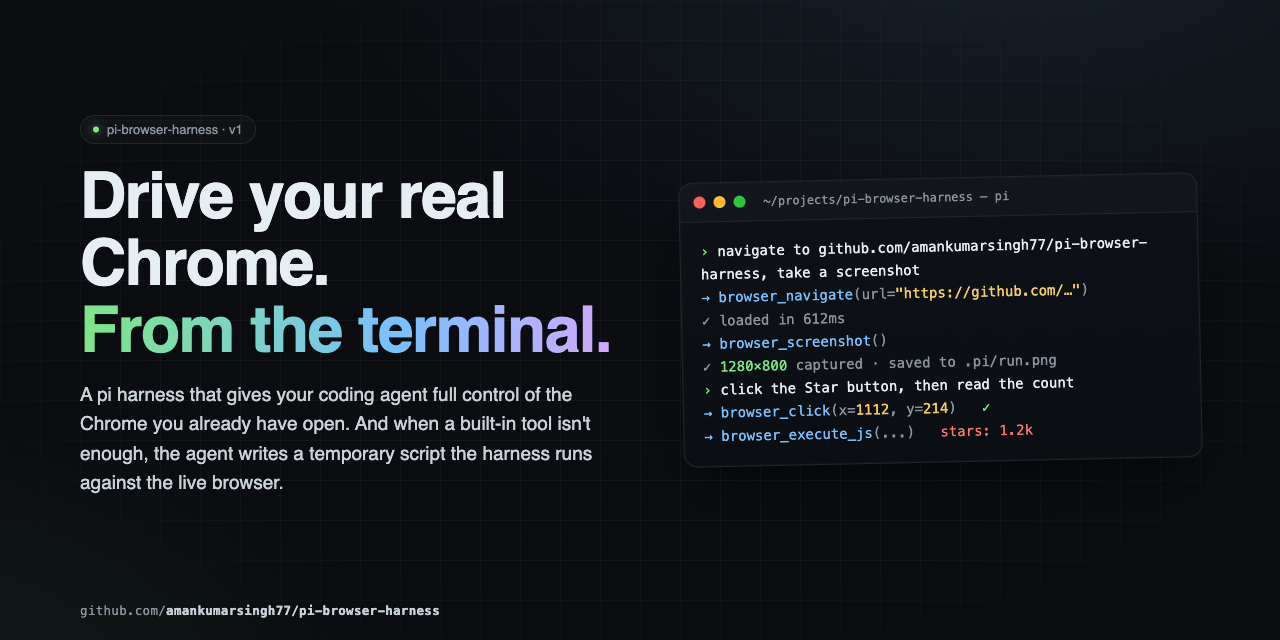
Browser control for pi agents, in the Chrome you're already using.
Your profile, your logins, your cookies. The agent reads pages as an accessibility tree with stable element handles, fills forms that React won't revert, captures network traffic and console errors, searches the web, and drops to raw CDP when the tools run out. 40 tools over a single CDP connection — no MCP hop, no second browser, no extra API keys.
How it compares
| pi-browser-harness | Playwright MCP | Puppeteer MCP | Stagehand | |
|---|---|---|---|---|
| Browser | Your running Chrome — real profile, live sessions | Launches a clean instance | Launches a clean instance | Launches a clean instance |
| Element targeting | AX-tree refs ([eN]) that re-resolve at action time; coordinate and selector fallbacks |
Selectors / AX locators | CSS selectors | LLM-inferred selectors |
| Input dispatch | Compositor-level CDP input — works through iframes, shadow DOM, cross-origin frames | DOM-level | DOM-level | DOM-level |
| Framework-safe writes | browser_fill writes via the native setter and fires bubbling events, so controlled inputs keep the value |
Native fill | Manual | Native fill |
| Transport | Native pi extension, in-process | MCP / JSON-RPC round trip | MCP / JSON-RPC round trip | In-process + its own LLM calls |
| Extra credentials | None | None | None | Its own model API key |
| Concurrency | Reads run in parallel; mutations auto-serialize through a shared mutex | Sequential | Sequential | Sequential |
| Isolation | Dedicated Chrome window per session; refuses tabs it didn't open | N/A (own browser) | N/A | N/A |
| Terminal output | Inline screenshots and Ctrl+O-expandable tool results |
Plain text | Plain text | Plain text |
| Escape hatch | browser_run_script — raw CDP + full Node in one call |
— | — | — |
Reflects each project's default configuration. Corrections welcome via PR.
The short version: if you live in pi and want an agent driving the same Chrome you're already signed into, this is the one that fits.
Install
pi install npm:pi-browser-harness
Then enable remote debugging in your browser — either open chrome://inspect/#remote-debugging
(or brave://inspect, edge://inspect), tick Discover network targets, and click Allow —
or relaunch the browser with --remote-debugging-port=9222.
Finally, run /browser-setup in pi to connect. It's a one-time step — the connection survives across
pi sessions and reconnects on its own when Chrome restarts.
The first time you connect, you'll be asked which browser profile the agent should work in:
Select the browser profile the agent should use
    Work (work@example.com)
  ✓ Personal (personal@example.com)
    Testing (test@example.com)
    — Clear selection (use whichever window is focused) —
That choice is saved to ~/.pi/agent/browser-harness.json and reused by every project until you
change it with /browser-profile. It decides which logins, cookies, and extensions the agent works
with, so pinning it keeps runs reproducible. Skip the prompt and the harness behaves as it always
did: tabs open in whichever profile currently has focus.
Requires: pi (latest) · Node.js ≥ 22 · Chrome, Chromium, Brave, or Edge
The mental model
Interaction is ref-first. browser_snapshot returns the accessibility tree, and every
interactive element carries a stable ref ([eN]) plus click coordinates @(x,y):
[e7]  textbox  "Email"          @(412,288)
[e9]  combobox "Country"        @(412,344)
[e12] button   "Create account" @(456,412)
Pass the ref — not the coordinates — to browser_click, browser_fill, browser_select_option,
browser_focus, browser_upload_file, or browser_dispatch_key. Refs are keyed to element
identity, so they re-resolve position at action time and survive the re-renders that SPA forms
trigger on every keystroke. Coordinates go stale the moment the layout reflows.
Three things follow from that:
- Never screenshot to find a click target. The snapshot already has refs and coordinates.
- Mutating calls append a "Page changes" diff. Read it to confirm the step landed — a panel
closed, a new
[eN]appeared — instead of taking a screenshot to check. "ref is stale"means the page changed. Re-snapshot for fresh refs; don't retry blindly.
Which tool answers your question
| You need to know… | Reach for |
|---|---|
| What's on the page, what's clickable | browser_snapshot — the default |
| One element's text, value, or geometry | browser_execute_js — one round trip |
| An article's readable content | browser_read_page |
| Why nothing happened after an action | browser_console |
| What the page requested over the network | browser_network_requests |
| Whether something rendered correctly | browser_screenshot — last resort, pixels only |
Tools
Reading the page
| Tool | Purpose |
|---|---|
browser_snapshot |
Default. Accessibility tree with [eN] refs and @(x,y) per interactive element. Optional includeScreenshot. |
browser_execute_js |
Surgical DOM reads — text, attributes, getBoundingClientRect(). Cheapest precise read. |
browser_page_info |
URL, title, viewport, scroll position — or the pending JS dialog, if one is blocking. |
browser_console |
JS errors and console output. Pass sinceSeq from the previous nextCursor to see only what an action caused. |
browser_screenshot |
PNG/JPEG capture. For verifying visual rendering only. |
Web research
| Tool | Purpose |
|---|---|
browser_web_search |
Query → ranked {title, url, snippet, rank}, by scraping a real Google SERP in your Chrome. No API key. Links only. |
browser_read_page |
Reader mode. A url (opened and closed in its own tab) or an owned targetId → clean article text, boilerplate stripped. |
Both run in isolated tabs and never disturb your current page.
Interacting
| Tool | Purpose |
|---|---|
browser_click |
Click by ref (preferred) or viewport x/y. Compositor-level, so iframes and shadow DOM work. |
browser_fill |
Set an input, textarea, or contenteditable. Fires bubbling input/change, returns the value written. |
browser_select_option |
Choose in a native <select> by value, label, or index. Returns available options on no match. |
browser_focus |
Deterministic .focus() — no coordinate accuracy needed. |
browser_type |
Type into the focused element. For keystroke-sensitive widgets; prefer browser_fill otherwise. |
browser_press_key |
Press a key with an optional modifier bitfield. |
browser_dispatch_key |
Synthetic DOM KeyboardEvent on one element, for pages that ignore raw CDP keys. |
browser_scroll |
Scroll by delta. W3C wheel convention: positive deltaY = down. |
browser_drag_and_drop |
Drag between two coordinate pairs. |
Navigation and tabs
| Tool | Purpose |
|---|---|
browser_navigate |
Go to a URL in the current tab. |
browser_new_tab / browser_open_urls |
Open one tab, or many URLs in parallel. |
browser_go_back / browser_go_forward / browser_reload |
History. |
browser_list_tabs / browser_current_tab |
List tabs (scope:"owned" by default) and inspect the attached one. |
browser_switch_tab / browser_close_tab |
Switch or close — owned tabs only. |
Waiting and dialogs
| Tool | Purpose |
|---|---|
browser_wait_for |
Wait until a selector appears (or disappears with gone:true), or text shows up. Prefer this over sleeping. |
browser_wait_for_load |
Wait for document.readyState === "complete". |
browser_wait |
Fixed delay, in seconds. |
browser_handle_dialog |
Accept or dismiss alert / confirm / prompt. |
Network
| Tool | Purpose |
|---|---|
browser_network_requests |
Requests captured on the current tab since attach. Filter by URL, method, status, resource type, or recency; optional response bodies. |
browser_http_get |
Plain GET outside the browser. Much faster than navigate-then-read for JSON APIs — but no JS rendering. |
Files and viewport
| Tool | Purpose |
|---|---|
browser_upload_file |
Set files on a file input, with a DataTransfer fallback for stubborn pages. |
browser_download |
Set the download directory and suppress the save-as prompt. |
browser_print_to_pdf |
Print the page to PDF via Page.printToPDF. |
browser_viewport_resize |
Override viewport size and device pixel ratio for responsive checks. |
Escape hatches
| Tool | Purpose |
|---|---|
browser_run_script |
Run a temporary script with raw CDP and full Node access. See Extending. |
browser_setup |
Agent-callable setup. Idempotent — how the agent recovers from not initialized on its own. |
browser_snapshot, browser_network_requests, browser_console, browser_execute_js,
browser_web_search, and browser_read_page ship custom TUI rendering: compact by default,
full output on Ctrl+O (app.tools.expand). The model always receives the complete result
regardless of render state.
Recipes
Fill a form on an SPA
Wait, snapshot once, then act by ref. No screenshots anywhere in this loop.
browser_wait_for({ selector: "#email" })
browser_snapshot()                                  // → [e7] textbox, [e9] combobox, [e12] button
browser_fill({ ref: "e7", value: "a@b.com" })
browser_select_option({ ref: "e9", label: "India" })
browser_click({ ref: "e12" })                       // re-resolves position even after reflow
Each mutating call returns a "Page changes" diff — that's your confirmation the step landed.
Extract data
// One value
browser_execute_js({ expression: "document.querySelector('.price').innerText" })

// Structured
browser_execute_js({ expression: `JSON.stringify(
  Array.from(document.querySelectorAll('.result')).map(el => ({
    title: el.querySelector('h3')?.textContent,
    link:  el.querySelector('a')?.href,
  }))
)` })

// Skip the browser entirely for a JSON endpoint
browser_http_get({ url: "https://api.github.com/repos/amankumarsingh77/pi-browser-harness" })
Debug a failing page
browser_click({ ref: "e12" })
browser_console({ levels: ["error", "warn"] })      // did JS throw?
browser_network_requests({                          // did a request 4xx/5xx?
  urlPattern: "/api/",
  statusFilter: { min: 400 },
  includeResponseBodies: true
})
Search, then read
browser_web_search({ query: "chrome devtools protocol overview", limit: 5 })
browser_read_page({ url: "<the best result's url>" })
Both tools open their own isolated tab, so neither disturbs the tab you are working in.
Keyboard modifiers
Modifiers are a bitfield: 1 Alt · 2 Ctrl · 4 Meta/Cmd · 8 Shift.
browser_press_key({ key: "c", modifiers: 2 })    // Ctrl+C
browser_press_key({ key: "T", modifiers: 10 })   // Ctrl+Shift+T
Concurrency and isolation
Parallel reads, serialized writes. Observation tools run concurrently with each other and with
mutations. Mutations (click, fill, type, scroll, navigate, switch_tab, …) pass through a
shared async mutex and FIFO-queue automatically, so emitting several in one turn is safe.
browser_snapshot() + browser_network_requests({ sinceMs: 5000 }) + browser_http_get({ url: "..." })
Tab ownership. On first attach the harness opens a dedicated Chrome window and only operates
inside it. browser_list_tabs defaults to scope:"owned" (pass scope:"all" for a read-only view
of your other tabs); browser_switch_tab and browser_close_tab refuse anything this session
didn't open. Owned tabs are closed at session shutdown, so nothing stale accumulates in your browser.
Extending
When the built-in tools can't express a workflow, write a script and run it. It executes inside the harness process with a live CDP handle — far faster than chaining tool calls.
write("<tmpdir>/scrape.js", `
  const results = [];
  for (const url of params.urls) {
    await daemon.session().call("Page.navigate", { url });
    await new Promise(r => setTimeout(r, 2000));
    results.push({ url, title: await daemon.evaluateJs("document.title") });
  }
  return { content: [{ type: "text", text: JSON.stringify(results, null, 2) }] };
`)

browser_run_script({ path: "<tmpdir>/scrape.js", params: { urls: [...] } })
Bindings: params, daemon, require, signal, onUpdate, ctx, console, fetch,
JSON, Buffer, setTimeout, clearTimeout.
daemon exposes evaluateJs, pageInfo, listTabs, switchTab, newTab, closeTab, current,
status, and session() for raw CDP (call · callOnTarget · callBrowser · takeDialog).
Scripts must live under the OS temp dir, the cwd, or BH_SCRIPT_DIR, and every call carries a
mandatory timeout (60s default, 600s max). They land on disk first, so they're reviewable and
re-runnable.
Commands, flags, and environment
| Command | Purpose |
|---|---|
/browser-setup |
Connect pi to your browser. Run once; idempotent. |
/browser-profile |
Pick which browser profile the agent works in. Remembered across sessions. |
/browser-status |
Connection state, selected profile, and current page. |
/browser-reload-daemon |
Force a client restart. Rarely needed — the transport reconnects on its own. |
| Flag / variable | Effect |
|---|---|
--browser-namespace <name> |
Override the session namespace (default: auto-generated). |
--browser-debug-clicks |
Save annotated click screenshots for debugging. Equivalent to BH_DEBUG_CLICKS=1. |
BU_CDP_WS |
Attach to a remote browser by WebSocket URL instead of discovering a local one. The daemon reads this when it starts, so stop a running daemon first. |
BH_DEBUG_CLICKS |
Same as --browser-debug-clicks. |
BU_CDP_PORTS |
Extra ports to probe during CDP discovery, beyond 9222. |
BH_SCRIPT_DIR |
Additional directory browser_run_script will accept paths from. |
Anti-patterns
- Don't launch your own browser. You're attached to the user's real Chrome.
- Don't type credentials. Hit an auth wall — stop and ask.
- Don't screenshot to understand a page, find coordinates, or read a value.
browser_snapshotandbrowser_execute_jsare cheaper and exact. - Don't guess CSS selectors when a snapshot ref exists.
- Don't sleep to wait.
browser_wait_foris deterministic;browser_waitis a last resort. - Don't ignore dialogs. They freeze the page's JS thread —
browser_page_inforeports them,browser_handle_dialogclears them.
Architecture
pi agent
   │  browser_* tools (in-process extension)
   ▼
pi-browser-harness  ──►  daemon (Unix socket / named pipe)  ──►  Chrome
                              CDP WebSocket
A long-lived daemon owns the CDP connection, so it outlives individual pi sessions — which is why
you only see Chrome's "Allow Remote Debugging" prompt once. browser_run_script executes in the
harness process with direct daemon and Node access.
Troubleshooting
| Symptom | Fix |
|---|---|
DevToolsActivePort not found |
Open chrome://inspect/#remote-debugging, tick Discover network targets, click Allow. Or relaunch with --remote-debugging-port=9222. |
No browser instance running |
Chrome/Brave/Edge isn't open, or only helper processes remain. Open the browser, then /browser-setup. |
Browser harness not initialized |
Run /browser-setup — or let the agent call browser_setup itself. |
ref is stale |
The page re-rendered. Re-run browser_snapshot for fresh refs. |
| Page looks loaded but content is missing | SPA still rendering. Use browser_wait_for({ selector }), not a fixed sleep. |
| Click did nothing | Check browser_console for a thrown error, then browser_network_requests for a failed call. |
| Actions all hang | A JS dialog is blocking. browser_page_info reports it; browser_handle_dialog clears it. |
No [eN] ref for your target |
The element wasn't exposed as interactive. Fall back to a CSS selector, or browser_execute_js with getBoundingClientRect(). |
| Connected but the wrong browser responds | A stale DevToolsActivePort file. Quit every Chromium-family browser, reopen one, then /browser-setup. |
| Agent acts as the wrong account | No profile is pinned, so tabs open in whichever profile has focus. Run /browser-profile and pick one. |
couldn't open a window in "…" automatically |
The profile window couldn't be opened for you. Open that profile from the browser's profile menu, then retry — the harness never falls back to a different profile silently. |
Security
This extension drives your real browser. The agent can read any page you're signed into, submit
forms, and act inside authenticated sessions. browser_run_script is full code execution in the pi
process with unrestricted require — review any script before running it. Scripts are
path-restricted and timeout-bounded, but that is a blast-radius limit, not a sandbox.
Contributing
See CONTRIBUTING.md for setup, conventions, and the PR process. Release history lives in CHANGELOG.md.
License
MIT — see LICENSE.