pi-budget-guard
An extension for Pi coding agent that tracks session spend and enforces budget limits.
Package details
Install pi-budget-guard from npm and Pi will load the resources declared by the package manifest.
$ pi install npm:pi-budget-guard- Package
pi-budget-guard- Version
0.2.1- Published
- Apr 24, 2026
- Downloads
- 273/mo · 139/wk
- Author
- samurai_mac
- License
- MIT
- Types
- extension
- Size
- 19.1 KB
- Dependencies
- 0 dependencies · 1 peer
Pi manifest JSON
{
  "extensions": [
    "./index.ts"
  ],
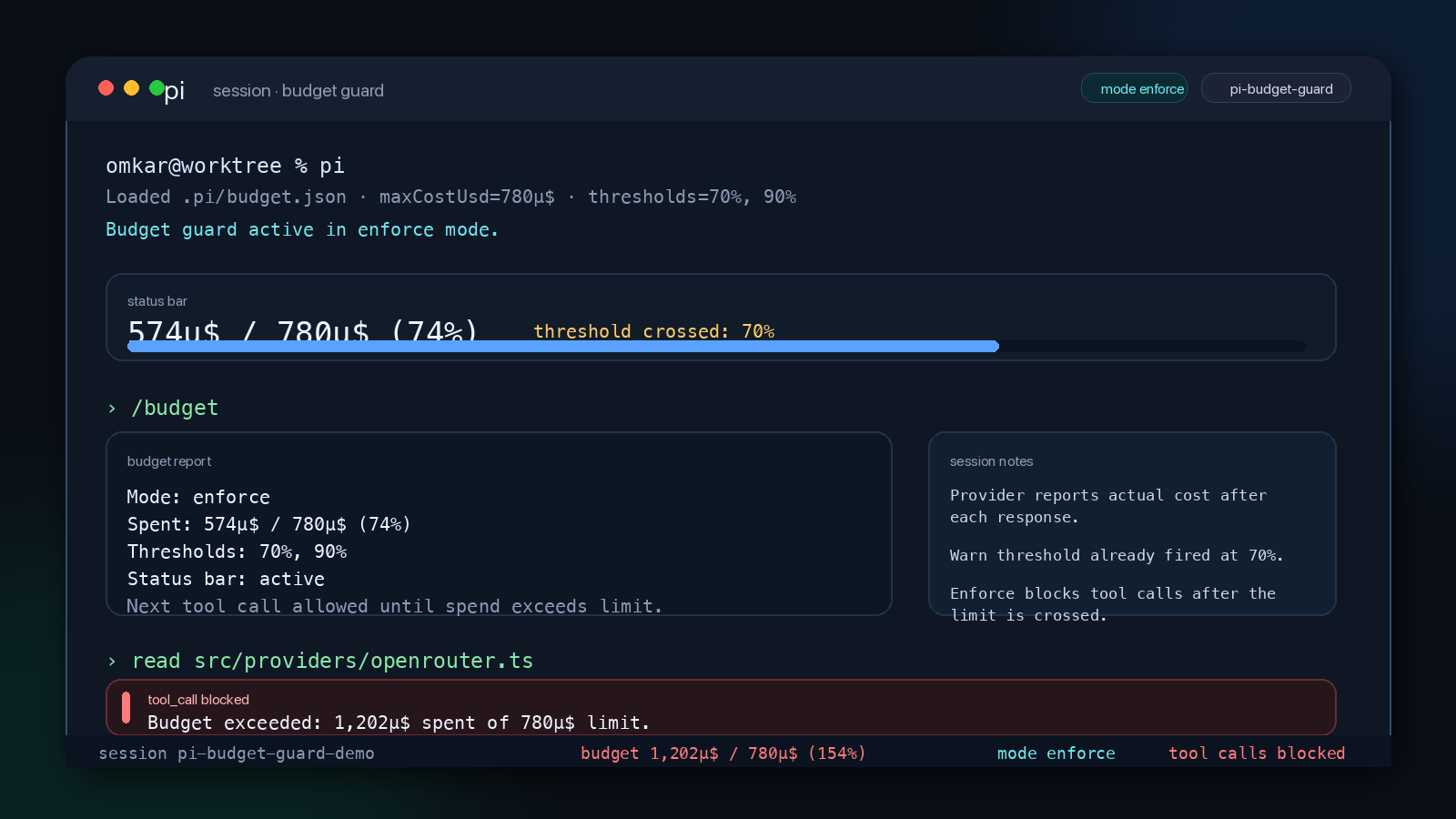
  "image": "https://raw.githubusercontent.com/omkarrajmane/pi-budget-guard/main/docs/screenshot.png"
}
Security note
Pi packages can execute code and influence agent behavior. Review the source before installing third-party packages.
README
Pi Budget Guard
An extension for Pi coding agent that tracks session spend and enforces budget limits.
Prerequisites
Pi coding agent must be installed:
npm install -g @mariozechner/pi-coding-agent
Then install the extension:
pi install npm:pi-budget-guard
Quick Start
# 1. Create a config in your project directory
mkdir -p .pi
echo '{"maxCostUsd": 1.00, "mode": "enforce"}' > .pi/budget.json

# 2. Start pi — the status bar now shows your spend vs budget
pi
After pi starts, type /budget to confirm it loaded:
Mode: enforce
Spent: $0.000 / $1.00 (0%)
Thresholds: 70%, 90%
Modes
| Mode | Behavior |
|---|---|
observe |
Tracks spend in the footer status bar. No warnings or blocking. |
warn |
Tracks spend + injects budget pressure messages at configured thresholds. |
enforce |
Tracks spend + pressure messages + blocks all tool calls when budget is exceeded. |
Configuration
Create .pi/budget.json in your project directory for per-project settings:
mkdir -p .pi
cat > .pi/budget.json << 'EOF'
{
  "maxCostUsd": 1.00,
  "mode": "observe",
  "warningThresholds": [0.70, 0.90]
}
EOF
For a global default that applies to every project:
mkdir -p ~/.pi/agent
cat > ~/.pi/agent/budget.json << 'EOF'
{
  "maxCostUsd": 5.00,
  "mode": "warn",
  "warningThresholds": [0.70, 0.90]
}
EOF
Config priority: project .pi/budget.json → global ~/.pi/agent/budget.json → defaults.
| Field | Type | Default | Description |
|---|---|---|---|
maxCostUsd |
number | 1.00 |
Session budget in USD |
mode |
string | "observe" |
One of observe, warn, enforce |
warningThresholds |
number[] | [0.70, 0.90] |
Fractions of budget that trigger warnings |
The /budget Command
Type /budget to display current status:
Mode: observe
Spent: $0.042 / $1.00 (4%)
Thresholds: 70%, 90%
Type /budget 5.00 to update the limit at runtime without restarting pi.
Provider Compatibility
Pi Budget Guard tracks the cost reported by the LLM provider after each response.
Free and preview models (e.g. google/gemini-3-flash-preview via OpenRouter) report
$0.00 per call — the extension loads and runs but spend never accumulates, so
warn and enforce modes have no effect.
Models with real cost reporting (tested):
google/gemini-2.0-flashvia OpenRouteropenai/gpt-4o-minivia OpenRouteranthropic/claude-3-5-haikuvia OpenRouter- Native Google, Anthropic, and OpenAI providers
How It Works
Pi Budget Guard hooks into four Pi extension events:
session_start: Loads config, resets or reconstructs cost (on resume).message_end: Accumulates cost from each assistant response.tool_call(enforce mode only): Blocks tool calls when budget is exceeded.context(warn/enforce modes): Injects a budget pressure message when a warning threshold is first crossed.
Cross-Session Persistence
Pi Budget Guard persists the accumulated cost to the session file as a custom entry after every assistant response. When pi restarts with the same session file, the extension restores the last known cost so budget enforcement survives process boundaries. This also means:
- Closing and reopening pi on the same session preserves the spend total
- Compaction does not erase cost (custom entries are excluded from LLM context)
- If the persisted snapshot is malformed, the extension falls back to zero silently
Limitations
- No daily/monthly tracking. Per-session budget persists across process restarts (since 0.2.1). Daily/monthly limits are a v2 feature.
- No pre-call estimation. Pi only exposes cost after the response completes. A single expensive call can exceed the limit before being blocked.
- Post-call bounded overrun. In enforce mode, the final response that crosses the limit is allowed to complete; only subsequent tool calls are blocked.
License
MIT