pi-cc-extensions
Claude Code-style TUI output with some personal touches and handy utilities.
Package details
Install pi-cc-extensions from npm and Pi will load the resources declared by the package manifest.
$ pi install npm:pi-cc-extensions- Package
pi-cc-extensions- Version
1.0.17- Published
- Nov 12, 2026
- Downloads
- 30.4K/mo · 4,296/wk
- Author
- minuque
- License
- MIT
- Types
- extension, theme
- Size
- 981.8 KB
- Dependencies
- 3 dependencies · 3 peers
Pi manifest JSON
{
  "image": "https://raw.githubusercontent.com/minuque/pi-cc-extensions/main/assets/readme/preview.webp",
  "video": "https://github.com/minuque/pi-cc-extensions/releases/download/v0.9.4/demo.mp4",
  "themes": [
    "./themes/cc-dark.json",
    "./themes/cc-light.json",
    "./themes/cc-dark-hc.json",
    "./themes/cc-light-hc.json"
  ],
  "extensions": [
    "./extensions/index.ts"
  ]
}
Security note
Pi packages can execute code and influence agent behavior. Review the source before installing third-party packages.
README
pi-cc-extensions
类 Claude Code TUI 输出风格,并融入了一些个人喜好,和一些实用小功能(无额外内置工具)。
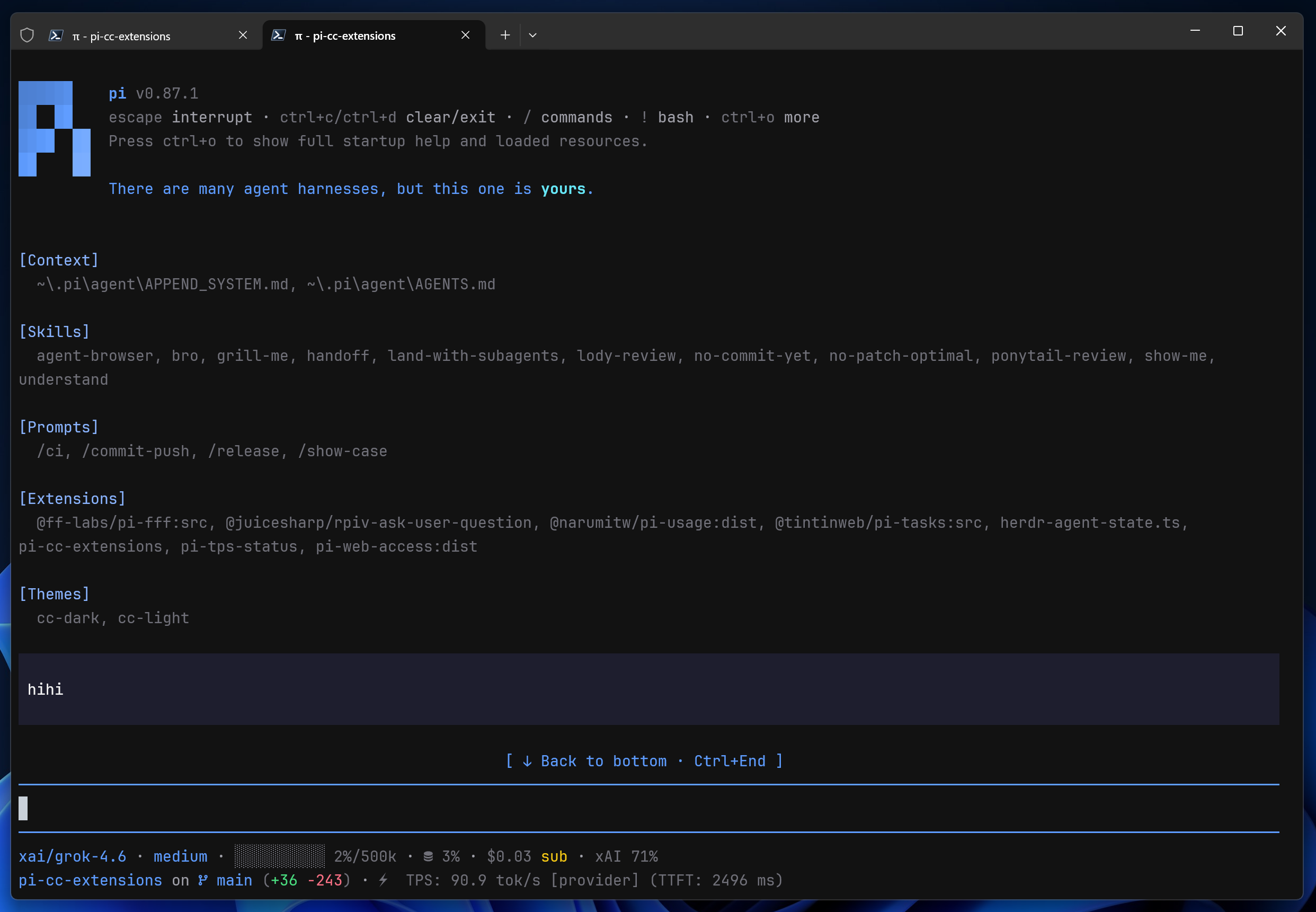
界面预览
点击封面播放演示视频
快速开始
pi install npm:pi-cc-extensions

# GitHub
pi install git:github.com/minuque/pi-cc-extensions
安装后执行 /reload
功能
| 功能 | 说明 | 入口 |
|---|---|---|
| Claude Code UI | 工具摘要、折叠展开、rich edit/write diff,以及on / compact / off 三种模式 |
/ccstyle |
| Markdown 增强 | 方言 fence 的 Mermaid 渲染(statediagram、classdiagram 等)、圈数字转半角括号;标准 mermaid 交给 pi |
自动生效;enableMarkdownEnhance: false 关闭 |
| Fullscreen mode | 工具卡/group 单击展开与收起、预览、hover 高亮、回到底部按钮 | --tui-mode fullscreen(pi 1.5 起默认) |
| 配置面板 | Style / Features / UI / Diff / Thinking / Footer 六页签 |
/ccstyle |
| 上下文检查 | 查看上下文占用,并预览 System prompt、Memory、Skills、Tools definition 和消息内容 | /context |
| 会话记录浏览 | 全屏浏览完整会话记录,工具输出全展开;对话区有可展开的 ! 输出时把键让给 pi |
Ctrl+O |
| Session/Subagent 引用 | 搜索并注入历史 Session 或现有 SubAgent 的有效上下文 | @ |
| 状态栏 | 显示:模型、上下文、缓存、费用、本次对话累计 token、git并适配 @narumitw/pi-usage 实时显示额度;git/缓存/token 图标可关 Nerd Font | /ccstyle |
| 主题 | 随包提供 4 个主题:CC Dark、CC Light、CC Dark HC、CC Light HC | /settings → Theme |
on / compact 两种模式的渲染样例:默认模式 · 紧凑模式
配置
/ccstyle 的行为由 ~/.pi/agent/pi-cc-extensions.json 配置:
{
  // style
  "mode": "on",                            // on / compact / off
  "excludeRenderers": [],                  // 走原生渲染的工具名,匹配忽略大小写;Agent 始终保留专用渲染器

  // features
  "enableSessionReference": true,          // @ session 引用
  "enableSubagentAutocomplete": true,      // @subagent:[name] 补全与委派提示
  "enableContextCommand": true,            // /context 上下文检查
  "enableAgentSummary": true,              // 每回合工具摘要
  "enableWorkingMessage": true,            // Working... 底部 token/耗时
  "enableAliases": true,                   // /clear、/exit 别名
  "enableMarkdownEnhance": true,           // markdown 转换:Mermaid 方言渲染、圈数字转半角括号;false 让位给其他扩展
  "enableEditorPrefix": true,              // 输入框 ❯ 前缀

  // ui
  "expandedInputMaxLines": 5,              // 展开工具卡 Input 可见行数,超出在末行显示展开提示
  "expandedOutputMaxLines": 10,            // 展开工具卡 Output 可见行数,超出在末行显示展开提示
  "expandedPreviewMaxLines": 40,           // 展开 TaskList 正文最大行数(展开 diff 始终全量)
  "toolLabelClip": 0,                      // 工具摘要 path/command 折叠字符数;0 = 按可用宽度
  "showStartupHeader": true,               // 启动头(logo + tips)开关
  "stickyUserMessage": true,               // fullscreen:userMessage 正文首行滚出视口上沿后钉住,直到下一条指令接手
  "scrollButtonMode": "dock",              // fullscreen:dock 独占行 / native Pi 原生浮层

  // diff
  "diffViewMode": "auto",                  // 布局:auto / split / unified
  "diffIndicatorMode": "bars",             // 变更指示:bars / classic / none
  "diffSplitMinWidth": 120,                // 左右分栏的最小终端宽度
  "editDiffCollapsedLines": 24,            // edit 折叠行数;0 仅显示变更统计摘要
  "writeDiffCollapsedLines": 0,            // write 折叠行数,0 仅显示创建摘要
  "diffWordWrap": true,                    // 长 diff 行换行

  // thinking
  "useSummaryTitlesAsThinkingTitle": true, // 用最新摘要作思考标题
  "previewLines": 3,                       // 思考中的预览行数,0 隐藏
  "completedPreviewLines": null,           // 完成态预览行数,0 隐藏;null 跟随 previewLines。面板可输入任意值或 follow
  "animationIntervalMs": 90,               // 标题动画间隔(毫秒)

  // footer
  "enableCustomFooter": true,              // 自定义状态栏
  "footerTokenRate": true,                 // 输出速率芯片;false 隐藏
  "footerTokenRateMode": "average",        // average:整段指令平均(avg);live:最近 1 秒瞬时(live)
  "footerTokenRateTtft": true,             // 速率芯片是否带 TTFT;false 只显示 tok/s
  "footerSessionTokens": false,            // 本次对话累计 token 芯片(Nerd Font 图标,纯文本为 Σ);累加会话条目的 usage.totalTokens,默认关
  "footerCurrency": "USD",                 // 底栏费用的显示币种
  "footerCurrencyRate": null,              // 1 单位费用换成多少显示币种;null 只换符号、不乘倍率
  "footerNerdIcons": true,                 // git/缓存/token 用 Nerd Font 图标;false 为纯文本
  "footerGitStatsMode": "working",         // working(默认):未提交改动;branch:分支累计净改动
  "footerContextLimit": "window",          // 上下文芯片分母:window(默认):完整上下文窗口;compaction:自动压缩触发点(窗口 − compaction.reserveTokens);both:压缩点并在括号中显示完整窗口
                                           // Pi 越过压缩点后才压缩,所以文字可能短暂超过 100%(如 104%/184k);条形图封顶 100%
  "footerHiddenKeys": [],                  // 隐藏的芯片 key
  "footerLine1Keys": ["model", "context", "cache", "rate", "cost", "tokens", "pi-usage"], // 每行芯片顺序;内置项与插件同一套排布
  "footerLine2Keys": ["cwd", "git"],       // cwd:目录和会话名;git:分支和改动。可换到任意行
  "footerLine3Keys": []                    // 有可见芯片才占行
}
[!TIP] 全屏模式:展开态 diff 全量显示。Input/Output 超行时末行给
… +N more lines,单击看全量,再击收起。
[!NOTE] Mermaid 渲染:
markdown.mermaid建议设final(/settings),避免流式逐帧重绘。
本地开发
./test.sh            # macOS/Linux,需要 node 和 pi
./test.bat           # Windows,经 Git Bash 运行 test.sh
pi -e .              # 只跑一次,不改 settings.json
兼容性
- Node.js
>=22.19.0,Pi^1.5.1(用到了 1.5.x 的注入式按键提示、messageTypes与ctx.ui.custom({ blocked }))
推荐搭配
| 扩展 | 用途 |
|---|---|
npm:pi-web-access |
网页搜索、URL 抓取、GitHub 克隆、PDF/视频解析 |
npm:@narumitw/pi-usage |
查看当前账号用量(Codex / Copilot / OpenRouter) |
npm:@juicesharp/rpiv-ask-user-question |
模型拿不准时向你提问的选择题面板 |
致谢
- Rich diff 改编自
MasuRii/pi-tool-display(MIT);详见extensions/renderer/tool/diff/ATTRIBUTION.md。
许可证
MIT © minuque