pi-cc-style-workflow
Claude Code-style dynamic workflow orchestration for Pi, built on @agwab/pi-workflow.
Package details
Install pi-cc-style-workflow from npm and Pi will load the resources declared by the package manifest.
$ pi install npm:pi-cc-style-workflow- Package
pi-cc-style-workflow- Version
0.1.3- Published
- Aug 3, 2026
- Downloads
- 491/mo · 69/wk
- Author
- esso0428
- License
- MIT
- Types
- extension, skill
- Size
- 37 MB
- Dependencies
- 3 dependencies · 1 peer
Pi manifest JSON
{
  "extensions": [
    "./src/extension.ts"
  ],
  "skills": [
    "./skills/workflow-guide",
    "./skills/execution-router"
  ]
}
Security note
Pi packages can execute code and influence agent behavior. Review the source before installing third-party packages.
README
pi-cc-style-workflow extends @agwab/pi-workflow with LLM-generated
workflow scripts — the same pattern Claude Code uses for dynamic orchestration.
Write a short JavaScript workflow script, and the engine fans out isolated out-of-process subagents with true parallelism, crash isolation, and a full workflow board you can inspect in real-time.
Built on the shoulders of @agwab/pi-workflow — all bundled workflows
(deep-research, deep-review, spec-review, impact-review), the /workflow board,
the active-workflow widget, and the store/resume/inspect infrastructure work
as documented there.
Installation
pi install npm:pi-cc-style-workflow
Then reload Pi. This installs:
- the
/workflowextension (workflow board + management) - the
workflow_scripttool (LLM-generated scripts) - the bundled
workflow-guideskill - the bundled
execution-routerskill
Usage: LLM-generated scripts
Ask Pi to write a workflow script for your task. Pi will write a small JavaScript
workflow, call the workflow_script tool, and subagents fan out in the background
while you keep working.
Check progress with the active-workflow widget below the editor or open
/workflow for the full board.
Write a workflow to inspect this repository and summarize the main modules.
Run a workflow to review every modified file from multiple perspectives.
Use a workflow to research our top three competitors' pricing pages.
Script shape
A workflow script is plain JavaScript with a meta export. Live progress is
driven by phase(title) at runtime:
export const meta = {
  name: 'inspect_project',
  description: 'Inspect repository and summarize main modules',
  phases: [
    { title: 'Scan' },
    { title: 'Analyze' },
  ],
}

phase('Scan')
const inventory = await agent('Inspect the repository structure.', {
  label: 'repo inventory',
})

phase('Analyze')
const summary = await agent(
  'Summarize the main modules from this inventory:\n' + inventory,
  { label: 'module summary' },
)

return { inventory, summary }
Agent type and Nico-style overrides
Each agent() call can specify an agent type. If you have configured
subagents.agentOverrides in your settings.json (via @esso0428/pi-subagents
or the Nico format), the overrides for model, thinking, and tools are applied
automatically:
const result = await agent('Research this topic', {
  agentType: 'researcher',  // ← respects subagents.agentOverrides.researcher
  model: 'haiku',           // ← explicit: overrides the override
})
Available globals
| Global | Description |
|---|---|
agent(prompt, opts) |
Spawn an isolated out-of-process subagent |
parallel(thunks) |
Run () => agent(...) thunks concurrently; results in input order |
pipeline(items, ...stages) |
Run each item through sequential stages; items fan out |
phase(title) |
Mark the current phase for live progress |
log(message) |
Append a workflow-level log line |
args |
Optional JSON value from the tool call |
cwd / process.cwd() |
Working directory for subagents |
budget |
{ total, spent(), remaining() } agent budget tracker |
Script writer guidelines
- The script must start with
export const meta = { name, description }. meta.name: short snake_case identifier.meta.description: non-empty human description.meta.phases(optional): upfront outline; runtime phases are driven byphase()calls.- Each
agent()should include a shortlabel(2–5 words) for readable progress. - Failed branches return
null— check before using results. - Include a final
returnwith a structured result.
Script tool vs dynamic workflow
workflow_script |
/workflow dynamic / workflow_dynamic |
|
|---|---|---|
| Orchestrator | LLM-written JS script (you decide the flow) | Built-in decision-loop controller |
| Flexibility | Full — conditionals, loops, custom logic | Structured — plan → work → verify → synthesize |
| Subagents | Out-of-process (true parallelism) | Out-of-process (true parallelism) |
| UI | Active workflow widget + /workflow board | Active workflow widget + /workflow board |
| Best for | One-off exploration, custom fan-out | Repeatable research, review, audit workflows |
Usage: predefined workflows (from @agwab/pi-workflow)
All bundled workflows from @agwab/pi-workflow work as-is:
Use the bundled deep-research workflow to research this repository.
/workflow run deep-review "Review the current diff for security issues."
Workflow board
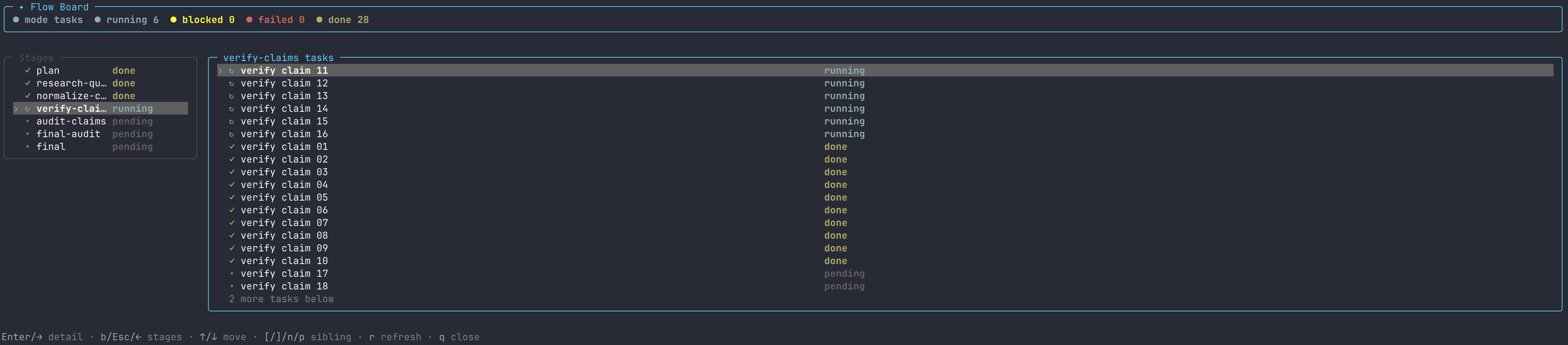
After starting a run, open /workflow to inspect it. Browse runs, drill into
stages and tasks, and preview task output — all in a read-only TUI.



Credits
pi-cc-style-workflow is a fork of @agwab/pi-workflow
by AgwaB. The original package provides the workflow engine,
workflow board UI, store/resume infrastructure, and bundled workflows. This package
adds the workflow_script tool for LLM-generated workflow scripts and Nicol-style
agent overrides.
Inspired by Anthropic's dynamic workflows in Claude Code
and the standalone pi-dynamic-workflows package.
Inspired by Anthropic's dynamic workflows in Claude Code
and the standalone pi-dynamic-workflows package.
Interactive slash-command launches use Pi's cancellable foreground loader while routing, validating, and completing the initial scheduling pass. Once at least one backend task is actually running, the command returns and Pi shows an `Active workflows` widget below the editor plus a compact footer status. The widget excludes launch/preparation states and stale `running` records with no running task, tracks top-level run progress, survives session reload by rebuilding from `.pi/workflows`, and disappears when no workflow remains active. Open `/workflow` for the full board.

### Execution profiles

A workflow may optionally declare custom-named `executionProfiles` and a
`defaultExecutionProfile`. Use `/workflow run --profile <name> ...` (or the
optional `profile` field of `workflow_run`) to select one. If omitted,
interactive runs offer the declared profiles plus the base workflow;
non-interactive launches (including tool execution without a selector) use the
declared default, or the base workflow when there is no default. They do not
infer a profile called `medium`. `low`, `medium`, and `high` are conventions,
not reserved names. See [the execution-profile reference](./docs/usage.md#execution-profiles)
for override precedence and batching constraints.

## Usage: choose an execution mode

Use the bundled `execution-router` skill when you are not sure whether a task should be handled directly, by a targeted verifier/subagent, by an existing workflow, or by a new workflow:

```text
/skill:execution-router decide whether this repository review should use a single-agent pass, deep-review, or a targeted verifier.
Usage: create your own workflows
Use the bundled workflow-guide skill when you want to create, adapt, or review a workflow definition. It includes validated scaffold bundles for common graph shapes, so new workflows can start from a known-good structure before customization and validation:
/skill:workflow-guide create a workflow for weekly release readiness.
It should inspect docs, tests, recent changes, package metadata, and produce a final checklist.
Save it as a reusable project workflow.
/skill:workflow-guide customize deep-review for frontend accessibility and UX review.
Save it as a reusable project workflow.
/skill:workflow-guide create a backend API review workflow.
It should check concurrency, transaction safety, error handling, observability, and test risk.
Workflow architecture
A workflow is a deterministic stage graph for running one natural-language task through a reusable process.
pi-workflow is organized around three parts:
- Workflow — the graph and run lifecycle: what stages exist, when they run, and how outputs move forward.
- Task — agent-backed work: focused prompts, dynamic fan-out, fan-in synthesis, and bounded loops.
- Support — deterministic local rails: helper code, validation, normalization, artifacts, and resume-friendly run state.
In short: workflows define the process, tasks ask Pi agents to do the work, and support keeps the process structured and repeatable.
A small workflow definition looks like this:
{
  "schemaVersion": 1,
  "defaults": {
    "agent": "researcher",
    "readOnly": true,
    "tools": ["read", "grep", "find", "ls"]
  },
  "artifactGraph": {
    "stages": [
      {
        "id": "plan",
        "type": "single",
        "prompt": "Put machine-readable JSON in <control> with an items array."
      },
      {
        "id": "inspect",
        "type": "foreach",
        "from": { "source": "plan", "path": "$.items" },
        "each": { "prompt": "Inspect this item: ${item}" }
      },
      {
        "id": "prepare",
        "from": "inspect",
        "sourcePolicy": "partial",
        "support": { "uses": "./helpers/prepare.mjs" }
      },
      {
        "id": "report",
        "type": "reduce",
        "from": ["plan", "prepare"],
        "prompt": "Use upstream workflow artifacts to write the final report."
      }
    ]
  }
}
Supported stage patterns
Workflow definitions compose a small set of stage patterns and graph shapes.
| Pattern | Use it for | Runtime shape |
|---|---|---|
single |
One focused step | one prompt -> one subagent |
foreach |
Dynamic fan-out | JSON array from an upstream control artifact -> one subagent per item |
reduce |
Fan-in / synthesis | upstream workflow artifacts -> one synthesis subagent |
loop |
Bounded repetition | repeat child stages until a deterministic stop condition |
dag |
Nested graph container | child stages lowered to namespaced tasks; selected output exposed downstream |
dynamic |
Adaptive orchestration | trusted bundle-local controller code can create official workflow tasks with ctx.agent() |

Predefined workflows
The package includes four bundled workflows for common research and review jobs. They are runnable defaults and authoring examples, not a complete workflow catalog.
| Workflow | Best for | What it does |
|---|---|---|
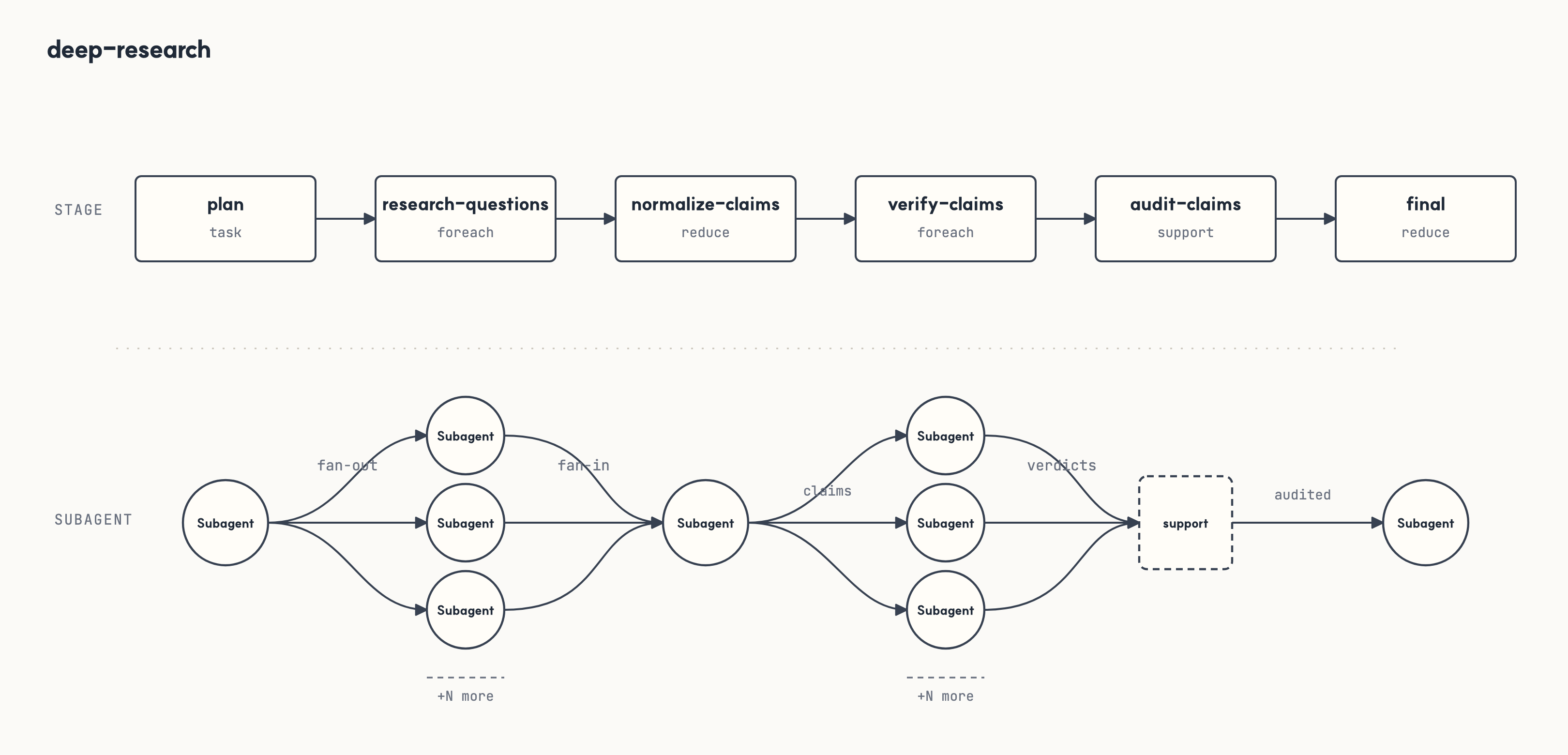
deep-research |
Deep, source-grounded research when breadth, verification, and cited recommendations matter. | Plans research questions by depth, fans out question-level research, normalizes and ranks claims, verifies selected claims against evidence, and renders an audited executive handoff. |
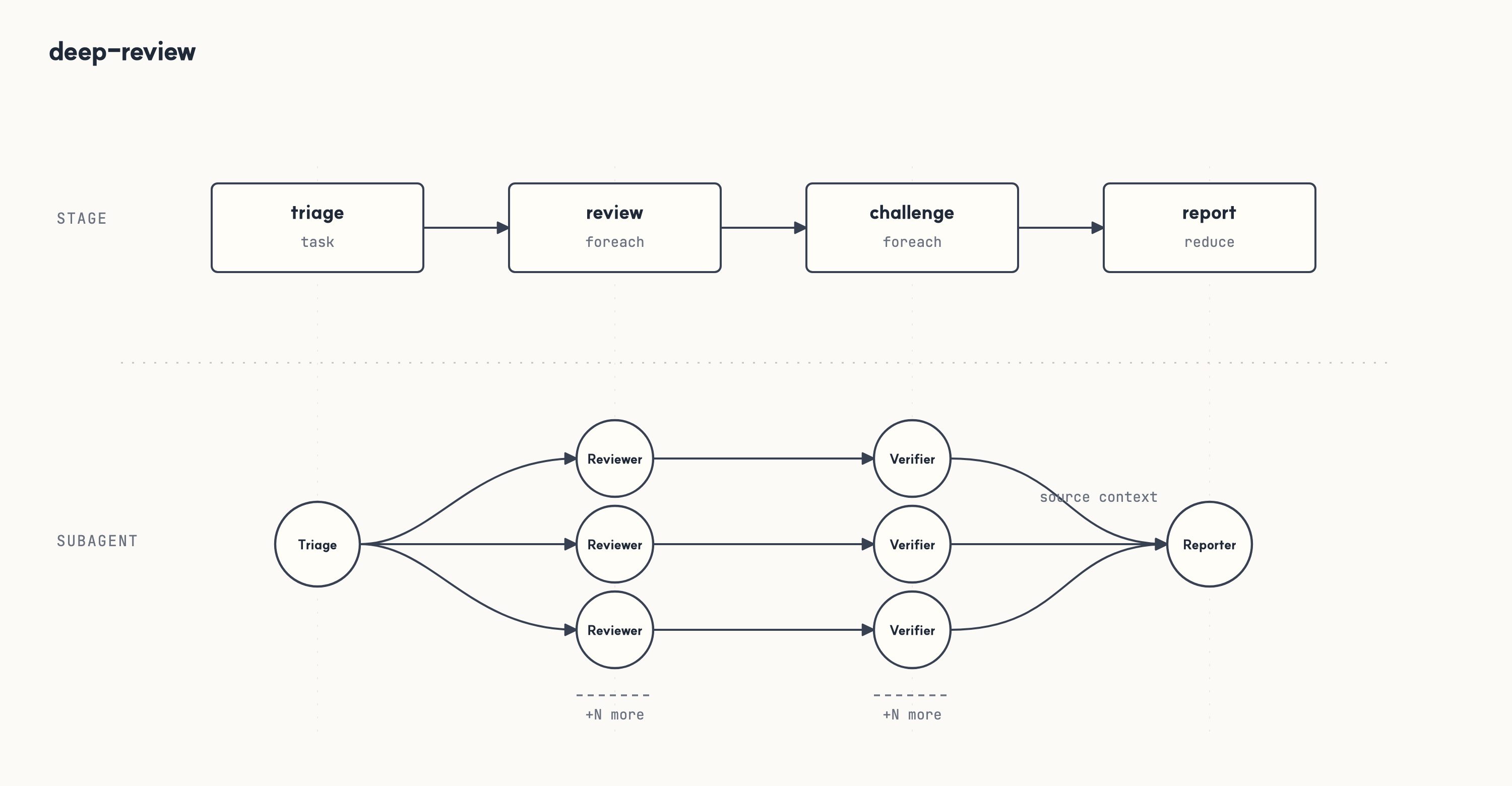
deep-review |
Code or design review when one reviewer pass is not enough. | Triage selects review lenses, reviewers produce findings, a deterministic helper deduplicates them, a challenge pass tests the surviving findings, a deterministic helper partitions verdicts, and the final report keeps only evidence-backed issues. |
spec-review |
Requirements-to-implementation traceability for an existing spec, API contract, or acceptance criteria. | Extracts testable requirements, maps implementation and tests, verifies candidate gaps, and reports which requirements are covered, missing, ambiguous, or need human judgment. |
impact-review |
Side-effect and risk review for proposed or applied changes. | Maps change scope and affected surfaces, analyzes contract, state/data, validation, docs, security, and performance impact, then joins those lenses into likely regressions, missing checks, and next actions. |


More official workflows are planned. Most teams should create project-specific workflows as their patterns settle.
Workflow board
After starting a run, open /workflow to inspect it in a read-only TUI. Browse runs, drill into stages and tasks, and preview task output without leaving Pi.
Start from the run list.
Drill into stage progress.
Inspect task-level fan-out.
Open a task detail view with its artifact output.
More
docs/usage.md— command reference, workflow resolution, run artifacts, and authoring rules.workflows/README.md— bundled workflow notes.
Runtime dependencies
pi-workflow bundles the runtime pieces it needs:
@agwab/pi-subagentlaunches and tracks the Pi subagent workers used by workflow tasks.pi-web-accessprovides web tools such asweb_search,fetch_content,get_search_content, andcode_searchwhen a workflow or agent requests them.
The web provider is just a tool provider. You can replace or narrow it with your own extension if it exposes compatible tool names, arguments, and results. Be careful when changing providers: if the tool result shape, reference/evidence formatting, or field names differ, workflow specs, prompts, and control/output schemas that depend on those fields may need to change too. The stage graph and normal workflow run record format do not need to change for a compatible web-tool implementation swap.