pi-chess
Play chess against the LLM in pi's TUI — full rules, annotated moves, disk persistence, and constant context cost
Package details
Install pi-chess from npm and Pi will load the resources declared by the package manifest.
$ pi install npm:pi-chess- Package
pi-chess- Version
1.1.0- Published
- Jun 16, 2026
- Downloads
- not available
- Author
- entelligentsia
- License
- MIT
- Types
- extension
- Size
- 158.3 KB
- Dependencies
- 1 dependency · 4 peers
Pi manifest JSON
{
  "extensions": [
    "./index.ts"
  ],
  "image": "./screenshot.png"
}
Security note
Pi packages can execute code and influence agent behavior. Review the source before installing third-party packages.
README
pi-chess
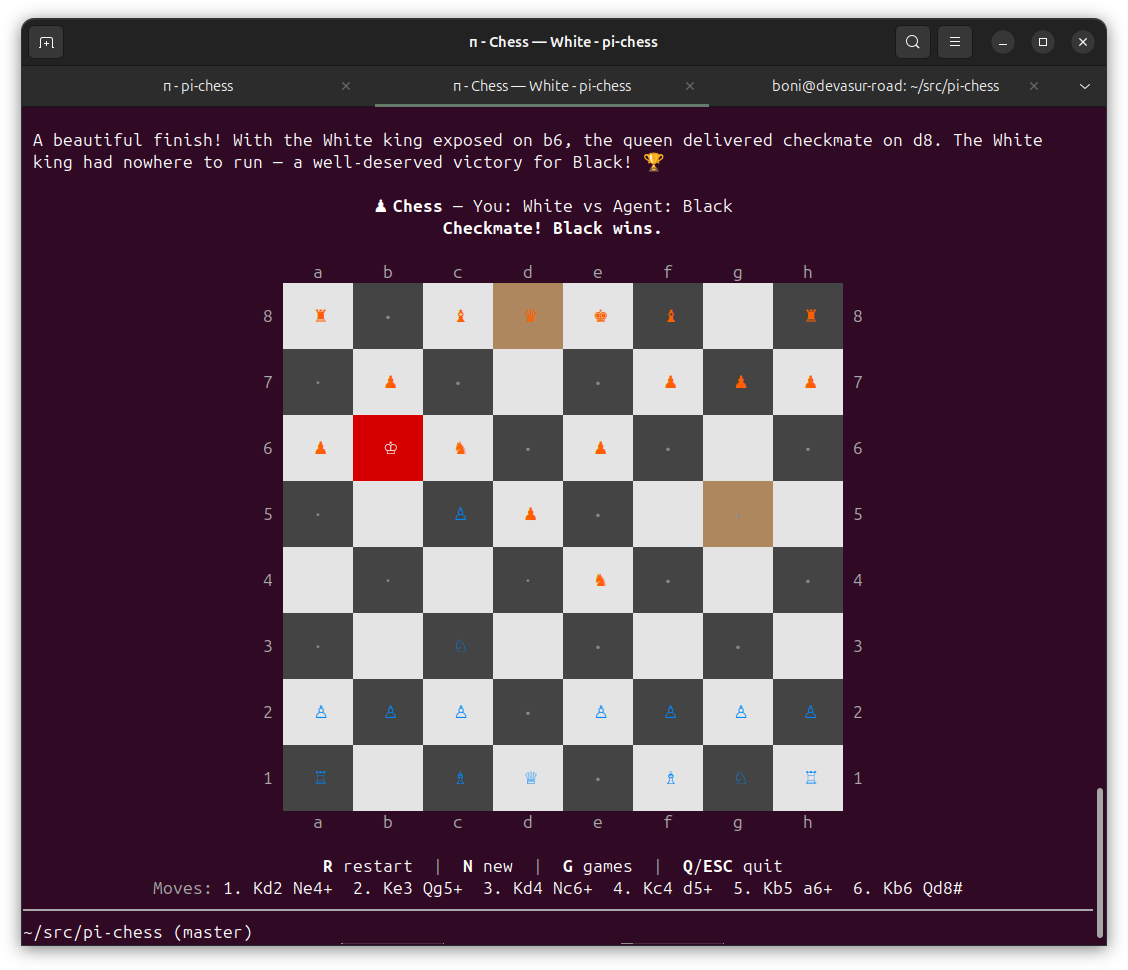
A pi extension that lets you play chess against the current LLM model directly in the TUI.
Installation
# Install from npm
pi install npm:pi-chess

# Or install from git
pi install git:github.com/earendil-works/pi-chess

# Or try without installing
pi -e npm:pi-chess
Usage
Start a game with the /chess command:
/chess— resume the last saved game, or start a new one (you play White)/chess black— start a new game (you play Black)/chess new— start a new game (you play White)/chess new black— start a new game (you play Black)/chess games— browse saved games and resume one
Games are automatically saved to disk after every move. When you run /chess without arguments, the extension loads the most recent saved game so you can pick up where you left off — even across different pi sessions.
Controls
| Key | Action |
|---|---|
↑↓←→ |
Move cursor |
Enter / Space |
Select piece / confirm destination / confirm promotion |
Escape |
Deselect piece (or quit if no selection) |
Q |
Quit the game |
R |
Restart with same color (when game is over) |
G |
Browse saved games |
F |
Flip board orientation |
N |
Start a new game (swaps color) |
U |
Undo last move pair |
How It Works
- You navigate the board with arrow keys and select a piece with
Enter - Legal move targets are highlighted with green dots (
●) - Navigate to a destination and press
Enterto move - After your move, the LLM (playing the opposite color) receives the board state and makes its move using the
chess_movetool - The board updates and play continues
LLM Integration
The LLM plays via two tools:
chess_move— Make a move using standard algebraic notation (SAN). Examples:e4,Nf3,Bxb5,O-O,e8=Qchess_get_board— View the current board position, FEN, and legal moves
When it's the LLM's turn, the system prompt includes full chess instructions with the current board state in both visual and FEN notation.
Features
- ♟️ Full chess rules via chess.js (castling, en passant, promotion, etc.)
- 🎨 Color-coded board with Unicode chess pieces
- ✨ Visual highlights: cursor, selected piece, legal moves, last move, check
- 🔄 Undo support (
Ukey undoes your move and the agent's response) - 💾 Auto-save to disk after every move — resume games across sessions
- 🔄 New game shortcut (
Nkey swaps color and starts fresh) - 🎯 Custom message renderers for move announcements and game-over
- 🤖 Works with any model — the LLM receives clear instructions and a well-structured board representation
- 📉 Constant context cost — context pruning keeps the LLM's context window small regardless of game length (see below)
- ⚡ Single-call moves — each agent move uses exactly 1 LLM call, no wasteful follow-up (see below)
Context Pruning
Chess is a game of perfect information: the FEN string encodes the complete game state. The agent never needs to see previous moves — only the current position.
Without pruning, each move adds ~500+ tokens of context (board ASCII, FEN, legal moves, tool call + result). By move 100, that's 50,000+ tokens of stale history.
The extension uses pi's context event to strip all chess-related messages before each LLM call:
- Custom messages (
chess-move,chess-game-over) — turn trigger announcements - Tool call/result messages for
chess_moveandchess_get_board - Assistant messages containing chess tool calls
The current board state is always injected fresh into the system prompt by the before_agent_start hook, so the agent always has the latest position. Context cost stays constant from move 1 through move 100.
Single-Call Moves
Each agent move requires exactly 1 LLM call. The chess_move tool returns terminate: true, which tells pi to skip the automatic follow-up LLM call that would otherwise generate unnecessary commentary after the tool result.
Without terminate: true, the standard tool-use loop would make 2 LLM calls per move:
- The LLM decides on a move and calls
chess_move - The LLM receives the tool result and generates a text commentary response
With terminate: true, the tool result marks the turn as complete — the move, commentary, and board state are all captured in the single tool call. The next LLM call only happens when the player makes their next move and triggers a new turn.
If the agent makes an illegal move, terminate is not set (the tool throws an error), so the agent gets the error message and can retry with a legal move.
Annotated Legal Moves
Every agent turn includes a numbered list of legal moves with safety annotations:
Legal moves (●safe ◐trade ○risk):
 1.● Nbd7   2.● Nc6   3.● Na6   4.● Bd7   5.● Be6   6.● Bf5
 7.● Bg4   8.○ Bh3   9.● Qd7   10.● Qd6   11.● Kd7   12.● Bg7
- ● safe — no opponent piece attacks the destination after the move
- ◐ trade — opponent attacks the destination, but we can recapture (potential trade)
- ○ risk — opponent attacks the destination and we cannot recapture (piece may be lost for free)
- Captures show the captured piece type:
exd5(p)captures a pawn
This eliminates illegal moves (the model copies SAN from the list) and gives the model enough tactical awareness to avoid blunders without requiring deep search. The annotation pass takes ~50ms — negligible vs. the LLM round-trip.
Disk Persistence
Games are automatically saved to ~/.pi/agent/extensions/pi-chess/.games/ after every move. Each save is a JSON file containing the FEN, player color, PGN, last move, and timestamp.
- Resume: Running
/chesswithout arguments loads the most recent save and lets you pick up where you left off — even across different pi sessions - New game:
Nkey inside the board starts a new game (swaps color);/chess newor/chess blackstarts fresh from the command line - Pruning: Only the last 20 saves are kept; older ones are automatically deleted
Architecture
index.ts              — Extension entry point: session handlers, prompt injection, context pruning
src/constants.ts      — ANSI codes, piece symbols, message types, sentinels
src/types.ts          — BoardState, SaveData, DiskSaveData, BoardDetails, PlayerColor
src/utils.ts          — Coordinate conversion, isLightSquare, centerPad
src/ascii-board.ts    — board → ASCII for the LLM
src/state.ts          — boardState, gameActive, chessComponent, persistence helpers
src/move-annotations.ts — annotate legal moves with threat/safety indicators
src/game-browser.ts    — GameBrowserComponent for browsing saved games
src/persistence.ts    — saveGameToDisk, loadLatestGame, listSavedGames, loadGameByPath, deleteAllSaves
src/turn.ts           — triggerAgentTurn, emitGameOverMessage, registerContextPruner
src/messages.ts       — BoardMessageComponent, GameOverMessageComponent, renderers
src/chess-component.ts — Interactive TUI board (keyboard input, rendering)
src/command.ts        — /chess command registration (resume, new game)
src/tools.ts          — chess_move and chess_get_board tool registration
Key design patterns:
- TUI Component (
ChessComponent) renders the board and handles keyboard input - Custom Tools (
chess_move,chess_get_board) allow the LLM to play - System Prompt Injection (
before_agent_start) provides chess instructions when a game is active - Context Pruning (
contextevent) strips stale chess messages before each LLM call - State Persistence — dual: session entries (
pi.appendEntry) for in-session recovery + disk saves (~/.pi/agent/extensions/pi-chess/.games/) for cross-session resume - Custom Message Renderers display move announcements with board snapshots