pi-claude-marketplace
Access Claude plugin marketplaces from Pi.
Package details
Install pi-claude-marketplace from npm and Pi will load the resources declared by the package manifest.
$ pi install npm:pi-claude-marketplace- Package
pi-claude-marketplace- Version
0.6.0- Published
- Jun 19, 2026
- Downloads
- 1,971/mo · 381/wk
- Author
- acolomba
- License
- MIT
- Types
- extension
- Size
- 1.7 MB
- Dependencies
- 3 dependencies · 3 peers
Pi manifest JSON
{
  "extensions": [
    "./extensions/pi-claude-marketplace/index.ts"
  ],
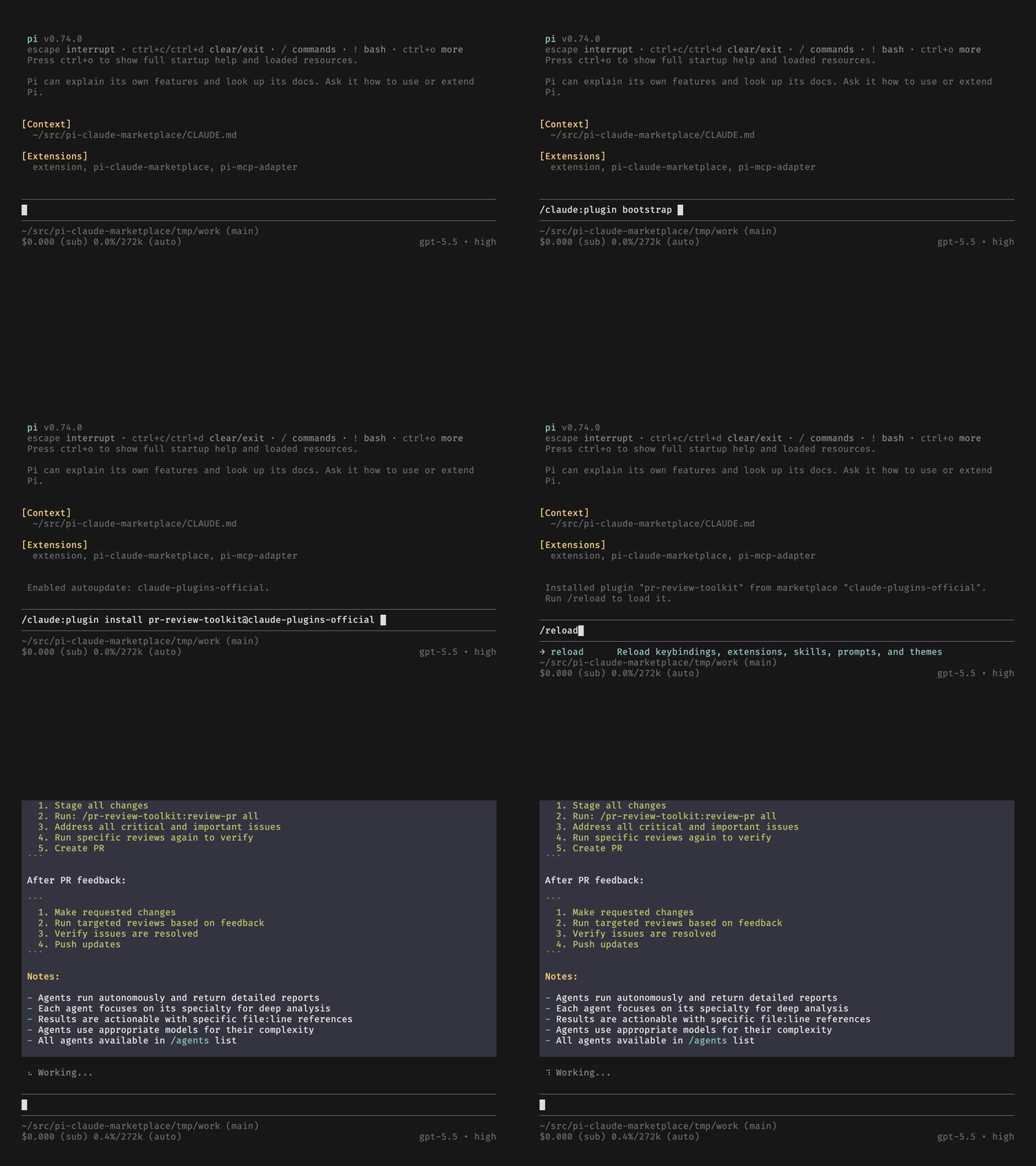
  "image": "https://media.githubusercontent.com/media/acolomba/pi-claude-marketplace/refs/heads/main/demos/bootstrap.gif"
}
Security note
Pi packages can execute code and influence agent behavior. Review the source before installing third-party packages.
README
Pi Claude Marketplace




Access Claude plugin marketplaces from Pi Coding Agent.
Features
Installs plugins from the Claude plugin marketplace that contain these components:
- Commands.
- Skills.
- Agents. Requires pi-subagents.
- Hooks. Partial support. For more information, see Hook compatibility.
- MCP servers. Requires pi-mcp-adapter.
Plugins that contain unsupported components are marked as "unavailable".
Prerequisites
- Pi Coding Agent
- pi-subagents (optional but recommended,
pi install npm:pi-subagents) - pi-mcp-adapter (optional but recommended,
pi install npm:pi-mcp-adapter)
Usage
Install the Pi extension.
pi install npm:pi-claude-marketplace
Bootstrap the official Claude plugin marketplace (anthropics/claude-plugins-official).
/claude:plugin bootstrap
List plugins available for installation.
/claude:plugin list --available
Install a plugin.
/claude:plugin install pr-review-toolkit@claude-plugins-official
Add another marketplace.
/claude:plugin marketplace add upstash/context7
List its plugins.
/claude:plugin list context7-marketplace --available
Add another plugin.
/claude:plugin install context7-plugin@context7-marketplace
Then reload.
/reload
Run a plugin:
/pr-review-toolkit:review-pr
Name mapping
Command and skill names are prefixed with the plugin name. If the command or skill is already prefixed with the plugin name plus -, that common part is elided.
Commands and skill names use Pi's colon form:
| Plugin name | Command or skill name | Pi name |
|---|---|---|
foo |
bar |
/foo:bar |
foo |
foo-bar |
/foo:bar |
foo |
foo |
/foo:foo |
Skills are also registered with hyphenated names after the /skill: prefix:
| Plugin name | Skill name | Pi name |
|---|---|---|
foo |
bar |
/skill:foo-bar |
foo |
foo-bar |
/skill:foo-bar |
foo |
foo |
/skill:foo |
MCP server names are not prefixed or rewritten. The server name is the key from the plugin's mcpServers object. If another MCP config already uses that name, the plugin install or update fails.
| Plugin name | mcpServers key |
Pi MCP server name |
|---|---|---|
foo |
api |
api |
foo |
foo-api |
foo-api |
bar |
api |
conflict if api already exists |
Scoping
Marketplaces and plugins can be installed in the user scope or in the current project's scope. The default is user scope.
The user scope is inherited, so it is possible to install a plugin from a user-scope marketplace in the project scope.
It is also possible to install the same plugin in both user and project scopes; the plugin in the user scope takes precedence.
Configuration files
Each scope stores its declarative marketplace and plugin configuration in claude-plugins.json under the scope root.
| Scope | File path |
|---|---|
user |
~/.pi/agent/claude-plugins.json |
project |
<cwd>/.pi/claude-plugins.json |
Every mutating command (marketplace add, marketplace remove, marketplace autoupdate, marketplace noautoupdate, install, uninstall, enable, disable, import, bootstrap) records its change into this file. The file is the authoritative record of which marketplaces and plugins are installed. Pi applies its contents at extension load (/reload).
Local configuration files
Each scope can also have a claude-plugins.local.json file alongside the base file.
| Scope | File path |
|---|---|
user |
~/.pi/agent/claude-plugins.local.json |
project |
<cwd>/.pi/claude-plugins.local.json |
The local file overrides individual entries from the base file: a marketplace or plugin entry in claude-plugins.local.json replaces the same-keyed entry in claude-plugins.json wholesale.
Pass --local to any mutating command to target the local file.
/claude:plugin install context7-plugin@context7-marketplace --local
/claude:plugin marketplace autoupdate context7-marketplace --local
A --local write never touches the base file.
Gitignore convention
In the project scope, commit claude-plugins.json so collaborators install the same marketplaces and plugins, but keep claude-plugins.local.json out of version control. Add the following to your project's .gitignore.
.pi/claude-plugins.local.json
User-scope files live in your home directory; they are personal and never shared.
Command reference
This extension mirrors Claude Code's /plugin command. Use /claude:plugin in Pi for marketplace and plugin operations, then run /reload after installing, uninstalling, updating, or reinstalling plugins so Pi discovers the changed resources.
Marketplace
Add a marketplace from a GitHub repository owner/repo shorthand.
/claude:plugin marketplace add upstash/context7
[!NOTE] Private repositories may trigger a Device Flow authentication if Git is not already authenticated.
Add the same marketplace from a GitHub URL.
/claude:plugin marketplace add https://github.com/upstash/context7-marketplace
Pin a GitHub marketplace to a branch, tag, or commit with a #ref suffix.
/claude:plugin marketplace add https://github.com/upstash/context7-marketplace#v1.0.30
Add a marketplace from the local filesystem. The path may be a directory containing .claude-plugin/marketplace.json or a direct path to a marketplace.json file.
/claude:plugin marketplace add ~/my-marketplace
/claude:plugin marketplace add ~/my-marketplace/.claude-plugin/marketplace.json
Add a marketplace local to the current project with --scope project. The default scope is user.
/claude:plugin marketplace add upstash/context7-marketplace --scope project
List configured marketplaces.
/claude:plugin marketplace list
/claude:plugin marketplace ls
Show details for one marketplace.
/claude:plugin marketplace info context7-marketplace
/claude:plugin marketplace info context7-marketplace --scope user
Update one marketplace, or all marketplaces if a name is omitted.
/claude:plugin marketplace update context7-marketplace
/claude:plugin marketplace update
Remove a marketplace and all plugins installed from it.
/claude:plugin marketplace remove context7-marketplace
/claude:plugin marketplace rm context7-marketplace
Toggle marketplace plugin auto-updates. When the marketplace is updated manually, installed plugins are automatically updated.
/claude:plugin marketplace autoupdate context7-marketplace
/claude:plugin marketplace noautoupdate context7-marketplace
Plugin
List plugins available for installation. Omit the marketplace name to list across configured marketplaces.
/claude:plugin list context7-marketplace --available
/claude:plugin list --available
Filter the list by plugin status, installed, available for installation, or unavailable to install.
/claude:plugin list --installed
/claude:plugin list --available
/claude:plugin list --unavailable
Show details for one plugin.
/claude:plugin info context7-plugin@context7-marketplace
Install a plugin, using the <plugin>@<marketplace> format.
/claude:plugin install context7-plugin@context7-marketplace
Install in the project scope instead of the user scope.
/claude:plugin install context7-plugin@context7-marketplace --scope project
Update one installed plugin, every installed plugin from one marketplace, or all installed plugins.
/claude:plugin update context7-plugin@context7-marketplace
/claude:plugin update @context7-marketplace
/claude:plugin update
[!NOTE] Agent definitions in plugins may include a preferred model for running the agent, e.g. "sonnet", "opus", etc. These are discarded by default, but the
--map-modeloption forinstallandupdatecan be used to make a best-effort attempt at mapping these models to Pi models.
Reinstall one installed plugin, every installed plugin from one marketplace, or all installed plugins.
/claude:plugin reinstall context7-plugin@context7-marketplace
/claude:plugin reinstall @context7-marketplace
/claude:plugin reinstall
Limit reinstall to one scope with --scope user or --scope project. The flag can appear before or after the target:
/claude:plugin reinstall --scope project
/claude:plugin reinstall @context7-marketplace --scope user
Force a reinstall should any foreign content have altered the plugin.
/claude:plugin reinstall context7-plugin@context7-marketplace --force
Uninstall a plugin.
/claude:plugin uninstall context7-plugin@context7-marketplace
Reload Pi after changes.
/reload
Bootstrap
Bootstrap is a convenience one-shot setup of the official Anthropic marketplace in the user scope with autoupdate enabled.
/claude:plugin bootstrap
This is equivalent to running.
/claude:plugin marketplace add anthropics/claude-plugins-official
/claude:plugin marketplace autoupdate claude-plugins-official
Import
Import is a convenience command to import marketplaces and plugins already defined in Claude Code settings.
/claude:plugin import
By default, marketplaces and plugins are added in accordance to the scope that they're defined in Claude Code. It's also possible to limit the import to a specific scope.
/claude:plugin import --scope user
/claude:plugin import --scope project
Plugins that are not available for installation in Pi because of unsupported components are skipped with a warning.
Contributing
Refer to CONTRIBUTING and CODE_OF_CONDUCT.
AI disclaimer
This project is developed with AI agent engineering practices using the Open GSD spec-driven development system.
The author vibe-coded a prototype until it was feature-complete for a first release, then extracted and reviewed a PRD from the implementation.
The PRD was then used to guide GSD through discussion, planning and implementation phases of a new implementation.
License
This project is licensed under the MIT License. See the COPYING file for details.
Copyright 2026 Alessandro Colomba