pi-claude-style-scroll
Pi extension for a Claude Code-style pinned composer: scroll message history while typing.
Package details
Install pi-claude-style-scroll from npm and Pi will load the resources declared by the package manifest.
$ pi install npm:pi-claude-style-scroll- Package
pi-claude-style-scroll- Version
0.3.3- Published
- Jul 10, 2026
- Downloads
- 567/mo · 250/wk
- Author
- emilioak
- License
- MIT
- Types
- extension
- Size
- 85.9 KB
- Dependencies
- 0 dependencies · 2 peers
Pi manifest JSON
{
  "extensions": [
    "./index.ts"
  ],
  "video": "https://raw.githubusercontent.com/EmilioAK/pi-claude-style-scroll/main/assets/demo.mp4"
}Security note
Pi packages can execute code and influence agent behavior. Review the source before installing third-party packages.
README
pi-claude-style-scroll
Claude Code-style scrolling for Pi: keep the input box pinned and scroll the message list, even while typing.


pi-claude-style-scroll is a Pi extension that makes Pi's input box behave more like Claude Code's pinned composer:
- the composer/input box stays pinned at the bottom;
- status widgets and footer controls stay with the composer;
- the message history is bounded in a viewport above it;
- the mouse wheel scrolls that message viewport, including while you are typing;
- native terminal/Herdr drag-highlight copy stays usable because the default path avoids full SGR mouse capture.
This is a fork of MasuRii/pi-sticky-input. The fork keeps the sticky split-footer renderer and changes the default scrolling UX around alternate-scroll so Pi can scroll while composing.
Not affiliated with Anthropic or Claude Code. "Claude Code-style" describes the pinned input + scroll-while-typing behavior only.
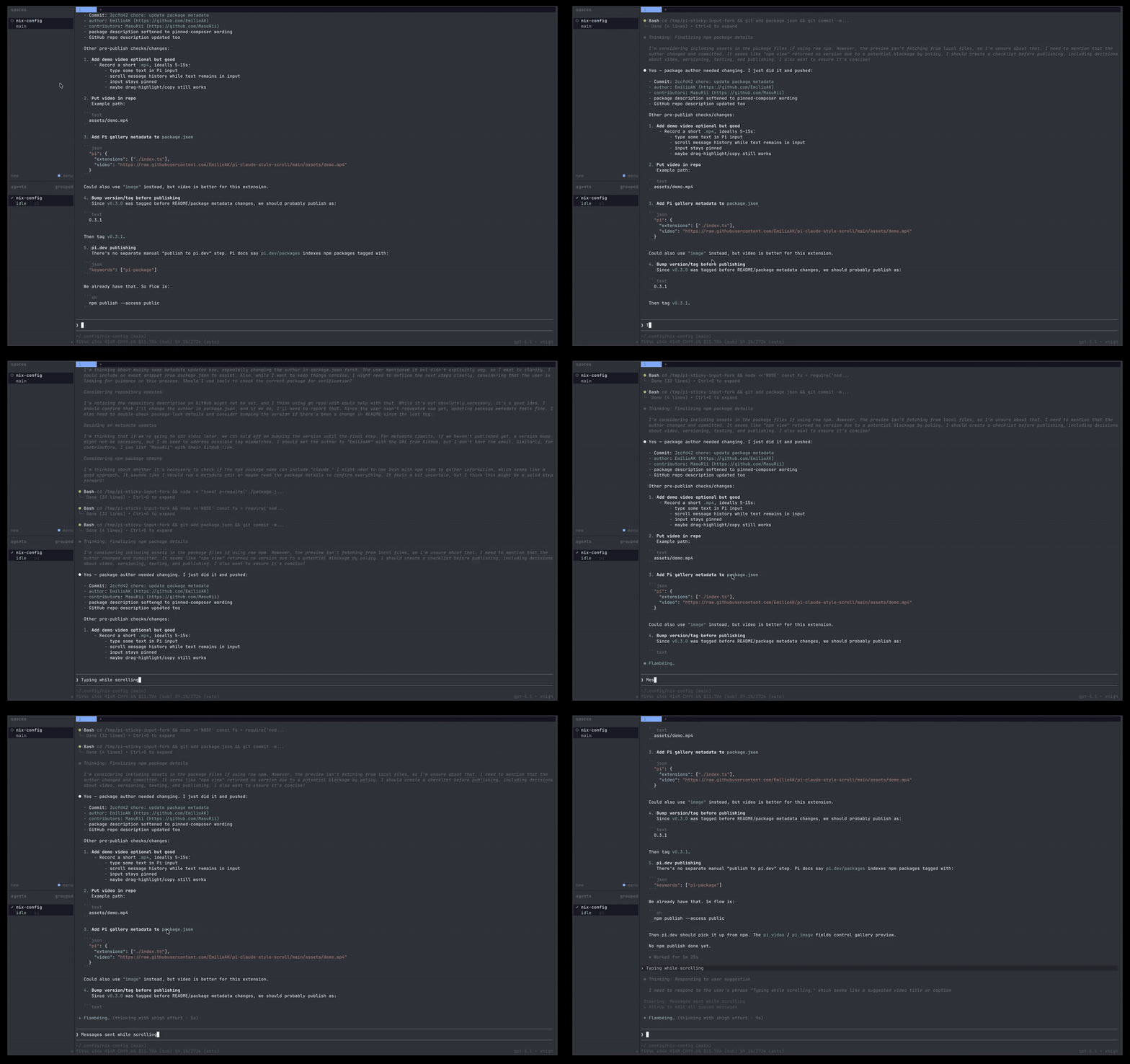
Demo
Why this exists
Pi's normal terminal scrollback can fight a sticky input layout: when you wheel-scroll, the outer terminal or multiplexer may scroll old screen history instead of Pi's message list. pi-claude-style-scroll keeps the input visible and routes wheel scrolling to Pi's internal history viewport, so you can read earlier assistant output while drafting your next prompt.
Install
Git install
pi install git:github.com/EmilioAK/pi-claude-style-scroll
For a pinned install, use a tag or commit:
pi install git:github.com/EmilioAK/pi-claude-style-scroll@v0.3.1
npm
Not published yet. Once published, the intended install will be:
pi install npm:pi-claude-style-scroll
Usage
The Claude-style sticky renderer is enabled automatically when the extension loads in Pi's TUI.
The main command controls optional full mouse-wheel capture:
/claude-style-scroll status
/claude-style-scroll mouse on
/claude-style-scroll mouse off
/claude-style-scroll mouse toggle
/claude-style-scroll help
/sticky-input is kept as a compatibility alias.
Most users should leave full mouse capture off. The default alternate-scroll path is what preserves normal terminal text selection/link behavior.
Important tradeoff
Terminals encode alternate-scroll mouse-wheel events as cursor-up/cursor-down key sequences. That is what lets this extension scroll the message viewport without enabling full mouse capture.
Because those sequences are indistinguishable from physical Up/Down arrow keys at Pi's terminal-input layer, the default scrollWhileTyping: true mode means:
- mouse wheel scrolls Pi messages while you type;
- native drag-highlight/copy remains available;
- physical Up/Down arrows may scroll the message viewport instead of moving inside the prompt.
If you prefer normal Up/Down arrow editing, set scrollWhileTyping to false. Wheel scrolling will then only be treated as message scrolling when the input box is empty.
Configuration
Config is loaded from these locations in order. Later files override earlier files.
| Scope | Path |
|---|---|
| Extension install root | <extension-root>/config.json |
| Legacy global override | ~/.pi/agent/extensions/pi-sticky-input/config.json |
| Global user override | ~/.pi/agent/extensions/pi-claude-style-scroll/config.json |
| Legacy project override | <project>/.pi/extensions/pi-sticky-input/config.json |
| Project override | <project>/.pi/extensions/pi-claude-style-scroll/config.json |
A starter template is included at config/config.example.json.
mkdir -p ~/.pi/agent/extensions/pi-claude-style-scroll
cp config/config.example.json ~/.pi/agent/extensions/pi-claude-style-scroll/config.json
Default config
{
  "debug": false,
  "enabled": true,
  "splitFooterRenderer": true,
  "alternateScreen": true,
  "alternateScroll": true,
  "scrollWhileTyping": true,
  "mouseScroll": false,
  "mouseWheelScrollRows": 3,
  "keyboardScroll": true,
  "keyboardScrollRows": 10,
  "minimumHistoryRows": 3,
  "historyViewportLineLimit": 200
}
Options
| Key | Type | Default | Purpose |
|---|---|---|---|
debug |
boolean |
false |
Enables file-only diagnostics under debug/debug.log |
enabled |
boolean |
true |
Enables the extension |
splitFooterRenderer |
boolean |
true |
Enables the sticky split-footer renderer patch |
alternateScreen |
boolean |
true |
Uses an alternate terminal screen while the session is active |
alternateScroll |
boolean |
true |
Lets compatible terminals translate wheel input into alternate-screen cursor sequences |
scrollWhileTyping |
boolean |
true |
Handles alternate-scroll cursor sequences even while the prompt contains text |
mouseScroll |
boolean |
false |
Enables full SGR mouse-wheel capture for terminals without alternate-scroll support |
mouseWheelScrollRows |
number |
3 |
Rows scrolled per wheel event |
keyboardScroll |
boolean |
true |
Enables page-key and home/end history scrolling |
keyboardScrollRows |
number |
10 |
Rows scrolled per keyboard page event |
minimumHistoryRows |
number |
3 |
Minimum history viewport height before falling back on very small terminals |
historyViewportLineLimit |
number |
200 |
Maximum retained renderer-managed history lines before choosing the visible slice |
Compatibility notes
mouseScroll: falseis the preferred mode when you want terminal/Herdr drag-highlight copy./claude-style-scroll onenables SGR mouse capture. Use it only if alternate-scroll does not work in your terminal and you accept that native selection/link clicks may be captured.- Overlays and structurally unknown layouts fall back to Pi's original renderer for safety.
- The legacy
PI_STICKY_INPUT_DISABLE_SPLIT_FOOTER=1environment variable still disables the split-footer patch. The new name isPI_CLAUDE_STYLE_SCROLL_DISABLE_SPLIT_FOOTER=1.
Development
npm install
npm test
npm run typecheck
npm run build
npm run package:dry-run
Credits
Forked from MasuRii/pi-sticky-input, which provides the original sticky split-footer renderer, terminal-session management, config layering, and tests. This fork changes the default input/scroll behavior to prioritize a pinned composer that can scroll message history while you type.
License
MIT. See LICENSE. Original copyright remains with MasuRii.