pi-clinepass-provider
ClinePass provider for pi — access GLM-5.2, Kimi K2.7, DeepSeek V4 and more open-weight coding models through Cline's $9.99/mo subscription
Package details
Install pi-clinepass-provider from npm and Pi will load the resources declared by the package manifest.
$ pi install npm:pi-clinepass-provider- Package
pi-clinepass-provider- Version
1.4.0- Published
- Aug 26, 2026
- Downloads
- 6,246/mo · 172/wk
- Author
- jellydn
- License
- MIT
- Types
- extension
- Size
- 148.3 KB
- Dependencies
- 0 dependencies · 2 peers
Pi manifest JSON
{
  "extensions": [
    "./src/index.ts"
  ]
}
Security note
Pi packages can execute code and influence agent behavior. Review the source before installing third-party packages.
README
pi-clinepass-provider 🚀




ClinePass provider for pi — 13 curated open-weight coding models (GLM-5.3, GLM-5.2, Kimi K2.7 Code, Kimi K3, DeepSeek V4, Qwen3.8 Max, and more) through Cline's $9.99/month subscription with 2-5x standard API rate limits.
ClinePass uses Cline's OpenAI-compatible Chat Completions API, so no custom streaming protocol is needed — pi's built-in openai-completions streaming handles SSE parsing, tool calls, and usage tracking.
📦 Installation
As a pi extension (recommended)
pi install npm:pi-clinepass-provider
# or from git
pi install git:github.com/jellydn/pi-clinepass-provider
# or local path
pi install /path/to/pi-clinepass-provider
As an npm package
npm install pi-clinepass-provider
# or
pnpm add pi-clinepass-provider
Note: This package requires
@earendil-works/pi-aiand@earendil-works/pi-coding-agentas peer dependencies. They are automatically available when installed as a pi extension; install them manually when using as a standalone npm dependency.
Pre-requirements
Features
- Full streaming via Cline's OpenAI-compatible
/api/v1/chat/completionsendpoint — SSE parsing, tool calls, and usage tracking handled by pi's built-inopenai-completionsstreaming - Per-model thinking level support — maps pi's 6 thinking levels (
off/minimal/low/medium/high/xhigh) to provider-specificreasoning_effortvalues, with per-model capability matrices (see table below) - Per-token cost tracking against ClinePass reference pricing
- WorkOS OAuth token refresh — reuses your existing Cline CLI login (
cline auth); no separate API key needed - API key auto-discovery from
CLINE_API_KEYenv var,~/.cline/data/settings/providers.json, or~/.pi/agent/auth.json - Dynamic model discovery — fetches the live model list from the Cline API at startup, falling back to a curated static list on error
/loginintegration — automatic WorkOS OAuth detection or browser-assisted manual paste- Modular architecture — 8 focused source modules (
env,auth,models,workos,oauth,error-handler,errors,utils) + entry point (index), all covered by per-module unit tests
Supported Models

| Model | Model ID | Context | Reasoning |
|---|---|---|---|
| GLM-5.3 | cline-pass/glm-5.3 |
1M | low / high / xhigh (xhigh → max; always on) |
| GLM-5.2 | cline-pass/glm-5.2 |
200K | off / low / medium / high / xhigh |
| Kimi K2.7 Code | cline-pass/kimi-k2.7-code |
262K | low / medium / high |
| Kimi K2.6 | cline-pass/kimi-k2.6 |
262K | low / medium / high |
| Kimi K3 | cline-pass/kimi-k3 |
1M | high (max; always on) |
| DeepSeek V4 Pro | cline-pass/deepseek-v4-pro |
1M | off + high (high used for xhigh) |
| DeepSeek V4 Flash | cline-pass/deepseek-v4-flash |
1M | off + high (high used for xhigh) |
| MiMo-V2.5 | cline-pass/mimo-v2.5 |
262K | off / low / medium / high |
| MiMo-V2.5-Pro | cline-pass/mimo-v2.5-pro |
262K | off / low / medium / high |
| MiniMax M3 | cline-pass/minimax-m3 |
1M | off / low / medium / high |
| Qwen3.7 Max | cline-pass/qwen3.7-max |
262K | off / low / medium / high |
| Qwen3.7 Plus | cline-pass/qwen3.7-plus |
1M | off / low / medium / high |
| Qwen3.8 Max | cline-pass/qwen3.8-max |
1M | low / medium / xhigh |
Thinking levels: pi supports 6 levels —
off,minimal,low,medium,high,xhigh. Each model declares which levels it supports, mapped to the provider'sreasoning_effortparameter. Set the thinking level with pi's--thinkingflag or/thinkingcommand. A level marked as unsupported (not listed above) maps tonull— noreasoning_effortis sent to the API, so the model runs with its default reasoning behavior.
Authentication
This extension supports two authentication methods, tried in order:
Option 1: Cline CLI Login (WorkOS OAuth — recommended)
If you already use the Cline CLI (npm i -g cline) and have authenticated with cline auth, this extension automatically reuses your login — no separate API key needed.
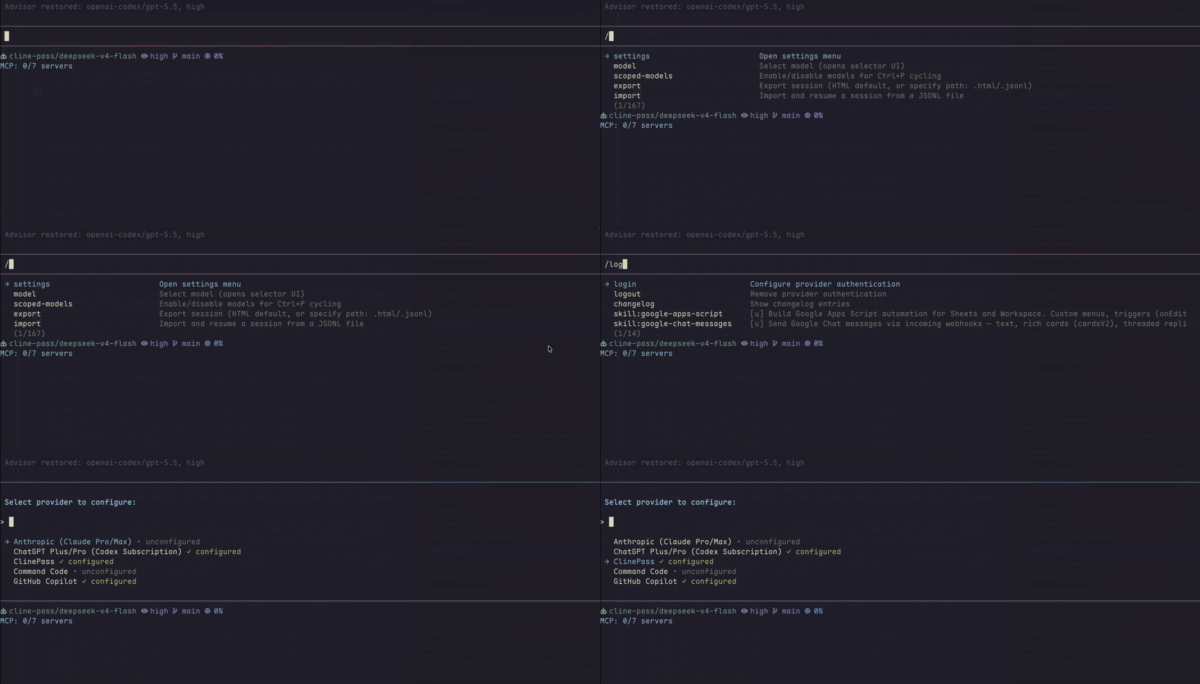
Run pi /login and select ClinePass. The extension detects your WorkOS OAuth credentials from ~/.cline/data/settings/providers.json and logs you in instantly. Short-lived access tokens (~1 hour) are refreshed automatically via Cline's server-side endpoint.
Option 2: Static API Key (manual)
- Subscribe to ClinePass at app.cline.bot, go to Settings → API Keys and click Generate API key. Copy it.
- Set the environment variable:
echo 'export CLINE_API_KEY="your_key_here"' >> ~/.zshrc
source ~/.zshrc
Alternatively, run pi /login and select ClinePass — if no Cline CLI login is detected, it opens the Cline dashboard and prompts you to paste a static API key.
The Cline CLI authenticates via WorkOS OAuth (browser login). The access token is a short-lived JWT (prefixed with workos:) that expires after ~1 hour. The refresh token is longer-lived.
This extension refreshes expired tokens by calling Cline's server-side endpoint:
POST https://api.cline.bot/api/v1/auth/refresh
{"granttype": "refresh_token", "refreshToken": "<your_refresh_token>"}
The response contains a new accessToken (with workos: prefix) and a rotated refreshToken. Both are persisted in pi's auth store for subsequent requests.
If the refresh token expires or is revoked (e.g., you re-login with cline auth), simply run pi /login again to re-import your fresh credentials.
Usage
# Non-interactive
pi --model clinepass/cline-pass/deepseek-v4-flash -p "Explain async/await in JavaScript"

# Interactive
pi --model clinepass/cline-pass/kimi-k2.7-code

# List available models
pi --list-models clinepass

# Use in another project
cd my-project
pi --model clinepass/cline-pass/glm-5.2 --trust "Refactor the auth module"
Switch models in-session with /model clinepass/cline-pass/glm-5.2.
Thinking levels
Set the reasoning effort per model using pi's --thinking flag or the in-session /thinking command:
# Use high reasoning with DeepSeek V4 Pro
pi --model clinepass/cline-pass/deepseek-v4-pro --thinking high -p "Design a scalable microservice architecture"

# GLM-5.2 supports five levels up to xhigh
pi --model clinepass/cline-pass/glm-5.2 --thinking xhigh -p "Solve this complex math proof"

# GLM-5.3 always reasons; pick low/high/max effort (xhigh → max)
pi --model clinepass/cline-pass/glm-5.3 --thinking xhigh -p "Refactor this monolith into services"

# Disable reasoning for a quick code gen task
pi --model clinepass/cline-pass/deepseek-v4-flash --thinking off -p "Write a React form component"
Each model's supported thinking levels are listed in the Supported Models table above. Unsupported levels are not sent to the API — the model runs with its default reasoning behavior.
Run tests
npm test
Pre-commit
This project uses prek to enforce code quality. To install hooks:
prek install
Notes
- Pricing: ClinePass is a flat $9.99/month subscription. Per-token costs in the model table are reference values for usage tracking only.
- Context windows: estimates from ClinePass docs — verify against Cline's
/modelsendpoint. - Custom API base: set
CLINE_API_BASEenv var to override the endpoint (default:https://api.cline.bot).
Resources
- opencode-clinepass-provider — ClinePass provider for OpenCode; same subscription and models outside of pi.
📄 License
This project is licensed under the MIT License - see the LICENSE file for details.
📋 Changelog
See CHANGELOG.md for release history.
Author
👤 Huynh Duc Dung
- Website: https://productsway.com/
- Twitter: @jellydn
- Github: @jellydn
Show your support
Give a ⭐️ if this project helped you!