pi-cloudflare
Cloudflare Agent Plugin and native Pi extension providing official skills and cf_-prefixed MCP tools.
Package details
Install pi-cloudflare from npm and Pi will load the resources declared by the package manifest.
$ pi install npm:pi-cloudflare- Package
pi-cloudflare- Version
0.6.3- Published
- Sep 10, 2026
- Downloads
- 1,938/mo · 1,938/wk
- Author
- 0xplayerone
- License
- MIT
- Types
- extension, skill
- Size
- 1.8 MB
- Dependencies
- 2 dependencies · 0 peers
Pi manifest JSON
{
  "extensions": [
    "./dist/index.js"
  ],
  "skills": [
    "./skills"
  ]
}
Security note
Pi packages can execute code and influence agent behavior. Review the source before installing third-party packages.
README
pi-cloudflare
One package for Cloudflare-driven agent work: skills + MCP tools + setup helper, distributed both as a native Pi package and an Agent Plugins 1.0 package.
Skills (12 vendored from the official cloudflare/skills repo:
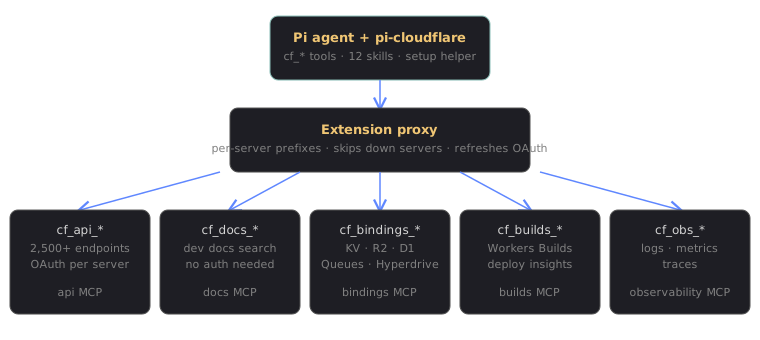
cloudflare,wrangler,workers-best-practices,durable-objects,agents-sdk,cloudflare-email-service,cloudflare-one,cloudflare-one-migrations,sandbox-stable,sandbox-next,sandbox-migrate-to-next,turnstile-spin). Refresh withscripts/sync-skills.sh.MCP tools — all five official Cloudflare MCP servers, proxied with per-server prefixes (a server that is down or unauthorized is skipped with a warning instead of failing the session):
Tools Server cf_api_*Cloudflare API (2,500+ endpoints) cf_docs_*Developer documentation (no auth needed) cf_bindings_*Workers primitives guidance cf_builds_*Workers Builds insights cf_obs_*Workers logs/metrics/traces
Large upstream text results (e.g. full Worker bundles) are truncated to
32 KiB per text block with a recovery hint instead of landing verbatim in
agent context. Override locally with PI_CLOUDFLARE_MAX_TEXT_BYTES when a
task genuinely needs more.
Requires Node 20.19+ (or 22.12+) and network access. Native Pi installation also requires Pi package support. No browser, wrangler CLI, or API token is needed to install; the docs tools work immediately after install.
Install
Pi
pi install npm:pi-cloudflare
Tools and skills register on the next session start.
Agent Plugins 1.0
The published npm package is also a self-contained Agent Plugin. Its root
plugin.json discovers skills/, while mcp.json launches the portable
stdio gateway in dist/mcp-server.js.
Agent Plugins deliberately leaves installation sources to each client. Install
or unpack the npm package using the client-specific plugin flow, with the
package root as PLUGIN_ROOT. A raw Git checkout must be built first with
npm ci && npm run build; npm releases already contain dist/.
The portable gateway exposes the same cf_api_*, cf_docs_*,
cf_bindings_*, cf_builds_*, and cf_obs_* tool names as the native Pi
adapter. OAuth state is stored under the client-managed ${PLUGIN_DATA}
directory rather than ~/.pi.
(web-perf is intentionally not vendored: keep a local customized copy
instead, since the upstream version would clobber environment-specific rules.)
Authenticate (one-time browser OAuth)
npx -p pi-cloudflare pi-cloudflare-setup                  # authorize missing servers
npx -p pi-cloudflare pi-cloudflare-setup --only builds    # re-auth specific servers
Each Cloudflare MCP server is its own OAuth issuer, so approval happens
once per server (docs needs none): the command opens one tab per server,
you approve, and tokens (with refresh) are stored owner-only in
~/.pi/cloudflare-tokens.json. The extension refreshes them silently
before expiry, and setup skips servers that are still fresh. If a server
later rejects its token, rerun setup (with --only for just that one).
Agent Plugins clients use their own token file under ${PLUGIN_DATA}. When
authentication is missing or rejected, call the generated
cf_<server>_reauthenticate tool and run the exact command it returns; that
command includes the plugin-local setup script and the correct data path.
Nothing is ever logged or committed.
Configure Pi (optional)
In ~/.pi/agent/settings.json:
{
  "pi-cloudflare": {
    "servers": { "builds": false }, // disable individual servers
    "connectTimeoutMs": 30000,
    // Env override also available: PI_CLOUDFLARE_MAX_TEXT_BYTES (default 32768)
  },
}
Persistent auth (a month and beyond)
Browser OAuth access tokens live about an hour; both adapters refresh them
silently before tool calls, so daily use normally does not re-authenticate.
When refresh itself is rejected (revoked, rotated away by a parallel login,
or expired), agents get an exact recovery command instead of a dead end — and
a cf_<server>_reauthenticate tool appears with the same instructions.
Two levers for longer-lived credentials:
Static API token (recommended for automation). A Cloudflare API token never expires. Set it once and the
apiserver skips OAuth entirely:{ "pi-cloudflare": { "apiToken": "${CLOUDFLARE_API_TOKEN}", // native Pi }, }Agent Plugin hosts can supply
CLOUDFLARE_API_TOKENto the MCP subprocess through their client-specific environment/secret mechanism. Agent Plugins 1.0 intentionally does not define a portable secret-reference field.Create one at dash.cloudflare.com → Manage Account → API Tokens with the scopes your agents need (exact template, additions, and account scoping in
docs/api-token.md). Other servers stay on browser OAuth.Re-authenticate surgically. Browser OAuth is the fallback for the other four servers. Tested 2026-09-06: the issuers ignore
offline_access(a scoped approval returned the standard 1-hour access token), so there is no scope knob — refresh behavior is set server-side.
Avoid re-running full setup on a schedule: each fresh approval can rotate
away tokens other sessions still hold. Re-authenticate single servers with
--only and only when told to.
Wrangler CLI vs MCP tools
Both are first-class; pick per task. Credentials do not transfer: wrangler bearers are recognized by MCP servers but scope-rejected (verified live), so use each where it wins:
| Task | Use |
|---|---|
Deploys, tail -f, KV/R2/D1 CLIs, scripting |
wrangler in bash (durable months-long login) |
| Endpoint discovery, docs search | cf_api_search, cf_docs_* |
| Typed CRUD on bindings with agent-shaped I/O | cf_bindings_* |
| Builds history, log exploration | cf_builds_*, cf_obs_* |
| Arbitrary API paths with static credentials | cf_api_execute + apiToken |
Wrangler's months-long session comes from its first-party OAuth grant; MCP servers require their own per-server grants (verified: cross-use fails closed on scope). They complement; neither replaces the other.
Troubleshooting
| Symptom | Likely cause | Fix |
|---|---|---|
Browser connection failed on session start |
A server is down or its token expired | The extension skips it with a warning and continues; rerun pi-cloudflare-setup --only <server> for the failing one |
| OAuth tab never opens | Headless environment or blocked popup | Copy the printed URL into any browser; native Pi tokens land in ~/.pi/cloudflare-tokens.json |
401 from one server only |
That server's refresh token was revoked | Call cf_<server>_reauthenticate for the host-correct recovery command |
| Tools missing for a server | Disabled in native Pi settings | Re-enable it; tools register on next session start |
| Rate-limited API calls | Too many write calls in a loop | Back off and batch; prefer one cf_api_execute with a precise query over paginated scans |
Development
npm install
npm test    # build + unit tests (mocked, no network)
npm run perf:check # performance budgets enforced by Code Foundry's performance job
npm run perf # build/startup/request/package performance report
Performance budgets, measured surfaces, and the release validation path are documented in
docs/performance.md.
License
MIT for this package's own code (see LICENSE). Vendored skill content
under skills/ remains under its upstream Apache License, Version 2.0
(see NOTICE).