pi-cockpit-hud
Flight-deck HUD and telemetry deck for pi: live context pressure, token throughput, cost and tool activity, mounted above the editor.
Package details
Install pi-cockpit-hud from npm and Pi will load the resources declared by the package manifest.
$ pi install npm:pi-cockpit-hud- Package
pi-cockpit-hud- Version
0.1.2- Published
- Oct 22, 2026
- Downloads
- 686/mo · 686/wk
- Author
- steelburn
- License
- MIT
- Types
- extension
- Size
- 67.5 KB
- Dependencies
- 0 dependencies · 5 peers
Pi manifest JSON
{
  "image": "https://raw.githubusercontent.com/steelburn/pi-cockpit-hud/main/docs/preview.png",
  "extensions": [
    "./extensions/cockpit/index.ts"
  ]
}Security note
Pi packages can execute code and influence agent behavior. Review the source before installing third-party packages.
README
π Cockpit
A futuristic flight-deck HUD and telemetry overlay for pi.


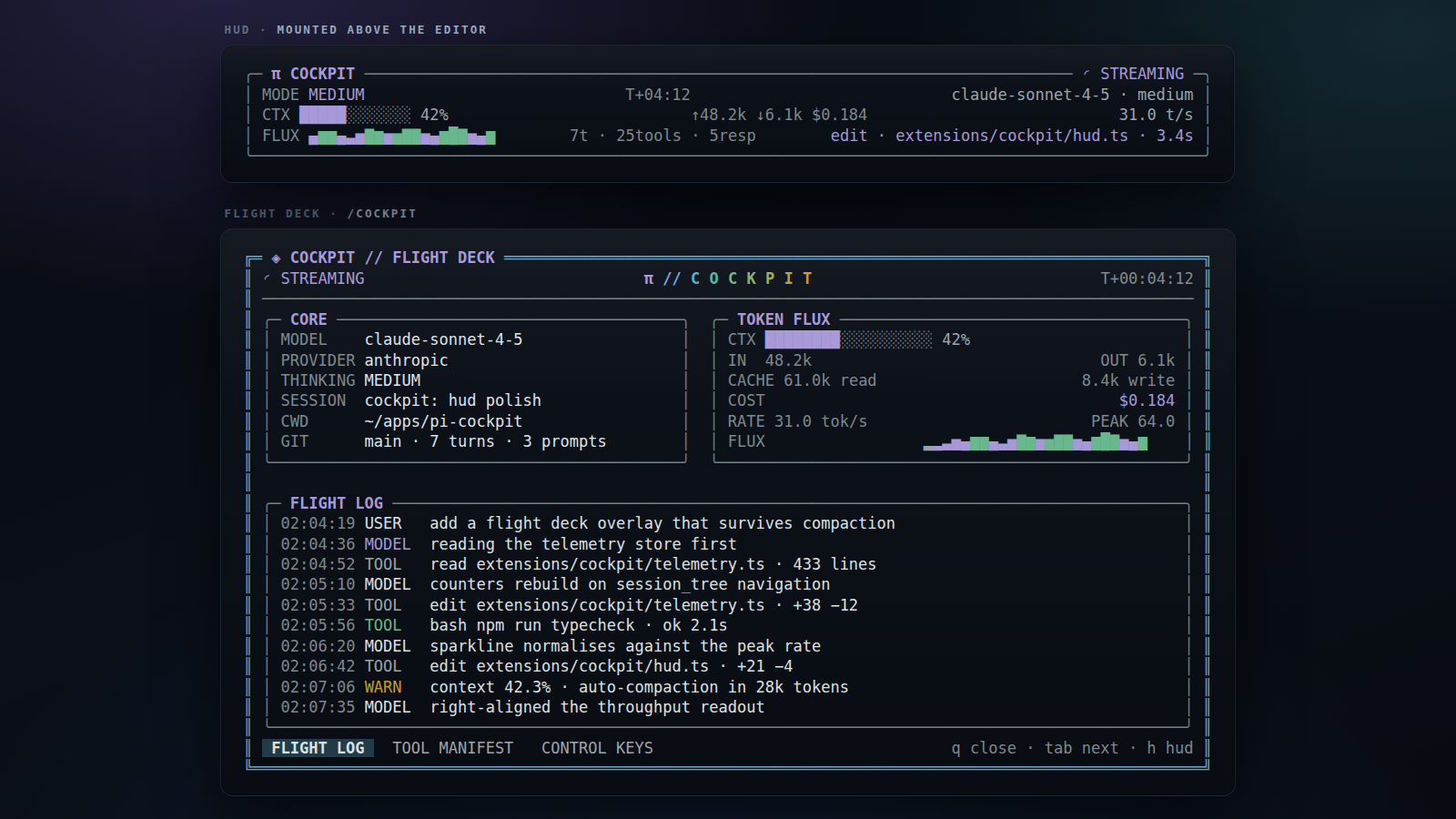
Cockpit turns the session into an instrument panel: model and thinking state, context pressure, token flux, cost, throughput sparklines, live tool execution, and a scrolling flight log. It is theme-aware, keyboard driven, and has no runtime dependencies beyond pi's host packages.
If you have ever wondered how close to compaction you are, what that turn
actually cost, or which tool is eating the clock, that information is on
screen instead of in a /status you have to remember to run.
╭─ π COCKPIT ───────────────────────────────────────────── ◉ NOMINAL ─╮
│ MODE OFF                  T+04:12                  claude-sonnet-4 │
│ CTX ████████░░░░ 42.3%      ↑48.2k ↓6.1k $0.184            31 t/s │
│ FLUX ▂▃▅▇▆▄▂▁▂▃▅▇         3t · 7tools · 5resp        systems nominal │
╰──────────────────────────────────────────────────────────────────────╯
Install
Requires pi 1.x. Nothing is installed beyond the extension itself — pi supplies the host packages.
pi install npm:pi-cockpit-hudPinned from git, or straight from a checkout:
pi install git:github.com/steelburn/pi-cockpit-hud@v0.1.2
pi install "$(pwd)"
Or load it for one run while developing:
pi -e ./extensions/cockpitIf the package is also installed, pi reports a tool-name conflict because the
extension would load twice. Either remove the installed copy first, or use the
isolated dev command (pi -ne -e ./extensions/cockpit). Note that -ne also
disables extension-provided model providers.
The extension is also a normal pi package: it declares
pi.extensions in package.json and exposes host packages as peer
dependencies.
Flight deck
Run /cockpit or press Ctrl+Shift+K to open the full-screen deck. The first
open in a session plays a short boot sequence; any key skips it.
| Panel | Contents |
|---|---|
| CORE | model, provider, thinking level, session, cwd, git branch, turns |
| TOKEN FLUX | context gauge, input/output/cache tokens, cost, rate, sparkline |
| FLIGHT LOG | timestamped prompts, model responses, tool starts/results, errors |
| TOOL MANIFEST | registered tools, exposure, active state, calls, latency, failures |
| CONTROL KEYS | keyboard reference |
Keys
| Key | Action |
|---|---|
q / Esc |
close the flight deck |
Tab / Shift+Tab |
cycle bottom panel |
1 2 3 |
jump to flight log / tools / keys |
↑ / ↓ |
scroll the flight log |
PageUp / PageDown |
scroll faster |
c |
clear the flight log |
h |
toggle the HUD live |
The deck adapts to terminal size: side-by-side panels on wide terminals, a stacked compact layout on narrow ones.
HUD
The HUD is mounted above the editor by default in interactive mode. It shows:
- animated flight state (
STANDBY,IGNITION,THINKING,STREAMING,TOOL,AWAIT,COMPACT,ERROR,NOMINAL), - mission clock and current model / thinking level,
- context gauge plus input, output and cost totals,
- token throughput and a rolling sparkline,
- active tool or latest flight-log event.
The footer also gets a compact ◉ COCKPIT <STATE> <ctx%> status.
Commands
/cockpit                 open the flight deck
/cockpit hud on|off      enable or disable the HUD
/cockpit hud toggle      toggle the HUD
/cockpit status          print a one-line telemetry summary
/cockpit clear           clear the flight log
HUD preference is stored as a branch-scoped custom session entry, so resuming or navigating the session tree restores the setting without polluting model context.
Model-facing telemetry
The extension registers cockpit_status with codemode exposure. A codemode
script can call it to read structured telemetry without adding another tool to
the model's direct tool list:
const status = await callTool("cockpit_status", {});It returns status, model, thinking level, context usage, token totals, throughput, session metadata, counters, active tools, per-tool statistics, and recent flight-log events.
Files
extensions/cockpit/
├── index.ts       session events, commands, shortcut, telemetry tool
├── telemetry.ts   branch-aware counters, rates, tool stats, flight log
├── hud.ts         five-line persistent HUD component
├── overlay.ts     boot sequence, panels, tabs, keyboard handling
├── paint.ts       width-safe layout, gauges, sparklines, gradients, formatting
└── types.ts       shared telemetry and snapshot types
Development
npm install          # for TypeScript and Node types
npm run typecheck
npm run dev          # pi -e ./extensions/cockpit
npm run dev:isolated # pi -ne -e ./extensions/cockpit
The extension is loaded by pi's jiti runtime, so no build step is required.
During development you can also run /reload inside pi to pick up changes.
Notes
- Terminal UI is only mounted in
tuimode. In RPC/JSON/print modes the extension still tracks telemetry and exposes the status tool, but does not attempt to render components. - The HUD updates at 140 ms while visible and disposes its timer when hidden or when the session shuts down.
- Throughput is estimated from streamed text/thinking/tool-argument deltas and is intentionally a live approximation; authoritative usage totals come from provider-reported assistant usage.