pi-code-rollback
Claude Code-style restore for pi with automatic git-backed code snapshots and restore mode selection
Package details
Install pi-code-rollback from npm and Pi will load the resources declared by the package manifest.
$ pi install npm:pi-code-rollback- Package
pi-code-rollback- Version
0.1.1- Published
- Apr 21, 2026
- Downloads
- 266/mo · 6/wk
- Author
- dakshmiglani
- License
- MIT
- Types
- extension
- Size
- 42.5 KB
- Dependencies
- 0 dependencies · 1 peer
Pi manifest JSON
{
  "extensions": [
    "./index.ts"
  ],
  "video": "https://raw.githubusercontent.com/sudodaksh/pi-code-rollback/main/docs/demo.mp4",
  "image": "https://raw.githubusercontent.com/sudodaksh/pi-code-rollback/main/docs/demo-preview.gif"
}
Security note
Pi packages can execute code and influence agent behavior. Review the source before installing third-party packages.
README
pi-code-rollback
Automagic code and conversation restore for Pi coding agent.
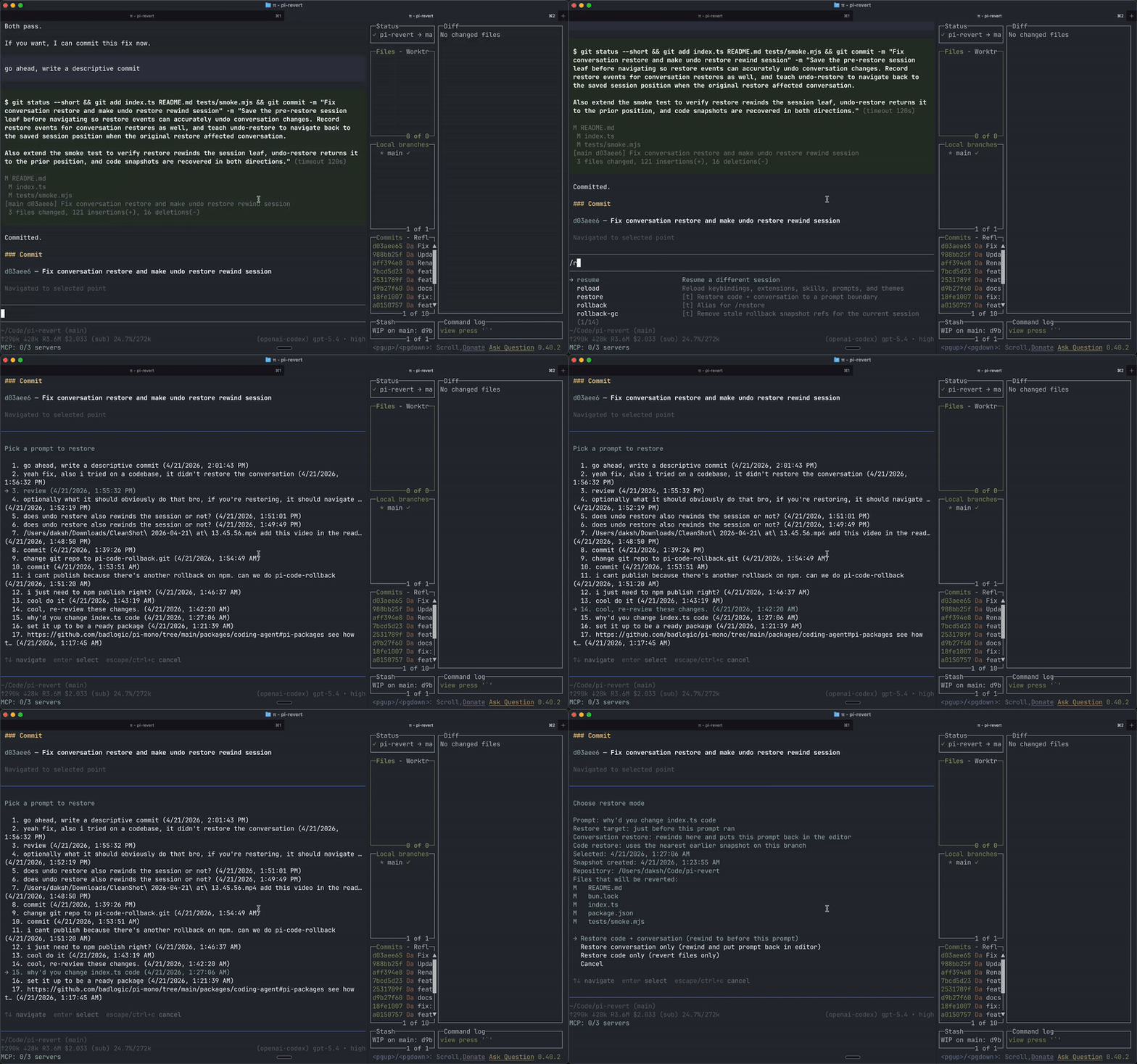
pi-code-rollback automatically snapshots your workspace as you work, then lets you restore either:
- the conversation,
- the code,
- or both.
The restore UX is built around prompt boundaries, which makes it much easier to understand what you are restoring.
Install in pi
Install from npm for all projects
pi install npm:pi-code-rollback
This writes to your global pi settings, so the extension is available in every repo.
Install from npm only for the current project
pi install -l npm:pi-code-rollback
This writes to .pi/settings.json in the current project.
Try it without installing
pi -e npm:pi-code-rollback
This loads the extension for the current pi run only.
Install from GitHub instead
pi install https://github.com/sudodaksh/pi-code-rollback.git
Install from a local checkout
From this repository root:
pi install .
Or with an absolute path:
pi install /absolute/path/to/pi-code-rollback
For one-off local testing:
pi -e .
Verify it is installed
Start pi inside a git repository and run:
/restore
You should see the restore picker listing your prompts.
What gets saved
During a session, the extension saves git-backed snapshots at two useful boundaries:
- before: just before a user prompt runs
- after: just after a completed run finishes
That means restore points map to how you actually think about work:
- "go back to before I asked for this"
- "go back to the finished result of that run"
Typical flow
- Work normally in a git repository.
- Ask pi to make changes.
- The extension captures:
- a baseline snapshot before a prompt runs
- a post-run snapshot after a completed run, but only if the workspace changed
- Run
/restorewhen you want to go back. - Pick a prompt from the list.
- Choose before or after that prompt (if both snapshots exist).
- Pick a restore mode:
- code + conversation
- conversation only
- code only
If you change your mind after restoring, run /undo-restore to recover the working tree from before the restore and restore the conversation position when the original restore changed it.
Restore semantics
Before
This means just before that prompt ran.
- Conversation restore: rewinds there and puts that prompt back in the editor
- Code restore: restores files to the snapshot from before that prompt started
After
This means the saved completed state after that prompt finished.
- Conversation restore: restores the completed response after that prompt
- Code restore: restores files to the exact post-run snapshot for that completed state
Example
Say your session looked like this:
a: update README.mdb: update loop.md
Running /restore and selecting prompt a:
- Before → restore to the original state before
README.mdchanged - After → restore to the finished state after
README.mdchanged
Selecting prompt b:
- Before → restore to the state after
a, but beforeb - After → restore to the finished state after
b, includingloop.md
Commands
/restore— restore code + conversation to a prompt boundary/rollback— alias for/restore/undo-restore— undo the last restore (recovers the working tree, and restores the conversation position when applicable)/rollback-gc— remove stale rollback snapshot refs for the current session
Requirements
- must be inside a git repository
- snapshots include tracked + untracked non-ignored files
- ignored files are preserved on restore
Notes
- Post-run snapshots are only saved when the workspace actually changes.
- If a prompt does not have its own exact snapshot, restore uses the nearest earlier snapshot on that branch path.
- Before any code restore, the current working tree is saved so it can be undone with
/undo-restore. - If the original restore also rewound or advanced the session conversation,
/undo-restorerestores that conversation position too. - Snapshots are stored as orphan git commits under
refs/pi/rollback/....
Package manifest
This repository is already structured as a publishable pi package.
Files used by pi
package.json— npm metadata + pi package manifestindex.ts— the extension entrypoint loaded by piREADME.md— package docs shown on npm/GitHubLICENSE— required for clean package publishingtsconfig.json— typecheck config for local validation and prepublish checks
The important manifest is:
{
  "keywords": ["pi-package"],
  "pi": {
    "extensions": ["./index.ts"]
  }
}
Publish this package
After pushing this repo to GitHub and logging into npm:
npm publish
Then users can install it with:
pi install npm:pi-code-rollback
To validate locally before publishing:
npm install
npm run check