pi-coder
Interactive code workbench and diff review UI for Pi, with annotations, GitHub pull-request reviews, and agent handoffs.
Package details
Install pi-coder from npm and Pi will load the resources declared by the package manifest.
$ pi install npm:pi-coder- Package
pi-coder- Version
0.9.8- Published
- Nov 4, 2026
- Downloads
- 921/mo · 563/wk
- Author
- dantetekanem
- License
- MIT
- Types
- extension, skill
- Size
- 1.2 MB
- Dependencies
- 2 dependencies · 4 peers
Pi manifest JSON
{
  "image": "https://raw.githubusercontent.com/dantetekanem/pi-coder/main/docs/assets/code.gif",
  "skills": [
    "./skills/diff-story"
  ],
  "extensions": [
    "./src/index.ts"
  ]
}Security note
Pi packages can execute code and influence agent behavior. Review the source before installing third-party packages.
README
pi-coder
pi-coder adds full-screen coding tools to Pi:
/diffand its/reviewalias review local changes, commits, branches, ranges, and configured remote pull requests./codebrowses and edits a workspace without leaving Pi./diff-storyarranges a change as ordered code steps with linked implementation and test diffs.
It also keeps a compact repository summary in Pi's footer so you can see the current file count, additions, and deletions between reviews. New, untracked files count individually and contribute their text additions. If Git cannot return complete counts, incomplete line totals are omitted rather than shown as exact.
For a deeper walkthrough of the workflow, usage, and the engineering reasoning behind it, read The Human in the Loop.
Try without installing
pi -e npm:pi-coderThis runs the published package for the current Pi invocation without adding it to your project configuration.
Install
pi install npm:pi-coderTo install the latest source directly from GitHub instead:
pi install https://github.com/dantetekanem/pi-coderRestart Pi or run /reload.
Pi compatibility and security baseline
Use Node.js 22.19.0 or newer and @earendil-works/pi-coding-agent, @earendil-works/pi-ai, and @earendil-works/pi-tui at 0.79.10 or newer. Keep the Pi packages on matching releases. The lockfile tests the 0.79.10 minimum; the peer ranges allow newer hosts without requiring Pi 1.x. Newer releases are not all covered by this compatibility check.
This baseline includes the Pi fixes described in these advisories:
- https://github.com/advisories/GHSA-jfgx-wxx8-mp94
- https://github.com/advisories/GHSA-r95r-rj6r-c39x
- https://github.com/advisories/GHSA-7v5m-pr3q-6453
- https://github.com/advisories/GHSA-mqxh-6gq7-558m
The baseline is not an audit-clean guarantee. The 2026-11-01 audit still reports upstream advisories for Pi's pinned undici 8.5.0, minimatch 10.2.5, and glob 13.0.6. The lockfile refreshes compatible protobufjs, zod, and brace-expansion resolutions without overriding Pi's dependency pins. Run pnpm audit --json for current findings. Updating this repository's lockfile does not update your installed Pi host or its dependencies; keep that installation current separately. Pi extensions run with the host's permissions, so use trusted repositories or external isolation for untrusted code.
Review changes
Run /diff or /review inside a repository:
/diff
/review
/review is an alias for /diff; both commands accept the same targets.
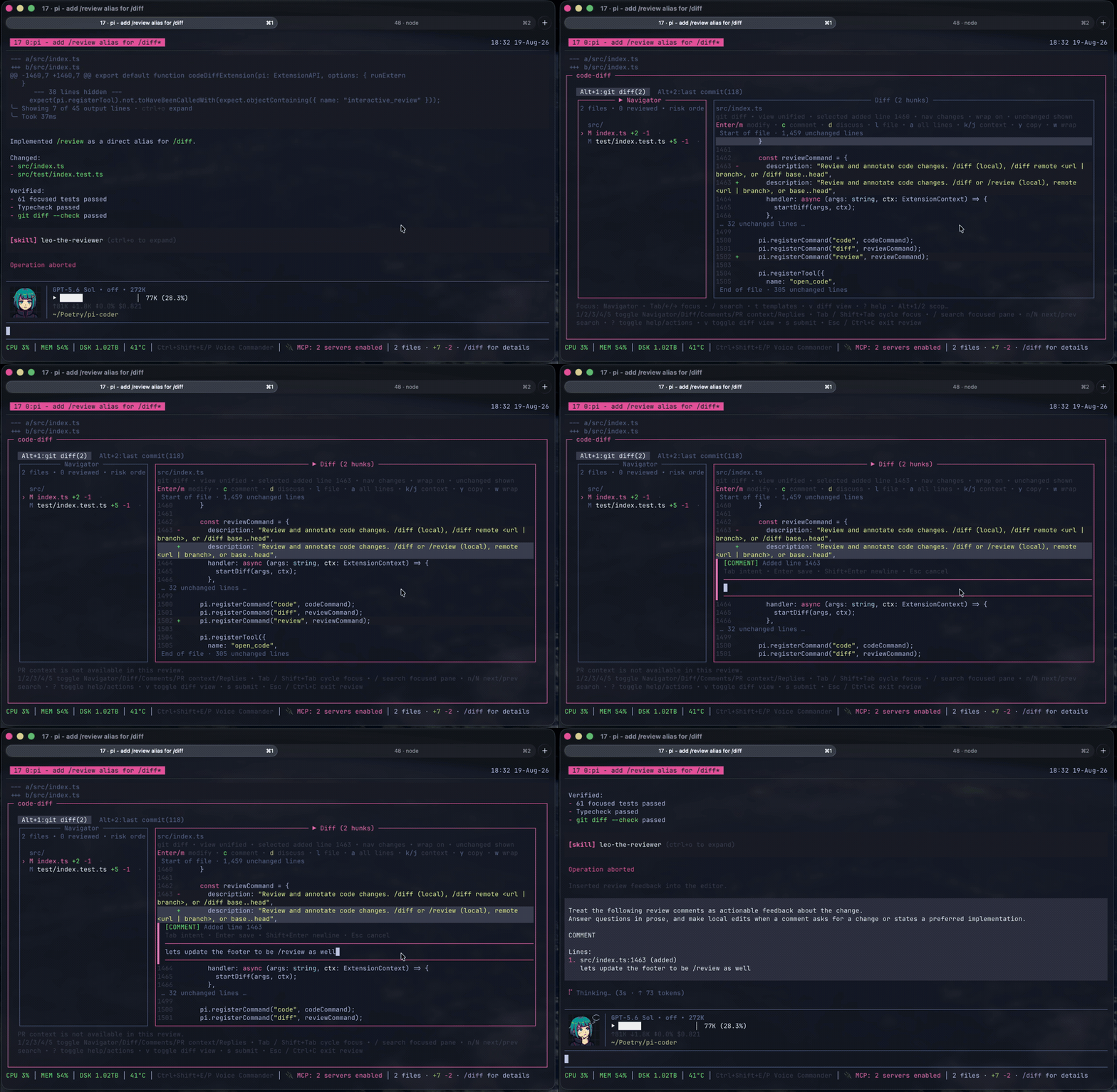
Useful targets:
/diff                         # uncommitted changes
/diff main...HEAD             # a Git range
/diff remote <branch-or-url>  # a remote branch or configured pull request
/diff --resume                # a parked review
/diff fullscreen on|off       # toggle Herdr pane zoom for future reviews
In Herdr, /diff zooms the current pane while the review is open and restores the previous layout afterward. Fullscreen is on by default; /diff fullscreen off disables it persistently until /diff fullscreen on enables it again. Launchers can set PI_CODER_HERDR_FULLSCREEN=on|off to override the initial behavior for one Pi process without changing the saved preference.
The review UI supports line, file, and review-wide feedback. Feedback can be marked as:
DISCUSS— save a question for the main agent. Pressdon code to add a note at the selected range.COMMENT— keep review feedback for a local or remote review.MODIFY— propose or apply an exact code change.
GitHub pull requests work by default through the authenticated gh CLI. Confirmed reviews receive a grammar-safety pass before submission, and saved drafts are revalidated when the reviewed revision changes.
Follow a diff story
/diff-story                        # walk through the selected local diff
/diff-story main...HEAD            # walk through a range
/diff-story remote <branch-or-url>
/diff-story --resume               # resume a saved review/story
/diff-story agent                  # choose the story model and thinking level
The story agent starts as openai-codex/gpt-5.6-luna with max thinking. Its selection is saved independently of the main conversation. Model selection validates support for the chosen thinking level.
A full-screen preparation view shows the captured files, change counts, and generation phase. The capture skips non-English/non-pt-BR locale files, as the /diff file list does, and shows how many it hid. Press F and then L to see them in the full diff. The extension extracts changed functions and individual tests locally. Changed lines outside a function join the nearest function in their file; a file without functions becomes one unit. The extension then pairs obvious filename and symbol matches. One model request arranges these prepared units and adjusts their test links. The extension supplies the exact ranges, complete changed-line coverage, and file/symbol titles. Each paired test appears once beside its implementation. Setup, helpers, and other unpaired tests join the step that owns the nearest paired test in their file, and a test file without pairs gets one step.
During preparation, a centered five-line strip shows public output, errors, and progress as they arrive, including the final ordering JSON. Gray text uses the normal terminal background, with the newest line at the bottom and older lines fading upward through 100% / 80% / 60% / 40% / 20%, approximated with terminal colors. The strip spans up to 120 columns. Space pauses/resumes the strip while generation and the running spinner continue. Elapsed time remains visible. The strip disappears when preparation ends. On generation failure, r explicitly retries against the same captured files.
File and change totals stay above two unified diffs: Implementation and Related changed tests. Both panes follow the current step, with faint green/red backgrounds on changed lines and colored addition/deletion counts for the current hunk. You select comment ranges with Shift+Up/Down. Each pane shows one file's lines for the current step, plus a few unchanged lines of context. Code owned by another step stays collapsed, so every changed line appears on exactly one page. Every captured change is reachable through step navigation; omitted units follow the model's ordered steps. At narrow widths the panes stack; below 40 columns or 27 rows, resize or switch to the full diff.
| Key | Story action |
|---|---|
Shift+Left / Shift+Right |
Previous / next step |
Left / Right |
Focus implementation / tests |
[ / ] |
Previous / next file in the focused member |
R |
Mark the current step seen |
c / d |
Comment / discuss at the selected range |
h / Tab |
Reach comments or the paired panes |
i |
View captured files, story steps, and saved notes |
4 |
Open PR context; D toggles the full description and Esc returns to the same step |
F |
Inspect the full captured diff, or return to the story |
s |
Finish through the normal review flow |
In either review mode, diff movement follows changed lines by default. Hold Option (Alt) with movement keys to reach unchanged code; Option+Shift+↑/↓ selects a context range for a note. In a story, movement stays inside the current page. Cursor keys stay with an active editor. Steps with no related changed test show an empty test pane. F opens the full diff with the same saved comments.
Resume retains the active step, per-member selections/scroll, marks, and comments. Changed bytes invalidate the saved story: explicitly rebuild it, use the ordinary diff, or cancel. Existing feedback remains subject to its usual anchor validation.
The model receives unit identifiers, filenames, symbols, reference matches, and proposed test pairs. Full captured code stays available through F. Requests use the provider's token, timeout, and retry settings. Cancel preparation with Esc or Ctrl+C. Before opening a story, the extension validates its anchors against the captured revision and reports unreadable files, binary content, or invalid output.
Discuss saved review notes
In /diff and /diff-story, d opens the normal comment editor with DISCUSS intent. Save the note with Enter and continue reviewing. Finish with s to hand feedback to the main agent; remote reviews offer “Start discussion with agents” when DISCUSS notes exist. COMMENT and MODIFY items stay saved for the PR author. After the discussion, confirm “Good to continue the review?” to reopen the saved review.
Review submission and recovery
s submits at any time. A stale line comment still posts on its lines when the diff shows them and they hold the code it was written on. Otherwise it posts as a file comment that names its original lines and quotes that code when known. Comments on files that left the review stay in the saved draft.
GitHub reviews pin the reviewed commit for every verdict, including approvals without comments. An approval with inline feedback uses one atomic review. Submission reports submitted, partial, unknown, or rejected; a timeout is not proof that nothing was posted.
Approved input is saved under an attempt ID before any write. Pass attemptId to reuse that decision. The UI resumes unfinished submissions or exact accepted feedback still awaiting cleanup. After a submission completes, remaining unsubmitted feedback can be reviewed or discussed. Confirmed steps are not reposted; uncertain steps require attributable provider evidence. Use newIntent only for an explicitly approved new review. A failed grammar pass keeps a separate, unconfirmed handoff until the final text is approved.
UI and tool submissions share draft cleanup. Only confirmed items whose saved IDs and full fingerprints still match are consumed; edited and unsubmitted feedback remains. Local receipt, journal and draft failures are reported separately from remote acceptance. See submission evidence and recovery limits.
Drafts and interrupted typing
A normal /diff opens a fresh review instance, even for a target with saved feedback. Use /diff --resume to pick an existing instance, or add --resume <id> after a local, range, or remote target. Picker labels include the instance ID; legacy drafts remain explicitly resumable. Discarded and retired draft-only IDs cannot be reused. Reviews with story or historical discussion data remain resumable after accepted feedback is consumed.
Snapshot saves compare the last loaded generation under a process-safe local store lock. A stale writer does not overwrite another review's feedback. On a conflict or storage error, keep the review open and copy or resolve its text; the UI does not reload a newer generation and replay stale edits. Picker membership is rebuilt from valid snapshots, including after an interrupted index update. Snapshots expire after 30 days without a snapshot update; terminal tombstones are retained indefinitely.
While a comment editor is active, its target, intent, original selection/anchor, text and cursor are saved separately from committed feedback. A first-change timer flushes at a two-second deadline, including during continuous typing. The intended typing loss window is at most two seconds with functioning, uncontended storage and a responsive event loop, within the limits below. Full review snapshots are not written per keystroke. Opening the first editor establishes a discoverable review snapshot before its first recovery write.
Enterflushes the buffer and commits feedback before closing the editor. Failed writes keep it open and leave recovery copies intact.Ctrl+Cinside the editor flushes and parks without committing the buffer.Esccancels a new editor; for a recovered editor it leaves the text saved for later recovery.- Explicit resume offers unfinished editor copies. Recovery opens editable text at its saved cursor; it never submits feedback. Each opening gets a separate composition ID, so two processes resuming one instance do not overwrite each other's buffers.
- Recovery checks the original file, scope and exact source anchor. Changed or unavailable bytes produce a stale draft; reanchor it manually to keep it on lines. A renamed/missing file or repository frame leaves the text editable but blocks saving it onto another target: copy it and manually choose the intended anchor.
- If recovered text conflicts with the current note or selected comment,
Enterasks "Replace with recovered text; keep current text as recovery?" Onlykconfirms. The exact current text and its intent/target are saved as a separate recovery before the generation-checked replacement. Any preservation or snapshot failure keeps the editor open.Escreturns to editing. If a recovered range would also remove other comments, saving is refused instead: the current comments and recovered buffer stay intact for manual merging.
Recovered buffers use the owned exact-text editor: arrows move the cursor, Ctrl+A selects all and Ctrl+Z undoes; Tab changes intent and Shift+Enter inserts a newline. New COMMENT/DISCUSS editors retain Pi's editor controls. Their completed bracketed pastes now remain expanded rather than collapsing into Pi paste markers, so cursor positions refer to the saved text. Chunked pastes are inserted when the closing paste marker arrives; an incomplete paste is not yet part of the editor buffer.
Recovery records live under ~/.pi/agent/cache/pi-coder/sessions/compositions (or PI_CODER_SESSIONS_DIR/compositions). Each JSON record is limited to 256 KiB, including text and anchor metadata. The shared store allows 64 recovery records and 16 MiB, including replacement byte capacity. Valid copies older than seven days since their last write are removed during recovery-store operations. Unknown or interrupted-write files remain for manual inspection and count against capacity. Limits and write failures report errors; they never truncate text or evict fresh copies to make space. Terminal instances do not offer their old compositions for recovery.
The .write-lock mutex never waits or removes an owner based on age or PID status. After a crash, stop all writers before manually inspecting and removing .write-lock/owner.json and its empty .write-lock directory. Do not remove a live lock or run mixed older writers against this store. The contract covers process interruption on a local filesystem; it does not include network/shared filesystems, fsync, or power-loss durability.
Remote providers
GitHub pull requests work through the authenticated gh CLI without extra configuration. See Remote providers to add another code host or configure repository-specific paths.
Common review controls:
| Key | Action |
|---|---|
| Arrow keys | Navigate files and changed diff lines by default |
Option/Alt + ↑ / ↓ / PgUp / PgDn / Home / End |
Reach any code line, revealing collapsed context as needed; add Shift to select a range |
c / d |
Add a comment / discussion |
| Mouse drag | Select text and copy it when you release. In a diff, the copy holds only code, without line numbers, +/- signs, or the other side. Double-click selects a word and triple-click a line. |
gf |
Open the selected line on the code host at the reviewed commit. Needs a pull request review and the provider's urls.file setting. |
gd or Ctrl+click |
Search for where the double-clicked or Ctrl+clicked symbol is defined. Needs the search setting. |
Enter or m |
Edit the selected line |
v |
Toggle unified and side-by-side views; from an opened PR thread, jump to its verified code location |
I |
Show or hide open PR threads under the lines they belong to. The lines keep a ○ marker either way. |
s |
Finish the review |
Esc |
Go back or close safely |
Replies: t / Enter / o / A |
Switch personal/all fetched threads; inspect full text; open browser; analyze read-only. PgUp/PgDn and gg/G scroll; Esc returns. |
Opened thread: e |
Edit a response buffer for this review window only |
Current PR context
Remote /diff and /diff-story show the PR title, reviewed revision, and a short author-derived brief. The same orientation stays visible during story preparation. In the context pane, D switches between the brief and the author's complete description, preserving each view's scroll position.
The context pane starts with the brief and fetched PR facts. When an optional generated explanation arrives, it appears above those facts under its own label. The original description remains available through D.
Known checks, comments, and reviews appear while slower conversation reads are still pending. Failed or limited sections are labeled unavailable; successfully fetched facts remain visible.
PR context and Replies distinguish missing resolution from an unresolved thread. Replies from deleted or unavailable authors remain visible as unknown.
A remote review reads the PR's review threads in the background when it opens, even when PR context and Replies are hidden. A ○ marks each line with an open thread (unresolved, or with unknown resolution) when the thread's anchor matches the reviewed code, and the Navigator shows each file's count, such as 2○. Press I to show or hide the thread text under its line; pi-coder remembers the choice. These threads are read-only. They never join your draft, the Comments pane, the submission, or the agent prompt, and your own feedback marker keeps a shared line. The diff header counts threads it could not place as N more in Replies, where t lists every fetched thread.
Both panes label incomplete thread reads. An empty partial result means no replies were found in the fetched threads, not that the whole PR conversation is empty.
PR context and Replies share pending reads within a review window. Supplied context stays read-free until refresh; it has no authenticated viewer or stable thread IDs. In either pane, press r for a fresh generation, even at the same head, or m to resume a ready continuation. The header shows the latest read's generation, time, coverage, and known open/unknown-resolution counts. Failed refreshes retain usable panes with their original metadata. Reply selection and context scroll are preserved. Replies shows fetched totals separately from the 100-reply and 1,200-character preview limits.
From an opened thread, e restores its response buffer or starts from that thread's analyzed suggestion. Enter, Esc, or Ctrl+C keeps the buffer; Shift+Enter inserts a newline. Buffers survive thread changes and refreshes within this window. They never become review feedback, go to the provider, or survive closing the window, including when parking a review.
Browse and edit code
Run the Explorer, or open a repository-relative file directly in INSERT mode:
/code
/code app/models/user.rb
The Workbench remains the default. To use one command for every code-opening interface instead, add it to ~/.pi/agent/pi-coder-settings.json. This example runs TTT through tmux:
{
  "code": {
    "command": ["tmux", "split-window", "-h", "-c", "{cwd}", "ttt", "{cwd}"],
    "targetArgs": ["{file}:{line}"]
  },
  "providers": {},
  "repositories": {}
}
command is direct argv, not a shell string, and supports only {cwd}. Optional targetArgs are appended for file targets and support {cwd}, {file}, and {line}. Pi waits for the command to finish. In this example, tmux returns after creating the pane, so Pi is ready while TTT stays open.
The same command handles /code, open_code, open_code_diff, and the review UI's open-code action. Without a configured command, the existing Workbench and review UI behavior remains unchanged.
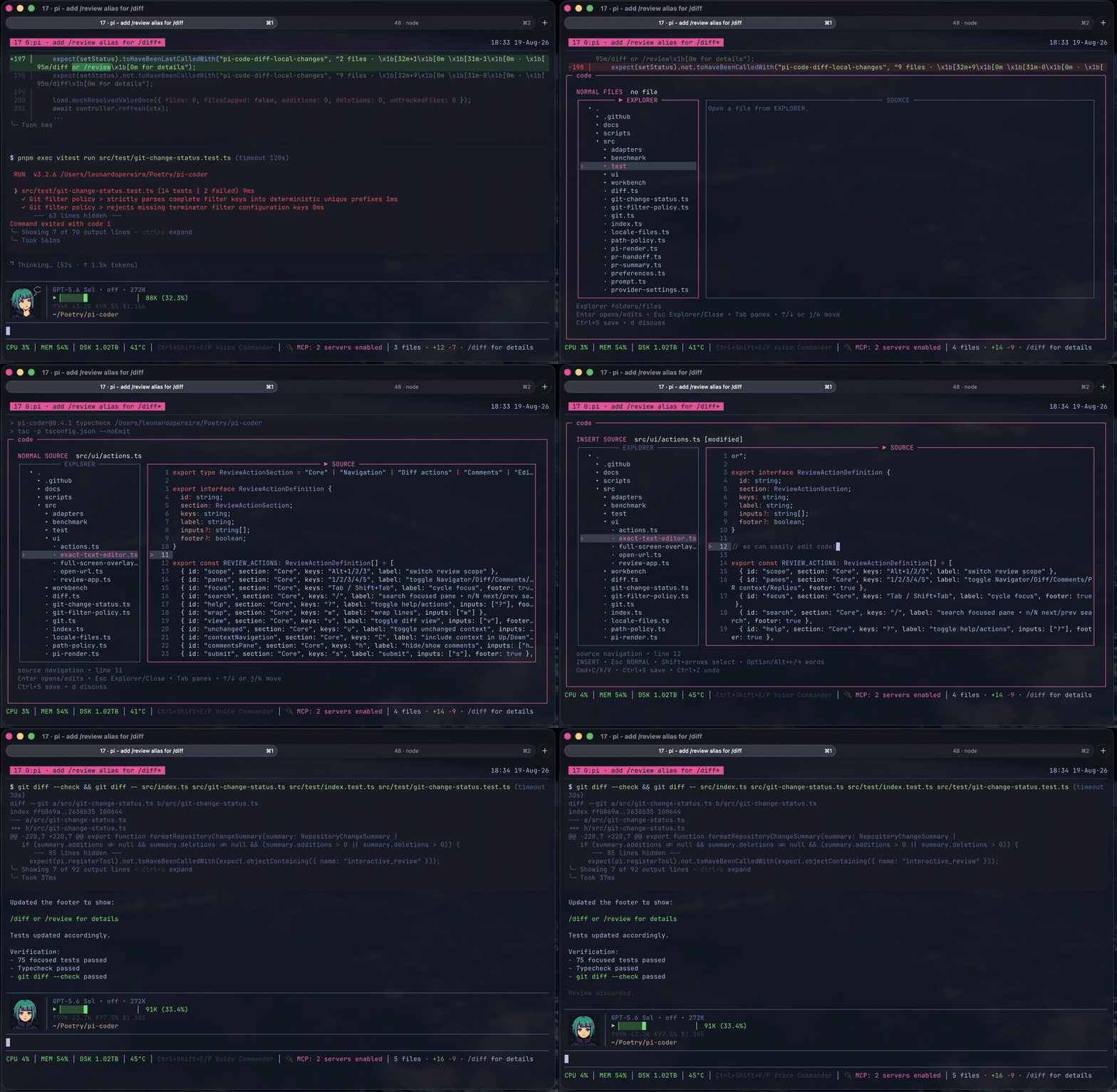
/code fills the small gap between the coding agent and you. It is for the last 1% of the work, when you want to open the file yourself, read the code around it, make a small change, or point to exact lines and ask a question. Instead of leaving Pi or asking the agent to paste fragments into the conversation, you can work with the code directly and continue where you left off.
/code is not a replacement for Vim, Neovim, VS Code, or the editor you already use. If one of those is already part of your workflow, keep using it. But learning Vim or Neovim just to inspect one function makes no sense, and opening something as heavy as VS Code can be more than the moment needs. /code is the minimum viable coding tool: a small project explorer, readable source, search, and enough editing for focused changes. The agent can take you to the exact file and lines, guide you through related parts of the code, and bring a selected piece back into the conversation when you want to discuss it. It protects unsaved work, will not overwrite a file changed somewhere else, and stays away from staging, commits, and pushes. The goal is not less human involvement. It is keeping the human loop powerful without slowing the work down.
Run /code syntax to choose and remember any syntax theme bundled with Shiki. The selection applies the next time /code opens.
Common Workbench controls:
| Key | Action |
|---|---|
Arrow keys or j / k |
Navigate files and source lines |
Enter |
Open a file or enter INSERT mode |
Tab / Shift+Tab |
Move between Explorer and Source |
/ |
Find a file or search the current buffer |
n / N |
Move through buffer matches |
Ctrl+S |
Save |
Esc |
Leave INSERT, return to Explorer, or close safely |
See docs/workbench.md for the full Workbench behavior and standalone runner.
Agent tools
Agents can use the same interfaces through:
open_code— run the configured code command at an optional path or structured target; without one, open the Workbench.open_code_diff— run the configured code command; without one, open/diffwith an optional target and prepopulated comments.open_code_diff_story— open/diff-storywith the same targets andcwd. It always uses the built-in story view, even with a configured code command.submit_pr_review— submit a confirmed configured-provider review.
Security and data access
Read SECURITY.md for private vulnerability reporting and docs/access.md for the exact subprocess, filesystem, and network access used by the package.
Development
pnpm install
pnpm typecheck
pnpm test
Build the standalone Workbench with pnpm workbench:build.
Acknowledgments
Inspired by Mario Zechner's pi-diff-review, with thanks to Rob Zolkos for his contributing work on the review workflow.
License
MIT