pi-coder
Interactive code workbench and diff review UI for Pi, with annotations, GitHub pull-request reviews, and agent handoffs.
Package details
Install pi-coder from npm and Pi will load the resources declared by the package manifest.
$ pi install npm:pi-coder- Package
pi-coder- Version
0.7.0- Published
- Sep 16, 2026
- Downloads
- 301/mo · 67/wk
- Author
- dantetekanem
- License
- MIT
- Types
- extension
- Size
- 1 MB
- Dependencies
- 2 dependencies · 4 peers
Pi manifest JSON
{
  "image": "https://raw.githubusercontent.com/dantetekanem/pi-coder/main/docs/assets/code.gif",
  "extensions": [
    "./src/index.ts"
  ]
}Security note
Pi packages can execute code and influence agent behavior. Review the source before installing third-party packages.
README
pi-coder
pi-coder adds two full-screen coding tools to Pi:
/diffand its/reviewalias review local changes, commits, branches, ranges, and configured remote pull requests./codebrowses and edits a workspace without leaving Pi.
It also keeps a compact repository summary in Pi's footer so you can see the current file count, additions, and deletions between reviews.
For a deeper walkthrough of the workflow, usage, and the engineering reasoning behind it, read The Human in the Loop.
Try without installing
pi -e npm:pi-coder
This runs the published package for the current Pi invocation without adding it to your project configuration.
Install
pi install npm:pi-coder
To install the latest source directly from GitHub instead:
pi install https://github.com/dantetekanem/pi-coder
Restart Pi or run /reload.
Review changes
Run /diff or /review inside a repository:
/diff
/review
/review is an alias for /diff; both commands accept the same targets.
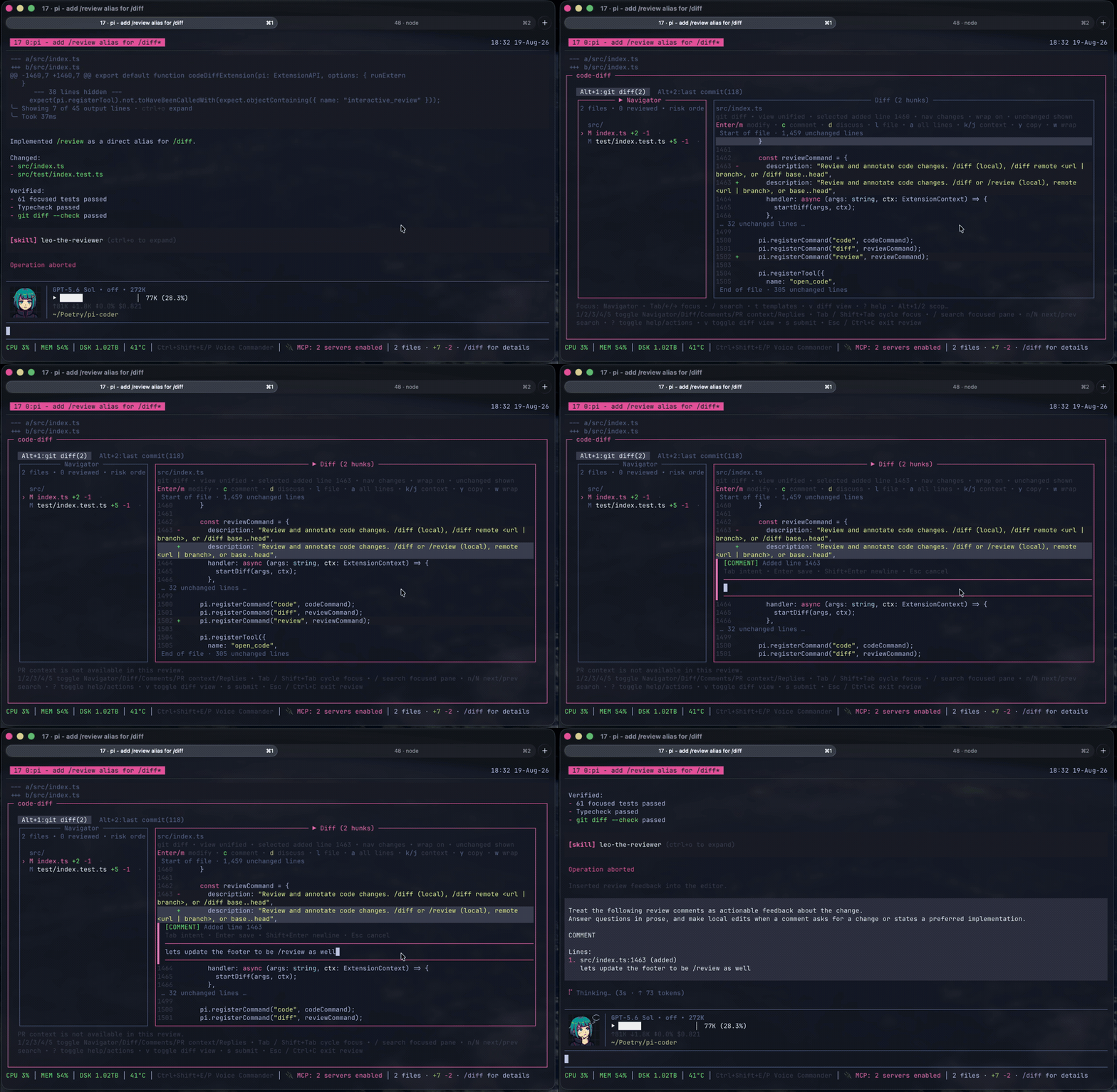
Useful targets:
/diff                         # uncommitted changes
/diff main...HEAD             # a Git range
/diff remote <branch-or-url>  # a remote branch or configured pull request
/diff --resume                # a parked review
/diff fullscreen on|off       # toggle Herdr pane zoom for future reviews
In Herdr, /diff zooms the current pane while the review is open and restores the previous layout afterward. Fullscreen is on by default; /diff fullscreen off disables it persistently until /diff fullscreen on enables it again. Launchers can set PI_CODE_DIFF_HERDR_FULLSCREEN=on|off to override the initial behavior for one Pi process without changing the saved preference.
The review UI supports line, file, and review-wide feedback. Feedback can be marked as:
DISCUSS— send the question back to the agent.COMMENT— keep review feedback for a local or remote review.MODIFY— propose or apply an exact code change.
GitHub pull requests work by default through the authenticated gh CLI. Confirmed reviews receive a grammar-safety pass before submission, and saved drafts are revalidated when the reviewed revision changes.
Review submission and recovery
GitHub reviews pin the reviewed commit for every verdict, including approvals without comments. An approval with inline feedback uses one atomic review. Submission reports submitted, partial, unknown, or rejected; a timeout is not proof that nothing was posted.
Approved input is saved under an attempt ID before any write. Pass attemptId to reuse that decision. The UI resumes unfinished submissions or exact accepted feedback still awaiting cleanup. After a submission completes, remaining unsubmitted feedback can be reviewed or discussed. Confirmed steps are not reposted; uncertain steps require attributable provider evidence. Use newIntent only for an explicitly approved new review. A failed grammar pass keeps a separate, unconfirmed handoff until the final text is approved.
UI and tool submissions share draft cleanup. Only confirmed items whose saved IDs and full fingerprints still match are consumed; edited and unsubmitted feedback remains. Local receipt, journal and draft failures are reported separately from remote acceptance. See submission evidence and recovery limits.
Drafts and interrupted typing
A normal /diff opens a fresh review instance, even for a target with saved feedback. Use /diff --resume to pick an existing instance, or add --resume <id> after a local, range, or remote target. Picker labels include the instance ID; legacy drafts remain explicitly resumable. Discarded and fully consumed IDs cannot be reused.
Snapshot saves compare the last loaded generation under a process-safe local store lock. A stale writer does not overwrite another review's feedback. On a conflict or storage error, keep the review open and copy or resolve its text; the UI does not reload a newer generation and replay stale edits. Picker membership is rebuilt from valid snapshots, including after an interrupted index update. Snapshots expire after 30 days without a snapshot update; terminal tombstones are retained indefinitely.
While a comment editor is active, its target, intent, original selection/anchor, text and cursor are saved separately from committed feedback. A first-change timer flushes at a two-second deadline, including during continuous typing. The intended typing loss window is at most two seconds with functioning, uncontended storage and a responsive event loop, within the limits below. Full review snapshots are not written per keystroke. Opening the first editor establishes a discoverable review snapshot before its first recovery write.
Enterflushes the buffer and commits feedback before closing the editor. Failed writes keep it open and leave recovery copies intact.Ctrl+Cinside the editor flushes and parks without committing the buffer.Esccancels a new editor; for a recovered editor it leaves the text saved for later recovery.- Explicit resume offers unfinished editor copies. Recovery opens editable text at its saved cursor; it never submits feedback. Each opening gets a separate composition ID, so two processes resuming one instance do not overwrite each other's buffers.
- Recovery checks the original file, scope and exact source anchor. Changed or unavailable bytes produce a stale draft requiring manual reanchor. A renamed/missing file or repository frame leaves the text editable but blocks saving it onto another target: copy it and manually choose the intended anchor.
- If recovered text conflicts with the current note or selected comment,
Enterasks "Replace with recovered text; keep current text as recovery?" Onlykconfirms. The exact current text and its intent/target are saved as a separate recovery before the generation-checked replacement. Any preservation or snapshot failure keeps the editor open.Escreturns to editing. If a recovered range would also remove other comments, saving is refused instead: the current comments and recovered buffer stay intact for manual merging.
Recovered buffers use the owned exact-text editor: arrows move the cursor, Ctrl+A selects all and Ctrl+Z undoes; Tab changes intent and Shift+Enter inserts a newline. New COMMENT/DISCUSS editors retain Pi's editor controls. Their completed bracketed pastes now remain expanded rather than collapsing into Pi paste markers, so cursor positions refer to the saved text. Chunked pastes are inserted when the closing paste marker arrives; an incomplete paste is not yet part of the editor buffer.
Recovery records live under ~/.pi/agent/cache/pi-code-diff/sessions/compositions (or PI_CODE_DIFF_SESSIONS_DIR/compositions). Each JSON record is limited to 256 KiB, including text and anchor metadata. The shared store allows 64 recovery records and 16 MiB, including replacement byte capacity. Valid copies older than seven days since their last write are removed during recovery-store operations. Unknown or interrupted-write files remain for manual inspection and count against capacity. Limits and write failures report errors; they never truncate text or evict fresh copies to make space. Terminal instances do not offer their old compositions for recovery.
The .write-lock mutex never waits or removes an owner based on age or PID status. After a crash, stop all writers before manually inspecting and removing .write-lock/owner.json and its empty .write-lock directory. Do not remove a live lock or run mixed older writers against this store. The contract covers process interruption on a local filesystem; it does not include network/shared filesystems, fsync, or power-loss durability.
Remote providers
GitHub pull requests work through the authenticated gh CLI without extra configuration. See Remote providers to add another code host or configure repository-specific paths.
Common review controls:
| Key | Action |
|---|---|
| Arrow keys | Navigate files and diff lines |
c / d |
Add a comment / discussion |
Enter or m |
Edit the selected line |
v |
Toggle unified and side-by-side views; from an opened PR thread, jump to its verified code location |
s |
Finish the review |
Esc |
Go back or close safely |
Replies: t / Enter / o / A |
Switch personal/all fetched threads; inspect full text; open browser; analyze read-only. PgUp/PgDn and gg/G scroll; Esc returns. |
Opened thread: e |
Edit a response buffer for this review window only |
Current PR context
The context pane shows fetched PR facts, including the reviewed head, before the optional generated explanation. The explanation appears below those facts without replacing them or resetting your scroll position.
Known checks, comments, and reviews appear while slower conversation reads are still pending. Failed or limited sections are labeled unavailable; successfully fetched facts remain visible.
PR context and Replies distinguish missing resolution from an unresolved thread. Replies from deleted or unavailable authors remain visible as unknown.
Both panes label incomplete thread reads. An empty partial result means no replies were found in the fetched threads, not that the whole PR conversation is empty.
PR context and Replies share pending reads within a review window. Supplied context stays read-free until refresh; it has no authenticated viewer or stable thread IDs. In either pane, press r for a fresh generation, even at the same head, or m to resume a ready continuation. The header shows the latest read's generation, time, coverage, and known open/unknown-resolution counts. Failed refreshes retain usable panes with their original metadata. Reply selection and context scroll are preserved. Replies shows fetched totals separately from the 100-reply and 1,200-character preview limits.
From an opened thread, e restores its response buffer or starts from that thread's analyzed suggestion. Enter, Esc, or Ctrl+C keeps the buffer; Shift+Enter inserts a newline. Buffers survive thread changes and refreshes within this window. They never become review feedback, go to the provider, or survive closing the window, including when parking a review.
Browse and edit code
Run the Explorer, or open a repository-relative file directly in INSERT mode:
/code
/code app/models/user.rb
The Workbench remains the default. To use one command for every code-opening interface instead, add it to ~/.pi/agent/pi-code-diff-settings.json. This example runs TTT through tmux:
{
  "code": {
    "command": ["tmux", "split-window", "-h", "-c", "{cwd}", "ttt", "{cwd}"],
    "targetArgs": ["{file}:{line}"]
  },
  "providers": {},
  "repositories": {}
}
command is direct argv, not a shell string, and supports only {cwd}. Optional targetArgs are appended for file targets and support {cwd}, {file}, and {line}. Pi waits for the command to finish. In this example, tmux returns after creating the pane, so Pi is ready while TTT stays open.
The same command handles /code, open_code, open_code_diff, and the review UI's open-code action. Without a configured command, the existing Workbench and review UI behavior remains unchanged.
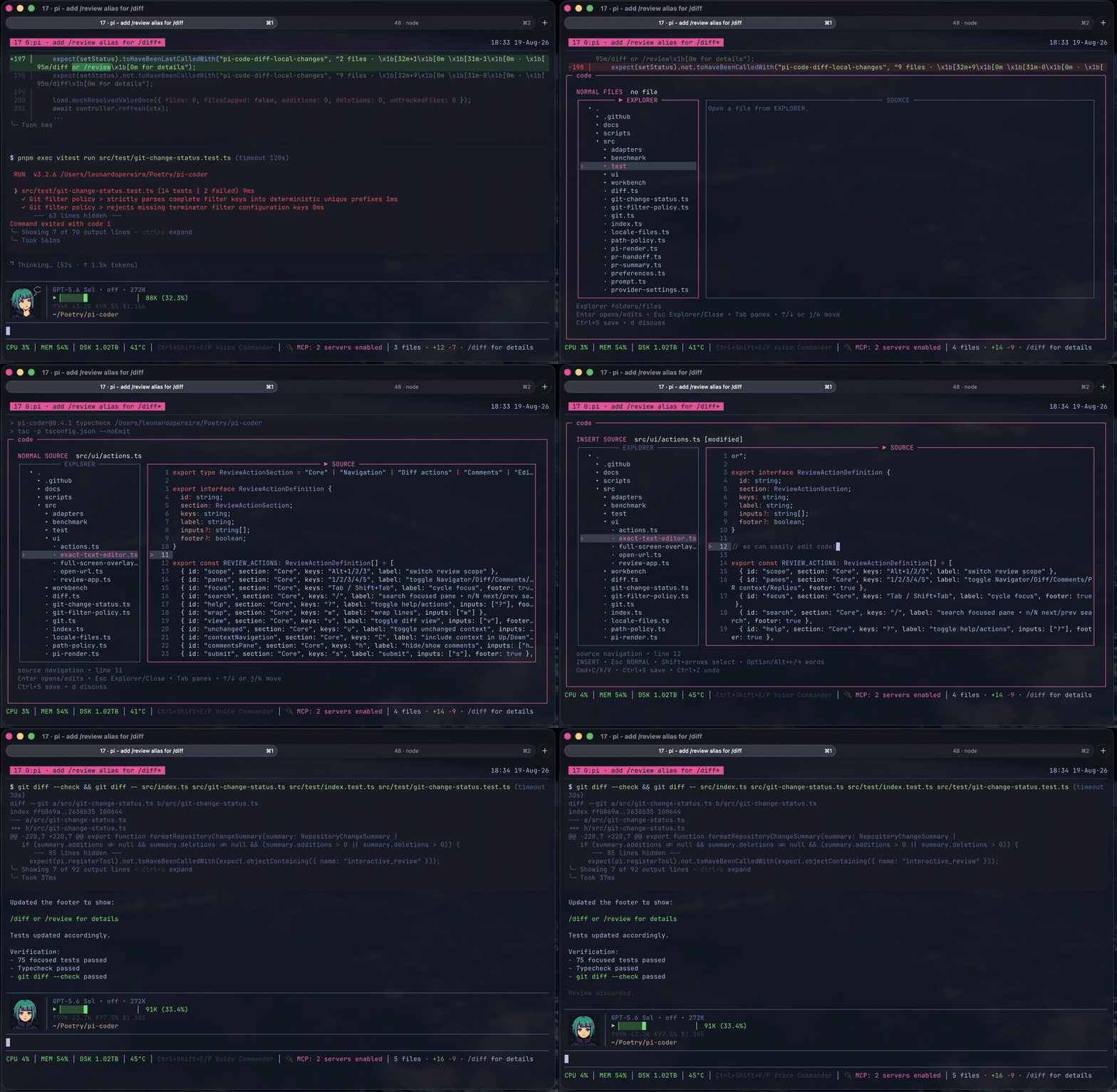
/code fills the small gap between the coding agent and you. It is for the last 1% of the work, when you want to open the file yourself, read the code around it, make a small change, or point to exact lines and ask a question. Instead of leaving Pi or asking the agent to paste fragments into the conversation, you can work with the code directly and continue where you left off.
/code is not a replacement for Vim, Neovim, VS Code, or the editor you already use. If one of those is already part of your workflow, keep using it. But learning Vim or Neovim just to inspect one function makes no sense, and opening something as heavy as VS Code can be more than the moment needs. /code is the minimum viable coding tool: a small project explorer, readable source, search, and enough editing for focused changes. The agent can take you to the exact file and lines, guide you through related parts of the code, and bring a selected piece back into the conversation when you want to discuss it. It protects unsaved work, will not overwrite a file changed somewhere else, and stays away from staging, commits, and pushes. The goal is not less human involvement. It is keeping the human loop powerful without slowing the work down.
Run /code syntax to choose and remember any syntax theme bundled with Shiki. The selection applies the next time /code opens.
Common Workbench controls:
| Key | Action |
|---|---|
Arrow keys or j / k |
Navigate files and source lines |
Enter |
Open a file or enter INSERT mode |
Tab / Shift+Tab |
Move between Explorer and Source |
/ |
Find a file or search the current buffer |
n / N |
Move through buffer matches |
Ctrl+S |
Save |
Esc |
Leave INSERT, return to Explorer, or close safely |
See docs/workbench.md for the full Workbench behavior and standalone runner.
Agent tools
Agents can use the same interfaces through:
open_code— run the configured code command at an optional path or structured target; without one, open the Workbench.open_code_diff— run the configured code command; without one, open/diffwith an optional target and prepopulated comments.submit_pr_review— submit a confirmed configured-provider review.
Security and data access
Read SECURITY.md for private vulnerability reporting and docs/access.md for the exact subprocess, filesystem, and network access used by the package.
Development
pnpm install
pnpm typecheck
pnpm test
Build the standalone Workbench with pnpm workbench:build.
Acknowledgments
Inspired by Mario Zechner's pi-diff-review, with thanks to Rob Zolkos for his contributing work on the review workflow.
License
MIT