pi-codex-goal
Codex-style goal tracking and continuation for pi.
Package details
Install pi-codex-goal from npm and Pi will load the resources declared by the package manifest.
$ pi install npm:pi-codex-goal- Package
pi-codex-goal- Version
0.7.7- Published
- Nov 3, 2026
- Downloads
- 5,139/mo · 2,926/wk
- Author
- fitchmultz
- License
- MIT
- Types
- extension, prompt
- Size
- 239.8 KB
- Dependencies
- 0 dependencies · 4 peers
Pi manifest JSON
{
  "prompts": [
    "./prompts"
  ],
  "extensions": [
    "./extensions"
  ]
}
Security note
Pi packages can execute code and influence agent behavior. Review the source before installing third-party packages.
README
pi-codex-goal
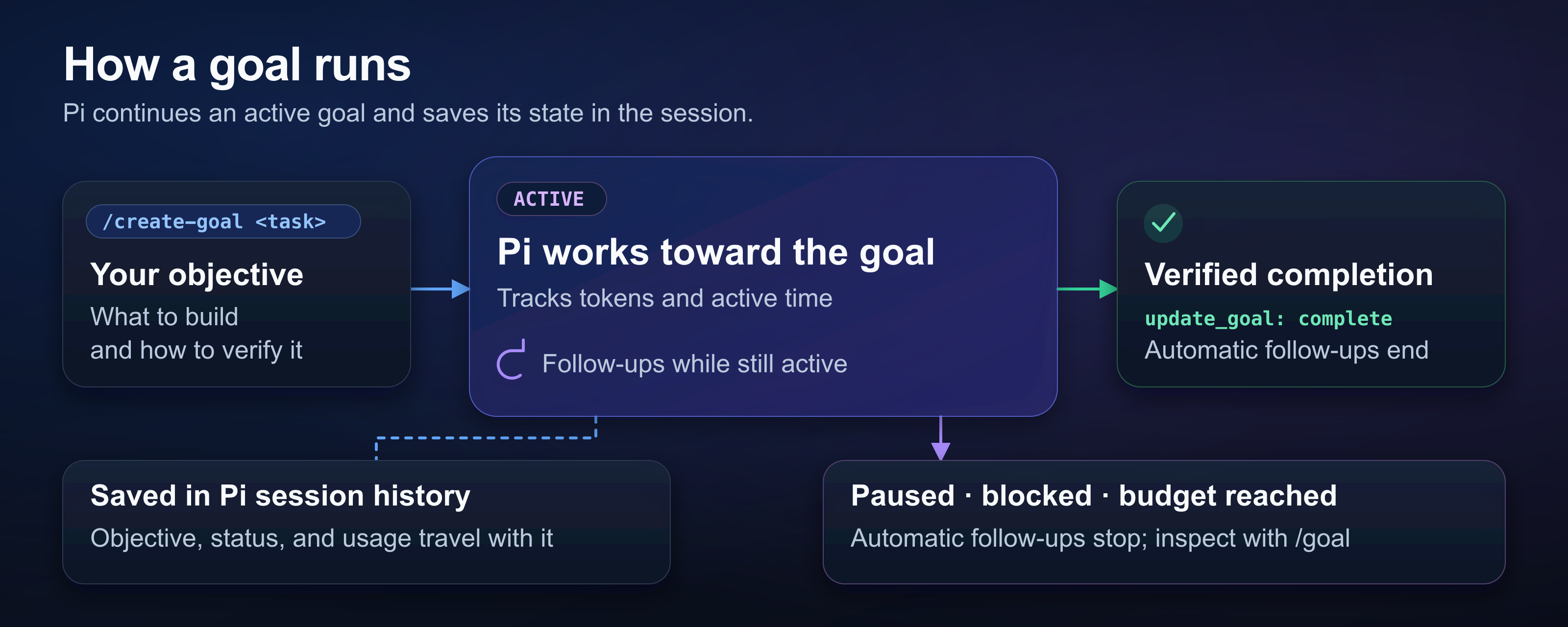
pi-codex-goal adds a persistent goal to Pi. The extension prompts Pi to continue an active goal across turns.
Install and start
Check the Node.js and Pi requirements before installing. The extension supports official Pi releases and the fitchmultz Pi fork.
pi install npm:pi-codex-goal
pi
Run /reload if Pi is already open. Enter a task in the Pi editor:
/create-goal Add CSV export to the reports page. Test the export. Document its use./create-goal expands your task into an objective with completion checks. The new goal replaces the old one. Include every requirement you want to keep.
Goal controls
| Command | Action |
|---|---|
/goal |
Show the objective, status, token budget, usage, and active time. |
/goal <objective> |
Set the exact objective. Confirm replacement of an unfinished goal. |
/goal pause |
Pause an active or waiting goal. |
/goal resume |
Continue a paused, blocked, or waiting goal. |
/goal resume cancel |
Cancel a scheduled provider-limit retry. |
/goal copy |
Copy the objective to the system clipboard. |
/goal clear |
Remove the current goal. |
Press Esc to stop the current assistant turn and pause its active goal.
Goal-generated follow-ups are hidden custom messages, not editable user input. Alt+Up restores only genuine queued user text, never automated Goal instructions. Use the commands above to pause, resume or replace automated work. Genuine input, image attachments and existing editor drafts keep Pi's native editing behavior.
A blocked goal needs input or external work. Run /goal to read the reason. Resolve the dependency. Run /goal resume.
For background jobs that deliver their own result messages, the agent can set the goal to waiting with a reason naming the work. Waiting stops hidden continuations and active-time accounting without polling. New user input, steering, or another extension's result automatically reactivates the goal; /goal resume also works. /goal pause keeps it paused even when a result arrives.
Completed goals stay complete. Create a new goal for more work.
Limits and cost
Active goals cause extra model calls. Use /goal pause to stop automatic continuation.
New goals have no token limit. Ask the agent to set token_budget through create_goal to limit a goal. The default minimum is 500,000 tokens. The goal stops automatic continuation when it reaches the budget.
Goal tokens count assistant input and output. This count excludes provider cache accounting and host maintenance costs. It does not show total provider charges.
Sessions and recovery
The goal survives resume, reload, fork, tree navigation, and compaction. The Pi footer shows goal status and usage when a UI is available. In the terminal UI, a separate line below the editor shows the unfinished goal's status and objective. Long or multiline objectives are condensed to one truncated line; run /goal for the full text. Completing or clearing the goal hides this line.
Pi controls compaction. The extension uses bounded retries for transient provider errors. Recognized provider usage limits can schedule an automatic retry.
Automated Goal follow-ups do not reset exhausted native context-overflow recovery. Goal pauses with an explanation instead of forcing another attempt. Reduce context or switch models, send a genuine user message to get native user recovery, then run /goal resume.
Headless use
Ask the agent to use create_goal, get_goal, and update_goal for headless runs.
pi -p '/goal …' runs the command and can change saved goals. Print mode can exit before the goal turn finishes and leave the goal paused.
Details
Read the reference for installation options, budget policy, tools, and recovery.
Read the development guide for checks, compatibility qualification, smoke tests, and releases.
See the changelog for version history. Report problems in Issues.
License
Mitch Fultz publishes this project under the MIT license.