pi-codex-web-search
Pi extension that exposes web search through the local Codex CLI
Package details
Install pi-codex-web-search from npm and Pi will load the resources declared by the package manifest.
$ pi install npm:pi-codex-web-search- Package
pi-codex-web-search- Version
0.2.0- Published
- Oct 4, 2026
- Downloads
- 322/mo · 253/wk
- Author
- ayagmar
- License
- MIT
- Types
- extension
- Size
- 152.6 KB
- Dependencies
- 1 dependency · 4 peers
Pi manifest JSON
{
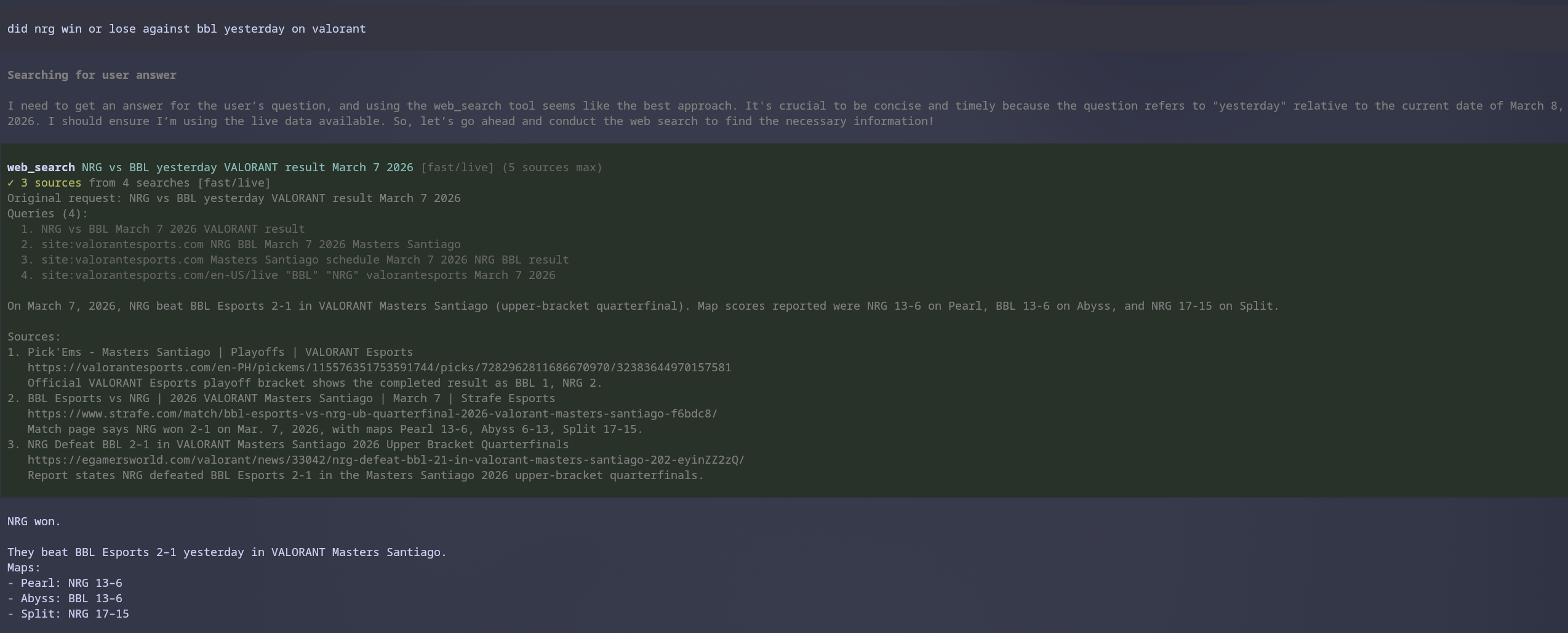
  "image": "https://raw.githubusercontent.com/ayagmar/pi-codex-web-search/master/docs/images/web-search-demo.png",
  "extensions": [
    "./src/index.ts"
  ]
}
Security note
Pi packages can execute code and influence agent behavior. Review the source before installing third-party packages.
README
pi-codex-web-search
Pi extension that registers a web_search tool backed by your local codex CLI.
It is designed for the case where:
- you already use
codex - you are already authenticated with
codex login - you do not want to manage a separate API key inside the extension
How it works
When Pi calls web_search, the extension auto-resolves a usable Codex binary, then runs Codex non-interactively:
codex exec --json-c web_search="indexed",-c web_search="cached", or-c web_search="live"-c model_reasoning_effort="low"for fast mode or"medium"for deep mode- read-only sandbox
- ephemeral session
- structured JSON output enforced with
--output-schema - final assistant message captured with
--output-last-message
Codex's current web-search modes are disabled | cached | indexed | live.
This extension uses indexed for the normal fast path, cached when explicitly requested,
and live for freshness-sensitive searches. indexed is Codex's hosted index path: it is
usually more useful than a stale cache without paying the latency of a live crawl.
The extension then:
- parses Codex JSONL events to show search progress in Pi
- tracks the actual search queries Codex issued across multiple item event shapes without double-counting Codex's abbreviated display query
- budgets
web_searchtool calls rather than individual query strings batched inside one call - keeps page opens/find-in-page activity separate so document inspection does not consume the search-call budget
- prevents differing sibling
web_searchcalls from running concurrently; related subquestions must share one request - coalesces identical concurrent searches onto one Codex run and serves repeated identical requests within a turn from a small result cache
- keeps running query and search-call counters in the tool UI
- shows clearer in-flight status when fast mode nears its search-call budget
- uses persisted defaults for mode, freshness, and per-mode source caps unless the tool call overrides them
- records when a default fast search had to be retried as deep/live after a transport failure
- emits heartbeat progress while Codex is connecting or synthesizing, so a quiet backend is observable instead of looking hung
- applies phase-aware inactivity deadlines: a run with no backend events within 30s fails as a dead connection, and a run whose events stop for 60s mid-research fails as stalled, both well before the wall-clock timeout
- caps captured subprocess output so runaway Codex or Defuddle processes cannot exhaust memory
- shows elapsed time, search-call budget, attempt number, JSONL event count, page inspections, and the last backend status in expanded tool details
- uses Defuddle for direct URL-only requests and supports optional URL fallback when Codex cannot produce a usable result; fallback answers include a bounded excerpt of the extracted page content
- returns a concise summary plus numbered sources with URLs and snippets
Requirements
Pi 1.0 or newer (
@earendil-works/pi-coding-agent>= 1.0.1)Node.js 22.19+
authenticated Codex CLI session
Codex CLI either:
- available in
PATH, or - installed in a common npm location the extension can auto-detect, or
- pointed to explicitly with
PI_CODEX_WEB_SEARCH_CODEX_PATH
A Codex installed only in the opened project's
node_modulesis never used automatically; point to it withPI_CODEX_WEB_SEARCH_CODEX_PATHif that is the one you want.- available in
Check your Codex auth state with:
codex login statusIf needed, authenticate with:
codex loginInstall
From npm:
pi install npm:pi-codex-web-searchFrom GitHub:
pi install git:github.com/ayagmar/pi-codex-web-searchTry it for a single session without installing:
pi -e npm:pi-codex-web-searchUpdate an installed copy with pi update npm:pi-codex-web-search (or pi update --extensions; a bare pi update only updates Pi itself).
From a local checkout (run pnpm install in the checkout first; pi does not install dependencies for local paths, and the defuddle runtime dependency must be present):
pi install /absolute/path/to/pi-codex-web-searchOr load directly during development:
pi -e ./src/index.tsFor hot reload, place the extension in one of Pi's extension folders and run /reload.
Tool
web_search
Parameters:
query: string— what to search formaxSources?: number— optional cap from 1 to 10. If omitted, the saved fast/deep default is used for the chosen mode.mode?: "fast" | "deep"— optional depth override. If omitted, the saved default mode is used.freshness?: "cached" | "indexed" | "live"— optional backend override. Indexed is the recommended general-purpose path; use live for time-sensitive questions.
Behavior:
- uses the local Codex CLI
- requires a non-empty query
- defaults to saved settings of:
- default mode =
fast - fast freshness =
indexed - deep freshness =
live - fast max sources =
5 - deep max sources =
5
- default mode =
- supports explicit
deepmode for broader research - supports explicit
cached/indexed/livefreshness overrides - keeps
indexedas the default for normal fast lookups and auto-promotes tolivefor strong recency cues liketoday,latest,current,now,weather,price,breaking, andurgent - uses Defuddle immediately when the query is just a URL (including
https://defuddle.md/<url>mirrors) whendefuddle-modeallows direct extraction - automatically retries one default fast search as
deep+livewhen Codex loses transport mid-run; timeouts and budget exhaustion fail fast instead of silently paying for a second, longer attempt - constrains fast mode to one batched search call before synthesis and forces low Codex reasoning effort so simple lookups do not inherit a slow global reasoning setting
- uses medium Codex reasoning effort for deep mode and strengthens prompts with targeted guidance for site-constrained and documentation-style queries
- shows reconnects, WebSocket-to-HTTPS fallback, and the final classified failure cause in tool progress/details when they happen
- can fall back to Defuddle for single-URL extraction-style requests when Codex still fails after its own retries, if
defuddle-modeenables fallback - falls back to Codex's final JSONL agent message if
--output-last-messagecomes back empty, including newer rawresponse.output_item.*assistant events as a compatibility path - tolerates fenced or wrapped JSON when Codex produces the right object with extra surrounding text
- treats
turn.failed,response.*.failed, anderrorJSONL events as first-class failure signals - enforces smaller timeout/search-call budgets in fast mode so lightweight lookups do not run indefinitely
- counts each real
web_searchtool call once, even when it batches many query strings or emits both started/completed events - excludes
open_pageandfind_in_pagefollow-up actions from the search-call budget - warns when fast mode has consumed its full search-call budget and is about to fail
- blocks repeated fast-mode retries within the same turn after fast mode has already been exhausted
- shows live search queries and separate query/call counters in Pi's tool UI
- supports expanded tool details with
Ctrl+O - returns a compact answer with sources
- truncates oversized output and saves the full result to a temp file when needed
- surfaces clearer Codex auth guidance, including
codex login statusandcodex login, when authentication appears to be missing or expired - soft-degrades recoverable Codex failures (timeouts, transport errors, rate limits, budgets, empty or invalid output) so Pi can keep going: the result still carries the failure details for the UI, but is flagged as a tool error so the model and
tool_resulthooks see the call failed. Missingcodex, bad local config, cancellations, and auth problems still fail outright
Settings
Use the slash command below to persist defaults across sessions:
/web-search-settingsThe interactive dialog is grouped into:
- Search defaults
- Defuddle behavior
- Timeouts
- Search-call budgets
You can also use direct subcommands:
/web-search-settings status
/web-search-settings default-mode deep
/web-search-settings fast-freshness indexed
/web-search-settings deep-freshness live
/web-search-settings fast-max-sources 5
/web-search-settings deep-max-sources 5
/web-search-settings default-max-sources 5
/web-search-settings defuddle-mode direct
/web-search-settings fast-timeout-ms 90000
/web-search-settings deep-timeout-ms 240000
/web-search-settings defuddle-timeout-ms 45000
/web-search-settings fast-query-budget 10
/web-search-settings deep-query-budget 24
/web-search-settings reset
Notes:
default-max-sourcesis kept as a compatibility alias and updates bothfast-max-sourcesanddeep-max-sources.- The settings file is
pi-codex-web-search.settings.jsonin your Pi agent directory (~/.pi/agentby default, or$PI_CODING_AGENT_DIRwhen set) and is reused by future sessions. - Upgrading from 0.1.x with
PI_CODING_AGENT_DIRset: older versions always used~/.pi/agent/pi-codex-web-search.settings.json. Move that file to$PI_CODING_AGENT_DIR/to keep your saved settings; it is not read from the old location. - If that file contains invalid JSON, searches use the defaults and
/web-search-settingsreports the problem instead of overwriting your values; fix the file or run/web-search-settings reset. - Defaults include
defuddle-mode = directfor URL-only extraction without surprising non-URL search behavior. - Timeouts and search-call budgets are configurable for both fast and deep modes. Existing
fast-query-budgetanddeep-query-budgetcommand names are retained for compatibility.
Note: current Codex docs describe the top-level web_search setting as the supported configuration surface. Older legacy settings such as features.web_search_request are deprecated.
Example
Ask Pi something like:
Search the web for the latest Codex CLI release notes and summarize the key changes.
Pi can call:
{
  "query": "latest Codex CLI release notes",
  "maxSources": 3
}
Development
pnpm install
pnpm run check
Releasing
Releases are cut from GitHub Actions — never from a laptop.
- Merge Conventional Commits (
feat:,fix:,feat!:…) intomaster. - Run Actions → Release → Run workflow (or
gh workflow run release.yml -f increment=auto).autoderives the bump from the commits; pickpatch/minor/majorto override. Tickdry_runto preview. - The workflow runs
pnpm run check, then release-it bumpspackage.json, updatesCHANGELOG.md, tagsvX.Y.Z, pushes and creates the GitHub release, and finallynpm publishpublishes with provenance through npm trusted publishing (OIDC — no npm token stored in the repo).
Preview locally with pnpm release:dry.
Notes
- This extension does not register the native OpenAI Responses
web_searchtool directly inside Pi. - Instead, it exposes a Pi tool that delegates web research to the locally installed Codex CLI.
- That keeps auth and web-search behavior aligned with your existing Codex setup.
License
MIT