pi-compact-transcript
A compact transcript extension for pi: collapsed thinking summaries and one-line tool previews.
Package details
Install pi-compact-transcript from npm and Pi will load the resources declared by the package manifest.
$ pi install npm:pi-compact-transcript- Package
pi-compact-transcript- Version
0.9.0- Published
- Sep 6, 2026
- Downloads
- 1,328/mo · 133/wk
- Author
- avhagedorn
- License
- MIT
- Types
- extension
- Size
- 173.4 KB
- Dependencies
- 0 dependencies · 2 peers
Pi manifest JSON
{
  "image": "https://raw.githubusercontent.com/avhagedorn/pi-compact-transcript/main/assets/with-extension.png",
  "extensions": [
    "./extensions/compact-transcript.ts"
  ]
}
Security note
Pi packages can execute code and influence agent behavior. Review the source before installing third-party packages.
README
pi-compact-transcript
A compact transcript extension for pi.
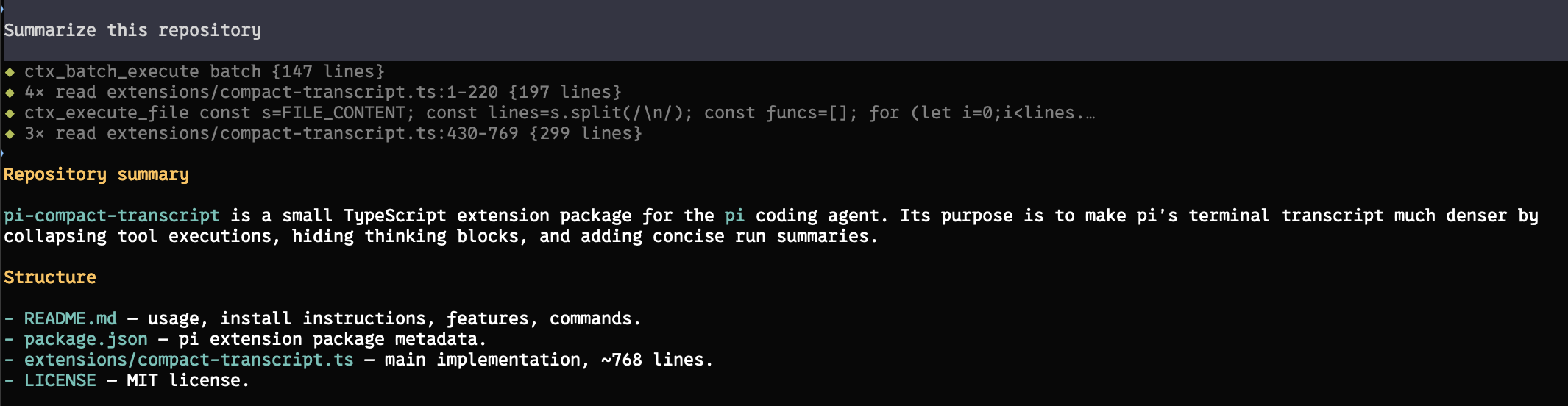
With the extension
Without the extension
What it does:
- Highlights agent commentary with an accent-colored left rail and a blank line before the tools below it, preserving Markdown formatting. Final answers stay unframed.
- Collapses every tool call/result into a dimmed one-line preview with a status diamond: blinking gray
◆while running, green on success, red on failure. Failed previews retain higher-contrast text. Durations show at a second or longer. - Consecutive uses of the same tool coalesce into a single row, e.g.
◆ 4× read src/foo.ts {12 lines · 8s}. Edit and write previews show git-style counts such as{+3/-1}and{+42/-0}with additions in green and deletions in red; no diff content is rendered. Failed tools always get their own visible row. - Each agent run ends with a one-line summary, e.g.
Read 6 files, edited 2, ran 3 commands, 1 failed · 42s. - Suppresses
Thinking...markers when thinking is hidden. - Works with custom/external tools from other extensions; unknown tools preview their most meaningful string argument (command, code, query, path, url, ...) instead of raw JSON.
- Expanded tool output still uses pi's original renderer, so pi's normal tool expansion works when details matter.
Install
pi install npm:pi-compact-transcript
Or from GitHub:
pi install git:github.com/avhagedorn/pi-compact-transcript
Or try it for one run:
pi -e git:github.com/avhagedorn/pi-compact-transcript
Reload or restart pi after installing:
/reload
Recommended settings
Works best with hidden thinking and no output padding — set in ~/.pi/agent/settings.json or via /settings:
{
  "hideThinkingBlock": true,
  "outputPad": 0
}
Thinking suppression only applies when hideThinkingBlock is on; with it off, pi renders thinking traces normally. Commentary styling works with either setting. A message is identified as commentary once it contains a tool call, so streaming text stays unframed until that tool call arrives.
Default configuration
The default can be overridden without editing the extension source:
- User-wide:
~/.pi/agent/compact-transcript.json - Trusted project:
<project>/.pi/compact-transcript.json
Example:
{
  "enabled": false
}
Configuration is resolved in this order (highest priority first): current-session /compact-transcript on|off, trusted project configuration, user-wide configuration, then the built-in default (enabled: true). Project configuration is ignored unless Pi reports the project as trusted. Missing files, invalid JSON, and unsupported values are ignored and the next fallback is used. Session toggles remain stored in the existing session entries, and legacy mode values remain supported.
Commands
/compact-transcript          # toggle on/off
/compact-transcript on|off   # set explicitly
/compact-transcript status   # show current state
Toggling re-renders the visible transcript immediately — no reload needed. Write stats are always shown for completed writes. Pre-0.5 mode names (balanced, aggressive, debug, disabled) are accepted as legacy aliases for on/off.
Notes
This extension changes display only — tool execution is still handled by pi and any other extensions that registered or override tools.
Compact rendering uses pi's public exported TUI components where available. Burst compaction and thinking suppression rely on pi's current TUI internals; if a future pi release changes those, the affected rows fall back to pi's normal rendering.