pi-copy-button
Click "⧉ copy" on code blocks and quotes in Pi's fullscreen transcript
Package details
Install pi-copy-button from npm and Pi will load the resources declared by the package manifest.
$ pi install npm:pi-copy-button- Package
pi-copy-button- Version
0.1.1- Published
- Oct 23, 2026
- Downloads
- 532/mo · 532/wk
- Author
- jonaslsa
- License
- MIT
- Types
- extension
- Size
- 19.4 KB
- Dependencies
- 1 dependency · 2 peers
Pi manifest JSON
{
  "extensions": [
    "./index.ts"
  ]
}
Security note
Pi packages can execute code and influence agent behavior. Review the source before installing third-party packages.
README
pi-copy-button
Click ⧉ copy next to a code block, a blockquote or a section between two --- rules in Pi's transcript to copy it.
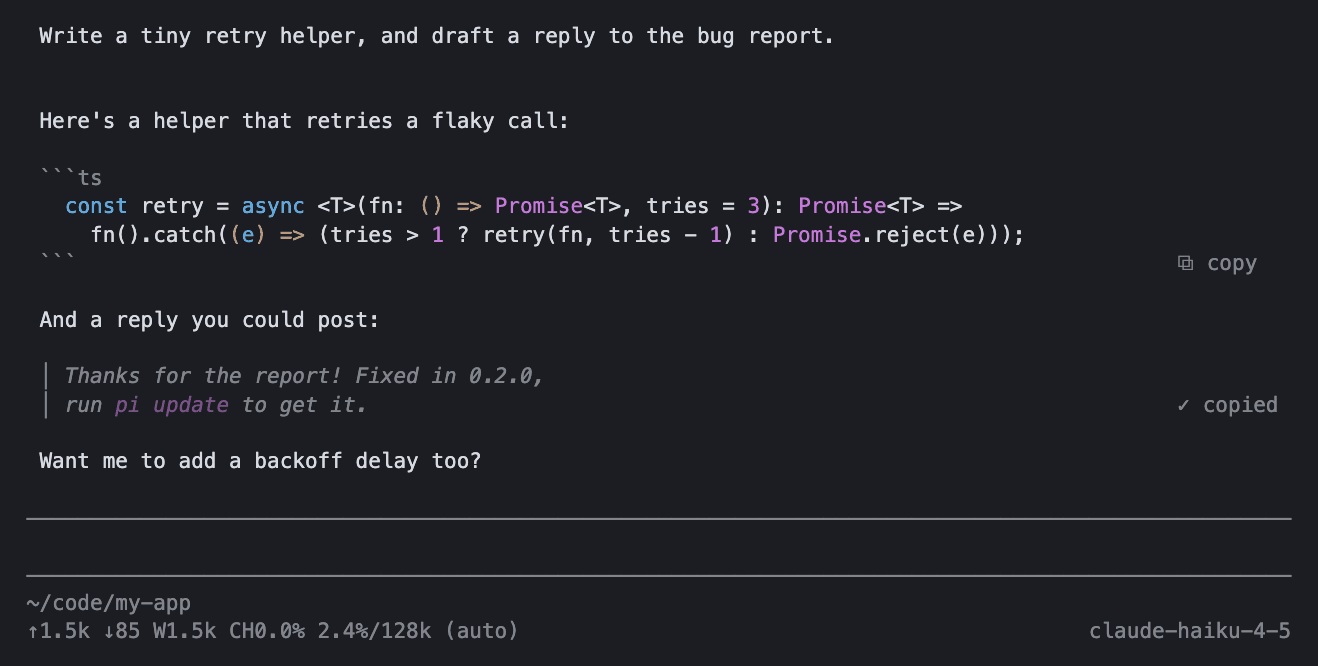
pi install npm:pi-copy-button- The label sits right-aligned on the block's last line, and shows
✓ copiedfor 1.5s. - Code blocks copy the code without fences or indent. Quotes copy their Markdown without the
>markers. Sections (handy for drafts) copy the Markdown between the rules; the label sits on the closing rule. - Option-click (Alt; Ctrl-click in some terminals, but not in tmux with
mouse on) copies the other format: plain text instead of Markdown, or the other way round if plain is your default. The label then says✓ plainor✓ raw. Code blocks are the same either way. - Plain text drops the Markdown syntax but keeps your line breaks: no
**,_or backticks, headings without#, bullets as-/1., links astext (url), tables asa | brows. - Only finished assistant replies get labels (not thinking, not your own messages).
- Fullscreen TUI only (Pi's default
tuiMode). In regular mode the terminal owns the mouse. - Plain clicks elsewhere and drag-selection work as before.
Settings
/copy-format plain makes labels copy plain text by default, /copy-format raw goes back to Markdown, and /copy-format alone toggles. It applies right away and is saved in ~/.pi/agent/settings.json:
{ "pi-copy-button": { "format": "plain" } }You can also set it by hand there or in a trusted project's .pi/settings.json (then /reload); a project value wins after the next reload.
How it works (hacky)
Pi has no public hook for rendering parts of assistant messages (earendil-works/pi#11276),
so index.ts wraps AssistantMessageComponent.prototype.updateContent and, for each finished message's Markdown,
its private renderToken/render, and adds handleMouse. Top-level code/blockquote tokens and hr-delimited sections get a zero-width
marker on their last line, which survives wrapping; render strips it and draws the label there.
Built against Pi 1.4.0. If a Pi update renames these internals, the labels just disappear; Pi keeps working.
Releasing
Bump version in package.json, merge, then publish a GitHub release tagged v<version>.
The Publish workflow waits for approval and publishes to npm with trusted publishing (no token).