pi-copy-response
Pi package for copying the latest assistant response with a code-block picker, live preview, and optional /copy override
Package details
Install pi-copy-response from npm and Pi will load the resources declared by the package manifest.
$ pi install npm:pi-copy-response- Package
pi-copy-response- Version
0.3.5- Published
- Apr 10, 2026
- Downloads
- 728/mo · 23/wk
- Author
- cadenzadesigns
- License
- MIT
- Types
- extension
- Size
- 33.9 KB
- Dependencies
- 0 dependencies · 2 peers
Pi manifest JSON
{
  "extensions": [
    "./extensions"
  ],
  "image": "https://raw.githubusercontent.com/cadenzadesigns/pi-copy-response/main/assets/preview.png"
}
Security note
Pi packages can execute code and influence agent behavior. Review the source before installing third-party packages.
README
pi-copy-response


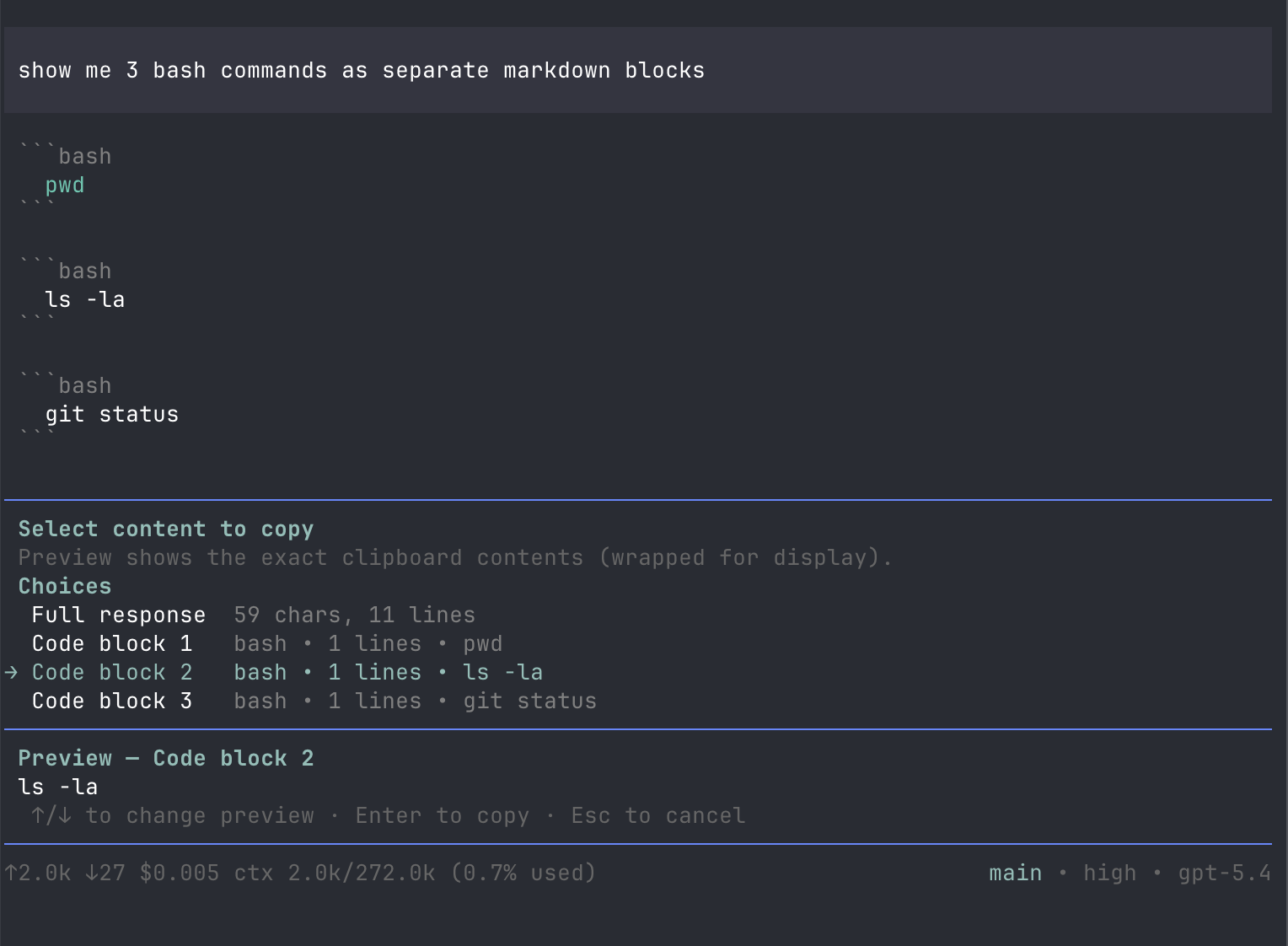
A Pi package that copies the latest assistant response with a code-block picker, live preview, and optional built-in /copy override.
Quick install
pi install npm:pi-copy-response
Adds a Pi slash command:
/copy-response
It also supports subcommands:
/copy-response apply/copy-response restore/copy-response status
It copies the latest assistant response.
If that response contains fenced code blocks, /copy-response opens a picker with:
Full response- one entry per fenced code block
The picker includes a live preview of the currently highlighted item, so you can see exactly what will be copied before pressing Enter.
If the latest assistant response has no fenced code blocks, /copy-response copies the full response immediately.
Install
Package links:
- npm: https://www.npmjs.com/package/pi-copy-response
- GitHub: https://github.com/cadenzadesigns/pi-copy-response
Local path
pi install /absolute/path/to/pi-copy-response
npm
pi install npm:pi-copy-response
git
pi install git:github.com/cadenzadesigns/pi-copy-response
Standard usage
In Pi, run:
/copy-response
This copies the latest assistant response, with a picker if fenced code blocks are present.
Optional override management
If you personally want Pi's built-in /copy command to use the same picker and live preview as /copy-response, use the built-in override subcommands.
Apply the override:
/copy-response apply
Check override status:
/copy-response status
Restore original built-in /copy:
/copy-response restore
After applying or restoring, fully restart Pi.
After restart:
/copyuses the enhanced picker if applied/copyreturns to stock behavior if restored/copy-responsealways remains available
Why the override is optional
Current Pi versions handle built-in interactive commands before extension commands, so a package cannot cleanly replace the exact built-in /copy command through standard extension registration alone.
Because of that, this package offers two modes:
Normal package mode
- use
/copy-response - no patching
- best for shared/package use
- use
Personal override mode
- run
/copy-response apply - patches your installed Pi locally so
/copyuses the same behavior - best if you want the enhanced UX on your own machine
- run
Behavior
- no fenced code blocks: copies full latest assistant response immediately
- fenced code blocks present: opens a picker with live preview
- in non-UI contexts: copies the full response
Notes
- The preview is wrapped for display, but the clipboard gets the raw content.
- Clipboard support uses the system clipboard when available and falls back to OSC 52 terminal clipboard support when possible.
- The optional
/copyoverride modifies your local Pi install and may need to be re-applied after Pi upgrades.