pi-cowboy
Agent orchestrator for pi: each subagent runs as its own pi process in a background Herdr pane, isolated by a copy-on-write git worktree.
Package details
Install pi-cowboy from npm and Pi will load the resources declared by the package manifest.
$ pi install npm:pi-cowboy- Package
pi-cowboy- Version
0.4.1- Published
- Oct 10, 2026
- Downloads
- 1,036/mo · 1,036/wk
- Author
- electric-dragon-80000v
- License
- MIT
- Types
- extension
- Size
- 675.4 KB
- Dependencies
- 3 dependencies · 4 peers
Pi manifest JSON
{
  "image": "https://raw.githubusercontent.com/electric-dragon-80000v/pi-cowboy/main/docs/assets/logo-pi-package-landscape.png",
  "video": "https://raw.githubusercontent.com/electric-dragon-80000v/pi-cowboy/main/docs/assets/pi-cowboy-ad-trimmed.mp4",
  "extensions": [
    "./dist/index.js"
  ]
}
Security note
Pi packages can execute code and influence agent behavior. Review the source before installing third-party packages.
README

License: MIT
pi-cowboy is an agent orchestrator for pi. It is designed for step-by-step task decomposition and supervision. It coordinates multiple agents in the background while keeping their work visible and actionable. Each agent gets a dedicated pi process and an isolated Herdr workspace backed by its own copy-on-write worktree. pi-cowboy creates those worktrees and cleans them up for you automatically.
Why should I use it?
Improved code understanding: Give each agent a smaller, isolated subtask. A single focused task with clear guidance leaves little room for error; a long list of tasks and expectations creates more room for drift and over-engineering. Smaller tasks therefore improve code quality and yield results that are easier to review: each agent commits to its own branch, so a subtask is reviewed and merged on its own, separately from the others.
Parallel work with minimal disk overhead: Multiple agents can edit, build, and run tests concurrently without interfering with each other. Copy-on-write unlocks more parallelism by reducing the disk overhead of the worktrees. The numbers below are from a Git repository containing 153,607 files in total. The tracked files occupy 479 MB, while the repository is 27 GB in total, including untracked files.
Method Including untracked Size on disk Pi-cowboy's copy-on-write yes 75 MiB Classic git worktree addno 479 MiB Classic wt + copy of untracked yes 27 GiB Herdr integration: Each task gets its own shell, a visible pane, and notifications when an agent needs your attention.
Custom workflows: You can specify custom workflows via agent and orchestrator templates to fit your environment and working style.
Grazing cows and a cowboy on your screen:
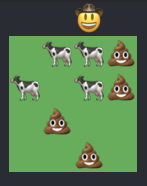
Who wouldn’t want their agents visualized as cow emojis? Go on… guess. That's exactly right. No one.
Requirements
Linux/macOS
herdr0.8 or laterherdrpi integrationmacOS also needs
python3for copy-on-write worktrees- macOS has shipped no
python3since 12.3. Install the Xcode Command Line Tools:xcode-select --install
- macOS has shipped no
Copy-on-write capable filesystem (APFS on macOS, BTRFS, and ZFS on Linux)
- ext4 does not support CoW. If you use ext4,
agent.worktreeMaterializationfalls back tocheckout.
- ext4 does not support CoW. If you use ext4,
Install
Install from npm:
pi install npm:pi-cowboy
Usage
Delegating a task
pi-cowboy spawns agents for the tasks in the background.
✓ Spawned agent b7g2nspx (general-purpose) ✓ Spawned agent 5m1xx7fa (general-purpose) ...
Depending on your concurrency settings, some of the tasks queue. The default global concurrency is 4, so 6 of them queue and start as soon as a spot opens.
Agent isolation
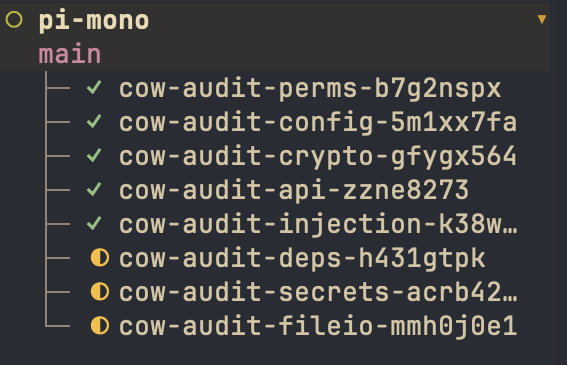
Each agent runs as a separate pi process in its own Herdr workspace. Open a workspace at any time to monitor the agent or to steer it.
Three Herdr terms recur below: a workspace is the outermost Herdr container and holds tabs, a tab holds panes, and a pane is one terminal session — the one the agent's pi process runs in. pi-cowboy gives each agent its own workspace and tab, and puts the agent in that tab's root pane. Outside a git repository there is no worktree to open, so the agent gets a tab in your current workspace instead. The pane id is the durable handle cleanup_cowboy_agent uses to find that pane again.
The agents work in separate git worktrees placed under $HOME/.pi/agent/pi-cowboy/worktrees/.
Agent completion
When an agent settles, its result arrives in the parent session that started it:
✓ [Cowboy agent "general-purpose" b7g2nspx completed] Addressed all the points raised in the security audit for the given set of files. (Worktree: $HOME/.pi/agent/pi-cowboy/worktrees/cow-audit-perms-b7g2nspx (branch cow-audit-perms-b7g2nspx). The agent process and its herdr pane stay until you call cleanup_cowboy_agent — its pane is closed, which ends that process. The worktree stays until you call cleanup_cowboy_agent to remove it — call it once the branch is merged or rejected.)
The orchestrator then follows your instructions and the agent's report.
Merging
pi-cowboy calls the merge_cowboy_branch tool, which merges the branch in your repository's main working tree:
✓ Merged "cow-audit-perms-b7g2nspx" into "main" in pi-mono.
Cleanup
The orchestrator cleans up the branches after merging when your instructions call for it. If it has not, tell it to clean up.
Clean up comes last. The tool refuses an agent that is still running, removes a branch only once you have merged it, and keeps any worktree that still holds uncommitted changes.
pi-cowboy calls the cleanup_cowboy_agent tool, which removes the agent's artifacts and reports the results:
✓ Cleaned up agent b7g2nspx: agent status: completed pane: closed worktree: removed ($HOME/.pi/agent/pi-cowboy/worktrees/cow-audit-perms-b7g2nspx) branch: deleted (cow-audit-perms-b7g2nspx)
The cleanup_cowboy_agent tool removes the pane, its tab, the worktree, and the branch.
If pi-cowboy cannot remove one of them, it reports the failure and completes the removals it can.
Commands
/cowboy opens a menu. See Menu.
/cowboy # pi-cowboy menu /cowboy status # List spawned, queued, and settled agents /cowboy spawn # Spawn an agent manually /cowboy worktree # Create a git worktree with no agent attached /cowboy model # Model selection for the agents /cowboy model provider/model-id # Set the model for this session /cowboy model clear # Clear the model set for this session /cowboy enable # Enables pi-cowboy /cowboy disable. # Disables pi-cowboy
Tools
cowboy_agent
Delegates one or more tasks to cowboy agents. Each cowboy agent runs in its own pi process and works in its own branch. The call returns immediately, one agent ID per task. Results arrive as a message as each agent settles.
| Parameter | Required | Description |
|---|---|---|
agents[] |
yes | One object per task. |
run_in_background |
no | Set to false to wait for the result in the same turn. Only allowed when agents has one task. |
agents[]:
| Field | Required | Description |
|---|---|---|
prompt |
yes | Task instructions for the cowboy agent. |
task_name |
yes | Short 2-3-word name (e.g. "fix login flow") that names the agent's branch, worktree, and tab. |
agent_type |
no | Agent type to use. Defaults to the type set at /cowboy > Agent. |
model |
no | Model for this cowboy agent as "provider/model-id". Defaults are resolved in the order under Model resolution. |
steer_cowboy_agent
Sends a message to one or more agents. steer_cowboy_agent revives a settled agent for another turn: the same agent in its pane picks the message up, and you get another completion message when it settles again.
A queued agent cannot be steered — it has no pane yet. Neither can an agent whose pane is gone (cleaned up), whose id is unknown, or that is being cleaned up.
| Parameter | Required | Description |
|---|---|---|
agent_ids[] |
yes | Agent ids to send the message to. |
message |
yes | The message to deliver to each agent. |
stop_cowboy_agent
Stops one or more running agents. The agent's worktree and branch are preserved.
| Parameter | Required | Description |
|---|---|---|
agent_ids[] |
yes | Agent ids to stop. |
merge_cowboy_branch
Merges one or more settled agent branches into a target branch in your repository's main working tree. A merge conflict stays in place for you to resolve. The main working tree must be on the target branch and have no uncommitted changes.
| Parameter | Required | Description |
|---|---|---|
branches[] |
yes | The cow-<task>-<id> branches from the agent results. |
target |
no | Branch to merge into. Defaults to main. |
repo |
no | Path inside the repository. Defaults to the parent session's working directory. |
cleanup_cowboy_agent
Removes the pane, its tab, the worktree, and the branch of one or more settled agents. The tool reports the result for each agent.
A removal that fails does not throw. The branch is removed only after you have merged it, and a worktree with uncommitted changes is kept and reported instead of removed.
| Parameter | Required | Description |
|---|---|---|
agent_ids[] |
yes | Agent ids to clean up. cleanup_cowboy_agent refuses an agent that is still running. |
Model resolution
A model set in the cowboy_agent call wins over everything; below it come the session overrides, the agent template, and finally the model of the parent session. The authoritative order is in Configuration.
Concurrency
A running agent holds a place in every concurrency limit that applies to it. pi-cowboy releases those places when the agent settles, then the next queued agent starts. You can define concurrency limits as follows:
- Per-model —
concurrency.models["<provider>/<model-id>"] - Per-provider —
concurrency.providers.<provider> - Global —
concurrency.default(default4), which every agent counts against
The levels are independent: an agent whose model and provider both have limits counts against both of them and against the global limit, so you have to free room at every level that applies. pi-cowboy starts the first waiting agent whose every level has room: an agent that waits for one limit to clear does not hold back an agent behind it.
An agent with no model selection counts against the global limit alone.
pi-cowboy floors limits at one, so 0 and a negative number both mean one at a time. See Configuration.
A steered agent that settled and starts again is a second live process. It counts against its limits at once, even when it then exceeds a limit. The message is already in the pane of that agent, so its second turn cannot wait for room.
These settings can be configured via the configuration file or via the menu /cowboy > Settings > Concurrency Settings.
Agent templates
You can define custom agent templates for tasks that keep coming back and would otherwise make you repeat the same instructions.
As an example, a release notes template may look like this:
name = "release-notes"
description = "Prepares release notes."
system_prompt = '''
You prepare release notes for this repository. Read the history and tags
(git log, git tag) and report the changes as a message.
'''
You can then refer to this in the parent session to trigger it:
Agent templates have more configuration options. See Agent Templates for the full list.
Orchestrator templates
You can define custom orchestrator templates when the same instructions should apply to every agent you spawn, no matter the task.
If you have an adversarial review tool installed, you can define an "adversarial-review" orchestrator:
name = "adversarial-review"
guidance = '''
Run the adversarial-review tool before you commit, and fix any glaring mistakes that the review finds and then commit.
'''
You can switch orchestrators during a session at /cowboy > Default orchestrator. See Menu.
Orchestrator templates also allow you to customize how the agent communicates with the orchestrator. See Orchestrator Templates for more details.
FAQ
Why is my agent queued, not running?
Every running agent holds a place in every concurrency limit that applies to it: the limit of its model, the limit of its provider, and the global limit. pi-cowboy queues the other agents until every one of those limits has room. Raise the limit in /cowboy > Settings > Concurrency Settings, or in the concurrency config keys. See Concurrency.
Why did my worktree survive cleanup?
cleanup_cowboy_agent will not remove a worktree that has uncommitted changes or whose state it cannot read. Commit or discard the changes, stop the agent if it is still running, then call the tool again. See cleanup_cowboy_agent.
Isn't one pi process per agent too much overhead?
It can be. For a single small task the overhead can cost more time than the task itself. pi-cowboy is built for many tasks at once, where that overhead is amortized by parallelization.
To avoid the overhead, pi-cowboy has support for pig, a drop-in replacement for pi written in Go, and for pi-bolt, faster, lighter Pi variant compiled ahead of time. They start up fast and have a lower memory footprint. See agent.harnessType in Configuration.
I don't like the emojis, can I turn them off?
I don't understand who in their right mind would ever want to do such a thing... but yes. You can disable both the cowboy and the grazing in settings. See Configuration.
References
The settings, screens and template files mentioned above are documented in these four pages.