pi-dictation
Safe push-to-talk dictation for Pi with pluggable transcription backends
Package details
Install pi-dictation from npm and Pi will load the resources declared by the package manifest.
$ pi install npm:pi-dictation- Package
pi-dictation- Version
0.6.0- Published
- Aug 1, 2026
- Downloads
- 130/mo · 34/wk
- Author
- yasuhito
- License
- MIT
- Types
- extension
- Size
- 69.7 KB
- Dependencies
- 1 dependency · 2 peers
Pi manifest JSON
{
  "extensions": [
    "./extensions/pi-dictation.ts"
  ],
  "video": "https://raw.githubusercontent.com/yasuhito/pi-dictation/main/assets/pi-dictation-demo.mp4",
  "image": "https://raw.githubusercontent.com/yasuhito/pi-dictation/main/assets/pi-dictation-demo.gif"
}Security note
Pi packages can execute code and influence agent behavior. Review the source before installing third-party packages.
README
Pi Dictation


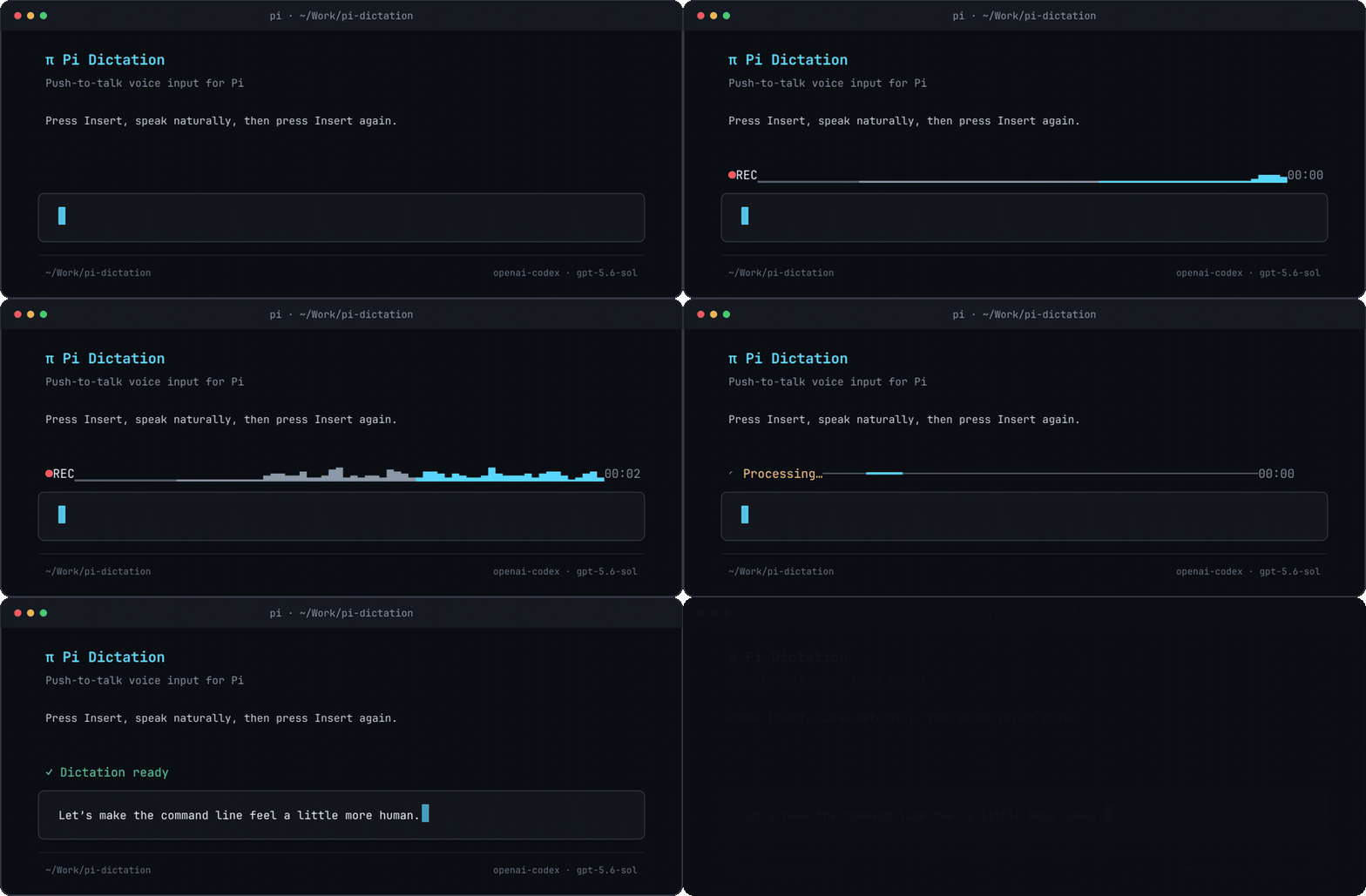
Push-to-talk dictation for Pi. Press a shortcut, speak, press it again, and the transcription is pasted into Pi's editor.
Pi Dictation supports OpenAI audio transcription and arbitrary local transcription commands. Recorder and transcriber processes are isolated, bounded, and cleaned up on cancellation or session shutdown.
Requirements
- Linux or macOS with
/bin/shand POSIX process-group support - Pi
- Node.js 22.19 or newer
- One recorder:
- Linux:
pw-recordon PipeWire systems orarecordon ALSA systems - macOS: FFmpeg with AVFoundation (
brew install ffmpeg)
- Linux:
- One transcription backend:
- an OpenAI API key, or
- a local command such as
whisper-cli
On macOS, Pi Dictation records from the system-default audio input and macOS may ask the terminal running Pi for microphone permission. Native Windows support remains on the roadmap until its process-lifecycle safety design is validated.
Install
From npm:
pi install npm:pi-dictation
From GitHub:
pi install git:github.com/yasuhito/pi-dictation
From a local checkout:
pi install /absolute/path/to/pi-dictation
Restart Pi or run /reload after installation.
Use
Press Insert to begin recording. Press it again to stop and transcribe. Mac keyboards commonly lack an Insert key, so macOS users should configure a shortcut such as f8 and use fn+F8 when the function-key row controls media features.
While recording, a one-line Dictation strip appears above the editor with a blinking recording marker, recent live microphone levels, and elapsed time. The same strip shows processing, transcription, completion, cancellation, and failure states, then hides automatically. Live levels are available for PCM16 mono WAV recorder output, including custom recorder commands that produce that format. Incomplete or unsupported output uses a flat silent line rather than simulated activity.
Commands:
/dictate— start or stop dictation/dictate-cancel— cancel recording or transcription/dictate-config— edit safe settings interactively and inspect privacy-safe recorder/backend status/dictate-help— show whether recorder selection is automatic or custom, plus the transcription backend
Diagnose setup
Run the privacy-safe doctor when recording or transcription is not working:
npx -p pi-dictation pi-dictation-doctor
From a source checkout:
npm run doctor
The doctor checks Node.js, Pi, Linux or macOS support, configuration validity, recorder availability, the requested and effective transcription backend, and whether an OpenAI credential source is configured. It does not execute API-key commands or print custom commands or secret values.
Configure OpenAI transcription
The simplest option is OPENAI_API_KEY:
export OPENAI_API_KEY=...
To avoid storing the key in shell configuration, save it in the system keyring.
Linux with Secret Service:
secret-tool store --label="Pi Dictation OpenAI key" service openai account pi-dictation
{
  "$schema": "https://raw.githubusercontent.com/yasuhito/pi-dictation/main/pi-dictation.schema.json",
  "language": "ja",
  "openaiModel": "gpt-4o-mini-transcribe",
  "openaiApiKeyCommand": "secret-tool lookup service openai account pi-dictation"
}
macOS Keychain (the command prompts for the key without placing it in shell history):
security add-generic-password -a "$USER" -s pi-dictation-openai -U -w
{
  "$schema": "https://raw.githubusercontent.com/yasuhito/pi-dictation/main/pi-dictation.schema.json",
  "shortcut": "f8",
  "language": "ja",
  "openaiModel": "gpt-4o-mini-transcribe",
  "openaiApiKeyCommand": "security find-generic-password -a \"$USER\" -s pi-dictation-openai -w"
}
Audio is sent to the configured OpenAI-compatible endpoint when this backend is used.
Configure a local transcription command
Commands receive the WAV path through {file}:
{
  "$schema": "https://raw.githubusercontent.com/yasuhito/pi-dictation/main/pi-dictation.schema.json",
  "language": "ja",
  "transcribeCommand": "whisper-cli -m ~/models/ggml-small.bin -f {file} -l ja -otxt -of -"
}
The command must write only the transcription to standard output.
Configuration
Configuration lives at ~/.pi/agent/pi-dictation.json. Run /dictate-config to edit the shortcut, language, OpenAI model, duration limits, and spinner through Pi's TUI. The settings screen never displays API keys or custom command contents, preserves fields it does not edit, identifies environment overrides, and saves atomically with 0600 permissions. Shortcut changes require /reload or a restart; other saved changes apply to the next recording.
You can also start from pi-dictation.example.json; editors that support JSON Schema can use its $schema field for completion and validation. Unknown fields and invalid values are rejected before external work starts.
| Field | Default | Purpose |
|---|---|---|
shortcut |
insert |
Pi shortcut used to toggle dictation |
language |
unset | Language passed to the OpenAI backend |
recordCommand |
auto-detected | Recorder command; {file} is replaced with the WAV path |
transcribeCommand |
unset | Local transcription command |
openaiModel |
gpt-4o-mini-transcribe |
OpenAI-compatible transcription model |
openaiBaseUrl |
https://api.openai.com/v1 |
OpenAI-compatible API base URL |
openaiApiKey |
unset | API key; prefer an environment variable or keyring command |
openaiApiKeyCommand |
unset | Command that prints the API key |
timeoutMs |
120000 |
Transcription timeout; accepts 1000–3600000 ms |
maxRecordingMs |
600000 |
Graceful-stop threshold from 1000–3600000 ms, including after an abrupt Pi exit; stubborn processes are force-killed within 5 more seconds |
spinner |
arc |
cli-spinners animation name |
Every field can also be set with an environment variable:
PI_DICTATION_SHORTCUTPI_DICTATION_LANGUAGEPI_DICTATION_RECORD_CMDPI_DICTATION_TRANSCRIBE_CMDPI_DICTATION_OPENAI_MODELPI_DICTATION_OPENAI_BASE_URLPI_DICTATION_OPENAI_API_KEYPI_DICTATION_OPENAI_API_KEY_COMMANDPI_DICTATION_TIMEOUT_MSPI_DICTATION_MAX_RECORDING_MSPI_DICTATION_SPINNER
Environment variables take precedence over the configuration file. The package-specific PI_DICTATION_OPENAI_API_KEY takes precedence over OPENAI_API_KEY when both are set.
Safety
Pi Dictation:
- prevents shortcut races from starting multiple recorders;
- terminates entire recorder and transcriber process groups;
- uses an independent process-group watchdog to stop recordings after 10 minutes by default, even if Pi is killed, then force-kills stubborn processes within 5 more seconds;
- bounds subprocess output retained in memory;
- aborts transcription on cancellation and session shutdown;
- creates recordings in private (
0700) temporary directories; - removes temporary recordings after normal use, cancellation, and graceful shutdown.
An uncatchable Pi crash (for example, SIGKILL) can leave the private recording directory behind for the operating system's temporary-file cleanup.
Development
npm install
npm run check
npm run pack:check
License
MIT