pi-diff-widget
Interactive diff viewer for pi: uncommitted changes and per-turn diffs
Package details
Install pi-diff-widget from npm and Pi will load the resources declared by the package manifest.
$ pi install npm:pi-diff-widget- Package
pi-diff-widget- Version
0.3.1- Published
- Nov 5, 2026
- Downloads
- 738/mo · 26/wk
- Author
- omgzsa
- License
- MIT
- Types
- extension
- Size
- 81.1 KB
- Dependencies
- 0 dependencies · 2 peers
Pi manifest JSON
{
  "image": "https://cdn.jsdelivr.net/gh/omgzsa/pi-diff-widget@v0.1.3/docs/widget.png",
  "extensions": [
    "./src/index.ts"
  ]
}Security note
Pi packages can execute code and influence agent behavior. Review the source before installing third-party packages.
README
pi-diff-widget
Interactive diff viewer and live edits widget for pi.
Install
pi install npm:pi-diff-widget
# straight from the repo, no npm required
pi install git:github.com/omgzsa/pi-diff-widget
# or from a local checkout
pi install /absolute/path/to/pi-diff-widget
Usage
/diffOpens a scrollable overlay with two sources:
- Uncommitted: tracked modifications, staged changes, deletions, and
untracked files from
git diff HEAD. - Turns: the files the agent edited, grouped by the prompt that caused them. Read straight from the session, so it needs no git and works anywhere.
Diffs render with pi's own renderer, so colors and intra-line highlighting match the inline edit diffs.
Keys:
Tab: switch between uncommitted and turns[/]: previous / next turn (turns view)up/down: scroll one linepageUp/pageDown: scroll one pagen/p: next / previous file or sectiong/G: jump to top / bottomq/Esc: close
See Commands for /diff accept, /diff reject, and the
/diff-widget visibility toggle.
Live edits widget
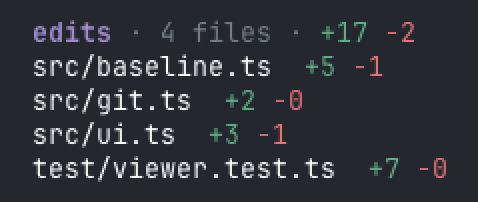
Above the editor, pi-diff shows the net effect of the agent's edits this session, refreshed at each turn boundary:
edits · 3 files · +3 -0
src/git.ts      +1 -0
src/index.ts    +1 -0
src/ui.ts       +1 -0
For each file the agent touches with edit or write, pi-diff records the
content before the first touch and diffs it against the current content.
Reverted files drop out and the counts are net, so it shows what the agent has
actually changed, not cumulative churn. Committing a file drops it from the
panel automatically, so what remains is the agent's work that is not yet
committed. Paths are shown relative to the working directory. Baselines live in
the session, capped at 256 KB per file. A baseline whose parent directory no
longer exists is dropped, so a checkout you move or delete stops counting as a
whole-file deletion.
At every turn boundary the panel also reconciles against git status: a file
that became dirty without an edit/write call, such as one written by bash,
a codegen script, another session, or a subagent, gets the HEAD content as its
baseline and appears. Files that were already dirty when the session started are
left alone, so your own uncommitted work is never claimed as the agent's. Only
changes git can see are reconciled: an ignored path changed through bash
stays invisible, while one touched through edit or write is tracked and
survives the commit prune.
Deleted files are struck through and labelled del; their removed lines still
count in the header. Files over the 256 KB cap are listed with a note instead of
disappearing. When more than eight files changed, the panel lists the first
eight and groups the rest by folder with per-folder counts, so a large session
still names every folder that has edits.
Dropping a baseline is persisted as a removal, so reloading or resuming a session never brings back a baseline for work that was already committed.
It hides itself when nothing differs.
Commands
Keeping or undoing the agent's edits acts on the tracked files, not on everything
the uncommitted view lists: /diff accept and /diff reject work from the
session baselines. Files the agent never changed, and files that were already
dirty when the session started, are left alone. If you hand edit a tracked file
after the agent first touched it, /diff reject discards that edit too. A
reconciled file reverts to HEAD, and a reconciled new file is deleted. Files
over the baseline cap are listed but cannot be diffed, accepted, or reverted;
they leave the panel once committed or removed.
| Command | Effect |
|---|---|
/diff accept |
Keep the agent's edits: the current content becomes the baseline and the panel clears. Alias: keep |
/diff reject |
Undo the agent's edits: restore every tracked file to its pre-agent content (or HEAD for reconciled files), delete the files the agent created, and recreate the ones it deleted |
/diff-widget |
Toggle the panel. With no argument it shows a hidden panel and hides a visible one |
/diff-widget on |
Show it |
/diff-widget off |
Hide it |
accept is Zed's Keep All. reject asks for confirmation first, naming up to
five affected paths, and cannot be undone. Whole files only: there is no
hunk-level accept or reject. With nothing to reject it reports Nothing to reject. Any unrecognized argument warns instead of acting, so a typo never hides
the panel or reverts a file. Both commands complete their arguments on Tab.
/diff accept
/diff reject
/diff-widget off
Status
- Uncommitted changes (
git diff HEADplus untracked files) - Per-turn diffs grouped by prompt, reconstructed from session edit results
-
write-tool before/after snapshots, persisted per turn - Nested
edit/writediffs from codemode and other tool-calling tools - Live net edits widget above the editor, with
/diff-widget on|off|accept|reject - Reconciliation with git for edits made outside
edit/write(bash, codegen, subagents) - Correct paths when pi runs in a subdirectory of the repository
See ROADMAP.md for planned work and known gaps.
How it works
- Uncommitted diffs shell out to git, then feed old and new content into pi's
generateDiffStringandrenderDiff. No third-party diff library. - Per-turn diffs read pi's session data. The
edittool persistsdetails.diffper call, so reconstruction needs no git and works outside a repo. Thewritetool stores no diff, so atool_callhandler snapshots the old content, synthesizes one ontool_result, and appends it to the session atturn_end. Write diffs therefore survive reload, same as edit diffs. - Calls another tool makes, such as a codemode script's
tools.editortools.write, never reach the transcript as their own results. Their diffs are captured from the nestedtool_resulthook and persisted under the calling call's id, then attributed to the turn that owns it. - Git paths are read from the repository root and displayed relative to the working directory, so running pi inside a subdirectory still reports tracked files correctly instead of as deletions.
Development
npm install
npm run typecheck
npm test
pi -e ./src/index.ts   # then run /diff
Tests use the built-in node:test runner with no extra dependencies. Git tests
build throwaway repos under the system temp directory.