pi-dj
AI music suite for pi — YouTube, global radio (30k+ stations), Suno, Lyria AI, SoundCloud/Bandcamp, mix, trim, BPM. Windows + macOS + Linux + Termux.
Package details
Install pi-dj from npm and Pi will load the resources declared by the package manifest.
$ pi install npm:pi-dj- Package
pi-dj- Version
3.2.1- Published
- Mar 17, 2026
- Downloads
- 188/mo · 10/wk
- Author
- artale
- License
- MIT
- Types
- extension
- Size
- 2.7 MB
- Dependencies
- 1 dependency · 0 peers
Pi manifest JSON
{
  "extensions": [
    "extensions/pi-dj.ts",
    "extensions/pi-djvj.ts"
  ],
  "image": "https://raw.githubusercontent.com/arosstale/pi-dj/master/assets/banner.png",
  "commands": [
    "dj-play",
    "dj-resume",
    "pause",
    "stop",
    "np",
    "vol",
    "queue",
    "skip",
    "repeat",
    "history",
    "dj-lib",
    "dj-viz",
    "djvj",
    "viz",
    "sc",
    "bandcamp",
    "bandlab",
    "mix",
    "bpm",
    "render",
    "subs",
    "radio",
    "strudel",
    "strudel-stop",
    "dj-help"
  ],
  "tools": [
    "dj_play_music",
    "dj_queue_music",
    "dj_radio",
    "dj_strudel",
    "dj_strudel_stop"
  ]
}
Security note
Pi packages can execute code and influence agent behavior. Review the source before installing third-party packages.
README
pi-dj 🎧


YouTube streaming, Suno AI generation, Lyria RealTime radio, SoundCloud / Bandcamp / BandLab downloads, mixing, trimming, BPM detection, and ffmpeg music video rendering — all from the terminal.
Works with pi coding agent.
Install
pi install npm:pi-dj
Dependencies are optional. The extension detects what's installed and degrades gracefully.
| Platform | Install |
|---|---|
| Windows | winget install mpv ffmpeg · pip install yt-dlp |
| macOS | brew install mpv yt-dlp ffmpeg |
| Linux / Raspberry Pi | sudo apt install mpv ffmpeg -y · pip install yt-dlp |
| Termux | pkg install mpv ffmpeg python · pip install yt-dlp |
Commands
Playback
| Command | Description |
|---|---|
/dj-play <query|url> |
YouTube search, URL, or playlist → stream via mpv. Auto-resumes last track if empty. |
/dj-resume |
Resume last played track from previous session (with seek position) |
/pause |
Toggle pause / resume |
/stop |
Stop + clear queue |
/np |
Now playing — title, timestamp, progress bar |
/vol <0-100> |
Set volume |
/skip |
Skip to next queued track |
/repeat |
Toggle repeat current track |
/queue <query|url> |
Add to queue |
/history |
Recently played |
Downloads
| Command | Description |
|---|---|
/sc <url> |
SoundCloud → MP3 |
/bandcamp <url> |
Bandcamp track or album → MP3 |
/bandlab <url> |
BandLab track, album, or collection → MP3 |
Radio
| Command | Description |
|---|---|
/radio <genre|name> |
Search Radio Browser — 30k+ global stations, no API key |
/radio jazz japan |
Genre + country filter |
/radio <http url> |
Play any stream URL directly |
/radio lyria |
Lyria RealTime AI generative radio (preset 1) |
/radio lyria chill |
Lyria with preset name or custom prompt |
/radio lyria <1-9> |
Lyria by preset number |
Radio Browser has 30k+ stations across every genre and country. 21 genre presets with aliases (lofi, dnb, hiphop, edm, etc.). Top station by votes plays automatically; alternatives listed.
Lyria requires lyria-cli.
Production
| Command | Description |
|---|---|
/mix <a> <b> [secs] |
Crossfade two audio files |
/trim <file> <start> [end] |
Trim a clip |
/bpm <file> |
Detect BPM |
/render <file|url> [style] |
Render a music video with ffmpeg |
/dj-help |
Show all commands + dependency status |
Render Styles
/render outputs a 1080×1080 MP4 with animated visualizer and title overlay. Pure ffmpeg — no extra dependencies.
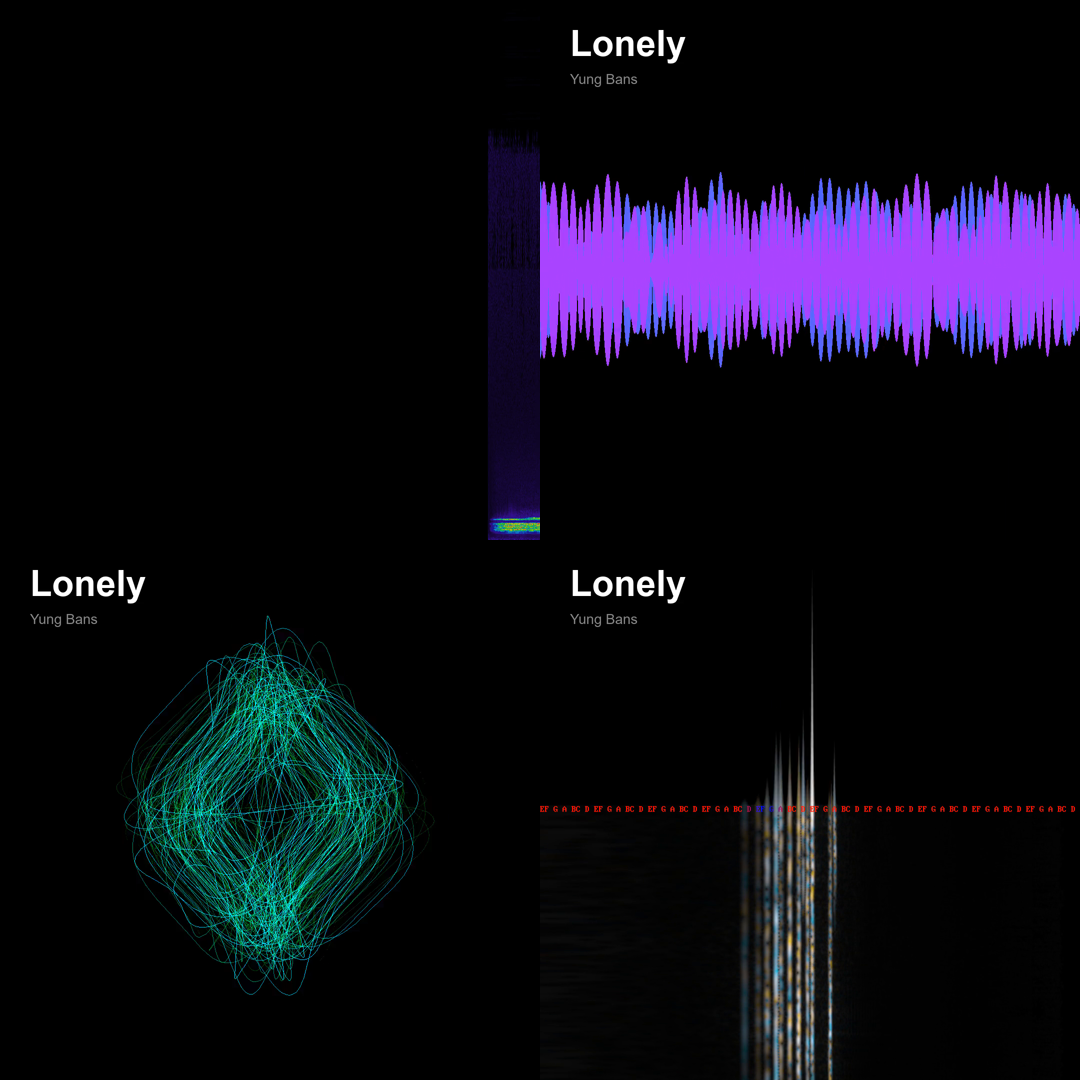
| Style | ffmpeg filter | Notes |
|---|---|---|
bars (default) |
showspectrum |
Frequency spectrum |
wave |
showwaves |
Waveform |
circle |
avectorscope |
Lissajous / stereo field |
cqt |
showcqt |
Constant-Q transform |
/render ~/Music/track.mp3
/render ~/Music/track.mp3 wave
/render https://youtu.be/xxx cqt
Output: ~/Music/Videos/<title>_<style>.mp4
If a URL is passed, yt-dlp downloads first.
Terminal Visualizer (/viz)
Audio-reactive terminal visualizer bundled as pi-djvj. Reacts to mpv IPC or mic.
/viz         — embedded in pi TUI (side panel)
/viz full    — fullscreen alt-screen mode
78 half-block shaders + 27 braille modes + ASCII = 106 visualizer modes.
Includes: Spectrum, Plasma, Tunnel, Starfield, Kaleidoscope, Black Hole, Nebula, Cymatics, Aurora, Voronoi, 3D Sphere, Liquid Metal, Jellyfish, Stained Glass, Neon City, Wormhole, Mandelbrot, and more. Plus 6 CAVA-inspired shaders: Polar Spectrum, Scrolling Spectrogram, Feedback Trail, AA Rings, Gradient Bars, Polar Waveform.
9 color palettes (press T to cycle): default, catppuccin, tokyo-night, nord, gruvbox, dracula, rose-pine, hackerman, vantablack.
Autosensitivity: auto-adjusts gain so the visualizer looks good at any volume — no manual tweaking needed.
| Key | Action |
|---|---|
N / P |
Next / previous shader |
v |
Cycle mode (halfblock → braille → ascii) |
T |
Cycle color palette |
+ / - |
Sensitivity |
F |
Toggle fullscreen |
Q |
Quit |
LLM Tools
Two tools the AI can call directly mid-conversation:
| Tool | Description |
|---|---|
dj_play_music |
Stream a YouTube search or URL |
dj_queue_music |
Add a track to the queue |
dj_radio |
Search and play global radio — genre, country, Lyria AI, or stream URL |
Division of Labour
| Extension | Commands |
|---|---|
cliamp |
Local files, HTTP streams, Lyria radio — /play /music /lyria |
pi-dj |
YouTube, AI, production, radio — /dj-play /radio /subs /render + tools |
pi-djvj |
Terminal visualizer — /viz /viz full — bundled with pi-dj |
pi install npm:pi-dj installs both pi-dj and pi-djvj in one shot.
Platforms
Windows · macOS · Linux · Raspberry Pi · Termux
License
MIT