pi-do-always
Pi extension: /do-always — pick a common task by number, it fills your prompt
Package details
Install pi-do-always from npm and Pi will load the resources declared by the package manifest.
$ pi install npm:pi-do-always- Package
pi-do-always- Version
0.9.0- Published
- Sep 30, 2026
- Downloads
- 407/mo · 407/wk
- Author
- guibo-agi
- License
- MIT
- Types
- extension
- Size
- 161 KB
- Dependencies
- 0 dependencies · 2 peers
Pi manifest JSON
{
  "image": "pi.image.png",
  "extensions": [
    "./extensions/pi-do-always/index.ts"
  ]
}
Security note
Pi packages can execute code and influence agent behavior. Review the source before installing third-party packages.
README
pi-do-always
A Pi extension that gives you a /do-always command for your
repeated "do the usual" prompts.
Type /do-always → a numbered list of tasks appears, grouped by category → press a number,
type to filter, scroll or click, or navigate with arrows + Enter → the task's prompt is
filled into the input editor. Review it, tweak it, press Enter to run. Tasks marked ⚡
(the Plan category by default) auto-run on selection instead — see autoRun below.
  do-always — pick a task

  PLAN
▸ 1. ⚡ Review changes       Review the current code changes (Plan)
  2. ⚡ Review code          Review the whole project's code quality (Plan)
  3. ⚡ Cleanup              Clean up dead code and duplicates (Plan)
  4. ⚡ Security             Security audit (Plan)
  5. ⚡ Performance          Performance review (Plan)
  6. ⚡ Propose features     Propose new features (Plan)
  DO
  7. Build                  Test build is ok and fix issues
  8. Tests                  Run tests and fix failures
  DOCS
  9. Readme                 Update the README.md
  OPS
 10. Release               Prepare a release (version, changelog, tag)
 11. Commit                Prepare a clean commit

  Review changes — prompt:
  Review the changes on branch fix/login-null (3 changed files: auth.ts, login.ts,
  test/auth.test.ts). Last commit: Fix null check in login. Check `git status` and
  `git diff` to see what changed, then double-check the changes for bugs, edge …

  1-9 pick by number  •  type to filter  •  ↑↓ navigate  •  enter select  •  esc cancel  •  ⚡ auto-runs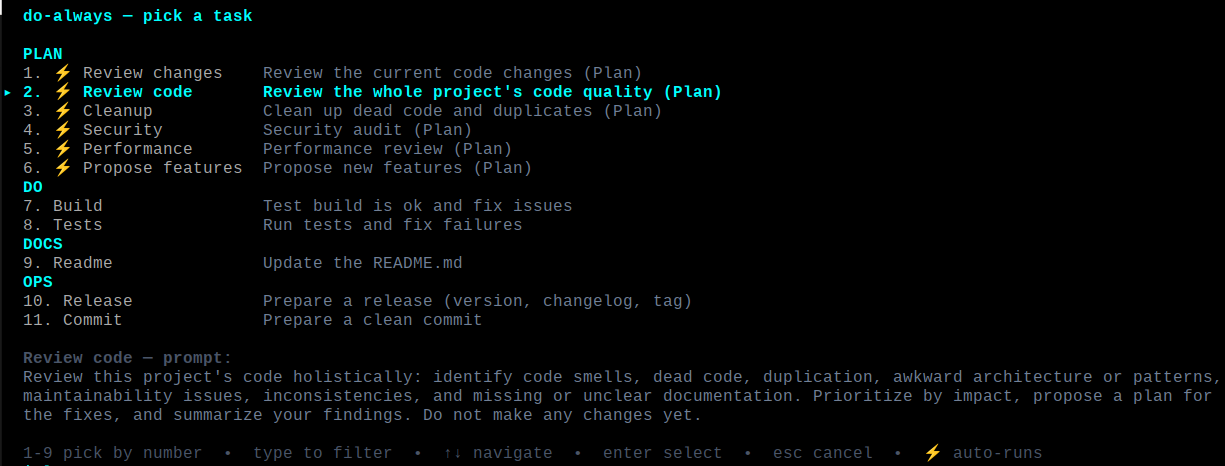
Usage
| Command | What it does |
|---|---|
/do-always or the shortcut key (default F4) |
Show the numbered task selector |
/do-always 2 |
Fill the prompt for task #2 directly |
/do-always review changes |
Fill the prompt for the task named review changes (task names autocomplete after /do-always) |
/do-always list |
Print the task list |
/do-always list-details |
Show the full rendered prompt text each task will inject |
The selector supports direct number-pick (1-9), live type-to-filter, arrow/Enter navigation,
mouse-wheel scrolling, and click-to-select. While a filter is active, typed digits refine the
filter instead of picking by number; clear the filter (backspace) to use number-pick again.
Pause on a task for two seconds and its full prompt is previewed below the list, so you can
see exactly what will be injected before running it; moving the selection or typing hides it
and restarts the delay. A task marked ⚡ runs immediately on selection (its prompt is sent,
not filled): the Plan category does this by default, and any task can opt in or out via the
autoRun field.
In non-interactive modes (no TUI) there is no editor to fill, so the selected prompt is sent as a user message instead.
Install
Install it from npm as a Pi package, which loads the bundled index.ts (and its tasks.ts) without
managing symlinks:
pi install npm:pi-do-alwaysManage it with pi list (to see installed sources) and pi remove <source> using the same
source you installed with (e.g. pi remove npm:pi-do-always).
Alternatively, you can install from the git repo or symlink a local checkout for development:
ln -s "$PWD" ~/.pi/agent/extensions/do-always # uninstall with: rm that symlinkFor development you can also load it explicitly: npm run dev (runs pi --extension ./extensions/pi-do-always/index.ts).
Tasks configuration
Tasks are read from JSON files (an array of tasks, or the object form {"tasks": [...], "shortcut": "f4"}):
| File | Scope |
|---|---|
~/.pi/agent/do-always.json |
Global (all projects) |
<project>/.pi/do-always.json |
Project-local; overrides global tasks with the same name |
If neither file exists, the built-in defaults (Review changes, Review code, Cleanup, Security, Performance, Propose features, Build, Tests, Readme, Release, Commit) are used.
This repo ships a sample in do-always.json — copy it to one of the
locations above to make it your own:
[
  {
    "name": "review",
    "category": "Plan",
    "description": "Review code and double-check changes",
    "prompt": "Review the changes on branch {{branch}} ({{files_changed_count}} changed files: {{files_changed}}). Last commit: {{last_commit}}. Check `git status` and `git diff` ..."
  }
]
Fields:
name(required) — short unique id, used for/do-always <name>category(optional) — group header the task is shown under in the selector (e.g."Plan","Do"). Matching is case-insensitive and the header is title-cased, so"plan"and"Plan"land in the samePlangroup. Tasks without a category fall underOther. The built-in defaults are grouped intoPlan,Do,Docs, andOps.description(optional) — one-line label shown in the selectorprompt(required) — the text filled into the editor (supports{{placeholders}}— see Prompt placeholders)autoRun(optional) — whentrue, selecting the task sends its prompt immediately instead of filling the editor; whenfalse, it always fills the editor. When omitted, the default is derived from the category:Plantasks auto-run, everything else fills the editor. Auto-run tasks are marked⚡in the selector.when(optional) — a condition that hides the task from the selector and lists when it is not met (see Conditionals).guards(optional) — an array of selection-time guards that block the task (with a message, not a hide) when a condition is unmet (see Guards). The legacyrequireDirty(boolean) still works and is combined with anyguards.
In the object form you can also configure the selector shortcut:
shortcut(optional) — key that opens the selector, e.g."f4". Set tonullto disable the shortcut. Defaults toF4. The project file's value wins over the global one.merge(optional) — how project tasks combine with the global tasks:"override"(default) replaces a global task with the samename;"append"keeps the global tasks and only adds new project task names (a cascade, like CSS). The project file's value wins over the global one; when neither sets it, the default isoverride(the historical behavior).
Example project file that only adds tasks without overriding the global set:
{
  "merge": "append",
  "tasks": [
    { "name": "deploy", "category": "Ops", "prompt": "Deploy this project to staging." }
  ]
}
Reload Pi (or start a new session) after editing a config file.
Prompt placeholders
Task prompts support {{placeholders}} that are filled in from the current
directory when a task is selected — so /do-always review changes on a hotfix branch
injects “Review the changes on branch fix/login-null (3 changed files:
auth.ts, login.ts, test/auth.test.ts) …” instead of a generic nudge.
| Placeholder | Value |
|---|---|
{{cwd}} |
Absolute path of the working directory |
{{date}} |
Local date (YYYY-MM-DD) |
{{branch}} |
Current git branch (unknown outside a git repo) |
{{last_commit}} |
Subject of the latest commit (unknown if unavailable, e.g. empty repo) |
{{files_changed}} |
Changed files from git status — comma-separated, capped at 20 entries (none when clean or not a git repo) |
{{files_changed_count}} |
Number of changed files (0 when clean or not a git repo) |
{{user}} |
git config user.name (unknown when unset) |
{{diff_stat}} |
git diff --shortstat output, e.g. 3 files changed, 41 insertions(+), 7 deletions(-) (none when unavailable) |
{{repo}} |
Basename of the git remote (or of the working directory when there is no remote) — disambiguates monorepo work |
{{staged_files}} |
Files staged for commit, one per line (none when empty) |
{{unstaged_files}} |
Modified-but-unstaged files, one per line (none when empty) |
Unknown placeholders are left as-is, and a prompt without placeholders is
injected unchanged, so existing configs keep working. The selector preview and
/do-always list-details show the rendered prompt — what you see is what gets
injected.
Conditionals
A task's when field controls whether it is shown in the selector and in
/do-always list / list-details. When the condition is not met the task is
hidden everywhere (including when picked by number or name), so it can never
be selected into a no-op. Omitting when always shows the task.
The string form is a single condition:
"git"— shown only inside a git working tree."!git"— shown only outside a git working tree.
The object form is a set of conditions that must all hold (logical AND):
| Key | Meaning |
|---|---|
"git": boolean |
true inside a git repo, false outside |
"branch": string |
current branch equals the given name (exact match) |
"file": string |
path exists (file or directory) relative to the working tree |
"repo": string |
equals the git-remote basename context value |
[
  { "name": "review", "category": "Plan", "prompt": "Review the changes…", "when": "git" },
  { "name": "deploy-staging", "category": "Ops", "prompt": "Deploy to staging.", "when": { "branch": "main" } },
  { "name": "lint-js", "category": "Do", "prompt": "Lint the JavaScript.", "when": { "file": "package.json" } }
]
An invalid when (wrong type, unknown key) is ignored with a warning and the
task is shown, so a typo never silently hides a task. Reload Pi (or start a new
session) after editing a config file.
Guards
Guards keep low-value round-trips down: the task stays visible, but selecting it
notifies with the reason instead of injecting a no-op prompt. Guards are
evaluated against the current prompt context, so a task is only injected when
every guard is met. requireDirty (boolean, the historical guard) is
combined with any guards array.
The guards array accepts these guard objects (all must pass):
type |
value |
Blocks when… |
|---|---|---|
requireDirty |
none | the working tree is clean (no changed files) |
requireBranch |
branch name | the current branch is not the given name |
requireRepo |
repo name | the git-remote basename context value is not the given name |
requireFilePattern |
glob | no changed file matches the glob |
For requireFilePattern, * matches within a path segment, ** crosses
segments, ? matches one non-separator character, and other regex
metacharacters are literal.
[
  { "name": "deploy-staging", "category": "Ops", "prompt": "Deploy to staging.", "guards": [ { "type": "requireBranch", "value": "main" } ] },
  { "name": "lint-tests", "category": "Do", "prompt": "Run the test suite.", "guards": [ { "type": "requireFilePattern", "value": "**/*.test.ts" } ] }
]
An invalid guard (unknown type, missing value, or a non-array guards)
is ignored with a warning, so a typo never silently disables a guard. Reload Pi
(or start a new session) after editing a config file.
Development
npm install        # dev dependencies (pi packages + typescript)
npm run typecheck  # tsc --noEmit
npm test           # run the unit tests (node:test + tsx, in test/)
The pure task logic (parseConfig, mergeTasks, renderPrompt, resolveTask, formatList) lives in
tasks.ts with no Pi dependencies, so it is unit-tested independently of the
Pi runtime. The extension (extensions/pi-do-always/index.ts) imports that logic and adds only the Pi UI.