pi-emote
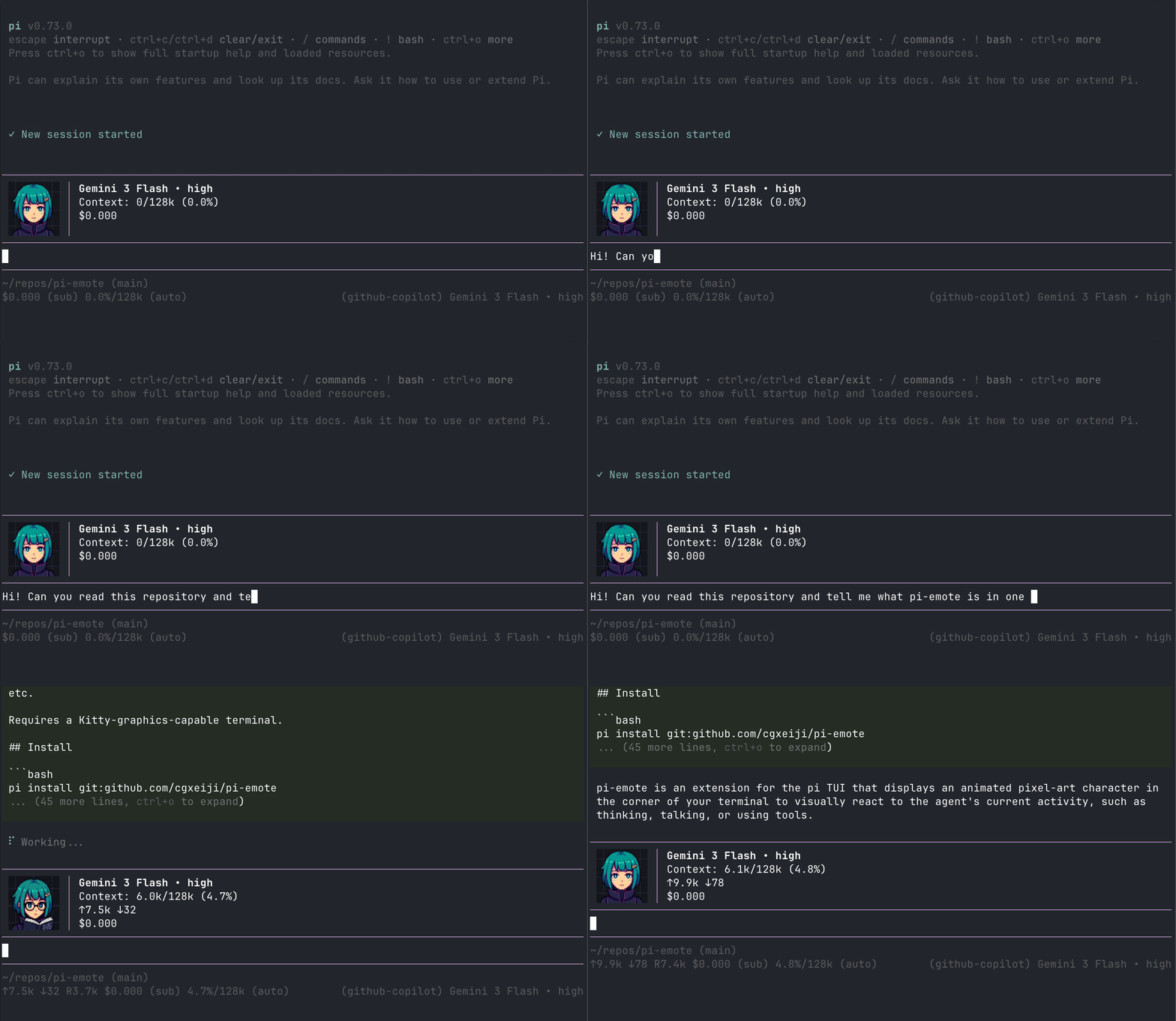
Animated pixel-art emote widget for pi TUI
Package details
Install pi-emote from npm and Pi will load the resources declared by the package manifest.
$ pi install npm:pi-emote- Package
pi-emote- Version
0.2.10- Published
- Jun 9, 2026
- Downloads
- 993/mo · 261/wk
- Author
- cgxeiji
- License
- MIT
- Types
- extension
- Size
- 4 MB
- Dependencies
- 0 dependencies · 2 peers
Pi manifest JSON
{
  "extensions": [
    "./src/index.ts"
  ],
  "image": "https://raw.githubusercontent.com/cgxeiji/pi-emote/main/pi-emote-demo.gif"
}
Security note
Pi packages can execute code and influence agent behavior. Review the source before installing third-party packages.
README
CGx's pi-emote
Currently looking to expand the emotes gallery! If you have an emote set you'd like to submit, please make a PR!
Animated pixel-art emote that lives in the top-right corner of your pi TUI session. Reacts to what the agent is doing — thinking, talking, reading, writing, using tools, etc.

Supports Kitty, iTerm2, and ASCII rendering.
Gallery
Community-contributed emote sets. Submit yours via PR!
Image Sets
| Avatar | Name | Contributor |
|---|---|---|
default |
@cgxeiji | |
aza_choi |
@shennguyenrs | |
aza_choi_nobg |
@shennguyenrs | |
red |
@cgxeiji |
ASCII Sets
| Avatar | Name | Contributor |
|---|---|---|
(^ ◡ ^)/ |
ascii |
@cgxeiji |
ʕ•̫͡•ʔ |
ascii-bear |
@LCorleone |
Install
pi install git:github.com/cgxeiji/pi-emote
States
| State | Trigger |
|---|---|
| hi | Session start |
| idle | Nothing happening (blinks occasionally) |
| think | Reasoning tokens streaming |
| talk | Text response streaming |
| read | read tool / reading tool output |
| write | write or edit tool |
| tool | Any other tool |
| success | Successful tool execution |
| failure | Failed tool execution |
| compact | Context compaction |
Config
Drop a config.json in one of these paths (highest priority wins):
~/.pi/agent/extensions/pi-emote/config.json— your global prefs.pi/extensions/pi-emote/config.json— project override
Only include what you want to change:
{
  "size": 12,
  "emotes": [
    { "model": "*claude*", "emote-set": "my-avatar" }
  ]
}
See config.json in the extension root for all defaults.
Multiplexers
pi-emote can render image avatars through tmux using DCS passthrough. When tmux is detected, pi-emote auto-detects the outer terminal and picks the right image protocol.
tmux Setup
Add these to your tmux.conf:
# Required — allow image sequences to pass through to the outer terminal
set -g allow-passthrough on

# Required — detect outer terminal when attaching from a different terminal
set -ga update-environment TERM
set -ga update-environment TERM_PROGRAM

# Recommended — reduces flicker during animation
set -sg escape-time 0
Then restart tmux completely:
tmux kill-server && tmux
Without allow-passthrough, pi-emote defaults to ASCII and shows a one-time warning with setup instructions.
Experimental Multiplexer Support
| Outer Terminal | Protocol | Status |
|---|---|---|
| Ghostty | kitty-unicode | ✅ Stable, pane-safe, auto-detected |
| kitty | kitty-unicode | ⚠️ Untested, pane-safe, auto-detected |
| iTerm2 | iterm2 | ⚠️ Experimental, opt-in only (pane bleed in multi-pane layouts) |
| WezTerm | iterm2 | ⚠️ Experimental, opt-in only (not verified) |
The outer terminal is detected via tmux show-environment TERM_PROGRAM, which reflects the currently attached terminal.
Ghostty and kitty use the kitty-unicode renderer (Unicode placeholders) which is pane-safe — images stay within their pane and clean up on session switch. This is the default when auto-detected.
iTerm2 and WezTerm use DCS passthrough for the iTerm2 image protocol. This works but has known limitations: images can bleed into adjacent panes and persist when switching sessions. Not enabled by default — opt in explicitly:
{
  "terminals": [
    { "match": "tmux", "render": "iterm2" }
  ]
}
Other Multiplexers
zellij and screen are not yet supported and default to ASCII.
Manual Override
Force a specific renderer:
{
  "terminals": [
    { "match": "tmux", "render": "kitty-unicode" }
  ]
}
Available render values for tmux: "auto", "kitty-unicode", "kitty", "iterm2", "ascii".
"auto"— detect outer terminal; uses kitty-unicode for Ghostty/kitty, ASCII for others"kitty-unicode"— pane-safe Unicode placeholders (Ghostty, kitty)"kitty"— classic DCS passthrough (single-pane only, experimental)"iterm2"— iTerm2 DCS passthrough (single-pane only, experimental)"ascii"— text fallback
Custom Emotes
Emote sets live in emotes/<set-name>/ with PNG frames per state:
emotes/my-avatar/
├── idle/*.png
├── think/*.png
├── talk/*.png
├── read/*.png
├── write/*.png
├── tool/*.png
└── ...          # hi, success, failure, compact
Not all states are required. Missing ones just won't animate.
Where to put them
pi-emote searches in order:
.pi/extensions/pi-emote/emotes/<name>/(project)~/.pi/agent/extensions/pi-emote/emotes/<name>/(user)- Extension built-in → falls back to
default
Map models to sets
Glob patterns against model ID, last match wins:
{
  "emotes": [
    { "model": "*", "emote-set": "default" },
    { "model": "*claude*", "emote-set": "my-avatar" },
    { "model": "*haiku*", "emote-set": "haiku-avatar" }
  ]
}
In this example, claude models use my-avatar, but haiku ones use haiku-avatar.
See emotes/default/emotes.json for per-set frame config (blink frames, talk weights).
License
MIT