pi-extended-teams
Control-first, session-connected subagents for Pi with live navigation and intent-tier routing
Package details
Install pi-extended-teams from npm and Pi will load the resources declared by the package manifest.
$ pi install npm:pi-extended-teams- Package
pi-extended-teams- Version
2.2.5- Published
- Sep 10, 2026
- Downloads
- 655/mo · 168/wk
- Author
- dantetekanem
- License
- MIT
- Types
- extension, skill
- Size
- 756.6 KB
- Dependencies
- 1 dependency · 3 peers
Pi manifest JSON
{
  "image": "https://raw.githubusercontent.com/dantetekanem/pi-extended-teams/main/assets/pi-extended-teams-in-action.png",
  "skills": [
    "skills"
  ],
  "extensions": [
    "extensions/index.ts"
  ]
}Security note
Pi packages can execute code and influence agent behavior. Review the source before installing third-party packages.
README
pi-extended-teams
A control-first subagent system for Pi.
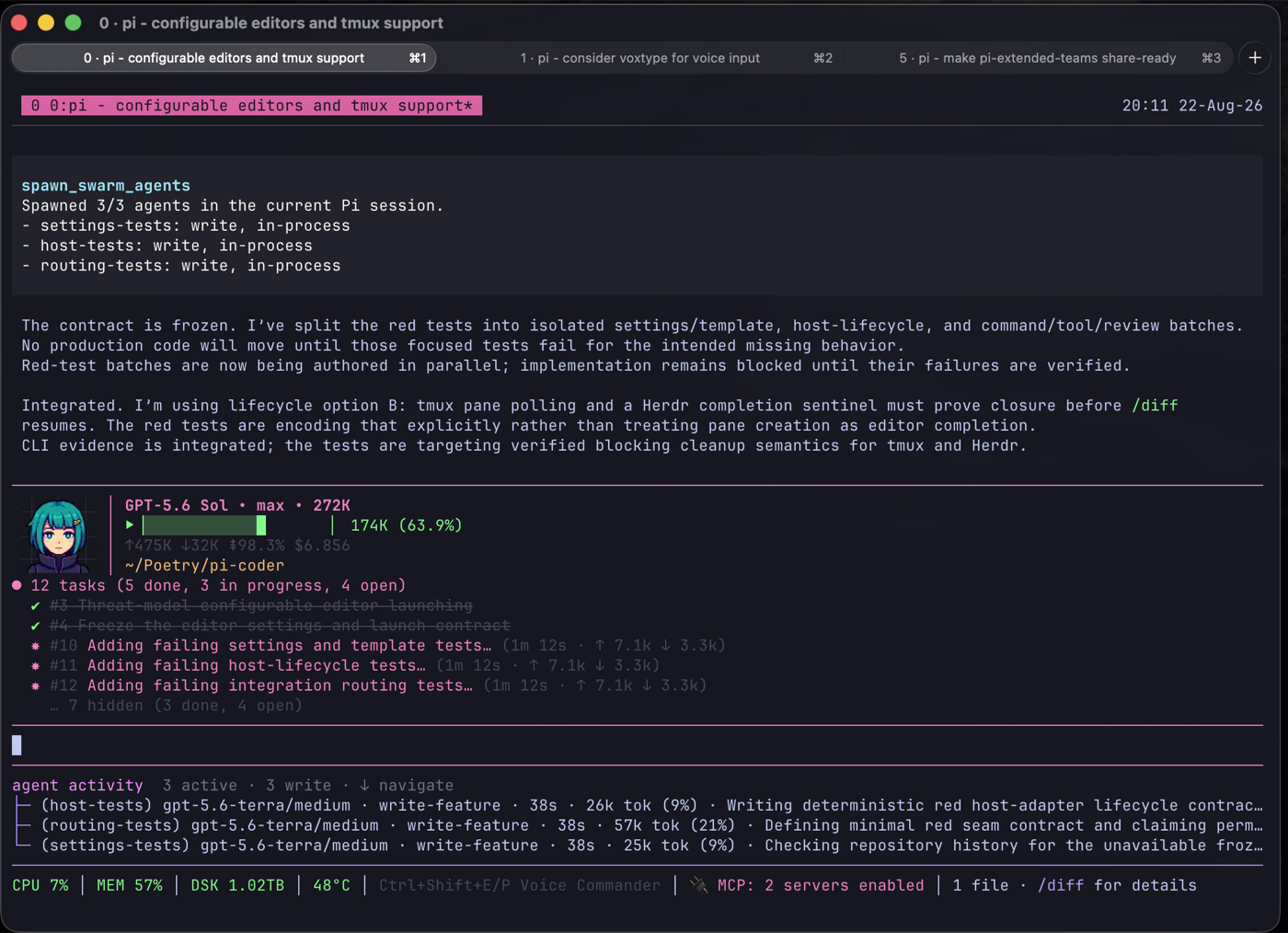
pi-extended-teams lets the lead split work into bounded lanes, watch agents live, steer or stop them, and receive their reports. The lead still makes the final call.
Read agents are the default. Edit agents are opt-in and should own isolated files.
Try without installing
pi -e npm:pi-extended-teams
This runs the published package for the current Pi invocation without adding it to your project configuration.
Install and run
Install from npm:
pi install npm:pi-extended-teams
Or install directly from GitHub:
pi install git:github.com/dantetekanem/pi-extended-teams
Then ask for help naturally:
Review the current changes with separate agents for correctness, test gaps, and security. Give me the evidence so I can make the final call.
The current Pi session becomes the agent group automatically. There is no separate setup step. Until you configure a tier, it uses the current lead-session model and thinking level. Run /agents-favorite-models when you want particular tiers to use different models.
How it works
- Read agents run in-process. Edit agents run in separate Pi sessions through the configured terminal adapter. Both stay connected to the lead session.
- The activity card shows progress, intent tier, elapsed time, tokens, and tool activity.
- You can open an agent's transcript, send it a message, interrupt a stuck tool command, or stop it.
- Completed reports return to the lead automatically and remain recoverable when needed.
get_agent_statusgives the lead or an eligible nested parent one read-only snapshot of owned active, queued, stalled, or recently completed read and edit agents.- Every spawn names an intent tier instead of choosing ad hoc model settings. Configured favorites take priority; unset tiers inherit the current lead model and thinking.
- Edit agents can claim isolated files. Claims coordinate cooperative agents; they are not access control.
- Lazy session context and nested read helpers are available when a bounded task needs them.
This works well for multi-angle code review, root-cause investigation, parallel verification, repository mapping, and one narrow edit that can stay separate from the lead's work.
Live control
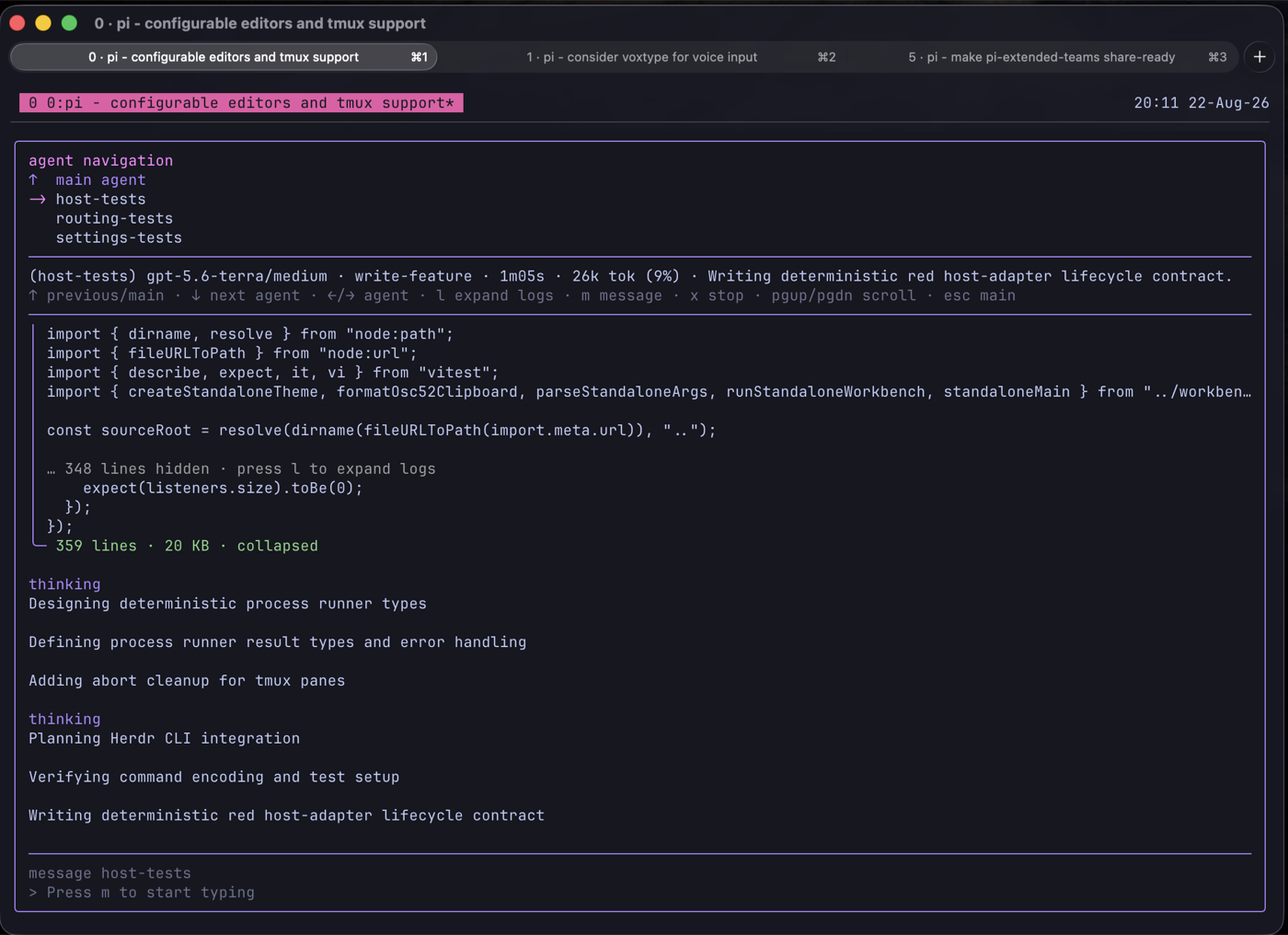
With the editor empty, press Down to open agent navigation. Use Down/Up to move, l to expand large tool logs, m to message an agent, i to interrupt its currently running tool command, x to stop the whole agent, and Escape to return.
Scroll the transcript with Page Up/Page Down or the mouse wheel, including under Herdr. Press End or scroll back to the bottom to follow new output.
The lead can invoke the same command-only behavior with interrupt_teammate({ agent_name: "agent" }). It keeps the agent's session, task context, and file claims intact so you can send follow-up work. In-process cancellation is cooperative and may report that it is still pending; for tmux-backed agents, success means Pi's Escape key was delivered, not that command settlement was independently confirmed.
Completed reports wake the lead automatically. End the current turn to wait. One get_agent_status snapshot is allowed when current status is needed; do not poll with sleeps, loops, or repeated checks. Use check_teammate only when get_agent_status shows a suspected lifecycle failure or a persisted report needs recovery.
The lead owns decomposition, integration, and acceptance. Pi packages and spawned agents run with your system permissions, so review project-local instructions and configuration through Pi's normal trust flow.
Intent tiers
Every spawn names a model_slot. Configured favorites take priority; otherwise the tier uses the current lead-session model and thinking level:
| Tier | Use it for |
|---|---|
read-collect |
Bounded facts, logs, inventories, or test output. |
read-review |
Normal review, verification, and test-gap work. |
read-analyze |
Root-cause analysis across connected evidence. |
read-critical |
Rare high-stakes security, architecture, concurrency, migration, or data reasoning. |
write-patch |
A narrow documentation, config, fixture, or bug fix. |
write-feature |
A bounded feature with a known design. |
write-system |
A cross-cutting integration or refactor inside claimed files. |
write-critical |
Rare high-risk security, concurrency, recovery, migration, or data-integrity work. |
read-review is the normal read default. Legacy tier names remain accepted for this minor release, but new prompts should use the canonical names above.
Explicit spawning
Pi can choose when delegation helps, or you can call the tools directly:
spawn_swarm_agents({
  defaults: { model_slot: "read-review" },
  agents: [
    { name: "correctness", prompt: "Review the diff for concrete correctness risks. Do not edit." },
    { name: "tests", prompt: "Find missing regression coverage with file and line evidence. Do not edit." }
  ]
})
For an edit, choose a write tier and name the files it may claim. Never run overlapping writers against the same paths.
Configuration
Global settings live at ~/.pi/agent/pi-extended-teams/settings.json. Project overrides live at .pi/pi-extended-teams.json. Favorite intent tiers are global so /agents-favorite-models and spawning use the same choices. Configuring favorites is optional; an unset tier falls back to the current lead-session model and thinking level.
Spawned sessions are private by default under ~/.pi/teams/<team>/agent-sessions/ and stay out of Pi's normal /resume picker.
Security and data access
Read SECURITY.md for private vulnerability reporting and docs/access.md for the subprocess, filesystem, extension, hook, and network boundaries.
Development
pnpm typecheck
pnpm test:focused
Credits
pi-extended-teams is based on pi-teams. This fork focuses on session-connected agents, live control, and a smaller public tool surface.
The broader coordination lineage includes claude-code-teams-mcp.
License
MIT