pi-file-picker
Native file/folder picker for pi (macOS/Windows) — pick files or folders in a real dialog and insert @path references
Package details
Install pi-file-picker from npm and Pi will load the resources declared by the package manifest.
$ pi install npm:pi-file-picker- Package
pi-file-picker- Version
0.3.1- Published
- Oct 15, 2026
- Downloads
- 701/mo · 18/wk
- Author
- mrgoethe
- License
- MIT
- Types
- extension
- Size
- 117.6 KB
- Dependencies
- 0 dependencies · 1 peer
Pi manifest JSON
{
  "image": "https://raw.githubusercontent.com/GoetheDady/pi-file-picker/main/assets/demo.png",
  "extensions": [
    "./extensions/file-picker.ts"
  ]
}Security note
Pi packages can execute code and influence agent behavior. Review the source before installing third-party packages.
README
pi-file-picker


English | 简体中文
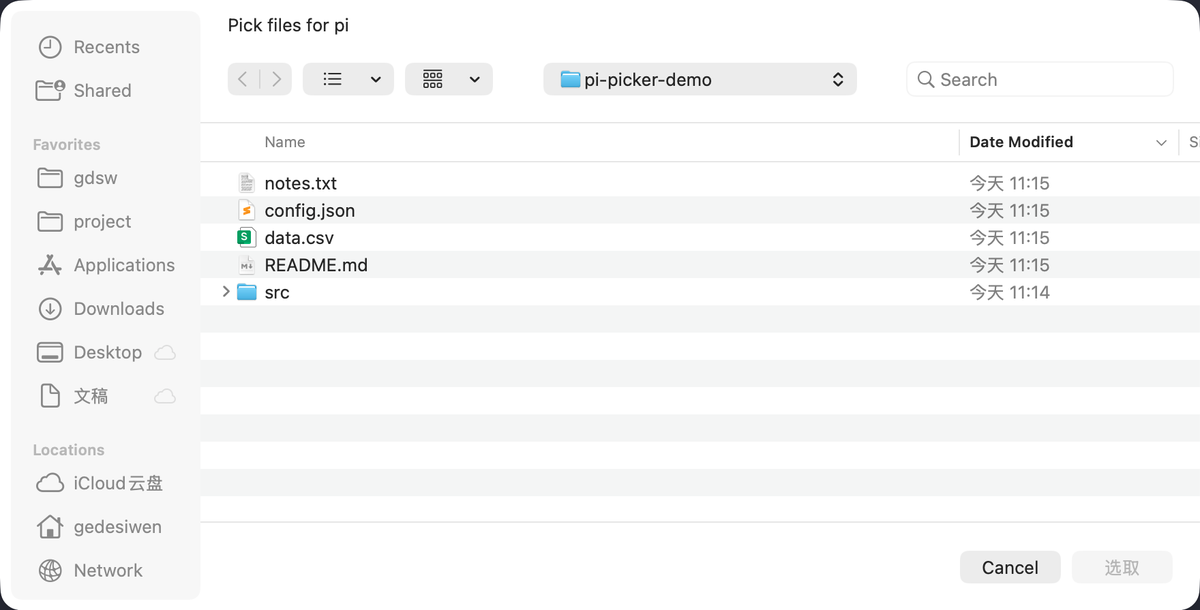
A pi extension that opens the real system file/folder dialog (macOS / Windows) and inserts what you pick into the editor as @path references.
Why: in a fullscreen terminal the only way in is typing @ paths by hand, and dragging files out of Finder or Explorer is awkward. This extension opens the native dialog instead — click a file or folder and the references land in your prompt.
Install
pi install npm:pi-file-pickerOr from GitHub:
pi install git:github.com/GoetheDady/pi-file-pickerRestart pi afterwards (or run /reload).
Usage
| Action | What it does |
|---|---|
/pick |
Open the file dialog |
Ctrl+Shift+E |
Same |
/pickdir |
Open the folder dialog |
Ctrl+Shift+D (macOS) / Ctrl+Shift+R (Windows) |
Same |
Picked paths are appended to the current draft as @ references — relative to the project when the file lives inside it (@src/a.ts, same as pi's own @ completion), absolute otherwise (@/tmp/other.txt). Paths containing spaces are quoted (@"a b.txt"). Your draft is left exactly as you typed it: a single space is added as a separator only when one isn't already there. Cancelling the dialog changes nothing.
Why these keys
Both are checked against pi's own bindings and the terminal's:
Ctrl+Shift+Owas pi's tree-filter key, andCtrl+Shift+Fis transcript search — avoided.- Windows Terminal owns a block of
Ctrl+Shift+<letter>shortcuts by default, includingCtrl+Shift+D(duplicate tab), which is why folders useCtrl+Shift+Ron Windows. - All shortcuts live in
keysinextensions/file-picker.tsif you want different ones.
Requirements
- macOS or Windows; on Linux
/pickand/pickdirreport that the platform is unsupported - Node ≥ 22
How it works
- macOS:
osascript -e 'choose file with multiple selections allowed', orchoose folderfor/pickdir. The folder dialog returns paths with a trailing/, which is stripped. - Windows: PowerShell driving the WinForms
OpenFileDialog(files) orFolderBrowserDialog(folders). The script switches stdout to UTF-8 so non-ASCII (e.g. Chinese) paths survive the pipe. - Both dialogs open in the session's working directory, not in whatever directory was visited last.
- No npm dependencies, and no shell in between —
pi.execspawns the process directly. - PowerShell's piped output is CRLF-terminated, so only the trailing
\ris dropped. The line is not trimmed: the path is the whole line, and macOS allows a file name to end with a space — trimming it would leave the reference pointing at a different file. - Cancelling is silent, but a real failure (no GUI session, blocked permission, broken WinForms) surfaces as an error notification with the underlying message instead of doing nothing.
- Paths with spaces need the
@"a b"form; a path that contains a double quote cannot be quoted, because pi has no escape convention for it. Such a path is inserted raw and a warning names it, so you can fix that one reference by hand. ctx.ui.setEditorText()only mutates editor state and does not repaint, so the insert is followed byctx.ui.notify()(notify → showStatus → ui.requestRender()). Without that call the new text stays invisible until the next keypress.
Limitations
- No directory picking on Windows beyond one folder at a time —
FolderBrowserDialogis single-select and the multi-select folder picker (IFileDialog) would need inline C# COM interop. macOS picks multiple folders. - Linux is not supported yet.
- Not available in RPC mode. There
ctx.hasUIis true butgetEditorText()always returns""(the client owns the editor), so appending is impossible andsetEditorText()would replace your draft with nothing but the references — and the dialog would open on the machine running pi, not at the client./pickreports this instead of clobbering. JSON and print modes have no UI at all.
Development
npm testtest/file-picker.check.mjs drives the extension through a faked pi API and covers eighteen cases (per-platform shortcut registration, file and folder insert on both platforms, relative vs absolute paths, path quoting, quote-in-name handling, script escaping of the working directory, trailing-slash trimming, silent cancel vs reported failure, unsupported platform, no UI, preservation of the draft's trailing whitespace, the RPC-mode refusal, and a file name ending in a space) — no terminal or real dialog needed. tsc -p . type-checks the extension against @earendil-works/pi-coding-agent. CI runs the same suite on ubuntu / macos / windows × node 22 / 24.
License
MIT