pi-glance
A polished input surface extension for pi, with a rounded multiline editor and inline model/context/status glance.
Package details
Install pi-glance from npm and Pi will load the resources declared by the package manifest.
$ pi install npm:pi-glance- Package
pi-glance- Version
0.5.2- Published
- Jun 8, 2026
- Downloads
- 997/mo · 58/wk
- Author
- linys77
- License
- MIT
- Types
- extension
- Size
- 184.5 KB
- Dependencies
- 0 dependencies · 3 peers
Pi manifest JSON
{
  "extensions": [
    "./index.ts"
  ]
}
Security note
Pi packages can execute code and influence agent behavior. Review the source before installing third-party packages.
README
◌ pi-glance
A calm input surface for pi
Replace the default prompt with a rounded multiline editor and an inline glance at Git, cost, Reply speed, context, optional tokens, and model.


Install
From npm:
pi install npm:pi-glance
Or clone as a traditional pi extension directory:
git clone https://github.com/LinYS77/pi-glance.git ~/.pi/agent/extensions/pi-glance
Then restart pi or run /reload.
Compatibility: current pi-glance releases target Pi packages under @earendil-works/* and the Node runtime supported by current Pi. If your Pi installation still exposes the older package namespace or runs on Node 20, pin pi-glance@0.3.0 or upgrade Pi before updating pi-glance.
For development/testing:
pi -e /path/to/pi-glance
Local checks and Git diagnostics:
npm test
npm run test:git
npm run debug:git
Use
/glance
That's the only command — opens a calm settings pane with a real input-surface preview and a compact three-column settings grid.
What you see
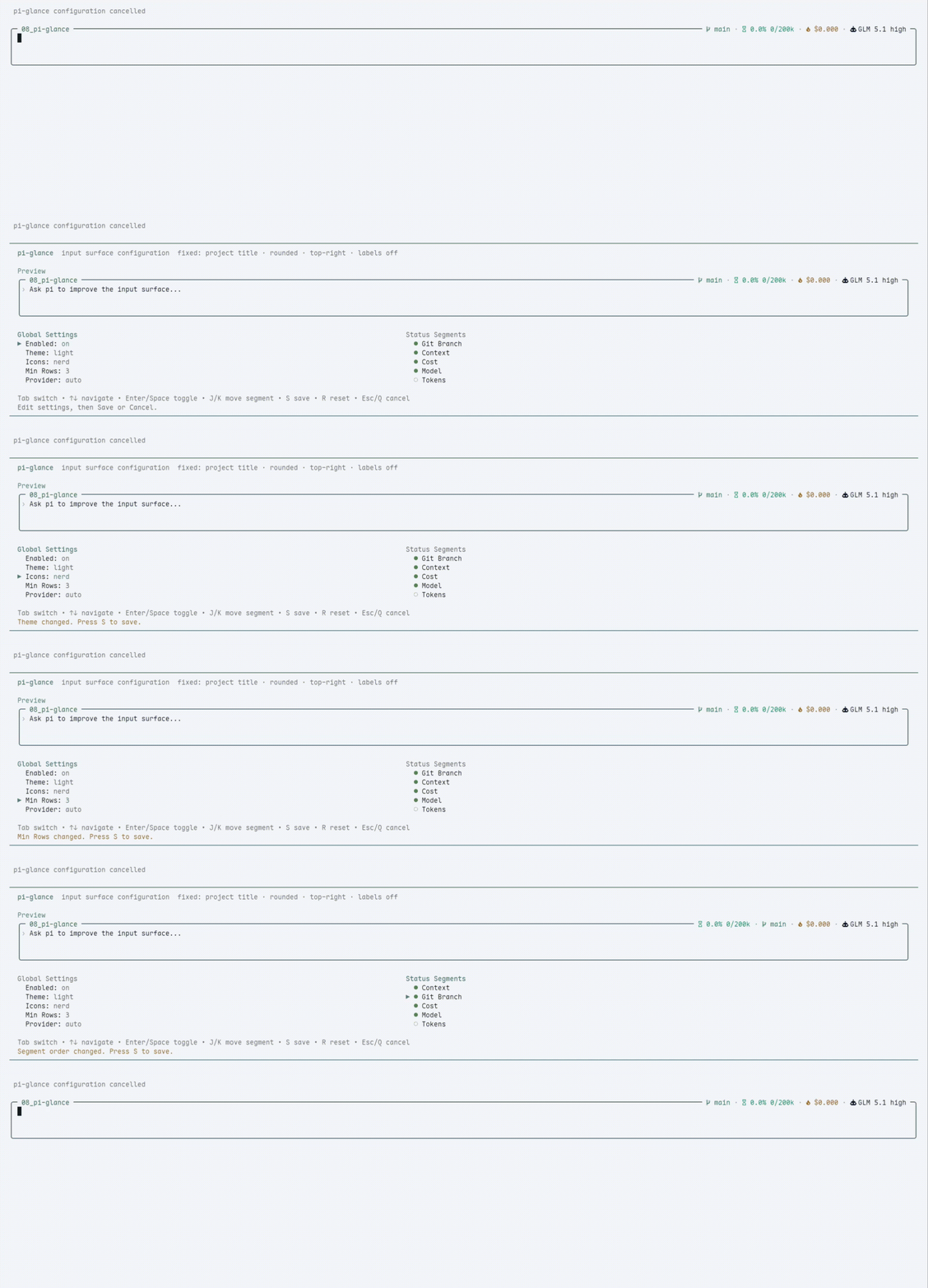
| 🖊️ | Rounded editor | Configurable 2 / 3 / 4 min rows and 0 / 1 / 2 top spacing rows, preserves all pi defaults |
| 🏷️ | Project title | Current folder name, or a safe ~/... path when enabled |
| 📊 | Inline status | Git · cost · Reply speed · context · optional tokens · model — top-right |
| ⚙️ | /glance pane |
General settings, segment order, and per-segment detail settings in a calm grid |
| 💤 | Dim unfocused | Surface quiets down when you scroll the chat |
| 🎨 | Themes | 22 built-in palettes, from Light/Dark to Catppuccin, Solarized, Gruvbox, Rosé Pine, One, Kanagawa, Everforest, and High Contrast |
Notes
- To switch themes, open
/glance→ General →Theme, press Enter, preview palettes in the browser, then press Enter to accept or Esc/Left to return. Built-ins: Light, Dark, Catppuccin Latte/Mocha/Frappé/Macchiato, Nord, Tokyo Night, Gruvbox Light/Dark, Solarized Light/Dark, Rosé Pine/Dawn, One Light/Dark, Kanagawa Wave/Lotus, Everforest Light/Dark, and High Contrast Light/Dark. - Icons default to
plainso pi-glance works with normal terminal fonts. - Editor top spacing is configurable: open
/glance→ General →Top spacingand choosenone,1 row, or2 rows. nerdicons are opt-in: open/glance→ General →Iconsand choosenerdfor richer symbols.- Nerd icons need a Nerd Font or Symbols Nerd Font fallback. If icons look like boxes, choose
plain. - pi-glance does not auto-detect, install, or bundle terminal fonts.
- Reply speed is enabled by default and appears between cost and context. It shows output tokens per wall time:
?means no trusted measurement yet,~42 tok/sis a provisional current-run checkpoint from completed turns, and42 tok/sis the finalized agent-end measurement. - Configure
/glance→ Reply speed →Precision:auto,1 digit, or0 digits. Wall time includes tools, waiting, network, and thinking, so it is not a benchmark. Reply speed uses no notifications, no timers/tickers, no token estimation from text/deltas, and adds no command, footer, dashboard, history, or average view.
Segment details
/glance keeps segment settings small and display-focused:
- Git — dirty marker, upstream counts, SHA, and polling.
- Cost — hide zero cost.
- Reply speed — enabled by default; shows unknown
?, provisional~, or finalized output tokens per wall time in the status line. Precision can beauto,1 digit, or0 digits. It sends no notifications, uses no timers, and does not estimate tokens from text or deltas. - Context — percent / tokens, or hide unknown usage.
- Tokens — input / output, total, or cache details. Tokens stay off by default.
- Model — provider and thinking labels. Model stays last by default.
Workspace title
Open /glance, select General, and set Workspace label:
name— show only the current directory name. This is the default.smart— show more path context on wider terminals.path— show a safe~/...path when possible.
pi-glance never renders full absolute paths in the title: home paths are shortened to ~/..., and non-home paths use an ellipsis tail such as …/work/project.
Git status
The Git segment is intentionally quiet:
- Clean repositories show only the branch name.
- Dirty repositories add
*in plain mode or●in Nerd Font mode. - Conflicts add
!in plain mode or⚠in Nerd Font mode. - Ahead/behind counts appear when Git reports an upstream, for example
↑2 ↓1. - Non-Git directories hide the Git segment.
Open /glance, select Git, move to a value with the arrow keys, and press Enter to configure:
Dirty marker— hide/show normal dirty markers; conflict markers stay visible.Ahead / behind— hide/show upstream counts.SHA—off,detached, oralways.Polling—2s,5s,10s, or30s.
Git is collected asynchronously and cached. External file changes usually appear within a few seconds. For local development/debugging you can compare pi-glance with Git directly:
git status --short --branch
npm run debug:git
Design
- No pi core patches — public extension APIs only
- No render-time IO — Git is collected asynchronously and cached
- Global config at
~/.pi/agent/pi-glance/config.json
License
MIT © 2026 linys77