pi-haiku
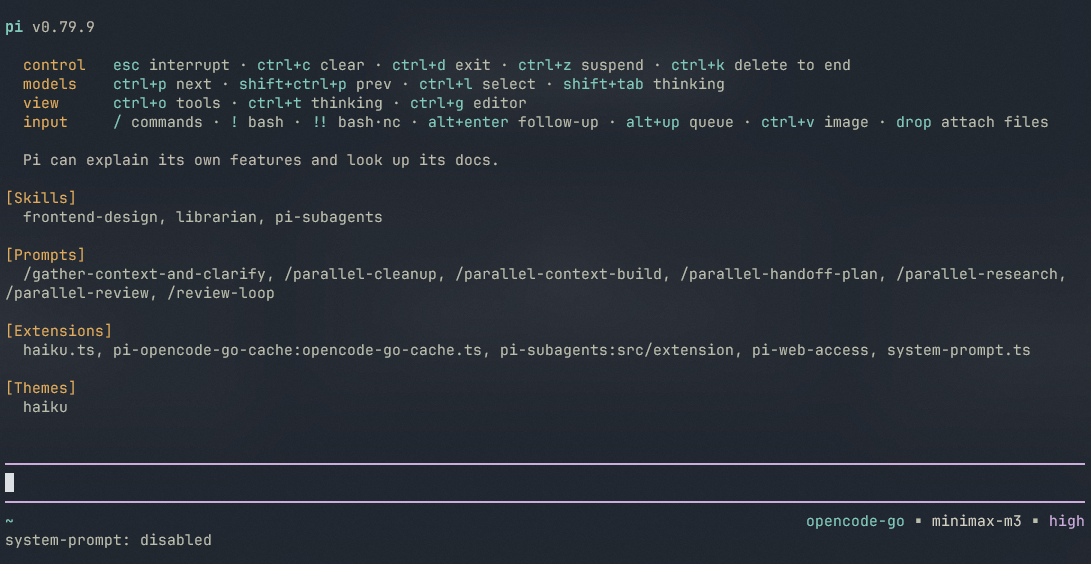
A warm, minimal theme plus a structured footer and keymap header replacement for Pi coding agent. Bundles the 'haiku' theme with a footer that surfaces location, model, context, tokens, cache, and cost — and a startup keymap that stays readable on any ter
Package details
Install pi-haiku from npm and Pi will load the resources declared by the package manifest.
$ pi install npm:pi-haiku- Package
pi-haiku- Version
0.2.0- Published
- Jun 21, 2026
- Downloads
- 384/mo · 16/wk
- Author
- nnocte
- License
- MIT
- Types
- extension, theme
- Size
- 27.3 KB
- Dependencies
- 0 dependencies · 3 peers
Pi manifest JSON
{
  "extensions": [
    "./extensions"
  ],
  "themes": [
    "./themes"
  ],
  "image": "https://raw.githubusercontent.com/nnocte/pi-haiku/main/screenshots/haiku-1.png"
}
Security note
Pi packages can execute code and influence agent behavior. Review the source before installing third-party packages.
README
pi-haiku
A warm theme and a tidier header and footer for pi.
What's in it
- A calm dark theme — soft teal accent, deep blue-violet background, easy on the eyes during long sessions.
- A header at the top of the screen with the most-used shortcuts, grouped by what they do, so you can find them at a glance.
- A footer that quietly shows the useful stuff — where you are, which model is thinking, how long it's been thinking, how full the conversation is, and how much it has cost so far.
- A live timer that counts up while pi is working, and reports the total when it's done.
- A fresh start — the visible screen is cleared when you launch pi, so you always begin on a clean page. Your scrollback is kept, so the mouse wheel still works.
Everything is on by default when you install it.
Install
pi install npm:pi-haiku
Toggle
Type /haiku to turn the header and footer on or off. The theme stays as you set it.
License
MIT