pi-hash-anchored-edit
Hash-anchored read/edit replacement tools for Pi coding agent.
Package details
Install pi-hash-anchored-edit from npm and Pi will load the resources declared by the package manifest.
$ pi install npm:pi-hash-anchored-edit- Package
pi-hash-anchored-edit- Version
0.1.4- Published
- May 7, 2026
- Downloads
- 86/mo · 86/wk
- Author
- fadouse
- License
- MIT
- Types
- extension
- Size
- 569.6 KB
- Dependencies
- 1 dependency · 2 peers
Pi manifest JSON
{
  "extensions": [
    "./index.ts"
  ],
  "image": "https://raw.githubusercontent.com/Fadouse/pi-hash-anchored-edit/main/assets/hash-edit-preview.png"
}
Security note
Pi packages can execute code and influence agent behavior. Review the source before installing third-party packages.
README
Hash-Anchored Edit for Pi
Safer read/edit replacement tools for Pi coding agent. Each line returned by read includes a short SHA-256 content hash, and every edit must present the matching LINE#HASH position before the file is written.

Why this exists
Agentic coding often fails because context goes stale: line numbers drift, exact text snippets are duplicated, or another edit changes the file between read and edit. This package adds a lightweight optimistic-concurrency check to file edits:
readreturnsLINE#HASH|contentanchors.- The model sends target
LINE#HASHpositions back toedit. editre-reads the file and verifies every position still matches current content.- Any mismatch aborts the whole edit, forcing a fresh read instead of risking the wrong write.
Install
pi install npm:pi-hash-anchored-edit
Or install from GitHub:
pi install git:github.com/Fadouse/pi-hash-anchored-edit
The extension intentionally registers tools named read and edit. Pi gives extension tools priority over built-ins with the same name, so normal model calls automatically use these safer implementations.
Read output
read returns every editable text line as:
0001#a1b2|const value = 1;
0001is the real 1-based line number, padded to at least 4 digits.a1b2issha256(lineContent).slice(0, 4).- The hash is computed without the newline character.
The raw tool result keeps anchors for the model. The Pi TUI hides anchor noise in collapsed previews and supports Ctrl+O expansion, matching the default Pi read experience.
Edit schema
{
  "path": "src/file.ts",
  "edits": [
    {
      "pos": "0001#a1b2",
      "op": "patch",
      "old": "1",
      "new": "2"
    }
  ]
}
Each edit position is resolved against the current file content before any write happens.
Edit operations
patch— replaceoldwithnewinside the anchored line.oldmust occur exactly once and both strings must be single-line. Best for small token-efficient changes.replace— replace the anchored line withnew.newmay contain multiple lines.delete— delete the anchored line.before— insertnewbefore the anchored line.after— insertnewafter the anchored line.
Example small patch:
{
  "path": "example.txt",
  "edits": [
    { "pos": "0001#dccb", "op": "patch", "old": "I", "new": "he" }
  ]
}
Turns:
test I like you
into:
test he like you
without sending the whole replacement line.
TUI behavior
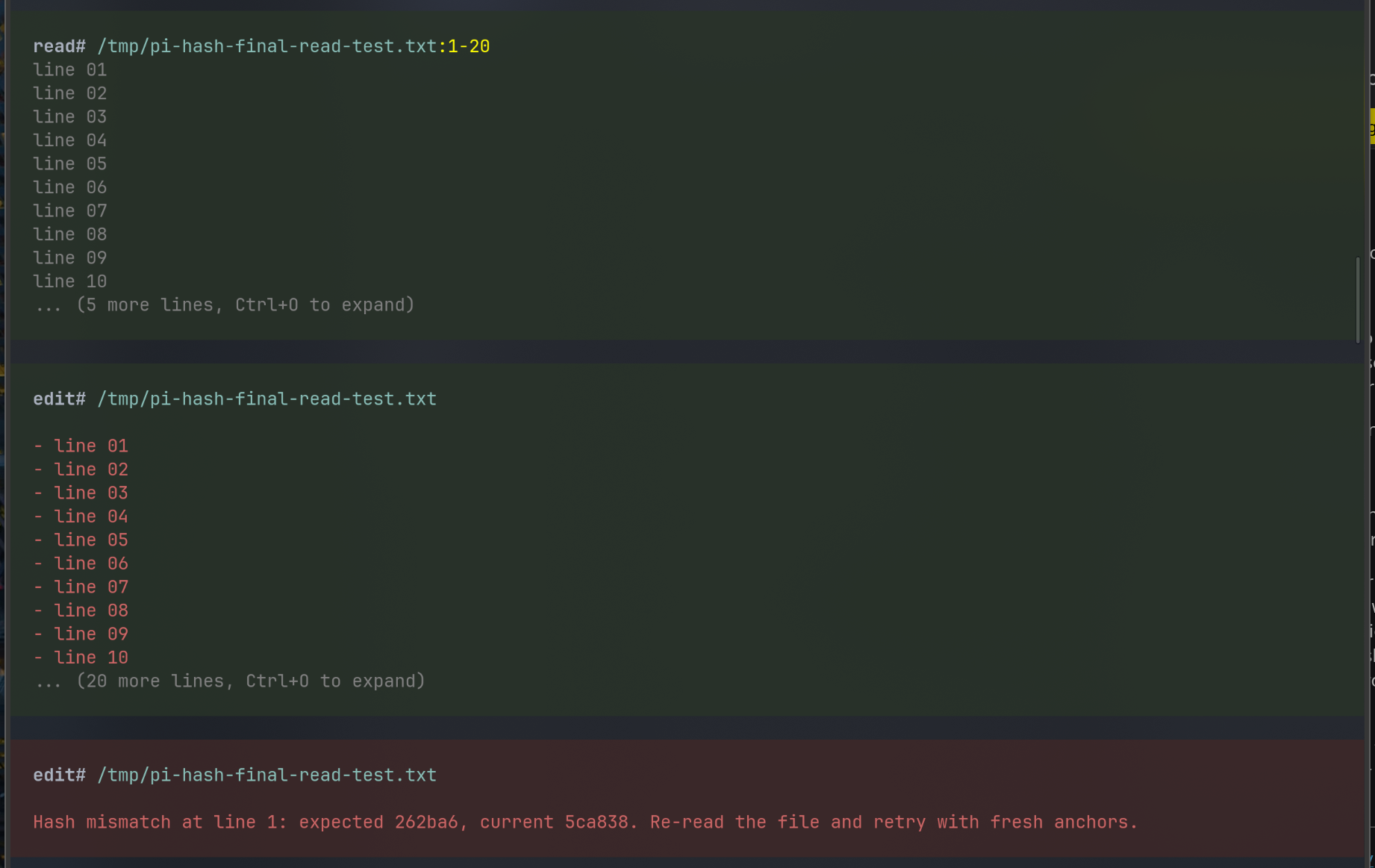
readshows a 10-line preview by default and Ctrl+O expands the full result.- raw
readoutput is capped at 400 lines or 32 KiB by default; useoffset/limitto continue. readmirrors Pi's:start-endrange display whenoffset/limitare used.- successful
editshows only a colored diff in a green edit block. - failed
editshows the error message inside a red edit block. - raw successful
editresults include only a small changed-anchor block, or ask the model toreadagain if that block would be too large.
Safety rules
- Every edit must include
posinLINE#HASHformat. - Missing or stale positions abort the whole edit.
- Multiple edits for the same position are rejected.
patch.oldmust occur exactly once on the anchored line.- Edits are validated against the original file, then applied bottom-up.
- Existing line endings and final newline style are preserved.
- Binary/image files are not inlined.
Command
/hash-edit-status
Shows whether the extension is loaded and which hash length is active.
Development
npm install
npm test
Project layout:
index.tsregisters the extension.src/read.tsimplements the anchoredreadtool.src/edit.tsimplements hash-validated edits.src/shared.tscontains hashing, line handling, UTF-8 text detection, and TUI helpers.prompts/stores tool prompt guidelines.test/stores Node test cases.
License
MIT