pi-hermes-memory
🧠 Persistent memory + 🔍 session search + 🛡️ secret scanning for Pi. SQLite FTS5 search across every conversation, auto-consolidation, memory aging, procedural skills. 272 tests. Ported from Hermes agent.
Package details
Install pi-hermes-memory from npm and Pi will load the resources declared by the package manifest.
$ pi install npm:pi-hermes-memory- Package
pi-hermes-memory- Version
0.6.4- Published
- May 3, 2026
- Downloads
- 1,014/mo · 1,014/wk
- Author
- chandra447
- License
- MIT
- Types
- extension
- Size
- 596 KB
- Dependencies
- 1 dependency · 1 peer
Pi manifest JSON
{
  "extensions": [
    "./src/index.ts"
  ]
}
Security note
Pi packages can execute code and influence agent behavior. Review the source before installing third-party packages.
README

🧠 Pi Hermes Memory
Persistent memory + session search + secret scanning for Pi
Your Pi agent normally forgets everything when you close a session. This extension fixes that.
- 🔍 Search every conversation — "what did we discuss about auth?" finds it instantly
- 🧠 Persistent memory — facts, preferences, corrections survive across sessions
- ⚠️ Learns from failures — remembers what didn't work so you don't repeat mistakes
- 🏷️ Categorized memories — failures, corrections, insights, conventions, and tool quirks organized for fast retrieval
- 🛡️ Secret scanning — API keys and tokens are blocked from being saved
- 📚 Procedural skills — the agent saves how it solved problems, not just what
- ⚡ Background learning — reviews every 10 turns, saves what matters
- 🔄 Auto-consolidation — merges entries when full, never loses data
Quick Start
# Install
pi install npm:pi-hermes-memory

# Index your past sessions (one-time)
/memory-index-sessions

# Learn how to use it
/learn-memory-tool
Features
| Feature | What happens |
|---|---|
| 🔍 Session Search | Search across all past conversations via SQLite FTS5 |
| 🧠 Persistent Memory | Facts, preferences, lessons saved to markdown files |
| ⚠️ Failure Memory | Learn from failures — stores what didn't work and why |
| 📚 Procedural Skills | The agent saves how it solved problems as reusable docs |
| ⚡ Background Learning | Every 10 turns (or 15 tool calls) the agent reviews and saves |
| 🔧 Correction Detection | When you correct the agent, it saves immediately |
| 🔄 Auto-Consolidation | When memory hits capacity, auto-merges instead of erroring |
| 🛡️ Secret Scanning | API keys, tokens, SSH keys blocked from persistence |
| 📊 Memory Aging | Entries carry timestamps — consolidation knows what's stale |
| 🏗️ Two-Tier Memory | Global + per-project memory, both searchable |
| 💾 Extended Store | Unlimited searchable memories beyond core 5,000-char limit |
| 🎓 Onboarding | /memory-interview pre-fills your profile on first session |
How It Works
Session Lifecycle
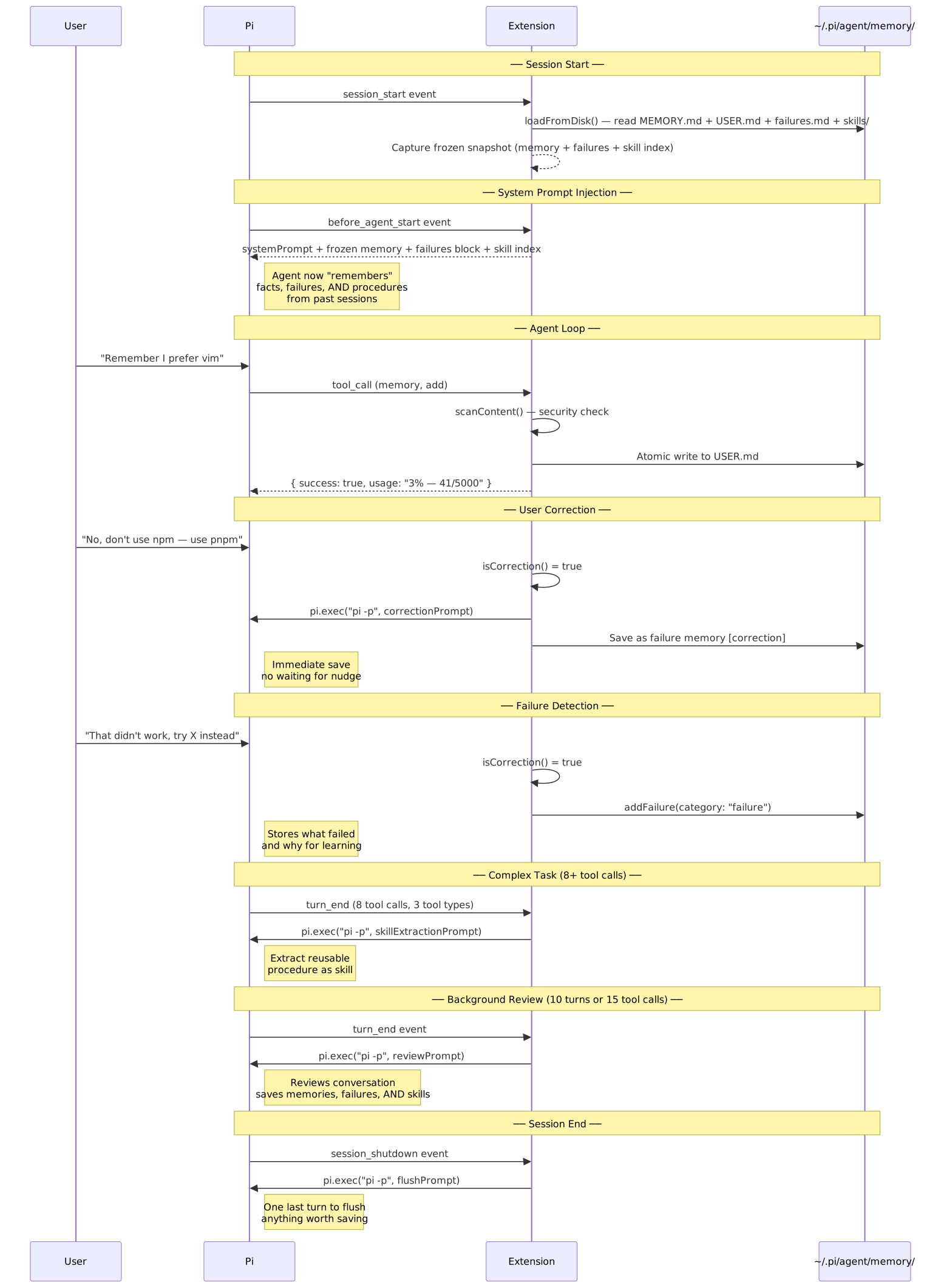
Memory + Skills Architecture
The extension manages three types of knowledge:
| Type | What | Storage | Token cost |
|---|---|---|---|
| Memory (MEMORY.md) | Facts — env details, project conventions, tool quirks | 2,200 chars max | Fixed per session |
| User Profile (USER.md) | Who you are — name, preferences, communication style | 1,375 chars max | Fixed per session |
| Skills (skills/*.md) | Procedures — how to do something, reusable across sessions | Unlimited | ~3K for index, full on demand |

Security: Content Scanning
Every write — memory and skills — passes through a scanner before being accepted. This prevents the LLM from being tricked into storing malicious content that would later be injected into the system prompt.

Installation
pi install npm:pi-hermes-memory
Or install from GitHub:
pi install git:github:chandra447/pi-hermes-memory
Or test locally without installing:
pi -e /path/to/pi-hermes-memory/src/index.ts
Two-Tier Memory Architecture
The extension stores memory at two levels:
| Tier | Location | What goes here | Injected when |
|---|---|---|---|
| Global | ~/.pi/agent/memory/ |
Facts that apply everywhere — your name, preferences, OS, tools | Always (every session) |
| Project | ~/.pi/agent/<project>/ |
Facts scoped to one codebase — architecture decisions, API quirks, team norms | When cwd matches the project |
Both tiers are injected into the system prompt under separate <memory-context> blocks.
System Prompt
┌─────────────────────────────────────────┐
│ <memory-context>                        │
│ MEMORY (your personal notes)            │
│ • prefers vim over nano                 │
│ • uses pnpm not npm                     │
│ ═══ END MEMORY ═══                     │
│ </memory-context>                       │
│                                         │
│ <memory-context>                        │
│ USER PROFILE (who the user is)          │
│ • name: Chandrateja                     │
│ • timezone: AEST                        │
│ ═══ END MEMORY ═══                     │
│ </memory-context>                       │
│                                         │
│ <memory-context>                        │
│ PROJECT MEMORY: pi-hermes-memory        │
│ • uses jiti for runtime TS loading      │
│ • tests use node:test with tsx          │
│ ═══ END MEMORY ═══                     │
│ </memory-context>                       │
│                                         │
│ <memory-context>                        │
│ RECENT FAILURES & LESSONS (learn from): │
│ • [correction] Use pnpm, not npm        │
│ • [failure] Tried localStorage — XSS    │
│ • [insight] Auth0 handles refresh tokens│
│ ═══ END MEMORY ═══                     │
│ </memory-context>                       │
└─────────────────────────────────────────┘
Failure Memory
The agent learns from failures, corrections, and insights — just like humans do.
Memory Categories
| Category | What it stores | Example |
|---|---|---|
failure |
What didn't work and why | "Tried localStorage for tokens — XSS vulnerability" |
correction |
User corrections | "Use pnpm, not npm" |
insight |
Learnings from experience | "Auth0 SDK handles refresh tokens automatically" |
preference |
User preferences | "Prefers dark theme" |
convention |
Project conventions | "Monorepo uses turborepo" |
tool-quirk |
Tool-specific knowledge | "CI needs --frozen-lockfile" |
How It Works
- Auto-detection: Background review extracts failures from conversations
- Correction capture: When you correct the agent, it saves what went wrong
- System prompt injection: Recent failures (last 7 days) are injected at session start
- Searchable: Use
memory_search("auth", category: "failure")to find past failures
Example
User: No, use pnpm not npm
Agent: [saves correction memory]

Next session:
Agent: "I remember you prefer pnpm over npm. Let me use that."
The agent learns from its mistakes so you don't have to repeat yourself.
Memory blocks are wrapped in <memory-context> XML tags with a guard note ("NOT new user input") to prevent the LLM from treating stored facts as instructions.
Usage
Once installed, the extension works automatically. You don't need to do anything special — the agent will start saving memories and skills on its own.
The memory Tool
The agent gets a memory tool it can call proactively:
| Action | Target | What it does |
|---|---|---|
add |
memory or user |
Append a new entry |
replace |
memory or user |
Update an existing entry (matched by substring) |
remove |
memory or user |
Delete an entry (matched by substring) |
The skill Tool
The agent also gets a skill tool for saving reusable procedures:
| Action | What it does |
|---|---|
create |
Save a new skill (name, description, step-by-step body) |
view |
Read a skill's full content, or list all skills if no name given |
patch |
Update one section of an existing skill (e.g., just the Procedure section) |
edit |
Replace the description and/or full body of a skill |
delete |
Remove a skill |
Skills are stored as SKILL.md files in ~/.pi/agent/memory/skills/. Each has a structured body:
---
name: debug-typescript-errors
description: Step-by-step approach to debugging TS errors in monorepos
version: 1
created: 2026-04-26
updated: 2026-04-26
---
## When to Use
When you see TypeScript compilation errors, especially in monorepo setups.

## Procedure
1. Read the error message carefully
2. Check tsconfig.json extends chain
3. Run tsc --noEmit to get full error list
4. Fix errors bottom-up (dependencies first)

## Pitfalls
- Don't trust VSCode's error display — use the CLI

## Verification
Run `tsc --noEmit` and confirm zero errors.
Memory vs User Profile vs Skills
| Store | File | What goes here | Limit |
|---|---|---|---|
| memory | MEMORY.md |
Agent's notes — env facts, project conventions, tool quirks, lessons learned | 5,000 chars |
| user | USER.md |
User profile — name, preferences, communication style, habits | 5,000 chars |
| skills | skills/*.md |
Procedures — how to debug, deploy, test, or fix something | Unlimited |
| extended | sessions.db |
Searchable memories beyond the core limit | Unlimited |
| sessions | sessions.db |
Past conversation history (searchable via FTS5) | Unlimited |
Session History Search
The extension indexes your Pi session history into a SQLite database with FTS5 full-text search. The agent can search across all past conversations using the session_search tool:
| Tool | What it does |
|---|---|---|
| session_search | Search past conversations — "what did we discuss about auth?" |
| memory_search | Search extended memory store — unlimited capacity, keyword-based |
Session history is indexed automatically on session shutdown. To bulk-import existing sessions:
/memory-index-sessions
Extended Memory Store
When the core memory (5,000 chars) isn't enough, the agent can store additional memories in the SQLite-backed extended store. These are searchable via memory_search but not automatically injected into the system prompt.
This is the hybrid memory architecture:
- Core memory (MEMORY.md/USER.md): Always injected, 5,000 chars each, human-readable
- Extended memory (SQLite): Unlimited, searchable on demand, agent-driven
Correction Detection
When you correct the agent, it saves immediately — no waiting for the background review. Examples of corrections the agent detects:
| You say | What happens |
|---|---|
| "don't do that" | ✅ Immediate save |
| "no, use yarn instead" | ✅ Immediate save |
| "actually, fix the test first" | ✅ Immediate save |
| "I said use pnpm" | ✅ Immediate save |
| "no worries" | ❌ Not a correction — ignored |
| "actually looks great" | ❌ Not a correction — ignored |
Auto-Consolidation
When memory or user profile hits its character limit, the extension automatically consolidates instead of returning an error:
- Spawns a one-shot
pi.exec()process with a consolidation prompt - The child agent merges related entries, removes outdated ones, keeps the most important facts
- Parent reloads from disk and retries the original save
- If consolidation fails, falls back to the original error
You can also trigger this manually with /memory-consolidate.
Tool-Call-Aware Review
Background review triggers based on activity level, not just turn count:
- Every 10 turns — the default nudge interval
- OR every 15 tool calls — catches complex tasks that involve many reads/edits/bash calls
Both counters reset after each review.
Skill Auto-Extraction
After a complex task (8+ tool calls using 2+ different tools in a single turn), the extension automatically asks the agent:
"This was a complex task — should we save a reusable procedure?"
This means skills build up naturally over time without you having to ask.
Commands
| Command | What it does |
|---|---|
/memory-insights |
Shows everything stored in memory and user profile |
/memory-skills |
Lists all agent-created skills |
/memory-consolidate |
Manually trigger memory consolidation to free space |
/memory-interview |
Answer a few questions to pre-fill your user profile |
/memory-switch-project |
List all project memories and their entry counts |
/memory-index-sessions |
Import past Pi sessions into the search database |
/learn-memory-tool |
Skill that teaches users how to use the memory system |
/memory-insights Output
╔══════════════════════════════════════════════╗
║            🧠 Memory Insights                ║
╚══════════════════════════════════════════════╝

📋 MEMORY (your personal notes)
──────────────────────────────────────────────
1. project uses pnpm not npm
2. test files go in __tests__/ directory
3. user prefers dark theme for UI

👤 USER PROFILE
──────────────────────────────────────────────
1. name: Chandrateja
2. prefers concise answers over verbose ones
3. codes primarily in TypeScript
/memory-skills Output
╔══════════════════════════════════════════════╗
║            🧠 Procedural Skills             ║
╚══════════════════════════════════════════════╝

📄 debug-typescript-errors
   Step-by-step approach to debugging TS errors in monorepos
   file: debug-typescript-errors.md

📄 deploy-checklist
   Pre-deploy verification steps for this project
   file: deploy-checklist.md
Configuration
Create ~/.pi/agent/hermes-memory-config.json:
{
  "memoryCharLimit": 5000,
  "userCharLimit": 5000,
  "projectCharLimit": 5000,
  "memoryDir": "~/.pi/agent/memory",
  "nudgeInterval": 10,
  "nudgeToolCalls": 15,
  "reviewEnabled": true,
  "autoConsolidate": true,
  "correctionDetection": true,
  "flushOnCompact": true,
  "flushOnShutdown": true,
  "flushMinTurns": 6
}
| Setting | Default | Description |
|---|---|---|
memoryCharLimit |
5000 |
Max characters in MEMORY.md |
userCharLimit |
5000 |
Max characters in USER.md |
projectCharLimit |
5000 |
Max characters in project-scoped MEMORY.md |
memoryDir |
~/.pi/agent/memory |
Custom directory for memory files |
nudgeInterval |
10 |
Turns between auto-reviews |
nudgeToolCalls |
15 |
Tool calls between auto-reviews (OR with turns) |
reviewEnabled |
true |
Enable/disable background learning loop |
autoConsolidate |
true |
Auto-merge when memory hits capacity |
correctionDetection |
true |
Detect user corrections and save immediately |
flushOnCompact |
true |
Flush memories before Pi compacts context |
flushOnShutdown |
true |
Flush memories when session ends |
flushMinTurns |
6 |
Minimum turns before flush triggers |
Where Data Lives
~/.pi/agent/memory/
├── MEMORY.md          ← Agent's personal notes (env facts, patterns, lessons)
├── USER.md            ← User profile (name, preferences, habits)
├── sessions.db        ← SQLite database (session history + extended memory)
└── skills/
    ├── debug-typescript-errors.md
    └── deploy-checklist.md
These are plain markdown files. You can read and edit them directly if you want to curate what the agent remembers. Memory entries are separated by § (section sign). Skills use standard SKILL.md format with frontmatter.
The sessions.db SQLite database stores session history and extended memory entries. It's searchable via FTS5 full-text search.
Known Limitations
§delimiter: Memory entries are separated by§(section sign). If an entry naturally contains§, it will be split incorrectly on reload. This is rare in English text but possible. [Hermes uses the same delimiter.]- Background review cost: Each review cycle costs one full LLM API call via a child
pi -pprocess. Correction detection and skill auto-extraction add occasional extra calls. - Session search requires indexing: Past sessions must be indexed before they're searchable. Run
/memory-index-sessionsto bulk-import, or let the extension auto-index on session shutdown. - System prompts are invisible: Pi's TUI does not display the system prompt. Memory injection works but you won't see it in the interface — verify by asking the agent a question that relies on stored memory.
- Skills are agent-generated: Skills are created by the agent based on its experience. They may not always be perfectly structured. You can edit or delete them in
~/.pi/agent/memory/skills/.
Architecture

Credits
Ported from the Hermes agent by Nous Research. Specifically:
tools/memory_tool.py—MemoryStoreclass, content scanner, tool schemarun_agent.py— Background review loop, session flush, nudge intervalagent/memory_provider.py— Provider lifecycle patternagent/memory_manager.py— System prompt injection, context fencing
License
MIT