pi-ide-context
/ide for pi — connect Neovim/VS Code, auto-inject editor context into LLM messages
Package details
Install pi-ide-context from npm and Pi will load the resources declared by the package manifest.
$ pi install npm:pi-ide-context- Package
pi-ide-context- Version
0.4.0- Published
- Sep 20, 2026
- Downloads
- 513/mo · 164/wk
- Author
- andy8647
- License
- MIT
- Types
- extension
- Size
- 38 KB
- Dependencies
- 0 dependencies · 0 peers
Pi manifest JSON
{
  "extensions": [
    "./src/index.ts"
  ]
}
Security note
Pi packages can execute code and influence agent behavior. Review the source before installing third-party packages.
README
pi-ide-context
/idefor pi — like Claude Code's IDE integration, but for Neovim, VS Code and Obsidian.


Select text in Neovim (or VS Code / Obsidian), switch to pi — pi already knows which
file you're in, where your cursor is, and what you selected. No copy-paste. No
:PiAsk. It just works.
Install
Pi extension
pi install npm:pi-ide-context
Then /reload in pi.
Neovim plugin (lazy.nvim)
{
  "Andy8647/pi-ide-context",
  lazy = false,
}
VS Code extension
Not published to the marketplace yet — build and install locally:
cd editors/vscode
npm install && npm run build
code --extensionDevelopmentPath="$PWD"   # dev instance, or package + install a vsix
Obsidian plugin
In the community plugin directory — search pi-ide-context under Settings → Community plugins → Browse, or install from community.obsidian.md/plugins/pi-ide-context.
To build from source instead:
cd editors/obsidian
npm install && npm run build
mkdir -p "<vault>/.obsidian/plugins/pi-ide-context"
cp main.js manifest.json "<vault>/.obsidian/plugins/pi-ide-context/"
Then enable pi-ide-context under Settings → Community plugins.
Usage
Nothing connects on its own — you decide per session:
pi starts (no IDE attached, ever)
  ↓
/ide → lists every live editor (nvim / VS Code / Obsidian), wherever it was
started from — no project/cwd filtering; you pick the relevant one
  ↓
status shows `in main.ts`; select lines → `5 lines selected in main.ts`
  ↓
ask pi → context injected automatically (selection fresh for 60s)
  ↓
/ide off (or pick "Disconnect" in the /ide list) → disconnect
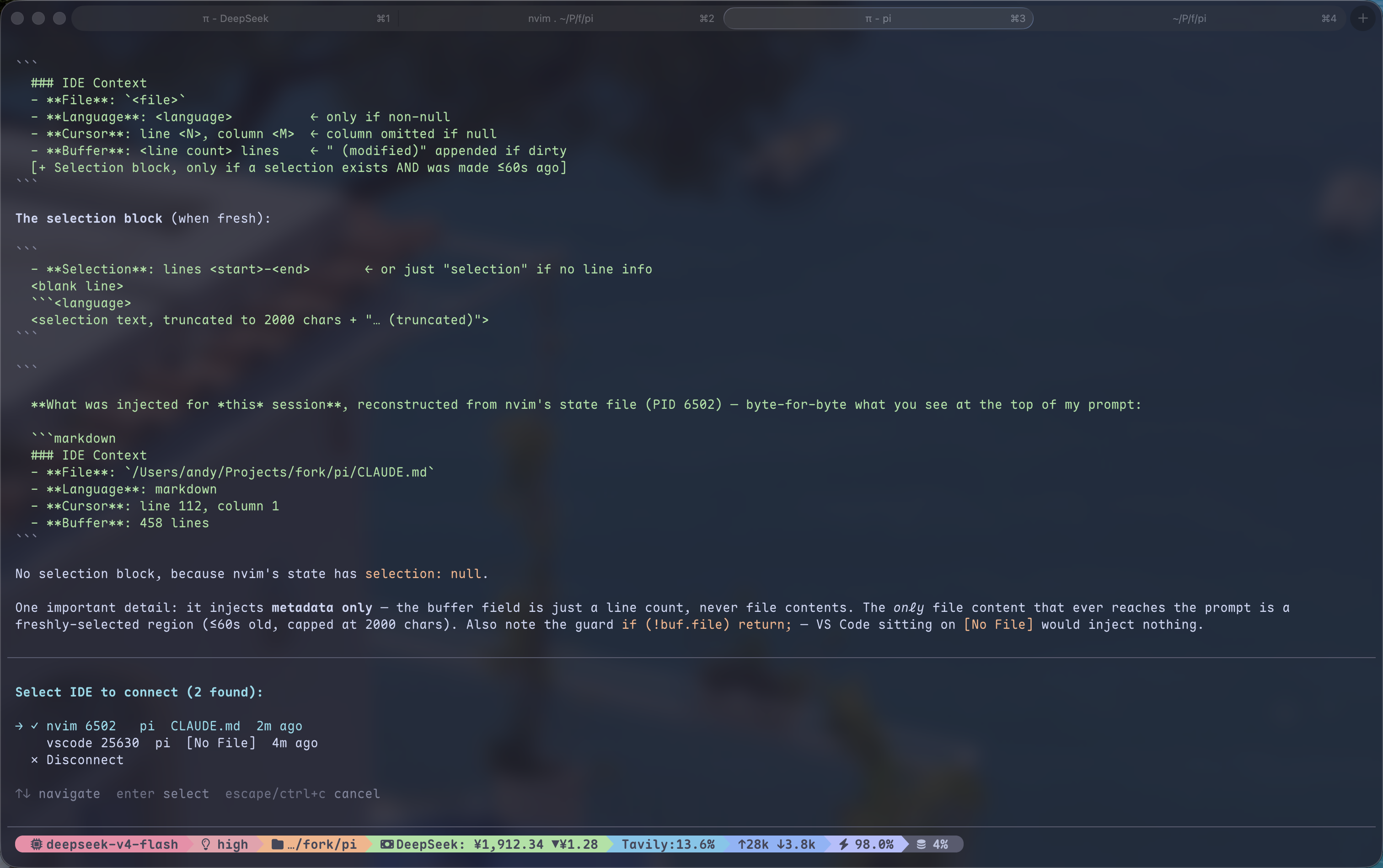
When connected, every message you send to pi automatically includes:
### IDE Context
- File: /Users/andy/my-project/src/main.ts
- Language: typescript
- Cursor: line 42, column 10
- Buffer: 200 lines (modified)
- Selection: lines 40–45
  ```typescript
  const foo = bar();
  // ...
Selection text is injected only while fresh (within 60s of making it); after
that the file/cursor context is still sent but the selection text is not — same
as Claude Code's chip disappearing. Status text is pure ASCII (no Nerd Font
needed). The `/ide` list shows each editor's directory and launch args
(`nvim pi/` vs `nvim pi-ide-context/`) so several instances are easy to tell
apart; a bare `nvim .` shows the directory name. If the connected editor exits,
the session disconnects with a notice — run `/ide` again to reconnect.

## How it works
┌──────────┐ writes JSON ┌──────────────┐ reads JSON ┌────────┐ │ Neovim │ ─────────────► │ /tmp/pi-ide/ │ ◄──────────── │ pi │ │ autocmd │ debounced │ .json │ before_ │ auto │ │ hooks │ every 200ms │ │ agent_start │ inject │ └──────────┘ └──────────────┘ └────────┘
**Neovim side**: autocmd on CursorMoved / TextChanged / BufEnter / ModeChanged / DirChanged writes
editor state to a JSON file. Zero dependencies — a single Lua file. Sends its launch
args (`argv`) so same-cwd instances can be told apart.

**Pi side**: `before_agent_start` reads the JSON for the connected editor and injects
formatted editor context (lightweight file/cursor/buffer every time; selection text
only while fresh). Connecting is fully manual: `/ide` lists every live editor
without project filtering, publishes `in main.ts` / `N lines selected in main.ts`
through `ctx.ui.setStatus("pi-ide", …)`, and `/ide off` disconnects.

With [pi-starline](https://github.com/Andy8647/pi-starline) installed, set
`"extensionStatuses": { "placements": { "pi-ide": "editor" } }` to move that
text to the editor's bottom-right metadata row instead of the footer.

Full protocol in [`docs/protocol.md`](docs/protocol.md).

## Protocol

Editor state is written to `/tmp/pi-ide/<pid>.json`:

```json
{
  "pid": 12345,
  "cwd": "/Users/andy/my-project",
  "timestamp": 1700000000,
  "app": "nvim",
  "argv": ["pi-ide-context/"],
  "active_buffer": {
    "file": "/Users/andy/my-project/src/main.ts",
    "name": "main.ts",
    "language": "typescript",
    "cursor": { "line": 42, "column": 10 },
    "selection": {
      "start": { "line": 40, "column": 1 },
      "end": { "line": 45, "column": 20 },
      "text": "selected code here...",
      "selected_at": 1700000000
    },
    "modified": false,
    "lines_total": 200
  }
}
Columns are 1-based. selected_at drives the freshness window (60s on the pi
side). The same protocol works for VS Code / Obsidian — just write this JSON. The pi
extension is editor-agnostic; all three clients (Neovim, VS Code, Obsidian)
write it. See editors/ for the VS Code and Obsidian clients.
License
MIT