pi-image-view
Paste screenshots into the Pi coding agent with clean [Image #N] markers, clickable draft and history links, and 2000px-max model images
Package details
Install pi-image-view from npm and Pi will load the resources declared by the package manifest.
$ pi install npm:pi-image-view- Package
pi-image-view- Version
0.5.0- Published
- Oct 9, 2026
- Downloads
- 686/mo · 95/wk
- Author
- caprika
- License
- MIT
- Types
- extension
- Size
- 106.1 KB
- Dependencies
- 0 dependencies · 2 peers
Pi manifest JSON
{
  "image": "https://raw.githubusercontent.com/alchemistklk/pi-image-view/main/screenshot.png",
  "extensions": [
    "./index.ts"
  ]
}Security note
Pi packages can execute code and influence agent behavior. Review the source before installing third-party packages.
README
pi-image-view
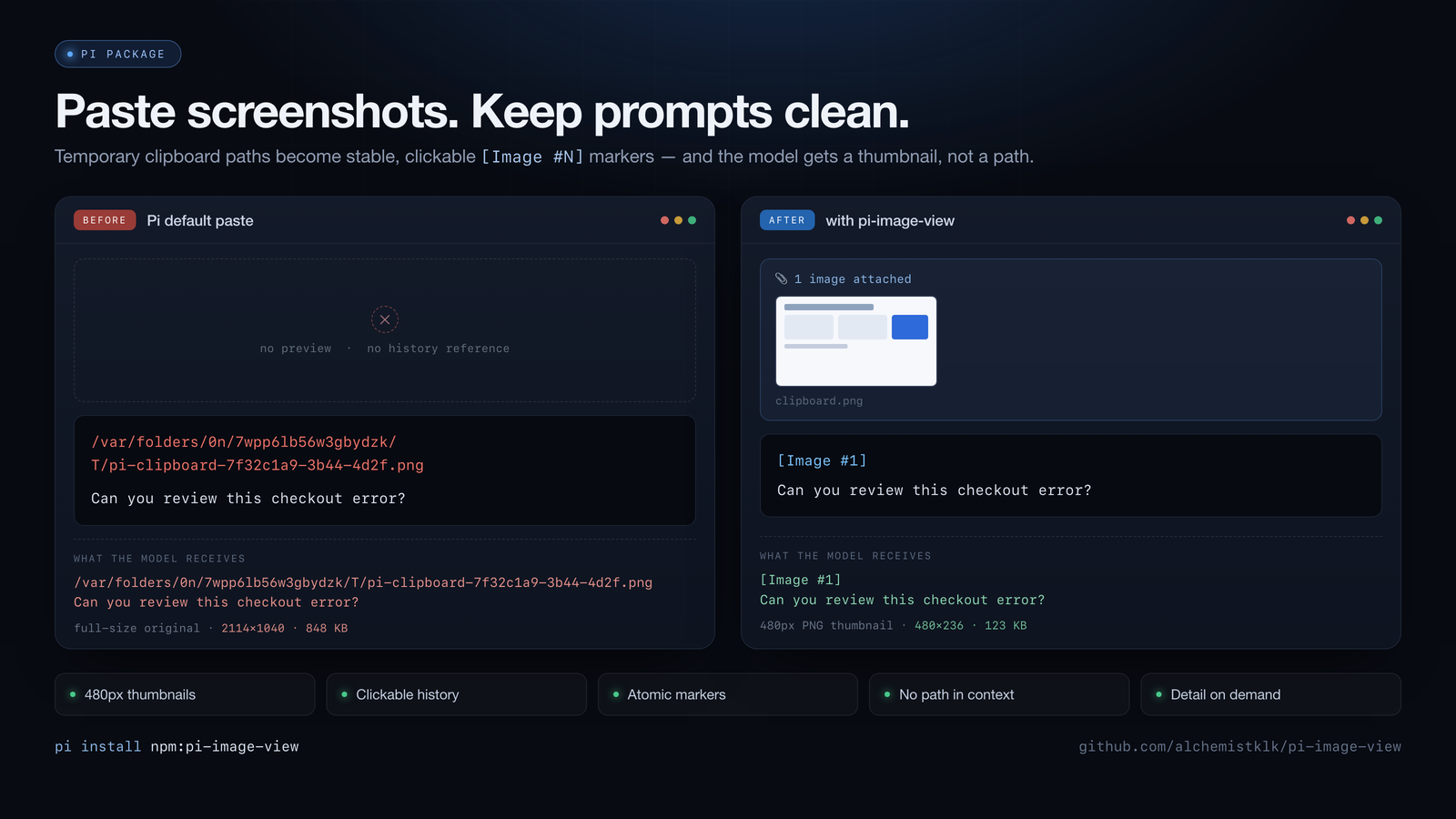
Paste a screenshot into the Pi coding agent without pasting a filesystem path.
pi-image-view is a Pi extension that turns pasted, dragged, and typed image paths into a stable [Image #N] reference, sends the model an image with a 2000px maximum dimension, and makes the reference clickable both in the input editor (once prepared) and in conversation history for the life of the session and beyond.
# Before                                    # After
/var/folders/9x/T/screenshot 3.png          [Image #1]
Help me resolve this conflict.              Help me resolve this conflict.
The model receives [Image #1] plus the image attachment. It never receives the local path.
When to use this
Install pi-image-view if you:
- paste screenshots into Pi regularly and don't want temporary clipboard paths cluttering the prompt
- want to scroll back through a long session and still click an image you sent an hour ago
- want clean, clickable draft markers without reducing model input to a terminal thumbnail
- share or export session transcripts and don't want local
file://paths reaching the provider - work inside tmux and want inline draft previews to survive the passthrough
You do not need it if you only send images occasionally and don't care about history, payload size, or path privacy — Pi's built-in paste already attaches the image.
Install
pi install npm:pi-image-viewTry it for a single run without installing:
pi -e npm:pi-image-viewPaste an image with Ctrl+V (Alt+V on Windows and WSL). If Pi is already running, /reload picks up a fresh install.
Compatibility: targets Pi 1.x. Local loading and editor rendering are checked against Pi 1.1.0; real terminal clicking and both Zentui load orders remain manual acceptance gates. Pi supplies the runtime peers. Private atomic-editor seams are feature-checked; unsupported deletion falls back to normal editing. Without supported inline graphics, no gallery or fallback labels are displayed.
Commands
| Command | Effect |
|---|---|
/pi-image-view clear |
Drop images already in the session from future model requests. Non-destructive: history, links, and blobs are untouched. Resets on a new session or /reload. |
/pi-image-view detail |
Compatibility alias: images already use a 2000px maximum dimension by default. |
Interaction
| Action | Key | Behavior |
|---|---|---|
| Paste image | Ctrl+V / Alt+V |
Inserts [Image #N] directly on macOS, Windows, WSL, and supported native Linux desktops. N increases across turns and resumes from the active session branch. No temporary path is ever displayed. |
| Paste text | Ctrl+V / Alt+V |
Unchanged — text pastes as text. |
| Drag & drop a file | — | The dropped path is detected and replaced within ~240ms. |
| Open a draft image | Terminal link modifier + click | Opens the persisted model image once ready; OSC 8 support is independent of inline graphics. |
| Move across a marker | ← / → |
Jumps the whole [Image #N] marker, not character by character. |
| Delete a marker | Backspace / Delete |
Removes the whole marker in one undoable action. Removing the marker detaches the image. |
Quick reference
| Formats | PNG, JPEG/JPG, GIF (first frame), WebP |
| Source size limit | 50 MB; larger files are skipped |
| Model payload | Best-effort 2000px maximum dimension, preserving aspect ratio; never enlarges smaller images. Pi may reduce dimensions further to fit its 4.5 MiB base64 limit. |
| Blob store | ~/.pi/agent/image-view/blobs/<sha256>.<ext> (honors PI_CODING_AGENT_DIR) |
| Path forms | Unix absolute, ~/, ./, ../, Windows drive (C:\...), UNC (\\host\share\...), and quoted paths with spaces. Shell escapes (~/My\ Photo.png) are resolved; ./ and ../ resolve against the active Pi cwd. |
| WSL | Windows drive paths are translated to /mnt/<drive>/... |
| Editor scan | 250ms non-blocking poll, plus a 0–240ms burst after a paste keystroke, plus an immediate-submit fallback |
| Debug logging | PI_IMAGE_VIEW_DEBUG=1 pi (writes to stderr) |
How it works
Pi writes a pasted image to a temporary path — or, on macOS/Windows/WSL and supported native Linux desktops,
pi-image-viewreads the clipboard itself and skips this step.The extension loads the image and replaces the path in the editor with
[Image #N].Independently prepare the model image (up to 2000px) and, only for supported graphics terminals, a 480px PNG thumbnail. Persist the model image before decorating the draft marker with a display-only OSC 8 link:
~/.pi/agent/image-view/blobs/<sha256>.<ext>Submission reuses the prepared model bytes. Editor text and model requests never contain OSC 8 sequences. Session text stores a clickable
file://link to that blob behind[Image #N].A
contexthook strips the link target before every model call, leaving the model[Image #N]plus the attachment.A display-only Markdown transformer keeps pre-release
image-view://references rendering.
Identical images share one blob, so pasting the same screenshot twice costs one file.
Resize fallback
Resizing is best-effort and never drops an attachment:
| Outcome | What gets sent and stored |
|---|---|
| Model resize succeeds | Up to 2000px in Pi's chosen output format |
| Terminal PNG conversion fails | Model input is unaffected; the unavailable thumbnail is hidden |
| Resize fails | The source image, unchanged |
The stored blob always contains whichever bytes were actually submitted.
Platform behavior
| Platform | Clipboard image paste | Editor |
|---|---|---|
| macOS | Read directly via osascript; [Image #N] appears immediately |
pi-image-view custom editor |
| Windows | Read directly via PowerShell | pi-image-view custom editor |
| WSL | Read directly via powershell.exe interop |
pi-image-view custom editor |
| Native Linux | Direct with Wayland wl-paste, or X11 xclip; text-only with X11 xsel |
Custom editor for draft links and atomic editing; direct clipboard reads fall back safely |
Selection is automatic. Wayland is preferred when WAYLAND_DISPLAY is set; otherwise X11 requires DISPLAY. The extension accepts only PNG, JPEG, GIF, and WebP image targets, bounds each Linux command to 1.5 seconds, and limits image/text reads to 50 MiB/10 MiB. If a command, target, or read is unavailable, Pi's normal paste handler remains (or is invoked) so its temporary-path plus burst-scan fallback still works. xsel is deliberately text-only: its -t option is a selection retrieval timeout, not a MIME-target selector. There is no environment variable or wrapper to configure.
Terminal support
Pure-text [Image #N] references work in every Pi-supported terminal.
Clickable links need OSC 8 support. On macOS use your terminal's normal link modifier, typically
Command-click.Inline draft thumbnails need Kitty 0.28+ (or another terminal implementing the Kitty graphics protocol). Unsupported terminals show only the editor markers, with no gallery header, filename, dimensions, or attachment count. Herdr is not forced into graphics mode.
tmux 3.3a+ additionally needs passthrough enabled:
set -g allow-passthrough all
Session portability and privacy
Clickable history references store an absolute local file:// blob path in Pi's session JSONL. That target is stripped from model-facing context, so providers receive only [Image #N] plus the attachment.
Two consequences worth knowing before you share a session:
- A raw session export reveals your local username and paths.
- The links will not resolve on another machine.
Review session data before sharing it.
Blob lifecycle
Preparing a draft persists its model image before submission, so an unsent or deleted draft can leave an unused blob. Automatic deletion is deliberately disabled. A Pi process can use a custom or temporary session directory, so scanning one directory is not sufficient evidence that a globally stored blob is unreferenced. Until cleanup can coordinate across every configured session root and every live process, preserving referenced history links takes priority over reclaiming disk space.
To reclaim space manually, delete files under ~/.pi/agent/image-view/blobs/. Historical [Image #N] references remain as text; only the links stop resolving.
Troubleshooting
The editor still shows a long path instead of [Image #N]
On native Linux, a path can still appear briefly when wl-paste/xclip is unavailable, when only text-capable xsel is installed, or when the direct clipboard read falls back. Pi then inserts its temporary path and image-view converts it within the ~240ms burst-scan window. A persistent path usually means the format is outside PNG/JPEG/GIF/WebP or the file exceeds 50 MB.
No inline thumbnail
Your terminal does not implement the Kitty graphics protocol. References, links, and model attachments all still work — only the inline draft preview is unavailable.
Thumbnails don't render inside tmux
Add set -g allow-passthrough all to your tmux config and reload it. Requires tmux 3.3a or newer.
A thumbnail is missing even though previews usually work
Kitty's f=100 requires PNG. If thumbnail conversion fails or the layout is too narrow, that unavailable preview is hidden rather than replaced with fallback text. Model attachments are independent.
Images stop working after installing pi-zentui
pi-image-view is provisionally compatible with pi-zentui 0.21.0 in either package order: it enhances an existing editor instance in place rather than replacing the renderer, and preserves Zentui's ownership metadata during reconciliation. This is covered by fixtures but has not yet been attested against a real Zentui install across reloads and session replacement, so keep loading pi-image-view before pi-zentui if you need a known-good order. Note that disabling Zentui's editor component also removes image-view's direct paste and atomic markers until reload, because Zentui owns the composed factory. Tracked in Issue #1, which stays open until the desktop matrix passes.
A long session with many screenshots got slow
Run /pi-image-view clear to drop the already-sent images from future requests. History and links stay intact.
Small text in a screenshot is unreadable to the model
Images already use up to 2000px by default. Crop to the relevant region or send a clearer source; the terminal thumbnail does not determine model resolution.
Compared with pi-image-preview
pi-image-view is forked from pi-image-preview and keeps its core Kitty/tmux preview behavior.
| Capability | pi-image-preview 0.1.5 |
pi-image-view working tree |
|---|---|---|
| Draft thumbnail | Yes | Yes |
| Typical model payload | 480px preview | Up to 2000px; separate 480px terminal preview |
| Editor text | Local image path | [Image #N] |
| Sent-history reference | No stable clickable reference | Clickable [Image #N] |
| Persistent local image | No dedicated history blob | SHA-256 content-addressed blob |
| Model-visible local path | Path can remain in message text | Link target stripped before provider calls |
| Duplicate attachment protection | No normalized reconciliation | Exact and Pi-normalized matching |
| Long-session escape hatch | Rely on Pi compaction / new session | Non-destructive /pi-image-view clear |
| Draft image link | No | Display-only OSC 8 link to prepared model image |
| Automatic blob deletion | Not applicable | Disabled for safety |
Both extensions still represent N images as N ImageContent blocks until Pi compacts the session or you clear context. A broader comparison against pi-paster and pi-screenshots-picker is in docs/research/pi-image-plugin-comparison.md.
Performance
The following historical 0.3.x benchmark used production 480px PNG payloads; it does not measure the new 2000px model policy. It used from five UI screenshots (118–157 KB each), isolated Pi sessions, medium thinking, and the prompt Reply with exactly OK. Each cell ran once cold and once warm; the table shows the warm round.
| Model | 0 images | 10 images | 20 images | 40 images |
|---|---|---|---|---|
| GPT-5.6 Luna | 5.61s | 6.98s | 7.51s | 9.44s |
| GPT-5.6 Sol | 6.11s | 7.06s | 11.81s | 9.35s |
| GPT-5.6 Terra | 10.48s | 8.32s | 9.18s | 11.64s |
All 12 measured requests completed and the persisted image count matched the target. Warm requests used roughly 1,664 / 4,096 / 7,680 cache-read tokens at 10 / 20 / 40 images. These are single-run measurements, not p50/p90 claims — the non-monotonic Sol and Terra rows are provider variance.
A representative source image went from 2114×1040 / 867,917 bytes to 480×236 / 125,889 bytes, about an 85% reduction.
Development
with-env npm ci --ignore-scripts
with-env npm test        # vitest
with-env pi -e .         # load the working tree into a Pi run
peerDependencies are provided by the Pi runtime through jiti and must not be installed locally — see the note in .npmrc.
Credits
Forked from RielJ/pi-image-preview. The original Kitty/tmux preview, image loading, resizing, and screenshot integration remain under the MIT license. Persistent references and hyperlink behavior follow the content-addressed design used by OMP.
License
MIT