pi-infobar
High-contrast, readable info bar for the Pi coding agent.
Package details
Install pi-infobar from npm and Pi will load the resources declared by the package manifest.
$ pi install npm:pi-infobar- Package
pi-infobar- Version
0.2.0- Published
- Jun 6, 2026
- Downloads
- not available
- Author
- inteist
- License
- MIT
- Types
- extension
- Size
- 930.2 KB
- Dependencies
- 0 dependencies · 2 peers
Pi manifest JSON
{
  "extensions": [
    "./index.ts"
  ],
  "image": "https://github.com/inteist/pi-infobar/raw/main/pi-infobar.png"
}
Security note
Pi packages can execute code and influence agent behavior. Review the source before installing third-party packages.
README
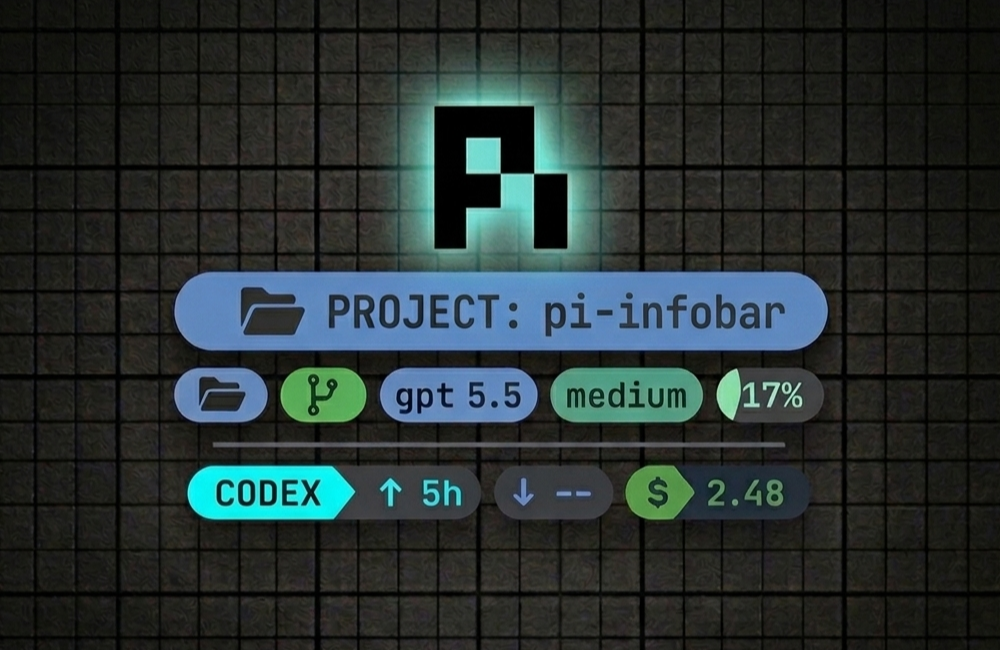
pi-infobar - Pi extension
High-contrast two-row info bar for the Pi coding agent.
This extension replaces Pi's default footer with a cleaner info bar layout inspired by a Starship-style prompt. It keeps the most important information visually dominant and avoids low-value activity labels like status, idle, or ready.
Install
pi install npm:pi-infobar
Try it without installing permanently:
pi -e npm:pi-infobar
Layout
Line 1 — navigation + model state
Left:
- current working folder, rendered first and styled as the primary segment;
- linked worktree name with
, when the current folder is a Git worktree; - git branch, when available, with Starship-style git status inline (
~modified blue,✘untracked red,+staged green,-deleted red,⇡/⇣ahead/behind).
The path segment stays as the normal path. Linked worktrees get a separate green worktree segment using the worktree root folder name.
Right:
- active model in light blue;
- thinking level with effort-specific color;
- context percentage with a stepped color ramp from transparent/green through yellow, orange, and red by 60%.
A subtle separator sits between the two information rows.
Line 2
Left: Codex subscription usage
Right: token usage and cost
↑tokens sent;↓tokens received;- dark-green
$estimated cost.
Commands
/pi-infobar            toggle the info bar
/pi-infobar on         enable
/pi-infobar off        disable
/pi-infobar toggle     toggle
/codex-status          show Codex usage and rate-limit windows
/codex-status --refresh  refresh Codex usage
/codex-status --no-statusline  show report without updating footer
/codex-status --clear-statusline  clear Codex usage from footer
You can start Pi with the info bar disabled:
PI_INFOBAR=0 pi
Implementation Details
Structure
pi-infobar/
├── src/
│   ├── index.ts          ← Entry point: extension lifecycle only (~80 lines)
│   ├── types.ts          ← All shared interfaces & type aliases (~45 lines)
│   ├── theme.ts          ← COLOR palette + contextColor/thinkingColor/codexAccent (~75 lines)
│   ├── ansi.ts           ← Low-level ANSI helpers: ansi(), stripAnsi(), hexToRgb(), readableTextOn() (~55 lines)
│   ├── chips.ts          ← Chip factory + renderChip/renderChips/renderSegmentedChip (~85 lines)
│   ├── format.ts         ← Pure data formatters: formatCount, formatCost, shortenModel, etc. (~80 lines)
│   ├── git.ts            ← Git snapshot, cache, parsing, status formatting (~175 lines)
│   ├── codex-usage/      ← Codex subscription usage queries, reports, cache, and statusline manager
│   └── renderers.ts      ← Footer line renderers: renderPrimaryLine, renderUsageLine, etc. (~140 lines)
├── index.ts              ← Re-export barrel: `export { default } from "./src/index.js"` (~1 line)
├── package.json          ← Updated "files" list & tsconfig include
└── tsconfig.json         ← Updated include glob
Code Overview
- The
COLORconstant object contextColor()— percent → color mappingthinkingColor()— thinking level → color mappingcodexAccent()— raw status string → accent colorcodexPercentColor()— codex percent → color
Low-level terminal rendering primitives:
ansi()— apply fg/bg/bold SGR codesstripAnsi()— strip ANSI escape sequenceshexToRgb()— hex string → RGBrgbCode()— RGB → SGR color codereadableTextOn()— pick readable text color for a background
The chip UI component system:
chip()factoryrenderChip(),renderChips()renderSegmentedChip()
Pure data formatting functions:
formatCount(),formatCost()shortenModel(),modelName()formatThinking()formatWorkingPath(),smartPathTruncate()shorten(),simplifyStatusText()formatCodexValue(),codexValueSegments()getTokenTotals()
All git integration, fully self-contained:
gitCache,GIT_CACHE_TTL_MS,GIT_COMMAND_TIMEOUT_MSgetGitSnapshot(),execGit(),getLinkedWorktreeName()parseGitStatus(),parseStatusBranch()formatGitStatus(),formatGitStatusPart(),isDirty()
Footer line renderers that compose chips, git, and formatting:
renderPrimaryLine(),renderUsageLine(),renderSeparatorLine()fitLeftRight()renderPathCluster(),renderPathChip(),renderFittedPathChip()renderBranchChip(),renderWorktreeChip()renderCodexStatus()
The main extension entry point — only lifecycle & event wiring:
piInfobar()default exportinstallFooter(),refresh()- Event handlers:
session_start,session_tree,session_shutdown,model_select,agent_end,turn_end,thinking_level_select - Command handlers:
pi-infobar,codex-status